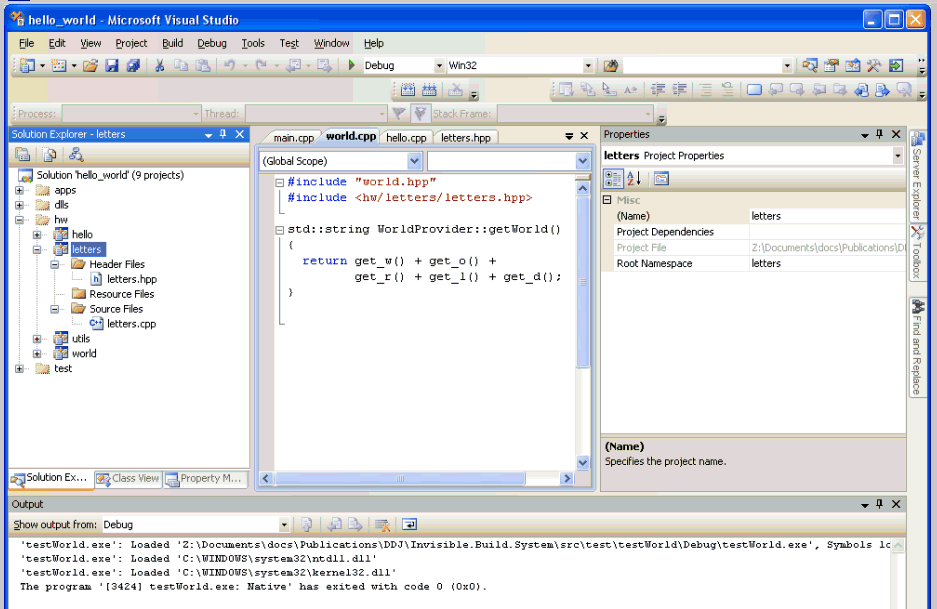
Figure 1
Dr. Dobb's Digest December 2009
Gigi Sayfan specializes in cross-platform object-oriented programming in C/C++/ C#/Python/Java with emphasis on large-scale distributed systems. He is currently trying to build intelligent machines inspired by the brain at Numenta (www.numenta.com).
A Build System for Complex Projects: Part 1
A Build System for Complex Projects: Part 2
A Build System for Complex Projects: Part 3
A Build System for Complex Projects: Part 4
A Build System for Complex Projects: Part 5
This is the fifth and last article in a series of articles that explore an innovative build system for complicated projects. The previous articles discussed build systems in general and the internals of the ideal build system that can integrate with existing build systems. Part 1 and Part 2 discussed build systems in general and the internals of the ideal build system that can integrate with existing build systems. Part 3 discussed in detail how to the ideal build system works with the NetBeans IDE and can generate its build files. Part 4 did the same for Microsoft Visual Studio. This installment (Part 5) focuses on testing the flexibility of ibs (short for the "Invisible Build System) and how to extend it in response to new requirements. The complete source code and related files are available here.
ibs was deployed and used as the build system for "Hello World - Enterprise Platinum Edition". The development team started to see how it does. The premise of ibs is that the developers will just add or remove files, directories, libraries, and programs and never need to muck around with build files.
Adding a File
The H team is responsible for the "hello" library that consists of two files called hello.hpp and hello.hpp. Here is the hello.cpp file:
#include "hello.hpp"

std::string HelloProvider::getHello()

{

  return "hello";

}
This file implements the HelloProvider::GetHello() method that returns the string "hello". The H team felt that putting all the eggs in one basket makes it difficult for multiple team members to work in parallel. They decided that it makes more sense to use divide and conquer approach. The new design calls for two new functions -- get_he() and get_llo() -- thatwill be used by the getHello() method. Here is the code for the two new functions that are placed in a file called helpers.cpp with the prototypes in helpers.hpp:
#include "helpers.hpp"

std::string get_he()

{

    return "he";

}

std::string get_llo()

{

    return "llo";

}
The getHello() method in hello.cpp now uses these functions:
#include "hello.hpp"

#include "helpers.hpp"


std::string HelloProvider::getHello()

{

  return get_he() + get_llo();

}
The new helpers.cpp and helpers.hpp files were added to the all the relevant build files automatically by ibs (requires running build_system_generator.py).
Here is the relevant part of the NetBeans configurations.xml file:
<?xml version="1.0" encoding="UTF-8"?>

<configurationDescriptor version="45">

  <logicalFolder name="root" displayName="root" projectFiles="true">

    <logicalFolder name="HeaderFiles"

                   displayName="Header Files"

                   projectFiles="true">

      <itemPath>hello.hpp</itemPath>

      <itemPath>helpers.hpp</itemPath>

    </logicalFolder>

    <logicalFolder name="ResourceFiles"

                   displayName="Resource Files"

                   projectFiles="true">

    </logicalFolder>

    <logicalFolder name="SourceFiles"

                   displayName="Source Files"

                   projectFiles="true">

      <itemPath>hello.cpp</itemPath>

      <itemPath>helpers.cpp</itemPath>

    </logicalFolder>

    ...
All the other build files were also updated and the new files show up in the NetBeans IDE after reloading the project. Bob recommended to the developers that they should close the NetBeans project group (or the Visual Studio solution) before running ibs and reopen it after ibs is done to make sure the IDE is up to date.
Removing a File
Removing a file is just as easy: You simply remove unnecessary files from the file system, run ibs, and watch the removed files disappear from all the build files.
Adding a New Library
The H team was proud of its software engineering acumen and shared their divide-and-conquer approach with the W team responsible for the world library. The W team got excited and wanted to pursue a similar approach. However Isaac (the development manager) wanted to go even further. He noticed that "hello" and "world" share the letters "o" and "l" and proposed a new reusable letters library that wil provide functions for getting important letters. This library can be used by the "hello" and "world" libraries to get all the letters they need.
The U team (responsible for developing the utils library) was assigned the task of creating the letters library. The library consisted two files: letters.cpp and letters.hpp. Each letter needed for the hello world application got its own function. Here is the code for letters.cpp (letters.hpp contains the function prototypes):
#include "letters.hpp"


std::string get_h() { return "h"; }

std::string get_e() { return "e"; }

std::string get_l() { return "l"; }

std::string get_o() { return "o"; }

std::string get_w() { return "w"; }

std::string get_r() { return "r"; }

std::string get_d() { return "d"; }
The H and W teams modified the getHello() and getWorld() methods to use the new letters library. The H team also got rid of the helpers.cpp and helpers.hpp files that were no longer needed. Here is the code for world.cpp file, which implements the getWorld() method:
#include "world.hpp"

#include <hw/letters/letters.hpp>

std::string WorldProvider::getWorld()

{

  return get_w() + get_o() +

         get_r() + get_l() + get_d();

}
This is a great example of code reuse and the code base is now very flexible. For example, if the project stakeholders decided that all the "o" letters in the system should be uppercase, only the get_o() function of the letters library will have to change and all the libraries and applications using it will just need to relink against it.
What kind of changes to the build files are needed to add a new library? First all the build files necessary to build the library itself, then all the dynamic libraries or executables that depend on it (directly or indirectly) must link against it. In addition, you want to update the workspace file so the new library shows up in the IDE and can be built and debugged in the IDE. Of course, you want to do all that for all the platforms you support. That's a lot of work and it's easy to miss a step or misspell a file here and there. Just figuring out what test programs and applications need to link against the new library is pretty labor intensive. Luckily, for Isaac and his development team ibs can do all that automatically. The single act of placing the letters library under the src\hw directory is enough to tell ibs everything it needs to know. Let's see what ibs did on Windows this time:
Here are the relevant changes to the hello_world.sln file:
Project("{8BC9CEB8-8B4A-11D0-8D11-00A0C91BC942}") = "letters", "hw\letters\letters.vcproj", "{C27369BC-2E11-4571-B524-2F0279F202BD}"

EndProject


Project("{8BC9CEB8-8B4A-11D0-8D11-00A0C91BC942}") = "hello", "hw\hello\hello.vcproj", "{23B8D8A1-8E84-462B-BF90-58E1F07D267D}"

	ProjectSection(ProjectDependencies) = postProject

	     {C27369BC-2E11-4571-B524-2F0279F202BD} = {C27369BC-2E11-4571-B524-2F0279F202BD}

	EndProjectSection

EndProject


Project("{8BC9CEB8-8B4A-11D0-8D11-00A0C91BC942}") = "world", "hw\world\world.vcproj", "{2A5E91EE-8A54-4594-A28E-3185F5F8602C}"

      ProjectSection(ProjectDependencies) = postProject

        {C27369BC-2E11-4571-B524-2F0279F202BD} = {C27369BC-2E11-4571-B524-2F0279F202BD}

	EndProjectSection

EndProject


	{C27369BC-2E11-4571-B524-2F0279F202BD}.Debug|Win32.ActiveCfg = Debug|Win32

	{C27369BC-2E11-4571-B524-2F0279F202BD}.Debug|Win32.Build.0 = Debug|Win32

	{C27369BC-2E11-4571-B524-2F0279F202BD}.Release|Win32.ActiveCfg = Release|Win32

	{C27369BC-2E11-4571-B524-2F0279F202BD}.Release|Win32.Build.0 = Release|Win32


  {C27369BC-2E11-4571-B524-2F0279F202BD} = {0276cb28-8c64-46ae-9e52-3363bb4dcbd8}
Adding a New Test
The U team did a good job with the letters library and to adhere to the development standard, it added a test program too -- not TDD (Test Driven Development), but better than no tests at all. The U team created a directory called testLetters under src/test and put the following main.cpp file in it:
#include <hw/utils/base.hpp>

#include <hw/letters/letters.hpp>

#include <iostream>


int main(int argc, char** argv)

{

  CHECK(get_h() == std::string("h"));

  CHECK(get_e() == std::string("e"));

  CHECK(get_l() == std::string("l"));

  CHECK(get_o() == std::string("o"));

  CHECK(get_w() == std::string("w"));

  CHECK(get_r() == std::string("r"));

  CHECK(get_d() == std::string("d"));


  return 0;

}
After invoking ibs, the new testLetters project became part of the solution and the U team ran the test successfully.
Adding a New Application
The "Hello World - Enterprise Platinum Edition" was a great success and became a killer app overnight. However, some big players weren't satisified with the security of the system and demanded an encrypted version of hello world. Isaac (the development manager) decided that this called for a separate application to keep the original hello_world application nimble and user-friendly. The new application was to be called "Hello Secret World" and print an encrypted version of the string "hello world!". Furthermore, it will not use any of of intensive infrastructure built for the original "Hello World" system. A special no-name clandestine team was recruited to implement it. After a lot of deliberation, the no-name team decided to implement the ultimate encryption algorithm -- ROT13. In addition, the team demonstrated a nice usage of the standard transform() algorithm to apply the ROT13 encryption.
#include <iostream>

#include <algorithm>


char ROT13(char c)

{

  if (c >= 'a' && c < 'n')

    return char(int(c) + 13);

  else if (c > 'm' && c <= 'z')

    return char(int(c) - 13);

  else

    return c;

}

int main(int argc, char** argv)

{

  std::string s("hello, world!");

  // Apply the secret ROT13 algorithm

  std::transform(s.begin(), s.end(), s.begin(), ROT13);

  std::cout <<s.c_str() << std::endl;

  return 0;

}
Again, ibs took care of integrating the new application. The unnamed team just had to put its hello_secret_world application under src/apps.
Extending the Build System
To this point, Bob hasn't make an appearence in this article and it is a good sign. The developers, including the new unnamed team, were able to use ibs effectively without any help from Bob. But, the success of the "hello world" product family brought new demands. Upper management decided that they want to package the "hello world" functionality as a platform and let other developer enjoy "hello world" (for a small fee of course). Isaac conducted a thorough market analysis and concluded that Ruby is the way to go. He summoned Bob and asked him to extend ibs, so it will be possible to provide Ruby bindings for the "hello" and "world" libraries.
Bob started to research the subject, soon discovering that Ruby depends on the gcc toolchain to produce its bindings. It's possible on Windows to generate an NMAKE file for Visual Studio, but Bob decided that he would first take a shot of building a Ruby binding for the Mac OS X only.
A Ruby binding is a dynamic library with a C interface that follows some conventions and uses some special data types and functions from the Ruby C API. The end result is a module that can be consumed by Ruby code.
Here is the C code Bob came up with as a pilot. The "ruby.h" header contains the Ruby C API definitions. The Init_hello_ruby_world() is the entry point that Ruby calls when it loads the binding. This function defines a class called HelloWorld that has two methods called get_hello() and get_world(). The temporary implementation just returns the strings "hello" and "world". The final version will link of course to the C++ "Hello, World!" project and utilize its sophisticated services.
#include "ruby.h"

static VALUE get_hello(VALUE self)

{

    VALUE result = rb_str_new2("hello");

    return result;

}

static VALUE get_world(VALUE self)

{

    VALUE result = rb_str_new2("world");

    return result;

}

VALUE cHelloWorld;

void Init_hello_ruby_world()

{

    cHelloWorld = rb_define_class("HelloWorld", rb_cObject);

    rb_define_method(cHelloWorld, "get_hello", get_hello, 0);

    rb_define_method(cHelloWorld, "get_world", get_world, 0);

}
To make an actual Ruby binding out of this source file, Bob created a Ruby configuration file called extconf.rb that contains just two lines
require 'mkmf'

create_makefile("hello_ruby_world")
Next Bob ran the configuration file through Ruby and Ruby generated a Makefile appropriate for the current platform (Mac OS X):
~/Invisible.Build.System/src/ruby/hello_ruby_world > ruby extconf.rb

creating Makefile
Here is the Makefile:
SHELL = /bin/sh#### Start of system configuration section. ####
srcdir = . topdir = /System/Library/Frameworks/Ruby.framework/Versions/1.8/usr/lib/ruby/1.8/universal-darwin9.0 hdrdir = $(topdir) VPATH = $(srcdir):$(topdir):$(hdrdir) prefix = $(DESTDIR)/System/Library/Frameworks/Ruby.framework/Versions/1.8/usr exec_prefix = $(prefix) sitedir = $(DESTDIR)/Library/Ruby/Site rubylibdir = $(libdir)/ruby/$(ruby_version) docdir = $(datarootdir)/doc/$(PACKAGE) dvidir = $(docdir) datarootdir = $(prefix)/share archdir = $(rubylibdir)/$(arch) sbindir = $(exec_prefix)/sbin psdir = $(docdir) localedir = $(datarootdir)/locale htmldir = $(docdir) datadir = $(datarootdir) includedir = $(prefix)/include infodir = $(DESTDIR)/usr/share/info sysconfdir = $(prefix)/etc mandir = $(DESTDIR)/usr/share/man libdir = $(exec_prefix)/lib sharedstatedir = $(prefix)/com oldincludedir = $(DESTDIR)/usr/include pdfdir = $(docdir) sitearchdir = $(sitelibdir)/$(sitearch) bindir = $(exec_prefix)/bin localstatedir = $(prefix)/var sitelibdir = $(sitedir)/$(ruby_version) libexecdir = $(exec_prefix)/libexec
CC = gcc LIBRUBY = $(LIBRUBY_SO) LIBRUBY_A = lib$(RUBY_SO_NAME)-static.a LIBRUBYARG_SHARED = -l$(RUBY_SO_NAME) LIBRUBYARG_STATIC = -l$(RUBY_SO_NAME)
RUBY_EXTCONF_H = CFLAGS = -fno-common -arch ppc -arch i386 -Os -pipe -fno-common INCFLAGS = -I. -I$(topdir) -I$(hdrdir) -I$(srcdir) DEFS = CPPFLAGS = $(DEFS) CXXFLAGS = $(CFLAGS) DLDFLAGS = -L. -arch ppc -arch i386 LDSHARED = cc -arch ppc -arch i386 -pipe -bundle -undefined dynamic_lookup AR = ar EXEEXT =
RUBY_INSTALL_NAME = ruby RUBY_SO_NAME = ruby arch = universal-darwin9.0 sitearch = universal-darwin9.0 ruby_version = 1.8 ruby = /System/Library/Frameworks/Ruby.framework/Versions/1.8/usr/bin/ruby RUBY = $(ruby) RM = rm -f MAKEDIRS = mkdir -p INSTALL = /usr/bin/install -c INSTALL_PROG = $(INSTALL) -m 0755 INSTALL_DATA = $(INSTALL) -m 644 COPY = cp
#### End of system configuration section. ####
preload =
libpath = . $(libdir) LIBPATH = -L. -L$(libdir) DEFFILE =
CLEANFILES = mkmf.log DISTCLEANFILES =
extout = extout_prefix = target_prefix = LOCAL_LIBS = LIBS = $(LIBRUBYARG_SHARED) -lpthread -ldl -lm -lutils -lhello -lworld SRCS = hello_ruby_world.c OBJS = hello_ruby_world.o TARGET = hello_ruby_world DLLIB = $(TARGET).bundle EXTSTATIC = STATIC_LIB =
RUBYCOMMONDIR = $(sitedir)$(target_prefix) RUBYLIBDIR = $(sitelibdir)$(target_prefix) RUBYARCHDIR = $(sitearchdir)$(target_prefix)
TARGET_SO = $(DLLIB) CLEANLIBS = $(TARGET).bundle $(TARGET).il? $(TARGET).tds $(TARGET).map CLEANOBJS = *.o *.a *.s[ol] *.pdb *.exp *.bak
all: $(DLLIB) static: $(STATIC_LIB)
clean: @-$(RM) $(CLEANLIBS) $(CLEANOBJS) $(CLEANFILES)
distclean: clean @-$(RM) Makefile $(RUBY_EXTCONF_H) conftest.* mkmf.log @-$(RM) core ruby$(EXEEXT) *~ $(DISTCLEANFILES)
realclean: distclean install: install-so install-rb
install-so: $(RUBYARCHDIR) install-so: $(RUBYARCHDIR)/$(DLLIB) $(RUBYARCHDIR)/$(DLLIB): $(DLLIB) $(INSTALL_PROG) $(DLLIB) $(RUBYARCHDIR) install-rb: pre-install-rb install-rb-default install-rb-default: pre-install-rb-default pre-install-rb: Makefile pre-install-rb-default: Makefile $(RUBYARCHDIR): $(MAKEDIRS) $@
site-install: site-install-so site-install-rb site-install-so: install-so site-install-rb: install-rb
.SUFFIXES: .c .m .cc .cxx .cpp .C .o
.cc.o: $(CXX) $(INCFLAGS) $(CPPFLAGS) $(CXXFLAGS) -c $<
.cxx.o: $(CXX) $(INCFLAGS) $(CPPFLAGS) $(CXXFLAGS) -c $<
.cpp.o: $(CXX) $(INCFLAGS) $(CPPFLAGS) $(CXXFLAGS) -c $<
.C.o: $(CXX) $(INCFLAGS) $(CPPFLAGS) $(CXXFLAGS) -c $<
.c.o: $(CC) $(INCFLAGS) $(CPPFLAGS) $(CFLAGS) -c $<
$(DLLIB): $(OBJS) @-$(RM) $@ $(LDSHARED) -o $@ $(OBJS) $(LIBPATH) $(DLDFLAGS) $(LOCAL_LIBS) $(LIBS)
$(OBJS): ruby.h defines.h
With a nice Makefile under his belt, Bob proceeded to build the hello_ruby_world binding:
~/Invisible.Build.System/src/ruby/hello_ruby_world > make

cc -arch ppc -arch i386 -pipe -bundle -undefined dynamic_lookup -o hello_ruby_world.bundle hello_ruby_world.o -L. -L/System/Library/Frameworks/Ruby.framework/Versions/1.8/usr/lib -L. -arch ppc -arch i386    -lruby  -lpthread -ldl -lm
The result was a hello_ruby_world.bundle file, which is the binding itself (a .dll on Windows, and .so on Linux). Now, Bob invited Issac to examine the new toy. Issac, a big Ruby fan, immediately wrote a ruby test program to make sure the binding is indeed usable from Ruby. The program starts with two require statements (the equivalent of import in Python). Note that the first one requires the new binding hello_ruby_world. Next, it creates a test class that subclasses the standard Ruby Test::Unit::TestCase and defines a method instantiates the HelloWorld class from the binding and exercises its methods.
require 'hello_ruby_world'

require 'test/unit'


class TestHelloWorld <l Test::Unit::TestCase

  def test_HelloWorld

    hw = HelloWorld.new

    assert_equal(hw.get_hello(), "hello")

    assert_equal(hw.get_world(), "world")

  end

end
Issac executed his test program and was happy with the results:
~/Invisible.Build.System/src/ruby/hello_ruby_world > ruby test_hello_ruby_world.rb


Loaded suite test_hello_ruby_world

Started


Finished in 0.000405 seconds.
Issac also tried the interactive Ruby interpreter (irb):
~/Invisible.Build.System/src/ruby/hello_ruby_world > irb

>> require "hello_ruby_world"

=> true

>> hw = HelloWorld.new

=> #<HelloWorld:0x3679b4>

>>  hw.get_hello() + ', ' + hw.get_world() + '!'

=> "hello, world!"

>>
Bob was satisfied and it was time to integrate the new capability to generate Ruby bindings into ibs. The proper way to do it was to figure out how to create a NetBeans project and a VisualStudio project that contain the various incantations hidden in the Ruby-generated Makefile. But Bob was pressed for time and the Ruby binding was really needed just for the Max OS X platform. Consequently, Bob decided to utilize Python's agility and integrate the Ruby binding building as a standalone Python program that will have to be invoked by the developers or build master after the build of the C++ projects was over. I'll shortly discuss how to integrate ibs into a full-fledged automated software development life-cycle.
For starters, he created a standalone piece of code to build Ruby extensions. He assumed the following:
The program he came up with automated the entire process. For each Ruby extension it: Generated an extconf.rb configuration file from a template (based on the project path); generated a Makefile from the configuration file; and finally created the extension bundle itself by running 'make'. This code demonstrates one of the simplest ways to invoke external processes like 'ruby' and 'make' from Python using the subprocess module. The subprocess.call() function used here doesn't provide a lot of control or interaction with the launched process, but in this case it's enough. The subprocess modules provides multiple ways to launch and interact with launched processes.
The program is based on the build_ruby_binding() function that accepts a project path (the directory that contains the extension's C code) and eventually creates the Ruby bindings bundle in the same directory. The build_all_ruby_bindings() function just iterates over all the sub-directories of the src/ruby directory and calls build_ruby_binding on each one.
import os

import sys

import subprocess


extconf_template = "require 'mkmf'\n create_makefile(\"%s\")"


def build_ruby_binding(project_path):

  """Build a Ruby binding


  - Generate an extconf.rb file (configuration file)

  - Run it through Ruby to generate a Makefile

  - Run the Makefile to build the actual binding

  """

  project_path = os.path.abspath(project_path)

  # Verify the project dir exists

  assert os.path.isdir(project_path)

  name = project_path.split('/')[-1]

  # make sure the binding file exists

  assert os.path.isfile(os.path.join(project_path, name + '.c'))


  save_dir = os.getcwd()

  try:

    os.chdir(project_path)


    # Generate the extconf.rb file

    extconf_rb = extconf_template % name

    open('extconf.rb', 'w').write(extconf_rb)


    # Remove exisitng Makefile

    if os.path.isfile('Makefile'):

      os.remove('Makefile')


    # Invoke the extconf.rb file to generate the Makefile

    subprocess.call(['ruby', 'extconf.rb'])

    assert os.path.isfile('Makefile')


    # Remove exisitng bundle and make a new one

    bundle = name + '.bundle'

    if os.path.isfile(bundle):

      os.remove(bundle)

    subprocess.call(['make'])

    assert os.path.isfile(bundle)


  finally:

    os.chdir(save_dir)


def build_all_ruby_bindings(ruby_dir):

  subdirs = os.walk(ruby_dir).next()[1]

  for s in subdirs:

    build_ruby_binding(s)


if __name__=='__main__':

  ruby_dir = '.'

  build_all_ruby_bindings(ruby_dir)
Sometimes builds fail. There are many possible reasons. With ibs, there could be problems during the generation process or during the build itself. If the problem happens during the build system generation, then you can just run the build_system_generator.py script in the debugger and put a breakpoint in the problematic area.
One problem that happens a lot with other build systems is missing or misnamed files. This happens if a file is moved, renamed or just deleted but the corresponding build file is not updated. With ibs, it can't happen because the build files are generated automatically based on the existing files. But, a source file might reference a missing file. This will be discovered during the build itself.
Another common problem is link failure. That happens if an executable or dynamic library depend on a static library, which is not linked into it. There are two reasons for link failures:
Failure #1 can't happen with ibs because it detects all dependencies automatically and adds them to the build files. Failure #2 is easy to detect because the static library will fail to build before the executable or dynamic library fail to link.
A more difficult failure that can't be detected automatically is dependency on dynamic library. You must come up with some system to track and manage dynamic library dependencies. You will usually get a clear error message that says that such and such dynamic library can't be loaded.
If you integrated testing into your build system then the most common failures will be test failures, which you just need to fix.
There could be other failures if your build system is even more sophisticated and perform other tasks like compiling documentation, packages your system for deployment, uploads to a staging area or a web server.
The key is always to prevent as much as you can and make sure that failures are easy to detect with good diagnostic messages that contain all the information needed to correct the problem.
ibs, the build system I described in this series, focused on building C/C++ source files in a cross-platform way or rather generating build files. A serious industrial-strength build system does much more. If you want to develop your own build system, you need to consider these aspects. The absolute minimum must include checking out the sources from source control, building all the software artifacts on all platforms, running a test suite on all platforms, and reporting the results.
The automated test suite is a critical piece for a professional software organization and it get as fancy as you want with complete test environment that simulate your deployment environment, automated GUI tests and complete builds and tests of your source releases (that's right -- building the source is part of the test)
Then there is packaging. There are many ways today to distribute software. You may develop a web application, a native client, a smart phone app or a plugin to some other application like Firefox, Eclipse, or Visual Studio. Probably, you end up with multiple artifacts that need to be packaged and deployed. Your build system should take care of this aspect too.
Automatically generated documentation is also in the realm of the build system. In general, almost any repetitive task can be automated with some imagination.
It is important to start small and grow the build system incrementally. If you try to nail everything down before you let the developers make the firs checkin you won't get very far.
The best guideline is to address pain points as they show up. If your developers keep having problems with third-party dependencies then figure out a way to verify it before checkin. But if you release software every two years, there is probably no need for the automatically creating an installer for fancy GUI client.
In this five-part article series, I delved into the sometimes mysterious world of building software. I described the issues involved in building cross-platform C/C++ code and presented a unique build system called ibs (Invisible Build System) that addresses many of the issues. I explored the design and implementation in great detail. I even tried to be funny by showcasing the build system through the most bloated "Hello World" application I could conceive. I hope you liked this series and that some of you will find it useful and may even try to create your own build system. It's a lot of fun.