Figure 1
Dr. Dobb's Digest November 2009
Gigi Sayfan specializes in cross-platform object-oriented programming in C/C++/ C#/Python/Java with emphasis on large-scale distributed systems. He is currently trying to build intelligent machines inspired by the brain at Numenta (www.numenta.com).
A Build System for Complex Projects: Part 1
A Build System for Complex Projects: Part 2
A Build System for Complex Projects: Part 3
A Build System for Complex Projects: Part 4
A Build System for Complex Projects: Part 5
This is the fourth article in a series of articles that explore an innovative build system for complicated projects. Part 1 and Part 2 discussed build systems in general and the internals of the ideal build system that can integrate with existing build systems. Part 3 discussed in detail how to the ideal build system works with the NetBeans IDE and can generate its build files. This article will do the same for Microsoft Visual Studio.
As you recall, Isaac the development manager became a true Invisible Build System (ibs) convert after seeing ibs in action. He gave Bob the mandate to use ibs on Windows to build the company's top-secret project: "Hello World - Enterprise Platinum Edition". The Windows developers of the company sweat by Visual Studio. Visual C++ supports a makefile-like build environment via the NMAKE tool, but it is not very common. Visual Studio provides both an IDE-based build environment for C/C++ projects as well as several alternatives for automated builds from the command line (vcbuild.exe, Visual Studio automation and extensibility object model, direct invocation of devenv.exe). The build files shared by all these approaches (except NMAKE) are the project and the solution. There is one project file per logical project and it encapsulates all the information about a project (same as the Makefile + nbproject directory of NetBeans). The solution is a collection projects and it corresponds the project group of NetBeans.
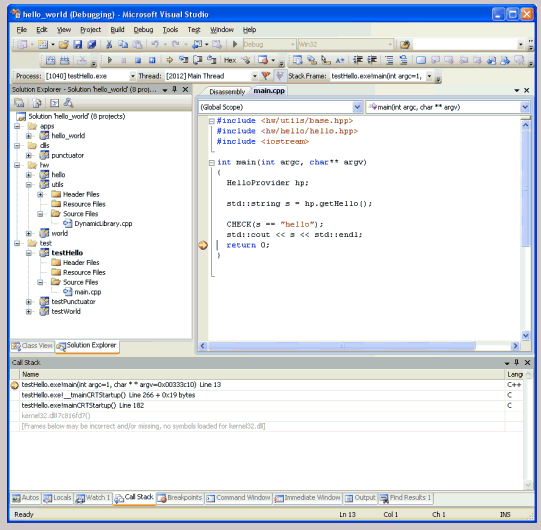
Figure 1 shows the Visual Studio IDE with the various Hello World projects organized in folders (apps, dlls, hw, and test).
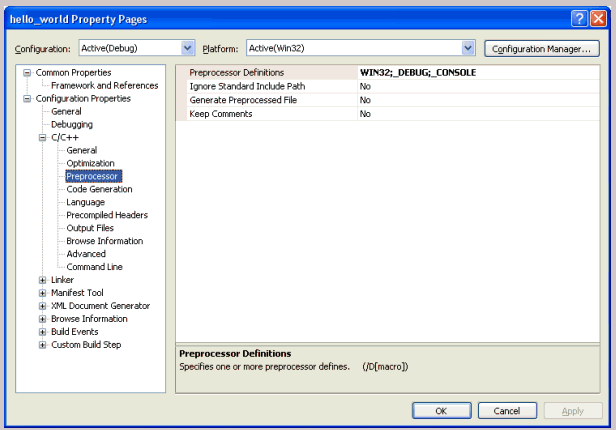
The Visual Studio build files are considerably simpler then NetBeans. There is a single project file, which is a pretty straightforward XML file and there is a solution file, which uses (unfortunately) a proprietary text format. Figure 2 shows the project properties page for the hello_world application. There many many options and settings in GUI and most of them have default values. The project file contains only the settings that differ from the defaults (and settings that don't have defaults and must be specified). The format of the .vcproj file is documented here.
Project file (.vcproj)
The entire build information for a project is stored in a single file. Let's examine the project file for the main hello_world application. I'll analyze it section by section. It all starts with an XML 1.0 tag to indicate it is an XML file and then there is a VisualStudioProject element with various attributes. The important ones are the project type (Visual C++), the version (9.00 for VC++ 2008), the name ("hello_world") and the ProjectGUID, which uniquely identifies this project.
<?xml version="1.0" encoding="UTF-8"?>

<VisualStudioProject

	ProjectType="Visual C++"

	Version="9.00"

	Name="hello_world"

	ProjectGUID="{88AD54BE-4316-4DFB-965E-4369A2910DF8}"

	RootNamespace="hello_world"

	Keyword="Win32Proj"

	TargetFrameworkVersion="0"

	>
The next section is the platforms section, which determines the target platforms. In this case just Win32:
	<Platforms>

		<Platform

			Name="Win32"

		/>

	*</Platforms>
There is an empty ToolFiles element. This element can point to custom build rules files. It is straightforward to use custom build rules from the IDE, but doing it programmatically is not documented very well (try this if you must). This capability can be added easily to ibs in a cross-platform way via a callback mechanism where ibs will call back a provided function before/after building each project.
   <ToolFiles>

   </ToolFiles>
The Configurations element is a collection of Configuration elements. Each configuration element contains a list of Tool elements where each tool is a program that participates in the build process. The most common and important ones are the compiler and linker. Here is the Debug configuration. The Release configuration is very similar:
	<Configurations>

		<Configuration

			Name="Debug|Win32"

			OutputDirectory="Debug"

			IntermediateDirectory="Debug"

			ConfigurationType="1"

			>

			<Tool

				Name="VCPreBuildEventTool"

			/>

			<Tool

				Name="VCCustomBuildTool"

			/>

			<Tool

				Name="VCXMLDataGeneratorTool"

			/>

			<Tool

				Name="VCWebServiceProxyGeneratorTool"

			/>

			<Tool

				Name="VCMIDLTool"

			/>

			<Tool

				Name="VCCLCompilerTool"

				Optimization="0"

				AdditionalIncludeDirectories=".;../..;../../../3rd_party/include/win32/"

				PreprocessorDefinitions="WIN32;_DEBUG;_CONSOLE"

				MinimalRebuild="true"

				BasicRuntimeChecks="3"

				RuntimeLibrary="1"

				UsePrecompiledHeader="0"

				WarningLevel="3"

				Detect64BitPortabilityProblems="true"

				DebugInformationFormat="4"

			/>

			<Tool

				Name="VCManagedResourceCompilerTool"

			/>

			<Tool

				Name="VCResourceCompilerTool"

			/>

			<Tool

				Name="VCPreLinkEventTool"

			/>

			<Tool

				Name="VCLinkerTool"

				LinkIncremental="2"

				AdditionalLibraryDirectories="..\..\..\3rd_party\lib\win32"

				IgnoreAllDefaultLibraries="false"

				IgnoreDefaultLibraryNames=""

				GenerateDebugInformation="true"

				SubSystem="1"

				TargetMachine="1"

			/>

			<Tool

				Name="VCALinkTool"

			/>

			<Tool

				Name="VCManifestTool"

			/>

			<Tool

				Name="VCXDCMakeTool"

			/>

			<Tool

				Name="VCBscMakeTool"

			/>

			<Tool

				Name="VCFxCopTool"

			/>

			<Tool

				Name="VCAppVerifierTool"

			/>

			<Tool

				Name="VCPostBuildEventTool"

			/>

		</Configuration>

		<Configuration

			Name="Release|Win32"

			OutputDirectory="Release"

			IntermediateDirectory="Release"

			ConfigurationType="1"

			>

			...

		</Configuration>

	</Configurations>
The References element may contain references to other projects that the current project depends on. The referenced projects will be built before the current project. This is mostly critical for static libraries that need to be linked into an executable or DLL. But, there is also an alternative way of specifying dependencies through the solution file. The same project may belong to multiple solutions (possibly with different references/dependencies). Using the References element in the .vcproj file is not as flexible, but keeps the dependencies with the rest of the project metadata. In this case, I chose to capture the dependencies in the solutions file, so the references element is empty.
	<References>

	</References>
The Files element simply contains all the project files. There are several filters like Header Files, Resource Files and Source Files. The filters are mostly important for user interface purposes because the different file types are grouped into folders based on the filter. For building purposes the compiler needs to know what extension to use for source files, because these are the files that are actually compiled (header files are always #included by some source file). Files can be specified using relative path or absolute path. It is almost always better to use relative paths, so the same project file can be used in different locations by different users. Also, with ibs every project file resides under the project directory.
	<Files>

		<Filter

			Name="Header Files"

			Filter="h;hpp;hxx;hm;inl;inc;xsd"

			UniqueIdentifier="{93995380-89BD-4b04-88EB-625FBE52EBFB}"

			>

			<File

				RelativePath=".\another_file.hpp"

				>

			</File>

		</Filter>

		<Filter

			Name="Resource Files"

			Filter="rc;ico;cur;bmp;dlg;rc2;rct;bin;rgs;gif;jpg;jpeg;jpe;resx"

			UniqueIdentifier="{67DA6AB6-F800-4c08-8B7A-83BB121AAD01}"

			>

		</Filter>

		<Filter

			Name="Source Files"

			Filter="cpp;c;cc;cxx;def;odl;idl;hpj;bat;asm;asmx"

			UniqueIdentifier="{4FC737F1-C7A5-4376-A066-2A32D752A2FF}"

			>

			<File

				RelativePath=".\another_file.cpp"

				>

			</File>

			<File

				RelativePath=".\main.cpp"

				>

			</File>

		</Filter>

	</Files>
The Globals element allows definition of global objects. I'm not sure what are they and how they are supposed to be used. I never had the need for any global object. ibs simply generates an empty Globals element:
	<Globals>

	</Globals>
Finally, the closing tag of the .vcproj file:
</VisualStudioProject>
Solution File(.sln)
The solution file organizes all the projects in folders and optionally stores dependencies too. At the solution level, dependencies are more than just build dependencies. As you recall build dependencies are always executables or dynamic libraries that link against static libraries. But, there are other dependencies too. If you have an executable E that loads a dynamic library D you want to make sure that D is up to date when you test E, so for testing purposes you may want to add a dependency of E on D. This will cause D to be built before E is built (although the order doesn't matter) and you can be confident that you test the same version of E and D.
Back to the solution file, the format is proprietary but fairly simple. The main concept is the "Project", which can be either a Visual Studio project (captured in a .vcproj file in the case of ibs) or a virtual folder that contains a number of other projects. The folders are not file system folders, but are used in the Visual Studio IDE for organizational purposes. Folders can be nested and can contain other folders or actual projects. Each project (either a real project or a folder) has a GUID (globally unique identifier) associated with it. The .sln file is using the GUIDs to refer to projects. The reason is that the solution may contain projects with identical names and it is easier to distinguish between them by GUID then by absolute path to a project file, which may not work in case of relative paths.
The file format consists of project elements that includes the project dependencies if any followed by a few global sections that determine the folder nesting and what projects participate in the build.
The dependencies are specified as GUIDs. The path to the project file is specified if there is a project file. Here is the project section of the "testHello" test project:
Project("{8BC9CEB8-8B4A-11D0-8D11-00A0C91BC942}") = "testHello", "test\testHello\testHello.vcproj", "{5F46CA1C-88BC-4E19-BB65-8686B453441D}"

	ProjectSection(ProjectDependencies) = postProject

		{D0736B61-D7AE-4B50-99FF-1AC604AF83D1} = {D0736B61-D7AE-4B50-99FF-1AC604AF83D1}

		{7A0F57A3-00B8-4879-BBE1-318E3FC0A526} = {7A0F57A3-00B8-4879-BBE1-318E3FC0A526}

	EndProjectSection

EndProject
In case of a folder the folder name is used instead of a path to the project file and there are no dependencies:
Project("{2150E333-8FDC-42A3-9474-1A3956D46DE8}") = "test", "test", "{64EECA44-A21D-4FB3-8C2C-3D3B81EE2F3C}"

EndProject
The Global part of the file contains multiple global sections. The configurations section contains the available configurations (by default Debug and Release) and which ones should be built. It is divided into two global sections marked preSolution and postSolution.
	GlobalSection(SolutionConfigurationPlatforms) = preSolution

		Debug|Win32 = Debug|Win32

		Release|Win32 = Release|Win32

	EndGlobalSection

	GlobalSection(ProjectConfigurationPlatforms) = postSolution

		{5F46CA1C-88BC-4E19-BB65-8686B453441D}.Debug|Win32.ActiveCfg = Debug|Win32

		{5F46CA1C-88BC-4E19-BB65-8686B453441D}.Debug|Win32.Build.0 = Debug|Win32

		{5F46CA1C-88BC-4E19-BB65-8686B453441D}.Release|Win32.ActiveCfg = Release|Win32

		{5F46CA1C-88BC-4E19-BB65-8686B453441D}.Release|Win32.Build.0 = Release|Win32

		...


	EndGlobalSection
Next there is a little section that determines if in the IDE the solution itself will have a node in the tree or if it's just going to be a list of projects/folders:
	GlobalSection(SolutionProperties) = preSolution

		HideSolutionNode = FALSE

	EndGlobalSection
The last section specifies the nesting of the projects inside folders. It is a clever way to specify arbitrarily nested structure in a linear format. Both the parent and the child are specified using their GUIDs, so it's pretty difficult to figure out what project is in what folder. Of course, this file is not intended for direct viewing:
	GlobalSection(NestedProjects) = preSolution

		{5F46CA1C-88BC-4E19-BB65-8686B453441D} = {64EECA44-A21D-4FB3-8C2C-3D3B81EE2F3C}

		{48933983-2311-4966-A33E-06B47FE88B6A} = {64EECA44-A21D-4FB3-8C2C-3D3B81EE2F3C}

		{6D1F69E3-575B-4BB9-8B5F-D295916A2C3B} = {64EECA44-A21D-4FB3-8C2C-3D3B81EE2F3C}

		{B5183A0D-18E4-4288-8DB0-60183460677E} = {8A47B373-446F-42A7-83BB-EFED3017940F}

		{88AD54BE-4316-4DFB-965E-4369A2910DF8} = {55B446A3-CAA3-4EFB-BA53-2232048BF417}

		{D0736B61-D7AE-4B50-99FF-1AC604AF83D1} = {0C7A17A3-B93D-43AE-A166-1DDAAE8E2B46}

		{7A0F57A3-00B8-4879-BBE1-318E3FC0A526} = {0C7A17A3-B93D-43AE-A166-1DDAAE8E2B46}

		{C99C4A67-8323-4CD7-B049-354E019994C8} = {0C7A17A3-B93D-43AE-A166-1DDAAE8E2B46}

	EndGlobalSection
Let's try and follow one such nesting relation:
{7A0F57A3-00B8-4879-BBE1-318E3FC0A526} = {0C7A17A3-B93D-43AE-A166-1DDAAE8E2B46}
The first GUID belongs to the utils project.
Project("{8BC9CEB8-8B4A-11D0-8D11-00A0C91BC942}") = "utils", "hw\utils\utils.vcproj", "{7A0F57A3-00B8-4879-BBE1-318E3FC0A526}"

EndProject
By the way, the GUID in Project("{8BC9CEB8-8B4A-11D0-8D11-00A0C91BC942}") denotes the project type (static library in this case). The project's GUID is the one following the project file path..
The second GUID belongs to the hw folder:
Project("{2150E333-8FDC-42A3-9474-1A3956D46DE8}") = "hw", "hw", "{0C7A17A3-B93D-43AE-A166-1DDAAE8E2B46}"

EndProject
So, the nesting relation says that the utils project is contained in the hw folder.
The VC++ 2008 Helper class is responsible for the VC++ specific code used to generate the .vcproj file for every project. It is equivalent to the NetBeans 6 Helper class. The generic build_system_generator.py script is using this helper to generate the .vcproj file and the solution (.sln) file. Let's take a closer look at this class. The first thing it does is import some useful system modules and then import the BaseHelper and Template classes from the build_system_generator module (as well as the 'title' function for debugging purposes):
#!/usr/bin/env python

import os

import sys

import glob

import string

import uuid

from pprint import pprint as pp


sys.path.insert(0, os.path.join(os.path.abspath(os.path.dirname(__file__)), '../'))

from build_system_generator import (BaseHelper,

                                    Template,

                                    title)
Then, there are a couple of utility functions for handling GUIDs. The make_guid() function simply creates a new GUID. Conveniently enough, Python has a module called uuid that can generate GUIDs (and much more). Handy modules like uuid are exactly why Python earned the "Batteries Included" reputation. In any other language, you would have to go and hunt for a 3rd party library (or even worse... implement GUID generation yourself), download it, test it, integrate it into your code and your deployment/packaging script and hope it's not too buggy.
def make_guid():

  title()

  return '{' + str(uuid.uuid4()) + '}'
The get_guid() function extracts the the GUID of a project from an existing .vcproj file or creates a new one if the file doesn't exist.
def get_guid(filename):

  title(additional=filename)

  if os.path.isfile(filename):

    lines = open(filename).readlines()

    guid_line = lines[5]

    assert 'ProjectGUID=' in guid_line

    g = guid_line.split('=')[1][1:-2]

  else:

    g = make_guid()


  return g.upper()
The Helper class itself subclasses BaseHelper to benefit from all its common functionality. The __init__() method initializes the templates dir and sets the path separator to a back slash. This is not strictly necessary. Windows can actually work with back and forward slashes and even mix them in the same path. This is a valid path on Windows: "c:/a/b\c\d". However, for esthetic and readability purposes it is best to have a uniform convention and on Windows the back slash is more prevalent. The separator is used when constructing paths.
class Helper(BaseHelper):

  """VC++ 2008 helper

  """

  def __init__(self, templates_dir):

    BaseHelper.__init__(self, templates_dir)

    self.sep = '\\'
The get_templates() method is pretty simple and returns a list containing a single Template object with the template type (program, static library or dynamic library), the path and the relative path of the .vcproj file.
  def get_templates(self, template_type):

    """Get all the template files associated with a particular template type


    Often there will be just one template file, but some build systems

    require multiple build files per template type


    @param template_type - 'program', 'dynamic_lib' or 'static_lib'

    @return a Template object

    """

    result = []


    vcproj_file = os.path.join(self.templates_dir,

                               template_type,

                               '%s.vcproj' % template_type)


    assert os.path.isfile(vcproj_file)

    relative_path = '%s.vcproj'

    template = Template(vcproj_file, relative_path, template_type)

    return [template]
The prepare_substitution_dict() is the essential method that prepares the values that the generic ibs uses to populate the template for the .vcproj file. It is much simpler than the corresponding NetBeans method because it needs to generate just one file and not six and also the dynamic information that needs to be substituted in is concentrated in a few places in a uniform way. There are only three placeholders: GUID, SourceFiles and HeaderFiles. All the other information is encoded in the templates. Here is signature:
  def prepare_substitution_dict(self,

                                project_name,

                                project_type,

                                project_file_template,

                                project_dir,

                                libs_dir,

                                dependencies,

                                source_files,

                                header_files,

                                platform):
The prepare_substitution_dict() method uses a nested function called make_files_section() to prepare the SourceFiles and HeaderFiles lists. This function sorts the file lists too (using a case insensitive custom compare function). Note the recursive nature of this operation to create the files section a mini-template is populated with the file's relative path for each file. The result is an XML fragment that can later be embedded directly in the .vcproj file:
    def make_files_section(file_list):

      def icase_cmp(s1, s2):

        return cmp(s1.lower(), s2.lower())

      file_template = """\

\t\t\t<File

\t\t\t\tRelativePath=".\%s"

\t\t\t\t>

\t\t\t7<</File>"""


      if file_list == []:

        return ''

      file_list = sorted(file_list, icase_cmp)

      files = [file_template % os.path.basename(f) for f in file_list]

      return '\n'.join(files) + '\n'
The code of prepare_substitution_dict() itself is trivial. It prepares the filename and then gets the GUID from the get_guid() function and the SourceFiles and HeaderFiles from the nested make_files_section()function and just populates the result dict:
    filename = os.path.join(project_dir, project_name + '.vcproj')

    return dict(GUID=get_guid(filename),

                SourceFiles=make_files_section(source_files),

                HeaderFiles=make_files_section(header_files))
The generate_workspace_files() is much more complicated in Visual Studio. It generates the solution file for the entire system. I'll walk you through it because there is a lot going on and it could be hard to figure it out just by staring at the code. It takes as input the solution name, the root path and a list of Project objects and starts iterating over all the sub-directories under the root path using Python's excellent os.walk() function that returns a 3-tuple for each directory under the root path that includes the current directory, its sub-directories and its files. That allows complete iteration of every file and directory. The Visual Studio Helper class supports the notion of folders. As always ibs uses convention over configuration. The convention is that a project must be a direct sub-directory of a folder. So, to figure out the folders automatically all the sub-directories are iterated and whenever a directory that contains a .vcproj file is found its parent must be a folder. Here is the code to iterate over all the sub-directories.
  def generate_workspace_files(self, solution_name, root_path, projects):

    """Generate a VC++ 2008 solution file


    """

    title()

    folders = {}

    for d, subdirs, files in os.walk(root_path):

      if os.path.dirname(d) != root_path:

        continue

      folder_projects = []

      for s in subdirs:

        ...
The project list is provided so non-project directories are skipped. The path to the .vcproj file is constructed and the project GUID is extracted. The correct paths to the dependencies of the current project are computed. Finally a SolutionItem object is constructed that contains all the relevant information of the project and the appended to the list of folder_projects.
        project_dir = os.path.join(d, s)

        if not project_dir in projects:

          continue

        vcproj_filename = os.path.join(project_dir,

                                       os.path.basename(s) + '.vcproj')

        assert os.path.isfile(vcproj_filename)


        guid = get_guid(vcproj_filename)


        # Get the directories of of all the dependency projects

        proj_dependencies = projects[project_dir].dependencies


        # Get the GUIDs of all the dependency projects

        dependencies = []

        for dep in proj_dependencies:

          basename = os.path.basename(dep)

          dep_path = os.path.join(dep, basename + '.vcproj')

          dependencies.append(get_guid(dep_path))


        si = SolutionItem(item_type=project_type,

                          name=s,

   						  path=vcproj_filename,

						  guid=guid,

						  dependencies=dependencies,

						  projects=[])

        folder_projects.append(si)
If the folder_projects list is not empty then a folder SolutionItem is created that contains all the folder's project. The guid for a folder is just a dummy '?'. After all the folder objects are constructed the make_solution() function is called, which actually generates the .sln file from all the information collected so far and the .sln file is saved to disk.
      guid = '?'

      if folder_projects != []:

        name = os.path.basename(d)

        folder = SolutionItem(name=name,

                              item_type=folder_type,

                              path=None,

                              guid=guid,

                              dependencies=[],

                              projects=folder_projects)

        folders[os.path.basename(d)] = folder


    gen_solution = make_solution(root_path, folders)

    solution_filename = os.path.join(root_path, solution_name + '.sln')

    open(solution_filename, 'w').write(gen_solution)
The make_solution() uses several mini-templates to construct different parts of the .sln file. Here are the templates. The names pretty much explain the purpose of each template. The templates use the same principle as the project templates and are just segments of text with placeholder for substitution values that the make_solution() function populates with the proper values and weave together:
# A project template has a header and a list of project sections

# such as ProjectDependencies. The ProjectDependencies

# duplicate the dependency information in .vcproj files in VS2005.

# For generating a solution that contains only C++ projects, no other

# project section is needed.

project_template_with_dependencies = """\

Project("${TypeGUID}") = "${Name}", "${Filename}", "${GUID}"

	ProjectSection(ProjectDependencies) = postProject

${ProjectDependencies}

	EndProjectSection

EndProject

"""

project_template_without_dependencies = """\

Project("${TypeGUID}") = "${Name}", "${Filename}", "${GUID}"

EndProject

"""

project_configuration_platform_template = """\

\t\t${GUID}.Debug|Win32.ActiveCfg = Debug|Win32

\t\t${GUID}.Debug|Win32.Build.0 = Debug|Win32

\t\t${GUID}.Release|Win32.ActiveCfg = Release|Win32

\t\t${GUID}.Release|Win32.Build.0 = Release|Win32

"""

# This is the solution template for VS 2008

# The template arguments are:

#

# Projects

# ProjectConfigurationPlatforms

# NestedProjects

#

solution_template = """

Microsoft Visual Studio Solution File, Format Version 10.00

# Visual Studio 2008

${Projects}

Global

\tGlobalSection(SolutionConfigurationPlatforms) = preSolution

\t\tDebug|Win32 = Debug|Win32

\t\tRelease|Win32 = Release|Win32

\tEndGlobalSection

\tGlobalSection(ProjectConfigurationPlatforms) = postSolution

${Configurations}

\tEndGlobalSection

\tGlobalSection(SolutionProperties) = preSolution

\t\tHideSolutionNode = FALSE

\tEndGlobalSection

\tGlobalSection(NestedProjects) = preSolution

${NestedProjects}

\tEndGlobalSection

EndGlobal

"""
Whoever designed the Visual Studio build system was big on GUIDs. Almost every object is identified by a GUID including the types of various solution items like folders and projects:
# Guids for regular project and solution folder

project_type = '{8BC9CEB8-8B4A-11D0-8D11-00A0C91BC942}'

folder_type = '{2150E333-8FDC-42A3-9474-1A3956D46DE8}'
The SolutionItem class itself is really just a named tuple, but since ibs is not limited to Python 2.6 and up (when named tuples were introduced into the language) I use a dedicated class:
class SolutionItem(object):

  """Represents a solution folder or project


  The set of solution projects contain all the information

  necessary to generate a solution file.


  name - the name of the project/folder

  type - folder_type or project_type

  path - the relative path from the root dir to the .vcproj file for projects,

         same as name for folders

  guid - the GUID of the project/folder

  dependencies - A list of project guids the project depends on.

    It is empty for folders and projects with no dependencies.


  projects - list of projects hosted by the folder. It is empty for projects.

  """

  def __init__(self, item_type, name, path, guid, dependencies, projects):

    title()

    self.name = name

    self.type = item_type

    self.path = path

    self.guid = guid

    self.dependencies = dependencies

    self.projects = projects
The make_solution() takes the source directory and the folders list to generate the solution file using a bunch of nested functions.
def make_solution(source_dir, folders):

  """Return a string representing the .sln file


  It uses a lot of nested functions to make the different parts

  of a solution file:

   - make_project_dependencies

   - make_projects

   - make_configurations

   - make nested_projects


  @param folders - a dictionary whose keys are VS folders and the values

    are the projects each folder contains. Each project must be an object that

    has a directory path (relative to the root dir), a guid and a

    list of dependencies (each dependency is another projects). This directory

    should contain a .vcproj file whose name matches the directory name.

  @param projects - a list of projects that don't have a folder and are contained

    directly by the solution node.

  """
The get_existing_folders() nested function takes and existing .sln file and extracts the GUIDs of every project in it. It returns a dictionary of project names and GUIDs that can be used to regenerate a .sln file with identical GUIDs to the existing ones.
  def get_existing_folders(sln_filename):

    title()

    lines = open(sln_filename).readlines()

    results = {}

    for line in lines:

      if line.startswith('Project("{2150E333-8FDC-42A3-9474-1A3956D46DE8}") ='):

        tokens = line.split('"')

        print tokens

        name = tokens[-4]

        guid = tokens[-2]

        results[name] = guid


    return results
The make_project_dependencies() nested function takes a list of dependency GUIDs of a project and returns the text fragment that is the ProjectDependencies sub-section of this project in the .sln file.
  def make_project_dependencies(dependency_guids):

    title()

    if dependency_guids == []:

      return ''


    result = []

    for g in dependency_guids:

      result.append('\t\t%s = %s' % (g, g))


    result = '\n'.join(result)

    return result
The make_projects() nested function takes the source directory and the list of projects and generates a text fragment that represents all the projects in the .sln file. It uses the micro templates defined earlier and the make_project_dependencies() function.
  def make_projects(source_dir, projects):

    title()

    result = ''

    t1 = string.Template(project_template_with_dependencies)

    t2 = string.Template(project_template_without_dependencies)

    for p in projects:

      if p.type == project_type:

        filename = p.path[len(source_dir) + 1:].replace('/', '\\')

      else:

        filename = p.name

      dependency_guids = [get_guid(p.path) for d in p.dependencies]

      guid = get_guid(filename) if p.guid is None else p.guid

      d = dict(TypeGUID=p.type,

               Name=p.name,

               Filename=filename,

               GUID=guid,

               ProjectDependencies=make_project_dependencies(p.dependencies))

      t = t1 if p.dependencies != [] else t2

      s = t.substitute(d)

      result += s


    return result[:-1]
The make_configurations() function returns a text fragment that represents all the project configuration platforms. It works by iterating over the projects list and populating the project_configuration_platform template with each project's GUID.
  def make_configurations(projects):

    title()

    result = ''

    t = string.Template(project_configuration_platform_template)

    for p in projects:

      d = dict(GUID=p.guid)

      s = t.substitute(d)

      result += s


    return result[:-1]
The make_nested_projects() function returns a text fragment that represents all the nested projects in the .sln file. It works by iterating over the folders and populating the nested_project template with the guids of each nested project and its containing folder. Each folder is an object that has guid attribute and a projects attribute (which is a list of its contained projects):
  def make_nested_projects(folders):

    title()

    for f in folders.values():

      assert hasattr(f, 'guid') and type(f.guid) == str

      assert hasattr(f, 'projects') and type(f.projects) in (list, tuple)


    result = ''

    nested_project = '\t\t${GUID} = ${FolderGUID}\n'

    t = string.Template(nested_project)

    for folder in folders.values():

      for p in folder.projects:

        d = dict(GUID=p.guid, FolderGUID=folder.guid)

        s = t.substitute(d)

        result += s


    return result[:-1]
These were all the nested functions and here is how the containing make_solution() function puts them to good use.
  try:

    sln_filename = glob.glob(os.path.join(source_dir, '*.sln'))[0]

    existing_folders = get_existing_folders(sln_filename)

  except:

    existing_folders = []


  # Use folders GUIDs from existing .sln file (if there is any)

  for name, f in folders.items():

    if name in existing_folders:

      f.guid = existing_folders[name]

    else:

      f.guid = make_guid()


  # Prepare a flat list of all projects

  all_projects =[]

  for f in folders.values():

    all_projects.append(f)

    all_projects += f.projects


  # Prepare the substitution dict for the solution template

  projects = [p for p in all_projects if p.type == project_type]

  all_projects = make_projects(source_dir, all_projects)


  configurations = make_configurations(projects)

  nested_projects = make_nested_projects(folders)

  d = dict(Projects=all_projects,

           Configurations=configurations,

           NestedProjects=nested_projects)


  # Create the final solution text by substituting the dict into the template

  t = string.Template(solution_template)

  solution = t.substitute(d)


  return solution
The project templates as you recall are the text files with some place holders that ibs populates with the values from the substitution dictionaries to generate the final .vcproj files. There are three different types of projects: static library, dynamic library, and a program. Each project type has its own template.
To create the template files I simply took the .vcproj file for each type of project I created manually and replaced anything that was project-specific (like the source files or list of dependencies) with a place holder. Let's examine one of the template files. Here is the template for a static library. The name of the file is static_lib.vcproj. The template is just an XML file and the place holders are ${Name}, ${GUID}, ${HeaderFiles} and ${SourceFiles}. Note the
<?xml version="1.0" encoding="UTF-8"?>

<VisualStudioProject

	ProjectType="Visual C++"

	Version="9.00"

	Name="${Name}"

	ProjectGUID="${GUID}"

	RootNamespace="${Name}"

	Keyword="Win32Proj"

	TargetFrameworkVersion="0"

	>

	<Platforms>

		<Platform

			Name="Win32"

		/>

	</Platforms>

	<ToolFiles>

	</ToolFiles>

	<Configurations>

		<Configuration

			Name="Debug|Win32"

			OutputDirectory="Debug"

			IntermediateDirectory="Debug"

			ConfigurationType="4"

			>

			<Tool

				Name="VCCLCompilerTool"

				Optimization="0"

				AdditionalIncludeDirectories=".;../..;../../../3rd_party/include/win32/"

				PreprocessorDefinitions="WIN32;_DEBUG;_LIB"

				MinimalRebuild="true"

				BasicRuntimeChecks="3"

				RuntimeLibrary="1"

				UsePrecompiledHeader="0"

				WarningLevel="3"

				Detect64BitPortabilityProblems="true"

				DebugInformationFormat="4"

			/>

		</Configuration>

		<Configuration

			Name="Release|Win32"

			OutputDirectory="Release"

			IntermediateDirectory="Release"

			ConfigurationType="4"

			>

			<Tool

				Name="VCCLCompilerTool"

				AdditionalIncludeDirectories=".;../..;../../../3rd_party/include/win32/"

				PreprocessorDefinitions="WIN32;NDEBUG;_LIB"

				RuntimeLibrary="0"

				UsePrecompiledHeader="0"

				WarningLevel="3"

				Detect64BitPortabilityProblems="true"

				DebugInformationFormat="3"

			/>

		</Configuration>

	</Configurations>

	<References>

	</References>

	<Files>

		<Filter

			Name="Header Files"

			Filter="h;hpp;hxx;hm;inl;inc;xsd"

			UniqueIdentifier="{93995380-89BD-4b04-88EB-625FBE52EBFB}"

			>

${HeaderFiles}		</Filter>

		<Filter

			Name="Resource Files"

			Filter="rc;ico;cur;bmp;dlg;rc2;rct;bin;rgs;gif;jpg;jpeg;jpe;resx"

			UniqueIdentifier="{67DA6AB6-F800-4c08-8B7A-83BB121AAD01}"

			>

		</Filter>

		<Filter

			Name="Source Files"

			Filter="cpp;c;cc;cxx;def;odl;idl;hpj;bat;asm;asmx"

			UniqueIdentifier="{4FC737F1-C7A5-4376-A066-2A32D752A2FF}"

			>

${SourceFiles}		</Filter>

	</Files>

	<Globals>

	</Globals>

</VisualStudioProject>
Bob finished the implementation of the VC++ 2008 component of ibs and tested it on Windows XP, Vista and Windows 7. First, he generated all the Visual Studio build files using the build_system_generator.py script:
PS Z:\ibs> python .\build_system_generator.py --build_system=VC_2008


--------------------


generate_build_files


--------------------


platform: win32


----------------------


_populate_project_list


----------------------


----


test


----


----


dlls


----


----


apps


----


--


hw


--


-----------------


generate_projects


-----------------


-------------


save_projects


-------------


------------------------


generate_workspace_files


------------------------


apps


dlls


hw


test


-------------


make_solution


-------------


--------------------


get_existing_folders


--------------------


['test',


 'testHello',


 'testPunctuator',


 'testWorld',


 'dlls',


 'punctuator',


 'apps',


 'hello_world',


 'hw',


 'hello',


 'utils',


 'world']


-------------


make_projects


-------------


-------------------


make_configurations


-------------------


--------------------


make_nested_projects


--------------------
Bob verified that the necessary .vcproj and .sln files were created and proceeded to build the solution. He started with a command-line build using the vcbuild.exe program. This program is normally located for Visual Studio 2008 in : "c:\Program Files\Microsoft Visual Studio 9.0\VC\vcpackages".
To build the hello world solution you can just pass the hello_world.sln filename to vcbuild. Here is the short PowerShell snippet Bob ran in the src directory to build hello_world:
$vcbuild = "c:\Program Files\Microsoft Visual Studio 9.0\VC\vcpackages\vcbuild.exe"


& $vcbuild hello_world.sln
Isaac barged in as usual and wanted to witness the Windows tests first hand. Bob copied the punctuator.dll from the dlls\punctuator\Debug directory to apps\hello_world\Debug and ran the hello_world.exe application that was built by vcbuild.exe:
PS <root dir>\src\apps\hello_world\Debug> cp..\..\..\dlls\punctuator\Debug\punctuator.dll .


PS <root dir>\src\apps\hello_world\Debug> .\hello_world.exe


hello, world!

Done.
Isaac was duly impressed, but wanted to verify that the solution can be built from the Visual Studio IDE too. Bob launched a new instance of Visual Studio and loaded the generated hello_world.sln solution. It then built it successfully (see Figure 3).
Next, Bob ran the testWorld program from within Visual Studio and put a breakpoint to demonstrate that ibs produces code that can be debugged properly (See Figure 4).
Isaac decided that ibs proved itself to be a strong cross-platform build system. Hw wanted to see it deployed and used to build and develop the "Hello World - Enterprise Platinum Edition". Bob was very excited and assured him that ibs is ready to go.
In this article you saw ibs in action, generating a full fledged VC++ 2008 solution for a non-trivial system that involves multiple projects, static libraries, shared libraries, applications and test programs. ibs handled well multiple target Windows operating systems (Windows XP, Vista and 7) and allowed building and testing from the Visual Studio IDE or externally from the command-line (using vcbuild.exe). Bob demonstrated ibs successfully to Isaac his manager and in the next episode, Bob will deploy ibs in the field and will wrestle with real-world issues and requirements.
Testing the Visual Studio-Generated build System
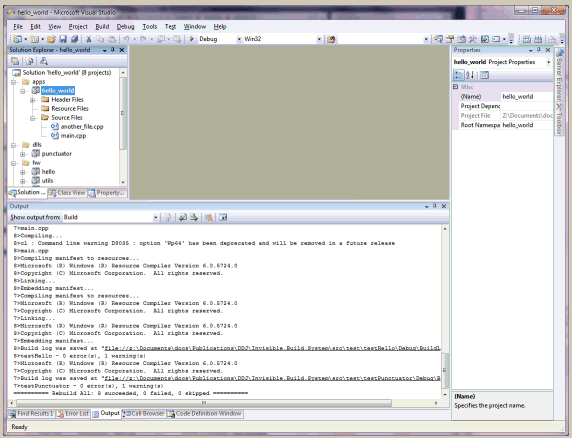 Figure 3
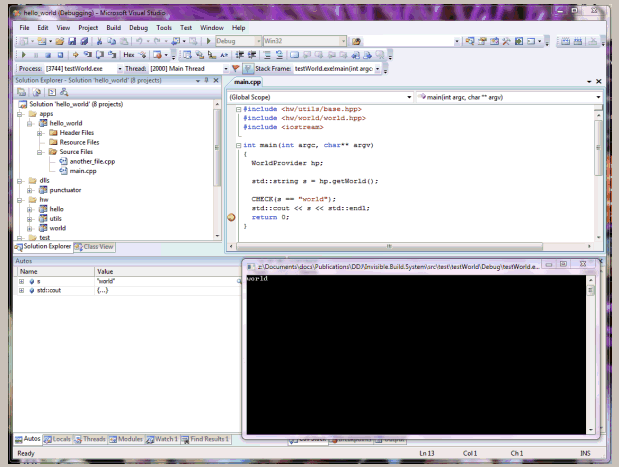 Figure 4
Conclusion