Al is a consultant specializing in software development, training, and documentation. Look for his latest book, Steal This Code! (Addison-Wesley, 1995). You can find Al at http://ourworld.compuserve.com/homepages/Al_Williams.
What single accomplishment made you most proud? For me, it was teaching my youngest son to read. It was gratifying as a parent, but it also was interesting as a programmer. Watching a young mind acquire language, you realize just how far current-technology computers still have to go to emulate the human brain.
Another thing that always brings home the difference between computers and brains is the name game. Not the banana-fana name game. This is a game you play on long car trips. One player thinks of a famous person (say, "Ringo Starr"). The next player then thinks of another famous person whose first name starts with the same letter as the first person's last name (in this case, maybe "Sonny Bono"). Play might continue with "Bob Barker," and so forth. This can go on for hours, even with only two people. What's amazing is how many people you can name. When you think of these people, you not only remember their names, but you recall their pictures, a biography, why you know them, what they sound like, and more. Imagine the amount of storage it would require to put this much data in your computer. Then think of how many ways you can quickly index into this data. Amazing.
Many people tout neural networks as a model for how our brains work. Perhaps, but I think that model presents, at best, only part of the picture. Of course, neural nets can be useful for certain kinds of pattern matching and other tasks where we want the computer to "learn" in a human-like fashion. The problem with neural networks is they are too much like humans--you have to train them, and sometimes when they learn something new, they forget what they used to know.
In this column, I'll show you a simple perceptron (neural network) object using Visual Basic 4.0's new class facility. I'll use the class to build a tic-tac-toe game that you teach--not program--to play. The main program and the training program both share the same class, and the class is reusable in any number of applications.
Visual Basic 4.0 provides classes--reusable chunks of code that support data abstraction. To create a new class, select Class module from the Insert menu. This creates a .CLS file and adds it to your project. The code browser for the class will show two pseudoobjects: Class and (General). The Class section contains the Initialize and Terminate subroutines. VB calls these when you create or destroy an instance of your class. All the other variables, functions, and subroutines that constitute your class reside in the (General) section.
When you declare a class object in your program, you can use the variable to refer to an existing object or you can create a new object. Consider the declarations in Example 1(a) where anObject uses the new keyword to create an object. The current_object variable, on the other hand, is only a reference to an object (it doesn't use the new keyword). Until you assign a value to current_object with Set, it isn't a valid object. After the Set statement in Example 1(a), anObject and current_object both refer to the same object.
You call functions and subroutines in your object using the period notation. For example, if the DDJObject has a subroutine named Publish, you could call it with anObject.Publish (or current_Object.Publish). Although you may see variables in an object, you'll usually use properties instead. Properties are like super variables. To the program using the class, they appear as variables. You can assign values to them or use them as values in expressions. From the class's point of view, properties are code. When someone assigns a value to the property, a special subroutine executes; when someone reads a value from the property, VB executes a special function to return the result. You define these routines with the property keyword. Example 1(b), for example, defines a silly property that is always 100. If you stop there, you have a read-only property. If you want to allow programs to set the property, you need to define a Let property, as in Example 1(c).
You also can declare a Set property to assign properties that refer to other objects. This is exactly like a Let property, but it assigns an object instead of a simple variable type.
You can control access to data and procedures in your object. If you use the Private keyword before the item, it will only be visible inside the class. If you use the Public keyword (or no keyword at all), you can access the item from anywhere in your VB program. Good object-oriented design dictates that you should hide implementation details as private data, functions, and subroutines.
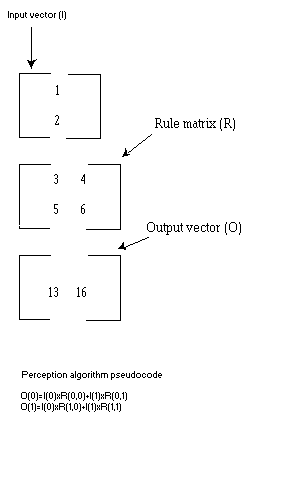
A perceptron is a simple form of neural network. The perceptron takes a fixed number of inputs. These inputs are real numbers and represent the input's level or degree of confidence. The perceptron uses a matrix to transform the inputs to a fixed number of outputs. The output with the highest value is the output the perceptron assigns for that input pattern. The transform (or rule) matrix has as many rows as there are inputs and a column for each possible output. To calculate an output value, multiply each input value by the corresponding row in the output column and sum the values (see Figure 1). Repeat this procedure for each output column.
If the matrix contains zeros or random values, you won't get the results you want from the perceptron. However, you can train the matrix to produce the results you want. The procedure is simple. Given a set of inputs, compare the perceptron's output with the desired output. If they are the same, you don't need to take any action. If they are different, you subtract the inputs from the column in the matrix that corresponds to the wrong result and add the inputs to the correct result's column. Eventually, the matrix will converge on the proper values.
Perceptrons have several limitations, but they are appropriate for many simple pattern-matching tasks. In particular, the perceptron can't solve problems unless they are linearly separable. That is, if each input value is a dimension in an n-dimensional space, you must be able to draw hyperplanes that separate all the output values. For example, a 2-input binary OR function is linearly separable; a 2-input binary XOR function is not; see Figure 2.
The Discriminate class (see Listing One) isn't very complex. It contains two arrays of unspecified dimensions: in_ary() holds the input pattern and Rules() holds the perceptron vector. The Setup subroutine takes two parameters: the number of possible results and the number of inputs. Setup redimensions the two arrays and sets the maxx and maxy parameters.
The class exposes a Value property that you use to fill the in_ary. This is an example of an array property--you can pass any number of parameters of any type to the Property Get routine. Then the Property Let routine takes the same parameters plus one extra parameter that specifies the value. Since the arguments can be of any type, you can easily create pseudoarrays that take noninteger indices. The class also exposes a read-only property, Calc, that computes the result based on the current input pattern. This routine implements the simple logic required to multiply the input array by each column of the rule matrix and score the results. The return value is an integer (starting with 0) that indicates which column scored highest.
Rounding out the class are the Train, Load, and Save subroutines. Train compares its single argument to the current Calc property. If the values are not equal, the routine performs the training algorithm previously described. The Load and Save routines read and write a disk file that contains the rule matrix.
By itself, this class isn't particularly useful, but it does have a general purpose. Because it avoids any specific knowledge of a particular problem, the discriminator class can be used in a variety of programs. VB's dynamic memory allocation (the ReDim statement) allows the class to handle any size problem without waste.
There are several ways you might represent a tic-tac-toe game using a perceptron. Usually, when you select a representation, the input value represents the "strength" of the input. For example, a signal processor might use values from 0 to 255 to represent signal strength. A medical diagnostic program might use values from -1000 to 1000 to represent the certainty of a symptom. In this case, -1000 means the symptom is not present, 1000 means the symptom is present and values in between signify various levels of uncertainty. A 0 value means you don't know if the patient has the symptom. This is important: Multiplying by 0 results in another 0, so you shouldn't use 0 as a meaningful value in the input vector.
For tic-tac-toe, I elected to use 18 input values. The first nine are set to 1 if the corresponding square contains an X. The last nine are set to 1 if the corresponding square contains an O. The program knows what is in each square, so each value is always 1 or 0. There are 9 possible outputs--one for each square on the board. Given a particular input pattern, the discriminator should select the best move as an output.
The problem with perceptrons and other neural networks is that you have to train them. This can be a tedious process. Training for a particular case is easy, but when you train the next case, it may upset the original training. Then retraining that case may upset the second one. Eventually, the rule matrix will converge on stable values, but this can take some time, especially with multiple training cases.
To make training more manageable, I decided to always allow the computer to go first. It always moves to the same square. You can change this, but if you do, the program will need more training. I also assume the opponent will always make a good move. With this strategy, if the opponent makes crazy random moves, he can beat the computer. You could train for all of these cases, but again, it's more time consuming.
With the complete system (available electronically; see "Availability," page 3), you'll find a program that allows you to interactively train the rule matrix. While this is fun, you'll probably lose patience before the matrix converges. Instead, you'll want to use the batch training program (see Listing Two). This program uses a simple ASCII file that specifies the possible board positions and the correct response for each. The program checks each case, calling the discriminator's Train subroutine as needed. The program tries the cases over and over until it can run through the entire file without any training. Then it writes the rule matrix out to RULEBASE.DAT.
Notice here that the logic for both of these programs is in the discriminator class. Each program shares this single class. This simplifies each program and allows them to use exactly the same logic.
The main program (TICTAC.BAS, Listing Three) also uses the same discriminator class. The user interface is simplistic (see Figure 3). It uses a grid control as the tic-tac-toe board. The program first reads the rule matrix from RULEBASE.DAT file (if present). It then begins playing. When you click on an empty square, the program places an O in the space. It then calls the Win function to see if you won the game. If the game is still going, it uses the discriminator to compute the next move. In case the training is bad, the program makes sure that the proposed square is empty. If it isn't empty, the program just searches for the next available square. When TICTAC finds an empty square, it places an X in it and checks for a win again.
The only other logic in the TICTAC program is a routine to reset the board. The game-playing logic is all in the rule matrix. You can certainly improve the user interface, but that isn't the point. The point is that the discriminator learns to play tic-tac-toe without any traditional programming.
The RULEBASE.DAT file included with the electronic listings plays a good game if you make sensible moves. However, you could train the game to play better or even just differently, if you like. If you use the manual training program, be sure to have a consistent plan. For any given board configuration, you should train the same response. Otherwise, the matrix may never converge. Also, be sure to test as many cases as possible. Remember, just because a case worked once doesn't mean it will work after further training.
The manual training program is entertaining. You play both X and O in the trainer. The computer guesses your X moves and displays its forecast. If you move to a different square (and there is a check in the training button), the program trains using the move you make. There is no win detection--you'll press the Reset button when you want to restart the game. When you press the Save button, the trainer writes the updated rule matrix to a file. It is interesting to watch the program project your moves, but you may tire of waiting for the matrix to converge.
If you want to create your own batch input-data file, just place each case on a single line. The first 18 spaces of the line correspond to the 18 elements of the pattern input. A space in a slot sets the corresponding pattern input to 0. Any other character sets the input to 1. The 19th character is a single digit from 0 to 8 that specifies the desired output for the pattern. Figure 4 shows how the positions relate to the tic-tac-toe board.
You could certainly write a tic-tac-toe program in a more-traditional way. However, it is exciting to have an easy way to add adaptive learning to any program. Perceptrons can tackle any linearly separable pattern-matching job. More sophisticated neural networks are little more than networks of perceptrons with different training algorithms. You can find more about neural networks in many past issues of Dr. Dobb's Journal; see the accompanying text box entitled "A Neural Network Resource Guide".
Simple perceptron discriminators can be very successful at optical character recognition, noisy pattern matching, and signal processing. The discriminator class can give you a good head start at adding perceptrons to your VB program.
Tic-tac-toe games are fun, but the perceptron can do serious work, too. By taking advantage of the new class capability in VB 4.0, you can encapsulate complex algorithms and save them for reuse.
A Practical Guide to Neural Nets, by Marilyn McCord Nelson and W.T. Illingworth, Addison-Wesley, 1991.
Neural and Intelligent Systems Integration, by Branko Soucek and the IRIS Group, John Wiley and Sons, 1992.
"Bidirectional Associative Memory Systems in C++," by Adam Blum, Dr. Dobb's Journal, April 1990.
"A Neural Network Instantiation Environment," by Andrew J. Czuchy, Jr., Dr. Dobb's Journal, April 1990.
"A Neural-Network Audio Synthesizer," by Mark Thorson, Forrest Warthman, and Mark Holler, Dr. Dobb's Journal, February 1993.
"Neural Nets Tell Why," by Casimir C. "Casey" Klimasauskas, Dr. Dobb's Journal, April 1991.
Neural Networks and Natural Intelligence, by Grossberg, MIT, 1988.
Adaptive Pattern Recognition and Neural Networks, by Pao, Addison-Wesley, 1988.
Neural Networks: A Comprehensive Foundation, by Simon Haykin, IEEE Computer Society Press, 1994.
Neural Networks and Fuzzy Logic Applications in C/C++, by Stephen T. Welstead, IEEE Computer Society Press, 1994.
Artificial Neural Networks: Concepts and Theory, edited by Pankaj Mehra and Benjamin W. Wah, IEEE Computer Society Press, 1992.
Artificial Neural Networks: Concepts and Control Applications, edited by V. Rao Vemuri, IEEE Computer Society Press, 1992.
(a)
Dim anObject as new DDJObject
Dim current_object as DDJObject
Set current_object=anObject

(b)
Property Get aProp As Integer
 aProp=100
End Property

(c)
Property Let aProp(val As Integer)
  Rem presumably you'll store
  Rem the val parameter here
End Property
VERSION 1.0 CLASS
BEGIN
  MultiUse = -1  'True
END
Attribute VB_Name = "Discriminate"
Attribute VB_Creatable = True
Attribute VB_Exposed = True
Private in_ary() As Single
Private Rules() As Single
Private maxx, maxy As Integer
Property Get Calc() As Integer
ReDim Res(maxx) As Single
For x = 0 To maxx
For y = 0 To maxy
  Res(x) = Res(x) + in_ary(y) * Rules(x, y)
Next y
Next x
Max = -3.4E+38
maxi = -1
For x = 0 To maxx
  If Res(x) >= Max Then Max = Res(x): maxi = x
Next x
Calc = maxi
End Property
Sub Setup(x%, y%)
maxx = x - 1
maxy = y - 1
ReDim in_ary(maxy)
ReDim Rules(maxx, maxy)
End Sub
Sub Load(fn$)
On Error Resume Next
Open fn$ For Input As #1
If Err <> 0 Then
 MsgBox "Can't open file", vbOKOnly, "Warning"
 Err.Clear
Else
 Input #1, maxx
 Input #1, maxy
 Setup maxx + 1, maxy + 1
 For y = 0 To maxy
 For x = 0 To maxx
  Input #1, Rules(x, y)
 Next x
 Next y
 Close 1
End If
End Sub
Sub Save(fn$)
Open fn$ For Output As 1
Write #1, maxx
Write #1, maxy
For y = 0 To maxy
For x = 0 To maxx
  Write #1, Rules(x, y)
Next x
Next y
Close 1
End Sub
Sub Train(n%)
r% = Calc()
If r% <> n% Then
  For y% = 0 To maxy
    Rules(r%, y%) = Rules(r%, y%) - in_ary(y%)
    Rules(n%, y%) = Rules(n%, y%) + in_ary(y%)
  Next y%
End If
End Sub
Property Get Value(n%) As Single
  Value = in_ary(n)
End Property
Property Let Value(n%, val As Single)
in_ary(n%) = val
End Property
Attribute VB_Name = "Module1"
Dim Rulebase As New Discriminate
Sub main()
MsgBox "Begin Training"
' Create rulebase
Rulebase.Setup 9, 18
' This flag will equal 0 when all cases
' are successful
Train = 1
Do While Train = 1
 Train = 0
 Open "Train" For Input As 1
 Do While Not EOF(1)
   Input #1, d$
   ' Ignore comments
   If Left$(d$, 1) <> ";" Then
    For i% = 0 To 17
      If Mid$(d$, i% + 1, 1) = " " Then Rulebase.Value(i%) = -1:
                                                  Else Rulebase.Value(i%) = 1
    Next i%
    n% = val(Mid$(d$, 19, 1))
    n1% = Rulebase.Calc
  ' If not right, train and set Train flag
    If (n% <> n1%) Then Rulebase.Train (n%): Train = 1
   End If
 Loop
Close 1
Loop
Rem training complete!
MsgBox "Training complete"
Rulebase.Save "RULEBASE.DAT"
End Sub
VERSION 4.00
Begin VB.Form Form1
   Caption         =   "Play Tic Tac Toe"
   ClientHeight    =   3735
   ClientLeft      =   240
   ClientTop       =   1485
   ClientWidth     =   8865
   Height          =   4140
   Left            =   180
   LinkTopic       =   "Form1"
   ScaleHeight     =   3735
   ScaleWidth      =   8865
   Top             =   1140
   Width           =   8985
   Begin MSGrid.Grid Grid1
      Height          =   3615
      Left            =   0
      TabIndex        =   0
      Top             =   0
      Width           =   8775
      _Version        =   65536
      _ExtentX        =   15478
      _ExtentY        =   6376
      _StockProps     =   77
      BackColor       =   16777215
      BeginProperty Font {0BE35203-8F91-11CE-9DE3-00AA004BB851}
         name            =   "Arial"
         charset         =   0
         weight          =   700
         size            =   48
         underline       =   0   'False
         italic          =   0   'False
         strikethrough   =   0   'False
      EndProperty
      Rows            =   3
      Cols            =   3
      FixedRows       =   0
      FixedCols       =   0
      ScrollBars      =   0
      HighLight       =   0   'False
   End
End
Attribute VB_Name = "Form1"
Attribute VB_Creatable = False
Attribute VB_Exposed = False
' Rule matrix
Dim rulebase As New Discriminate
' Cell Types
Dim NextPlay$
Dim XorO$
'Play Counter
Dim pctr As Integer
'Reset board
Sub Reset()
 For y% = 0 To 8
   Grid1.Row = y% Mod 3
   Grid1.Col = Fix(y% / 3)
   Grid1.Text = ""
 Next y%
 pctr = 0
 XorO$ = "X"  ' This version always plays X
 Grid1.Row = 0
 Grid1.Col = 0
 Grid1.Text = "X"
 pctr = 1
End Sub
'Check for a win or draw
Function Win()
  Dim c$(2)
  Win = 0
  For x% = 0 To 2
    Grid1.Col = x%
    For y% = 0 To 2
      Grid1.Row = y%
      c$(y%) = Grid1.Text
    Next y%
  If c$(0) <> "" And c$(0)=c$(1) And c$(1) = c$(2) Then Win = -1: Exit Function
  Next x%
  For y% = 0 To 2
    Grid1.Row = y%
    For x% = 0 To 2
      Grid1.Col = x%
      c$(x%) = Grid1.Text
    Next x%
  If c$(0) <> "" And c$(0)=c$(1) And c$(1)=c$(2) Then Win = -1: Exit Function
  Next y%
  Grid1.Row = 1
  Grid1.Col = 1
  c$(0) = Grid1.Text
  Grid1.Row = 0
  Grid1.Col = 0
  c$(1) = Grid1.Text
  Grid1.Row = 2
  Grid1.Col = 2
  c$(2) = Grid1.Text
  If c$(0) <> "" And c$(0)=c$(1) And c$(1) = c$(2) Then Win = -1: Exit Function
  Grid1.Row = 2
  Grid1.Col = 0
  c$(1) = Grid1.Text
  Grid1.Row = 0
  Grid1.Col = 2
  c$(2) = Grid1.Text
  If c$(0) <> "" And c$(0)=c$(1) And c$(1)=c$(2) Then Win = -1: Exit Function
End Function
'Create a new rulebase and read in file
Private Sub Form_Load()
rulebase.Setup 9, 18
rulebase.Load "RULEBASE.DAT"
Reset
End Sub
'Player clicked on a square
Private Sub Grid1_Click()
Dim xy, i As Integer
If Grid1.Text = "" Then ' Can't move to full sq
   NextPlay$ = "O"
   Grid1.Text = NextPlay$
  Rem check for win
  If Win() Then
    MsgBox "You Win!"
    Reset
    Exit Sub
    End
  End If

  Rem set up state for our move
  For i = 0 To 8
    Grid1.Row = i Mod 3
    Grid1.Col = Fix(i / 3)
    rulebase.Value(i) = -1
    rulebase.Value(i + 9) = -1
    If Grid1.Text = XorO$ Then rulebase.Value(i) = 1
    If Grid1.Text = NextPlay$ Then rulebase.Value(i + 9) = 1
  Next i
  n = rulebase.Calc
  Rem check n for legal move
  Do
   Grid1.Row = n Mod 3
   Grid1.Col = Fix(n / 3)
   If Grid1.Text <> "" Then
     Rem try again
     n = n + 1
     If n = 9 Then n = 0
    End If
  Loop While Grid1.Text <> ""
 Grid1.Text = XorO$
 pctr = pctr + 2
 Rem check for win
 If Win() Then
   MsgBox "I Win!"
   Reset
   Exit Sub
 End If
 If pctr = 9 Then
  MsgBox "Draw Game!"
  Reset
  Exit Sub
 End If
End If
End Sub
End Listings>>
<<