Al is a consultant specializing in software development, training, and documentation. He is also the author of Steal This Code! (Addison-Wesley, 1995). You can reach Al at 72010.3574@compuserve.com.
Remember Nehru jackets, hula hoops, and mood rings? Fads come and (thankfully) go. However, sometimes it's hard to tell what's a passing fad and what's here for the long term. Hey, even telephones, television, and computers were once considered fads. For that matter, who remembers the Cauzin strip reader? Bubble memory? The PS/2?
But then, sometimes fads come back. I've recently seen kids wearing bell bottoms, for instance. Which brings me to Delphi....
Delphi has brought new life to Pascal. Once, Pascal was a major PC language, but C and C++ have crowded it off most developer's PCs. Now that Delphi is one of the more exciting visual-development environments around, Pascal programmers are in higher demand.
If you are using Delphi now, do you have to give up all the controls you use in your C programs? Of course not. Delphi is a complete programming language--you can create controls and link to DLLs as easily as you can with C. There are a few tricks you need to know, but there's not much to it.
With a bit more effort, you can wrap your existing controls with a VCL component, then use them as simply as you use any other Delphi component. The control should reside in a DLL. You can link .OBJ files to your Delphi project, too. These techniques allow you to benefit from Delphi's component architecture without rewriting code. In this installment of "20/20," I'll examine how you build wrappers for existing controls in DLLs or .OBJ files.
The existing C control I wanted to use with Delphi is a simple countdown timer: the TimeCtrl class (the complete source code is available electronically; see "Availability," page 3). You send the timer a message (TC_SET) to set the number of seconds before the time-out period expires. Then you send a TC_GO message with wParam set to 1 to start the timer; a 0 in wParam suspends the timer. The control sweeps a clock hand around for each second until it reaches zero. The control sends its parent window a special message (TC_TICK) for each second that elapses with wParam set to the current count. When wParam is 0, the countdown is complete. You can also read the current timer value using TC_GETTIME.
In addition to these four messages, the control's DLL defines the TControl_Init() function. This call does nothing; however, if you call it from within your code, you force Windows to load the DLL before your program loads.
If you examine the code for this control you might argue that the countdown isn't truly accurate. It depends on each timer message received to compute the number of seconds. Of course, you can't depend on getting timer messages at exactly the interval you request. However, the intent for this control is to count down the time you have left to do something (cancel an operation, for example). Suppose the system load is so high that timer messages are not getting through to the application. Then the user probably couldn't interact with the system during that time either. So, although the elapsed time may not be correct, for this purpose, it is better to be incorrect.
Delphi controls derive from the class TWinControl, which provides the base mechanisms for incorporating a window as a Delphi component. Normally, you derive a class from TWinControl (or one of its subclasses) and implement the control's functionality in the new class. In our example, you still need to derive a new class; however, this class will control an existing window--the TimeCtrl window.
Although creating a wrapper class for a control may seem unusual, it isn't. Delphi creates TWinControls to encapsulate the standard Windows controls (for example, TButton). Indeed, the easiest way to start is to examine the existing code for classes like TButton. To make this work you need to figure out the following:
Sending messages from a Delphi program is no problem--just use SendMessage() or PostMessage(). Receiving a message seems simple. Any TControl-derived class can contain a function that uses the Message keyword. This function will automatically receive the indicated message. Example 1 shows WM_SETFOCUS messages in a form (TForm derives from TControl).
The message-handling procedure must take a single var argument (usually a record type from the Messages unit). By using a specific record type that corresponds to the message, the procedure will parse the message parameters correctly. For example, the TWMActivate record picks apart the wParam and lParam parameters into more-meaningful fields for WM_ACTIVATE messages. If the message has no special record, use the generic TMessage record. You can also define your own records to handle custom messages.
Why does this work? Messages travel a convoluted route before they wind up in your TControl-derived class. All messages for the control go to the WndProc procedure (in the \DELPHI\SOURCE\VCL\ CONTROLS.PAS of the VCL source code). This function does some housekeeping and eventually calls Dispatch to route the message to the appropriate message-handling function. If there is no corresponding message function, Dispatch calls DefaultHandler. Since the WndProc procedure is virtual, derived classes may override it to handle particular messages. To handle a message yourself, you can override WndProc or, better still, define a method with the Message attribute.
To use legacy code, you may need a few items inside TWinControl. The first is the read-only Handle property, which accesses the ordinary window handle for the control. You'll need this almost every time you make a Windows API call.
The biggest problem is how to make Delphi create a window of a specified class. To do this, you need to link the external DLL to your Delphi program and supply the correct class name. If the DLL has a function you call to initialize (the way the timer control does), you'll want to declare the function using the external statement. For example: procedure TControl_Init; far; external 'TCONTROL' name 'TControl_Init';.
To load the DLL dynamically, use the LoadLibrary and FreeLibrary calls, just as in an ordinary Windows program.
Once you have the DLL linked in, override the CreateParams procedure to make sure Delphi uses the new class name when it creates the new control. Call the base-class version and then CreateSubClass, which requires two arguments: a TCreateParams record (the one passed into CreateParams) and a class name.
You may also want to override the new component's constructor. Set a reasonable default size using the Width and Height properties. If you don't, the control will be practically invisible when you first drop it on a form.
You can now write properties and methods to control the window class. You can also define const message IDs to facilitate sending and receiving messages.
Listing One presents the final wrapper code for the timer control. Several const statements define each of the control's messages. Next, the code defines a TTimeControl class derived from TWinControl. The protected section of this class contains methods to support the Time property (defined later) and the override for CreateParams. The public section defines verbs that send messages to the control (Go and Stop) and overrides the constructor (Create). The class also defines a Time property.
In the implementation section, the code defines an external reference to the DLL function TControl_Init. The SetTime, GetTime, Go, and Stop members simply use the Handle property to send messages to the control. The constructor sets a default size and also calls TControl_Init. Since this function does no actual work, it is safe to call it multiple times.
You might expect to find a message handler for TC_TICK inside the TTimeControl class, but this isn't the right place for a handler--the message goes to the control's parent window, not the control itself. This is contrary to the way ordinary Delphi controls appear to work.
When you press an ordinary button control, the WM_COMMAND message goes to the button's parent. A Delphi button allows you to intercept this message by setting the button's OnClick property. This only works because TForm (the class that typically receives the WM_COMMAND message) routes the command message back to the originating control (as a CN_COMMAND message). To get this same behavior from a custom control, you'd need to modify TForm or one of its base classes. Alternatively, you could add special code to your program's TForm-derived class.
If you're adding a function to your TForm-derived class anyway, you might as well process the TC_TICK message in that function. While this is odd for a Delphi program, it closely models the work of ordinary controls.
To build and install the control, select Install Components from the Options menu. Press the Add button and select the TIMECTL.PAS file. When you close the dialog, Delphi will rebuild the component library including the new component. The TCONTROL.DLL file must be in a directory that appears in your path or Delphi will refuse to load the new component library.
If you make changes to the component, select the Rebuild Library menu item from the Options menu. If you make a mistake and Delphi refuses to load the new library, recover with the backup library file (COMPLIB.~DC). The build can take quite some time. You might want to set the Show Compiler Progress option in the Environment dialog so you can see the progress of the build.
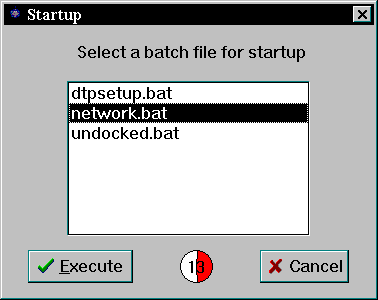
Listing Two is an example program called "StartUp" that uses the new control; Figure 1 is its startup screen. The program manages a list of .BAT files in a specific directory. Since Windows 95 batch files can execute Windows applications, this is a useful program to put in your startup group. When Windows starts, you'll see a list of batch files. You have several seconds to select one or cancel the program. If you select a batch file or the time expires, the selected batch file executes.
StartUp uses an .INI file to control the amount of time it waits, the directory it looks for batch files in, and the default batch file to use. The program is unremarkable in most respects. It uses a standard file list box and a few buttons. All of the INI file settings are in the [config] section. The variables available are:
You can also use the external keyword to link to an object file written in another language. Suppose you have an .OBJ file that contains a function named AboutBox() written in C (ABOUTBOX.C is available electronically). If the function uses the Pascal calling convention, you can declare it in your Delphi program this way: function AboutBox(w:HWnd; s:PChar) : Integer; external;.
You also need to link the object file with your program by using the $L directive; for instance, {$L ABOUTBOX.OBJ}.
Delphi sets strict limits on the object files you can use. In particular, all code must be in a segment named CODE, CSEG, or a name ending with _TEXT. Initialized data must reside in a segment named CONST or a name ending with _DATA. Uninitialized data must appear in a segment named DATA, DSEG, or a name ending with BSS.
You can link C code into your Delphi program as long as you are careful about using C library calls. Some C calls (for example, malloc()) require initialization before their use. In a C program, that happens automatically, but in a Delphi program, you probably shouldn't use them. You can use Windows API and Delphi calls freely. If you use a standard C-library function, you'll get a link error that the symbol is undefined because Delphi doesn't search the C run-time library automatically.
To bring the C functions in, extract the .OBJ files from the library (usually CWS .LIB). Those functions may use other functions--it can take a while to get it right. For example, if Delphi complains that _strcat is undefined, you need to generate STRCAT.OBJ. Use TLIB to extract the .OBJ file from the standard library: tlib cws.lib *strcat.obj.
Next, make Delphi link the file {$L STRCAT.OBJ}. After recompiling, you'll need strcpy, so repeat the process.
Here are a few other tips for mixing C code into a Delphi program:
If you have existing code in Visual Basic and you want to move to Delphi, Conversion Assistant from EarthTrek (Woburn, MA) may be just what you need. You can save your Visual Basic program as text and pass the MAK file into the Conversion Assistant.
The conversion is not perfect--it won't handle some things, and it does a less-than-perfect job on others. Still, it does quite a bit of work to get you started. Since Delphi can use most Visual Basic controls, programs that rely heavily on VBXs are not a problem. At $149.00, this tool provides a cost-effective first pass at translation.
Contrary to popular rumor, Al Stevens (Dr. Dobb's Journal's C columnist) and I really are two different people. We even have witnesses who have seen us together in public. Perhaps we should hold a "Name That Al" contest where you win prizes for correctly identifying our pictures. Then again, if you've seen us, it would be too easy--we don't look a thing alike.
This column launches the first installment of 20/20. In future columns, I'll explore advanced visual-programming techniques for Visual Basic, Delphi, and PowerBuilder. Occasionally, I'll look at some tools off the beaten track--including some for non-Windows platforms.
The complexity of Windows programming, coupled with the pressure to decrease product-development cycle times is fostering an explosion of visual-programming tools. Although current visual-programming environments are impressive, future releases promise to be even better. (If you don't think there's room for improvement, check out NeXT's Interface Builder.)
As the visual-programming milieu changes, you'll read about it here. In the meantime, drop me some e-mail and let me know what you are doing with visual development and what you would like to talk about in future columns. Oh, and tell me if you know where I can trade some bell bottoms for some of those 8-track stereo tapes....
type
  TAWindow = class(TForm)
private
    { Private declarations }
    procedure OnFocus(var Msg : TMessage);
       message WM_SETFOCUS;
       .
       .
       .
unit TimeCtl;
interface
uses Messages, Controls, Classes, WinTypes, WinProcs, DsgnIntf;
const
  TC_SET = WM_USER;
  TC_GO = WM_USER + 1;
  TC_TICK = WM_USER + 2;
  TC_GET = WM_USER + 3;
type
TTimeControl = class(TWinControl)
protected
  procedure SetTime(seconds : Integer);
  function GetTime : Integer;
  procedure CreateParams(var Params: TCreateParams); override;
public
  procedure Go;
  procedure Stop;
  constructor Create(AOwner : TComponent); override;
published
  property Time : Integer read GetTime write SetTime;
end;
procedure Register;
implementation
procedure Register;
begin
  RegisterComponents('Samples', [TTimeControl]);
end;
  procedure TControl_Init; far; external 'TCONTROL' name 'TControl_Init';
  procedure TTimeControl.SetTime(seconds : Integer);
  begin
    SendMessage(Handle,TC_SET,seconds,0);
  end;
  function TTimeControl.GetTime : Integer;
  begin
    result:=SendMessage(Handle,TC_GET,0,0);
  end;
  procedure TTimeControl.CreateParams(var Params: TCreateParams);
  begin
    inherited CreateParams(Params);
    CreateSubClass(Params,'TimeCtrl');
  end;
  procedure TTimeControl.Go;
  begin
    SendMessage(Handle,TC_GO,1,0);
  end;
  procedure TTimeControl.Stop;
  begin
    SendMessage(Handle,TC_GO,0,0);
  end;
  constructor TTimeControl.Create(AOwner : TComponent);
  begin
    inherited Create(AOwner);
    Width:=33;
    Height:=33;
    TControl_Init;
  end;
end.
unit Mainunit;
interface
uses
  SysUtils, WinTypes, WinProcs, Messages, Classes, Graphics, Controls,
  Forms, Dialogs, StdCtrls, ExtCtrls, Buttons, FileCtrl, IniFiles, TimeCtl;
type
  TForm1 = class(TForm)
    FileBox: TFileListBox;
    Label1: TLabel;
    ExecuteBtn: TBitBtn;
    BitBtn2: TBitBtn;
    CountDown: TTimeControl;
    procedure ExecuteBtnClick(Sender: TObject);
    procedure FileBoxClick(Sender: TObject);
    procedure BitBtn2Click(Sender: TObject);
    procedure FormCreate(Sender: TObject);
  private
    { Private declarations }
    procedure Tick(var Msg : TMessage); message TC_TICK;
  public
    { Public declarations }
  end;
var
  Form1: TForm1;
  ini : TIniFile;
implementation
{$R *.DFM}
procedure TForm1.ExecuteBtnClick(Sender: TObject);
var
Buffer : PChar;
Size : Byte;
index : Integer;
ps : String;
begin
index := FileBox.ItemIndex;
if index <> -1 then
begin
  ps := FileBox.Items[index];
  Size := Length(ps);
  Inc(Size);
  GetMem(Buffer,Size);
  StrPCopy(Buffer,ps);
  WinExec(Buffer,SW_MINIMIZE);
  FreeMem(Buffer,Size);
end;
Close;
end;
procedure TForm1.FileBoxClick(Sender: TObject);
begin
Countdown.Stop;
end;
procedure TForm1.BitBtn2Click(Sender: TObject);
begin
Close;
end;
procedure TForm1.FormCreate(Sender: TObject);
var
  dir : String;
  i : Integer;
begin
ini:=TIniFile.Create('STARTUP.INI');
dir := ini.ReadString('Config','Dir','');
if (dir <> '') then
   ChDir(dir);
FileBox.Directory:=dir;
FileBox.Update;
dir := ini.ReadString('Config','Default','');
i := FileBox.Items.IndexOf(dir);
if i = -1 then
  FileBox.ItemIndex:=0
else
  FileBox.ItemIndex:=i;
Countdown.Time := ini.ReadInteger('Config','Time',30);
Countdown.Go;
end;
procedure TForm1.Tick(var Msg : TMessage);
begin
if Msg.wParam=0 then
  begin
  ExecuteBtnClick(Self);
  Close;
  end;
end;
end.
End Listings