Andy, who holds a master's degree in engineering from Carleton University in Ottawa, Canada, currently works in Sydney, Australia. You can reach him at andy_yuen@sydney.sterling.com.
Although Forth is a powerful, general-purpose programming language, it is ideally suited for developing embedded systems: It is extensible; produces fast, compact code; and provides an interactive development environment. It is, however, sometimes convenient to organize an embedded application as a set of cooperating tasks synchronized using semaphores to simplify logic. It also is imperative that you be able to write interrupt-service routines in Forth itself, instead of assembler (a more-common practice).
While many implementations of Forth support multitasking, they usually only support cooperative multitasking, where one task has exclusive use of the CPU until it gives up the CPU voluntarily. There are very few task-synchronization mechanisms. There are add-on Forth words that allow writing of interrupt-service routines in Forth, but most of these general-purpose Forth implementations are too bloated to be usable in embedded systems.
Instead of starting from scratch to write my own Forth with preemptive multitasking and interrupt-service routines, I used eForth for the 8086 as a base. eForth, developed by Bill Muench and C.H. Ting, provides a simple model that can be ported easily to many 8-, 16-, or 32-bit CPUs. It features a small, ROMable, machine-dependent kernel, and portable high-level code. Currently there are implementations for 8051, 6811, 80x86 (16 and 32 bit), and the like. eForth is widely available at ftp sites, including taggeta.oc.nps.navy.mil and asterix.inescn.pt.
In this article, I'll describe how you can provide support for preemptive multitasking, semaphores (for task synchronization), and Forth interrupt-service routines in the 16-bit 8086 eForth--with about 1K of additional code. The same features can easily be ported to other processor/microcontroller-based systems, provided that there is sufficient RAM for separate stack and user-variable areas for each task.
My design criteria were that the multitasking services be simple to implement, fast in task switching, and small. Synchronization mechanisms were needed to coordinate task interaction. All multitasking services needed to be atomic; that is, noninterruptable so that the integrity of the multitasking kernel's internal data structures could be guaranteed.
The multitasking services are summarized in Table 1. Figure 1 is the state-transition diagram of the multitasking kernel.
Like BIOS and DOS functions, the multitasking services are invoked using a software interrupt. All registers are saved (with the exception of IPREEMPT) when a multitasking service is invoked, and restored on exit, so the task's context can be preserved between task switches.
When a task is created, it is put in the ready-to-run queue. The method of choosing a task to run is governed by the scheduling algorithm. There can only be one task running at a time. When a PREEMPT or IPREEMPT is executed, the running task's context (its register contents) is saved on the stack, the task is put back in the ready-to-run queue, and another task is run. When a task executes a WAIT on a semaphore, it either continues execution if the semaphore count is nonzero, or blocks otherwise. In the latter case, the task is moved to the semaphore queue and another task from the ready-to-run queue is run. The blocked task will remain blocked until the semaphore it is waiting on is SIGNALed by another task. When that happens, the blocked task will be moved back to the ready-to-run queue to await execution.
There is always a ready-to-run task in the system. This task is the IDLE task, which is created by the multitasking kernel when GO is called. It simply calls PREEMPT continuously to switch to another user task. The IDLE task can be thought of as a special, low-priority task in the system that only executes when there is no other ready-to-run task. In other words, if a user task is running and a PREEMPT or IPREEMPT is executed (by itself or by a timer interrupt-service routine) and the IDLE task is the only task in the ready-to-run queue, no task switch will result, and the running task continues execution.
To save memory, I have not implemented queues based on linked lists. Instead, I use a 16-bit word (not to be confused with a Forth word) to represent the ready-to-run queue. Each bit of the word represents a task. For example, if the queue has a value of 8005h, there are three tasks in the queue--task 0, task 2, and task 15 (the IDLE task). The same approach is used for a semaphore queue except that bit 15 (the most-significant bit) is used to indicate whether it is a count or a queue. When bit 15 is clear, the word represents a semaphore count. When bit 15 is set, it indicates that it is a queue and it has the same meaning as the ready-to-run queue. By using bit 15 as a queue indicator you limit yourself to a maximum of 15 user tasks that can wait on a semaphore. However, we assigned the system IDLE task as task 15 (the 16th task), which will never execute a WAIT anyway. By using this simple queue representation, you save the trouble of implementing linked lists, thus conserving memory and simplifying our implementation. The whole multitasking kernel--together with 60 semaphores--occupies only about 700 bytes of memory.
You can implement different scheduling algorithms by scanning the set bits in the queue. For example, if you always start scanning for set bits (which represent tasks) from bit position 0 (least significant bit), you have a priority scheduler where the lower the task number (between 0 and 14 if the system IDLE task is not counted), the higher its priority. To implement a round-robin-like algorithm, save the bit position where you found a task and start scanning for set bits in the queue one position higher the next time around. For example, if you located a ready-to-run task, say task 1, the next time you will start scanning from bit 2, and so on. A true round-robin algorithm is not possible since you don't know in what order the tasks were placed in the queue. The multitasking kernel supports both algorithms. The algorithm to use is specified during the initialization of the multitasking kernel when INIT is called.
DOS functions are non-reentrant--they cannot be called by different tasks at the same time. This is likely to happen if we use an interrupt service routine to invoke IPREEMPT to achieve preemptive multitasking. The workaround is to avoid task switching when DOS is in a critical section. You can use the undocumented DOS function 34h to obtain the critical-section pointer (returned in ES:BX) for testing. If the byte pointed to by the critical section pointer is nonzero, DOS is inside a critical section.
Since you may not be using DOS in the final product (to avoid licensing and/or royalty payments, for instance), conditional assembly instructions are used in the multitasking kernel source file KERNEL.ASM (available electronically; see "Availability," page 3) to control the inclusion of the DOS critical-section test. If the symbol MS-DOS is defined, a DOS critical-section test is performed by IPREEMPT to check if it is safe to do a task switch. No task switch is performed if DOS is inside a critical section. If MS-DOS is not defined, no DOS critical-section test is performed.
eForth includes the multitasking kernel source file KERNEL.ASM in the assembly process by using MASM's INCLUDE directive.
Before describing how to integrate the multitasking kernel, I'll first provide a quick backgrounder on eForth. I chose eForth as my base Forth system not just because it is small, portable, ROMable and reasonably powerful, but also because its source-code comments actually help me understand how eForth works. (I wish I could say the same for some of the Forth implementation source code I've seen.)
8086 eForth uses the small memory model: It uses the same segment for CS, SS, ES, and DS, and can therefore only address 64K of memory. It uses SP as the user stack pointer, BP as the return stack pointer, and SI as the Forth instruction pointer.
eForth consists of 31 low-level hardware-dependent words (implemented in assembler) and 168 high-level words (implemented in Forth). It is the isolation of the hardware-dependent words from the rest of the system that makes eForth easily portable to other processors.
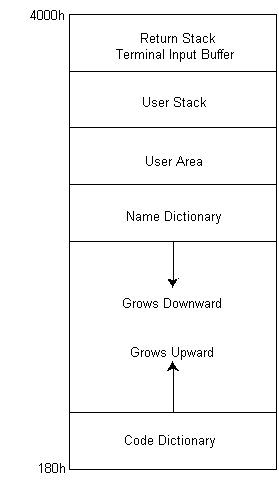
Figure 2 shows the eForth memory organization. It has separate name and code dictionaries. The name dictionary grows downward (toward low memory) and the code dictionary grows upward. Immediately above the name dictionary lies the user area where user variables are kept. Above that are the user stack, terminal input buffer, and return stack. High memory is arbitrarily set at 4000h: eForth only uses 16K of memory. (The user is free to redefine the constant EM, however, so that eForth uses up to 64K.)
In a multitasking environment, each task must have its own user and stack areas. Consequently, RAM usage increases with the number of tasks in the system.
As Table 2(a) shows, a number of new Forth words have been defined to interface to the multitasking kernel. With the exception of THREAD, all multitasking words call the multitasking kernel services directly via a software interrupt.
The Forth word THREAD allows the user to execute a defined Forth word as an independent task. For example, 1 THREAD TASK1 creates task 1 and uses the user-defined word TASK1 as the body of the task. It is the user's responsibility to see to it that TASK1 does not terminate--that is, the logic of TASK1 should be enclosed within BEGIN and AGAIN. Example 1 is the Forth definition for THREAD. In the source code, this is defined by the macro $COLON and the assembler directive DW, as in Example 2.
THREAD places the code address of the word TASK1 on the user stack and allocates memory for the task's user and stack areas. It then invokes DECLARE to create the task. The memory is allocated from the code area of the most recently created word. The user should create all tasks at once (see Example 3), and allocate all memory for them within the entry for TASKAREA.
The newly created task is put in the ready-to-run queue to await execution. A task switch occurs either when the running task executes a PREEMPT or when a timer interrupt-service routine performs an IPREEMPT. For the latter case to happen, the user has to write the interrupt-service routine and hook it into the timer interrupt.
Interrupt service routines are often written in assembler. However, it is much easier to develop in high-level Forth than in low-level assembler. Also, eForth does not have a built-in assembler. My advice is: Write them in Forth; if they're not fast enough, use assembler. However, a well-designed application should always keep processing to the absolute minimum within an interrupt-service routine. Now that we have multitasking and semaphores at our disposal, an interrupt service routine (ISR) can just do minimal, time-critical processing and SIGNAL a task to continue with more time-consuming work.
I have provided the word pair ISR:/ISR; for defining an interrupt-service routine. The user should define an interrupt-service routine with a sequence such as Example 4, which installs the word SERVICE as an ISR at interrupt 1Ch.
The ISR:/ISR; word pair is tightly coupled to the multitasking kernel. So if the multitasking kernel is changed to save the CPU registers in a different sequence, ISR:/ISR; must be changed too. The best way to understand how ISR: and ISR; work is to compare the pair with the standard :/; word definition pair.
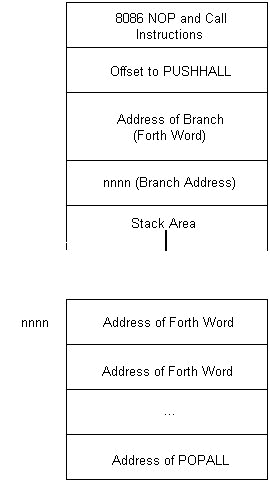
: and ISR: work in similar fashion. They first parse the input stream for the name to later be put into the dictionary entry. : then compiles an 8086 call instruction to the doLIST routine (which executes a list of compiled words) and puts Forth in the compile mode. ISR:, however, compiles a call instruction to PUSHALL, allocates memory for the Forth interrupt-service routine's user, and return stacks and compiles a Forth branch instruction to skip over the allocated memory area before putting Forth in the compile mode.
When terminating a : definition, ; compiles the Forth word EXIT into the code area, enters the interpret mode and links the new word to the dictionary. ISR; does the same, but compiles POPALL instead of EXIT into the code area. A compiled Forth interrupt-service routine is depicted in Figure 3.
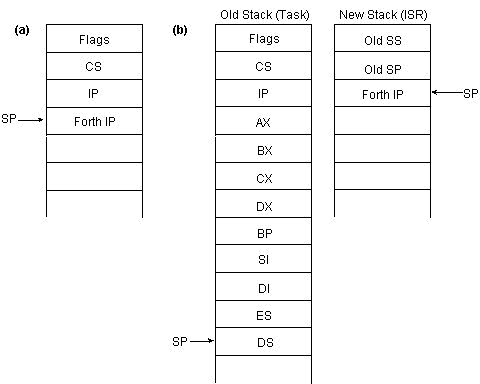
PUSHALL and POPALL are words written in assembler that manipulate the stack. PUSHALL sets up the Forth environment to execute compiled Forth words in the interrupt-service routine and POPALL cleans up and returns control to the interrupted task (see Figure 4).
When an interrupt occurs, control is transferred to the interrupt-service routine, which makes an 8086 subroutine call to PUSHALL. Consequently, on entry to PUSHALL, the stack content is like that in Figure 4 (a). PUSHALL retrieves the return address (which is actually the Forth instruction pointer indicating the first Forth word in the interrupt-service routine) from the stack and saves all CPU registers in the same sequence that the multitasking kernel saves them. This is necessary in case the interrupt-service routine invokes IPREEMPT to switch to another task. PUSHALL then sets up the Forth environment by switching to the Forth user and returns stacks allocated when the Forth interrupt-service routine was defined. Once it switches to the user stack, it pushes the old stack pointer (segment and offset) and the previously saved call return address (Forth IP) onto the user stack and jumps to doLIST. The stack content immediately before jumping to doLIST is depicted in Figure 4 (b). doLIST actually uses the return address as the Forth instruction pointer to locate the list of compiled Forth words (body of the Forth interrupt-service routine) to execute. The first Forth word it executes is branch, which skips over the stack area and proceeds to execute the rest of the Forth interrupt service routine.
The last Forth word executed by the interrupt-service routine is usually POPALL. POPALL sends an EOI (end of interrupt instruction) to the interrupt controller to reenable it, switches back to the original stack (using the stack segment/offset saved in the user stack), restores all saved registers (the interrupted task's context), and executes an 8086 IRET instruction to return from interrupt.
If the interrupt-service routine definition ends with an IPREEMPT, as in ISR: SERVICE ... IPREEMPT ISR;, IPREEMPT invokes the multitasking service IPREEMPT to switch to another task. IPREEMPT, like POPALL, sends an EOI, switches the stack, and switches to another task. In this case, POPALL is not executed.
The Forth words for interrupt-service support are documented in Table 2(b).
The startup sequence for Forth involves the following steps:
The user then can use Forth to create new tasks and write interrupt-service routines in Forth. I made slight changes to the standard Forth words KEY and UP.
KEY waits for a character from the input device. I introduced a PREEMPT in the loop so that it works better with the other tasks; see Example 5.
UP returns the pointer to the user area. Since we now have one user area per task, the old UP code no longer works. The solution is to define an array CUPP to store all the user-area pointers and modify UP so that it uses the running-task number to index into the array to retrieve the correct UP pointer. Example 6 provides the definitions of CUPP and UP.
All that was missing from our multitasking Forth was the ability to access 8086 input/output ports: eForth does not have I/O port access words. The only reason that I can think of for this omission is that eForth is meant to be portable, and many non-Intel processors/microcontrollers, most notably Motorola's, use memory-mapped I/O instead of separate I/O instructions.
To complete the enhancements to eForth, I created words for accessing both 8-bit and 16-bit I/O ports and for accessing memory in any segment:offset. These words are documented in Table 2(c).
Listing One illustrates a possible organization of an embedded system. It consists of four user tasks and one Forth interrupt-service routine.
You could have used the ISR to perform all the work done by tasks 0 and 1 in the aforementioned example. But when writing more-complicated applications, the ISR should do the minimal amount of processing and delegate the time-consuming processing to other tasks. Also, each task should do only a simple but well-defined job to simplify the logic. Whatever you do, keep it simple. But remember, only the Forth interpreter (that is, task 14) can start a compile, wait for user input, and allocate memory. No user tasks can use Forth words that do any of these things either directly or indirectly. Also, an interrupt-service routine should only invoke the multitasking services: SIGNAL, IPREEMPT, and ME.
With the added support for multitasking, semaphores, and Forth interrupt-service routines, there are now more tools to better organize an embedded application.
The multitasking Forth presented here can be used as an embedded-system development environment. However, to put it in ROM for use in the field may require a bit more work. You may want to exclude DOS (and the associated royalty payments) from the final product. Since only a few DOS functions are used, you may consider using the BIOS or your own routines instead.
You also might want to write your own simple I/O routines since neither DOS nor BIOS functions are reentrant. Switching tasks while a task is inside such a routine usually crashes the system.
Also, you can change the EXPECT, TAP, ECHO, and PROMPT vectors to point to your own words that implement an interrupt-driven serial link for communication with the outside world. This should be relatively simple to do now that you have multitasking and Forth interrupt-service routines.
Finally, you can redefine the Forth memory map to suit your hardware's ROM/RAM memory organization. You may want to get an eForth implementation on other processor microcontrollers from one of the Forth ftp sites for reference.
Service  Description                     Input            Output

INIT     Initializes multitasker and     AH = 0           none

         specifies scheduling algorithm  AL = 0           priority

                                         AL = 1 rotate

DECLARE  Creates a new task              AH = 1           none

                                         AL = task #

                                         DI = initial IP

                                         CX = initial SP

                                         DX = initial BP

GO       Creates IDLE task and starts    AH = 2           none

         all declared tasks

SIGNAL   Signals a semaphore             AH = 3           none

                                         AL = semaphore #

WAIT     Waits on a semaphore            AH = 4           none

                                         AL = semaphore #

PREEMPT  Switches to another ready task  AH = 5           none

         (called from a task)

IPREEMPT Switches to another ready task  AH = 6           none

         (called from an ISR)

ME       Retrieves task number of        AH = 7           AL = task #

         running task (0 to 14 inclusive)
Word                 Description                      Code


(a)

DECLARE              Creates task #u with             assembler

( u ca usp rsp -- )  IP = ca

                     SP = usp

                     BP = rsp

                     (internal use only,

                     use THREAD instead)

SIGNAL               Signals semaphore #u             assembler

( u -- )

WAIT                 Waits on semaphore #u            assembler

( u -- )

PREEMPT              Switches to another task         assembler

( -- )               (called from a task)

IPREEMPT             Switches to another task         assembler

( -- )               (called from an ISR)

ME                   Retrieves the running            assembler

                     task's task #

( -- u )

THREAD               Creates task #u using the        Forth

( u -- <name> )      defined Forth word <name>

                     as the body of the task


(b)

INT-ON               Enables interrupt                assembler

( -- )

INT-OFF              Disables interrupt               assembler

( -- )

INT-SET              Installs interrupt handler       assembler

( ca u -- )          (address ca) for interrupt

                     #u (for internal use only,

                     use INT-INSTALL instead)

INT-REMOVE           Removes interrupt handler        assembler

( u -- )             for interrupt #u and

                     installs a do-nothing handler

PUSHALL              Sets up Forth interrupt          assembler

( ca -- )            support (for internal use only)

POPALL               Cleans up after Forth ISR        assembler

( -- )               (for internal use only)

ISR:                 Starts a Forth ISR definition    Forth

( -- ; < string> )

ISR;                 Terminates a Forth ISR           Forth

                     definition

( -- )

INT-INSTALL          Installs the defined Forth       Forth

( u -- <name> )      ISR <name> for interrupt #u


(c)

P@                   Inputs value from 16-bit         assembler

                     port #u

( u -- n )

P!                   Outputs value n to 16-bit        assembler

                     port #u

( n u -- )

PC@                  Inputs value from 8-bit          assembler

                     port #u

( u -- c )

PC!                  Outputs value c to 8-bit         assembler

                     port #u

( c u -- )

M@                   Gets 16-bit value from           assembler

                     memory at seg:off

( seg off -- n )

M!                   Stores 16-bit value n to         assembler

                     memory at seg:off

( n seg off -- )

MC@                  Gets 8-bit value from            assembler

                     memory at seg:off

(seg off -- c )

MC!                  Stores 8-bit value c to          assembler

                     memory at seg:off

( c seg off -- )
: THREAD ( u -- <name )
    '                   \ GET ADDRESS OF WORD
    UP @ HERE 128 CMOVE     \ COPY USER AREA
    OVER CELLS CUPP     \ SAVE USER AREA POINTER
    + HERE SWAP !
    HERE DUP
    256 ALLOT               \ ALLOCATE USER STACK
    HERE CELLM
    DUP ROT 256
    + ! SWAP                \ SAVE SP0
    256 ALLOT               \ ALLOCATE RETURN STACK
    HERE CELLM
    DUP ROT 384
    + !                 \ SAVE RP0
    DECLARE ;
$COLON 6, 'THREAD', THREAD
DW  TICK                        ;get address of word
DW  UP,AT,HERE,DOLIT,US,CMOVE   ;copy user area
DW  OVER,CELLS,CUPP         ;save UP pointer
DW  PLUS,HERE,SWAP,STORE
DW  HERE,DUPP                   ;save user area ptr
DW  DOLIT,US+SPS,ALLOT          ;allocate UPP
DW  HERE,CELLM
DW  DUPP,ROT,DOLIT,SPPPOS
DW  PLUS,STORE,SWAP         ;save SP0
DW  DOLIT,RTS,ALLOT         ;allocate RPP
DW  HERE,CELLM
DW  DUPP,ROT,DOLIT,RPPPOS
DW  PLUS,STORE              ;save RP0
DW  K_DECLARE,EXIT
CREATE TASKAREA
0 THREAD TASK0
1 THREAD TASK1
    .
    .
    .
ISR: SERVICE ... interrupt
                 logic... ISR;
HEX
1C INT-INSTALL SERVICE
DECIMAL
        $COLON  3,'KEY',KEY
KEY1:   DW  K_PREEMPT           ;preempt
        DW  QKEY            ;get key
        DW  QBRAN,KEY1      ;repeat if no key pressed
        DW  EXIT
$COLON  4,'CUPP',CUPP
DW      DOVAR           ;create array
DW      MAXTHREAD DUP(UPP)  ;to hold all UPs

$COLON  2,'UP',UP
DW      K_ME,CELLS,CUPP,PLUS,EXIT ;retrieve UP
\ ***********************************************************
\ Example program to illustrate the use of multi-tasking and
\ Forth interrupt service routines
\ by Andy Yuen 1995 (C)
\ ***********************************************************
\ eForth has no CONSTANT, define one
\ (I have added DOES> to eForth)
: CONSTANT CREATE , DOES> @ ;
\ musical note generation frequency divider
6087 CONSTANT <G
5423 CONSTANT <A
4560 CONSTANT C
4064 CONSTANT D
3630 CONSTANT E
3044 CONSTANT G
\ hardware port and control definitions
HEX
61 CONSTANT CONTROL-PORT        \ speaker control port
43 CONSTANT TIMER-PORT          \ timer mode control port
42 CONSTANT COUNT-PORT          \ timer count register
0B6 CONSTANT SETUP              \ counter 2 square wave generator mode
0FE CONSTANT MASK               \ timer-driven speaker disable control mask
1C CONSTANT TIMER-INT           \ PC clock tick interrupt
0B800 CONSTANT SCR-SEG
DECIMAL
\ define tune in musical note/duration pair
CREATE TUNE
C , 6 , E , 6 , G , 3 , G , 3 , G , 4 , E , 4 , G , 6 ,
C , 6 , E , 6 , D , 3 , D , 3 , G , 4 , G , 4 , <G , 6 ,
E , 6 , D , 6 , C , 3 , C , 3 , <A , 4 , <A , 4 , C , 6 , 0 , 20 ,
\ 18 ticks equals one second
18 CONSTANT TICKS/SECOND
0 CONSTANT TMUSIC#              \ task# for music playing task
1 CONSTANT TTIME#               \ task# for time-of-day display task
2 CONSTANT TLOOP#               \ task# for runaway task
0 USER POS                      \ current position in tune
\ enable timer-driven tone-generation
: SPEAKER-ON ( -- ) CONTROL-PORT PC@ 3 OR CONTROL-PORT PC! ;
\ disable timer-driven tone-generation
: SPEAKER-OFF ( -- ) CONTROL-PORT PC@ MASK AND CONTROL-PORT PC! ;
\ delay for n signals
: DELAY ( n -- ) DUP FOR ME WAIT 1 - NEXT DROP ;
\ music playing task logic
: TMUSIC ( -- )
    SETUP TIMER-PORT PC! SPEAKER-ON \ setup timer and enable speaker
    0 POS ! ME WAIT BEGIN           \ wait for first signal to start
    SPEAKER-OFF                     \ disable speaker
    SPEAKER-ON                      \ and enable it to give a brief pause
    TUNE POS @ + DUP DUP C@ COUNT-PORT PC!  \ output frequency divisor to
    1 + C@ COUNT-PORT PC!           \ timer count register
    2 + @ DELAY                     \ delay specified duration
    4 POS +!                        \ advance tune pointer
    TUNE POS @ +
    @ 0 = IF 0 POS !
    SPEAKER-OFF 20 DELAY THEN       \ pasue a while song finishes
    AGAIN ;                         \ replay
\ replace standard word to quit: need to remove ISR and disable speaker
: BYE ( -- ) SPEAKER-OFF TIMER-INT INT-REMOVE BYE ;
\ declare variable for keeping the time-of-day
VARIABLE XCOUNT
TICKS/SECOND XCOUNT !
VARIABLE SECOND
VARIABLE MINUTE
VARIABLE HOUR
\ a semaphore is used for safe-guarding time-of-day variables access
\ note that all words accessing them do a wait in the beginning
\ and a signal at the end to provide mutial exclusive access
20 CONSTANT TODSEM
TODSEM SIGNAL
\ set time-of-day
: SETTOD ( n n n -- ) TODSEM WAIT SECOND ! MINUTE ! HOUR ! TODSEM SIGNAL ;
\ advance time-of-day clock by one second
: SECOND> ( -- ) TODSEM WAIT 1 SECOND @ + DUP 60 < IF
    SECOND ! ELSE 60 SWAP - SECOND !
    1 MINUTE @ + DUP 60 < IF
    MINUTE ! ELSE 60 SWAP - MINUTE !
    1 HOUR @ + DUP 24 < IF
    HOUR ! ELSE 24 SWAP - HOUR !
    THEN THEN THEN TODSEM SIGNAL ;
\ convert number to two ASCII characters on the stack
\ cannot use words like <#, #, #>, etc. because they allocate
\ memory and may interfere with the interpreter task #14
: DECODE ( n -- n n ) 10 EXTRACT SWAP 10 EXTRACT SWAP DROP ;
\ write ASCII characters to memory location until 0 is reached
: SCRWRITE  ( 0 n ... n seg off -- ) BEGIN
    2 + ROT DUP WHILE
    2 PICK 2 PICK MC! REPEAT 2DROP DROP ;
HEX
\ display time-of-day HH:MM:SS near top right hand corner of screen
: TODDISPLAY ( -- ) TODSEM WAIT
    0 SECOND @ DECODE 3A
    MINUTE @ DECODE 3A
    HOUR @ DECODE
    SCR-SEG 80 SCRWRITE
    TODSEM SIGNAL ;
DECIMAL
\ time-of-day display task logic
: TTIME ( -- ) 0 0 0 SETTOD BEGIN ME WAIT       \ set time to 00:00:00
    XCOUNT @ 1 - DUP XCOUNT ! 0 = IF        \ increment time every second
    SECOND> TICKS/SECOND XCOUNT ! THEN
    TODDISPLAY AGAIN ;                      \ display time
\ runaway task logic
: TLOOP BEGIN AGAIN ;                           \ loop
HEX
\ define interrupt service routine
ISR: CLOCKISR TMUSIC# SIGNAL                    \ signal tasks
    TTIME# SIGNAL IPREEMPT ISR;             \ multi-task
DECIMAL
\ install timer ISR
TIMER-INT INT-INSTALL CLOCKISR
\ create and start all tasks
CREATE STACKAREA
TMUSIC# THREAD TMUSIC
TTIME# THREAD TTIME
TLOOP# THREAD TLOOP