Ann Lindsey Williams was the prettiest girl in the sixth grade, which made her the prettiest girl in the world, at least as far as my world extended. Consequently, I was overjoyed when the principal teamed us to sell milk in the Lorton, Virginia Elementary School cafeteria. The Fairfax County School Board had allowed that two students could be released from class a few minutes early to set up the milk line and sell the milk. In exchange for our time and service, which also meant that we ate alone after the shift was over, we each earned a carton of milk, a significant contribution to the economies of our families' budgets in those tough times. It was an assignment of some consequence, a matter of duty, not to be taken lightly. Besides performing an official function and providing economic relief for my own personal daily operating expenses, I got to have lunch every day with Ann Lindsey Williams, the prettiest girl in the sixth grade.
Billy Alvey came through the line every day, tossed some coins on the table, paying a nickel or a dime more than his milk cost, and said with a superior smirk, "Keep the change." Billy liked to impress Ann Lindsey, although I doubt that he noticed me. Patiently each day, I followed Billy to where he sat down, returned his change to him, and explained that we were not allowed to keep the change. No suggestion of impropriety, graft, bribery, kickback, or any such indiscretion, imaginary or otherwise, would be allowed to jeopardize my position.
After several days, and with this scenario repeating itself each day, Ann Lindsey asked me why it was that we couldn't keep the change. I looked around the cafeteria, which doubled as an auditorium for student assemblies and a meeting and dance hall for the PTA. I regarded the Virginia State flag in one corner, Old Glory in the other, the patriotic mural on one wall, portraits of George Washington and Harry Truman on the other, and said after a moment's thought, "I think it's because we work for the government."
Those sure were simpler times.
Recently I undertook a project to develop a CD-ROM, in conjunction with DDJ. I had to choose between that project and writing the definitive Minesweeper for Dummies for Trudy Neuhaus at IDG books. The CD-ROM looked like it would be easier.
Plans for the project include multimedia, interactive, razzle-dazzle displays under Windows 95. The tutorial content comes from three books I've written, one on programming in general, one on learning C, and another on C++. Users will switch between the tutorial sessions and the programming exercises seamlessly, or so the plan goes. A definite must for the CD-ROM is a small, common software-development environment so that users can compile and run exercise programs and do some programming on their own. The books included that kind of support with QBasic, a mainstay of DOS; Quincy, a home-grown C interpreter; and GNU C++. Similar solutions but three completely different development environments.
I plan to continue to use QBasic for the first part of the tutorial, but neither Quincy nor GNU C++ fit into my vision of an integrated, online tutorial environment. That requirement has spawned "Quincy 96," a new "C Programming" column project kicking off this month. Quincy 96 is a Windows 95 version of Quincy that supports standard C and C++.
To review, the Quincy C interpreter runs in DOS under the D-Flat user-interface C library. I developed the program from an earlier version of a K&R interpreter. I included Quincy on the companion diskette of the C tutorial book and described it in this column last year. The new Quincy is not an interpreter. Instead, it is a Windows-hosted integrated development environment (IDE) that launches C and C++ compilers to compile and link projects and execute the compiled programs.
Let's consider the reason for a new Quincy by addressing some of the drawbacks of the old one. First, the old Quincy (Version 4) is a source-code interpreter. Consequently, it sets no speed records when executing C programs. Second, Quincy 4 has a few bugs. It works well with the tutorial programs in the book, but students have managed to uncover small quirks in Quincy's interpretation of C. Third, the old Quincy interprets programs consisting of one translation unit only--one source-code file and its included headers. The standard C library functions are implemented, but Quincy 4 has no linker to link multiple object modules in a project. Finally, Quincy 4 is restricted to interpreting programs written in the C language. As such, Quincy 4 offers little to the C programmer who is learning C++.
C++ code has been interpreted, I am told, but writing a C++ interpreter is a bigger chaw than I care to bite off. The efficiency of an interpreter is a function of the size of the language, the complexity of the programs being interpreted, and the effectiveness of the interpreter itself. Needless to say, C++ is big, and C++ programs are complex. Even if I could get an interpreter running in the time I have, it probably wouldn't run very well.
Having no C++ version of Quincy, I used the MS-DOS port of GNU C++ on the companion diskette of my C++ tutorial book. I discussed that experience last August, giving a lot of space and favorable comment to GNU C++, a fact completely ignored by Richard Stallman of the Free Software Foundation when he wrote to complain about a different review of GNU C++ in the September issue. See the December 1995 issue for his letter to the editor.
GNU C and C++ assume a UNIX-like, command-line, text-mode development environment, which is good enough for a free compiler to be given away with a book but not quite good enough for what I have in mind. Quincy C and GNU C and C++ in their current incarnations do not fit well into the interactive tutorial environment planned for the CD-ROM project.
Obviously, something more appropriate is called for.
Cygnus Support (http://www.cygnus.com) has ported GNU C and C++ 2.7.1 to the Win32 environment. The port is still in its beta configuration, but Cygnus has provided what will eventually be a free Windows-development compiler system. You can use GNU C and C++ to write Windows 95 and Windows NT protected-mode, 32-bit, GUI programs as well as 32-bit DOS command-line programs that run in a Windows 95 DOS box.
I have a compelling reason to use the Cygnus port in addition to the incentive that it can be freely distributed. GNU C++ 2.7.1 implements many of the new ANSI constructs--RTTI, new-style casts, template improvements, STL, namespaces, mutable, bool, typename, explicit. This compiler is the first I've seen for the PC platform that implements all these constructs, and it is free. You'll need a decompression/extraction utility that recognizes long filenames and works with the tar archive and zip compression formats. (I use WinZip 6.0, a shareware program from Nico Mak Computing. You can download and register the shareware version of WinZip from CompuServe.)
The GNU Win32 package includes both compilers, a make utility, the GNU debugger, many of the GNU utilities, and a complete set of standard C and C++ libraries. For my purposes, the compilers are almost perfect. First, the C++ compiler provides an early experience in the new ANSI C++ constructs. Second, my tutorial exercises use standard input and output to demonstrate language features, and the GNU compilers fully implement that generic interface. But the compilers themselves work in that same austere environment, and I want something that integrates with the GUI for the CD-ROM project.
Quincy to the rescue. Quincy 96 is an IDE built as a multiple document interface (MDI) Windows 95 program. I used Visual C++ 4.0 and the Microsoft Foundation Class library to build Quincy 96 and learned a lot of lessons about that environment--which I will share with you as the project progresses.
Quincy 96 inherits its name from the earlier Quincy, which was named after my daughter Wendy's cat. The cat was named after Oscar Madison on "The Odd Couple." How's that, you say? Let me explain. Wendy was a fan of Oscar Madison but unsure of her new kitten's sex. Oscar is a male name. "The Odd Couple" was in syndicated reruns, and Jack Klugman, the actor who played Oscar, had moved on to playing the medical examiner "Quincy," a name that Wendy figured would fit either way. Quincy the cat later cleared up the gender mystery by falling in love with a traveling salescat and adding significantly to the cat population at our house.
Quincy 96 has a simple mission. It manages two kinds of documents: project documents and text source-code documents. A project document is the same as it is with any IDE--a list of source-code files that, when compiled and linked, constitute the program. You build the source-code files and add their names to the project list. You can then build the executable program file with a command. Quincy checks the date/time stamp of the files to see what should be recompiled. Quincy scans each .c or .cpp file parsing out #include preprocessor directives to determine all the appropriate dependency conditions. When a .c or .cpp source-code file is to be compiled, Quincy launches the proper GNU compiler to run as a threaded process in the background. Quincy intercepts warning and error messages from the compiler and presents them to the user, who can select from them to go immediately to the errant line of code. Quincy launches the linker when the compiles are completed and, optionally, launches the compiled/linked executable program. There is no debugger yet, but I am working on it. This process, end-to-end, is similar to what Turbo C 1.0 did ten years ago but in the Windows 95 operating environment and with the addition of support for contemporary C++.
Quincy 96 has an additional mode of operation. If no project document is open, the build command assumes that the currently in-focus .c or .cpp document is a stand-alone program to be compiled and linked. This mode permits me to run short exercise programs like "hello world" without building a project document for each of them.
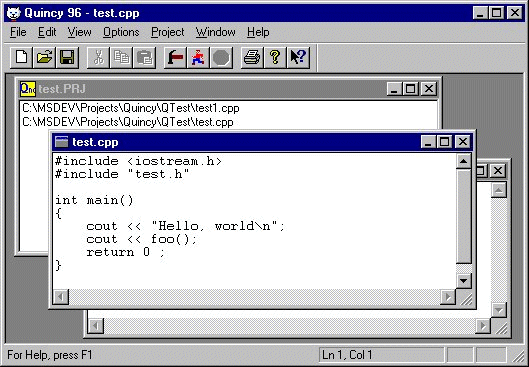
Figure 1 is Quincy 96's application window with some source files loaded.
Remember design patterns? They were a hot buzz word a few conferences ago. They kind of fizzled out of the popular press when software-marketing types found out there was nothing to sell. A small cadre of developers is still quietly working on the process, and some works have been published. Among other things, design patterns identify common programming problems and their solutions. The discussions that follow are design patterns. Well, sort of. They fit the definition of the problem that design patterns address, but I haven't applied any would-be formal pattern methodology in forming their descriptions.
These problems represent routine program operations that should be well understood by any MFC programmer and, therefore, well documented by Microsoft. However, I had to painstakingly ferret out their solutions by poring over the documentation and online help and by experimenting. This is a combination of my relative inexperience with MFC and the poverty of indexes into the mountains of MFC reference material. Sometimes there was no description of the solution, much less the problem. Sometimes the descriptions were difficult to find because I didn't know where to look or what to look for. Sometimes the solutions formed from fragments of seemingly unrelated information scattered about the documentation. The Windows API and MFC include hundreds--maybe thousands--of undocumented or poorly documented things that programmers need to know about. Programming by folklore.
Rather than describing each Quincy 96 source-code file in detail, I'll address individual programming issues and publish the source code that accompanies each such discussion. I won't dwell too much on the details of how I figured all these things out; I'll mainly show you the solution and hope that it saves you some time in your next VC++ MFC project.
Quincy is, first of all, a text editor. Before you can build any executable programs in an IDE, you have to build source-code files, and so Quincy is an MDI text editor. This month I'll discuss some of the design patterns that fell out of the text editing aspects of the design. Next month I'll talk about other parts of the project and the design patterns that resulted.
An MDI application can consist of multiple instances of multiple document types. Each open document is represented by one or more document views. Quincy has several document types with one view per document type. Only one instance of the project document type can be open at a time, but many instances of the source-code document types--C files, C++ files, and header files--can be open for editing.
The Visual C++ Developer Studio allows you to build an MDI application with documents that have application-specific views derived from the CEditView class, which gives the documents the properties of a text editor. You can open multiple editor documents, type into them, cut, copy, paste, and even pretend you are opening existing documents and saving ones you have changed. All the code to do that is generated for you by the Developer Studio. Easy. The hard part is doing more than that.
The default font for CEditView objects is the system font, which, being proportionally spaced, is not particularly acceptable for typing source code. A fixed-spaced font is necessary so that code indentations line up properly. You can add a CFontDialog dialog box to your user interface and let the user select a font, but I prefer to have the code font of my choice, 10-point Courier, as the default for text-editor documents.
The character font is associated with the document's view. To associate a specific font with a particular view, you first generate the font as a data variable by instantiating an object of type CFont. Declare this object as a data member of the derived CEditView class (see Listing One) and create the font itself in the class constructor by calling the CFont class's CreateFont member fuwnction; see Listing Two. Finally, apply the SetFont member function in the class's overriding Create function after calling the base class's overridden Create function (Listing Three). This action applies the created font to each open document of that type in the application.
The arguments to CFont::CreateFont are not intuitive. I deduced their values by writing a program that uses CFontDialog to create fonts and then looking at the Courier font's corresponding values. This pattern, then, explains only how to associate a 10-point Courier font with a derived CEditView class object. You would have to figure out the arguments to use the pattern for other fonts.
Observe that the program also calls the SetTabStops function from the Create function in Listing Three. I don't like the default eight-character tabs; they're too wide. The function's argument is expressed in dialog units, which are 1/4 of a character width, so 16 dialog units add up to one tab stop every four characters.
This pattern is not particularly tricky. All the functions are well documented, except for the esoteric CreateFont arguments. The real problem was that nothing at the highest level pointed me to the functions or told me where to apply them and in what sequence. You must already know about them in order to go directly to their documentation.
Most text editors can optionally display the current line and column number. Word for Windows displays them in the status bar along with the time of day, page number, and other stuff. The line number is essential information in a programmer's editor because compilers report warnings and errors by line number. The CEditView class does not automatically display the line and column numbers.
First, you have to extract the current line and column number from the current document. That sounds simple enough, but try to find out how from the documentation when you don't already know. Searches through the indexes and the online help for references to "line," "column," "cursor," and the like yield nothing. It takes a while to figure out that what we always called a "cursor" is now called a "caret."
The MFC online-help system is great. You can cruise through class descriptions and find out all kinds of good stuff. After a thorough reading of the class-member descriptions for the CEditView class, its embedded CEdit class, and all its base classes through CView up to CWnd, I eventually found a way to get the current line and column number.
The line number is easy. The CEdit::LineIndex function returns the character position of the first character of the current line when its argument is -1. That value can be converted into the current line number by passing it as an argument to the CEdit::LineFromChar function.
The column number is more difficult. The trick is to use the CEdit::GetSel function to get the character positions of the beginning and ending of the CEdit object's current selection, which is the currently marked block of text. As it turns out, when there is no currently marked block, the current selection is defined as beginning and ending at the current caret character position. When there is a marked block, the ending position corresponds to the current caret position. The documentation does not explain this behavior, but it works nonetheless.
You would think that the difference between the current caret character position and the character position of the first character of the line would produce the current column number. It does not, however, when tab characters are in the line, which is likely to happen in source code. The program has to scan the text of the current line and count the space characters that the view adds when it displays tab-character offsets. You'll see that after 200 characters of text in a line, I don't bother correcting for tabs. A C++ source-code line is too long if it needs 200 characters.
Listing Four is the function that determines the current line and column number from a CEditView class and sends those values to the derived CWinApp class to display in the status bar.
There might be an easier way. There should be. I didn't find it, however, and I'm sure if one exists, I'll get lots of mail from veteran MFC programmers telling me about it and about how stupid I am for not already knowing about it. Where was all that help when I was trying to get this thing to work? One thing is certain. The CEdit class should offer up these data values more willingly. Deriving from CEdit to add the behavior wouldn't work because then you'd have to coerce CEditView into using your derived class instead of CEdit.
Having figured out the line and column values, the application has to display the data on the status bar. The standard VC++ status bar includes three little recessed boxes that tell you whether the Num Lock, Scroll Lock, and Caps Lock keys are on or off. This is a software concession to the knowledge that the lights on the keyboard that provide the same information get reversed sometimes. I wanted to add a box to the left of the standard ones to display the line and column numbers. At the same time I wanted to get rid of the Scroll Lock box. (Does anyone know what the Scroll Lock key is for? Windows 95 sure doesn't use it to lock out any scrolling. As far as I know its only purpose is to change the pilot's viewing angle in Flight Simulator.) The status bar in Figure 1 shows that I got it working okay. Here's how.
Listing Five shows an array, indicators, that VC++ builds into the CMainFrame source-code file. indicators contains string identifiers. Listing Six shows the string-identifier declarations in the .rc resource text file. These strings identify the default text values for the panes in the status bar. The indicator elements tell the frame window how many panes there are and how wide they should be. The first indicator, ID_SEPARATOR, identifies the leftmost, unrecessed pane that the system uses to display menu and tool-button help messages.
Listing Seven shows the indicators array as modified to eliminate the Scroll Lock pane and insert a pane to use for the line and column numbers. I tried to use a different string identifier created specifically for this purpose but couldn't get it to work. This might be due to the beta copy of VC++ 4.0 that I have.
Listing Eight shows code added to the CMainFrame::OnCreate function to change the characteristics of the new pane so that it is wider (120 pixels wide) and has no initial text value.
Finally, Listings Nine and Ten show functions added to the main frame and application classes to display data in the new pane while the program is running.
MFC includes a data-serialization feature for reading and writing documents. You provide a Serialize function in the derived document class, and the system calls it to read and write document data with the appropriate file opened and a CArchive object that knows how to store and retrieve objects of many different types and classes.
Normally the document class manages the document's data, and the view class manages the display of the data. The text-editor view has to keep a complete copy of the text, so it might as well manage the data all by itself.
The CEditView class embeds a CEdit object to contain the data. The CEdit class represents the data as an object of type CString, VC++'s string class. If you use the CArchive object to write and read the text, an object-description field is inserted at the beginning of the object. This works fine for text editing, but when you want to pass that file to a compiler or any other program that expects raw text, the object-description field gets in the way.
The CEditView class includes a SerializeRaw function that reads and writes text data without the object-description field. Listing Eleven shows how I used that function from within the derived document class's overriding Serialize function. The text document has only one view. The GetFirstViewPosition function returns a position index to that one view that the single call to GetNextView uses to return a pointer to the CEditView object associated with the document. A call to SerializeRaw through that pointer passing a reference to the CArchive object takes care of both reading and writing. The call to CArchive::Flush for output operations ensures that the text is written to the file before Quincy 96 tries to pass the file specification to the compiler.
The MFC documentation is vague on how to implement text search-and-replace operations in a CEditView derived class. As you read the class-member descriptions and meander through the hypertext links in the online help, you get the impression that MFC provides the primitives, and you have to integrate them somehow. Actually, the process is much simpler. All you have to do is add menu commands with the ID_EDIT_FIND and ID_EDIT_REPLACE identifiers, and the framework does the rest.
When you execute an MFC application built by the Developer Studio's AppWizard, the application's first action is to create a new, empty document. If your application supports multiple document types, you must select one of them from a dialog box to tell the framework what kind of new document to create. That behavior, which reflects the behavior of many Microsoft applications (Word, for example), is not always what you want. In Quincy's case, the application should reopen the project and text documents that were open when the application last ran, similar to how the Developer Studio works. Getting an application to load previous documents is no trick. Suppressing the creation of that initial new document is not as easy.
Listing Twelve shows the code generated in the derived CWinApp application class's InitInstance member function. The CWinApp::ProcessShellCommand function opens documents specified on the command line or dragged to the applications icon by the user. If neither condition exists, the function creates a new document. That's not what I want. If neither condition exists, I want the application to use values saved in its .ini file to load the documents from the previous run. By stepping into the ProcessShellCommand function with the debugger, I was able to develop the test in Listing Thirteen, which calls ProcessShellCommand only when documents specifications are provided as command parameters from the command line or a drag operation.
Enough of the GNU puns already. As you can probably tell, I am a fan of the GNU compiler suite. First, GNU is free; it offers schools and students a way to use and learn C and C++ without straining their budgets for individual compiler purchases and site licenses. Second, GNU's C++ language implementation is contemporary; it implements many of the new ANSI features that teachers should be teaching and students should be learning.
So why, then, am I not using GNU compilers as the development platform for my "C Programming" column projects?
I would have used GNU C++ rather than Visual C++ to build Quincy but for these reasons: First, the beta of the Cygnus port is not ready to compile C++ Windows programs. A small C demo works, but the C++ compiler chokes on some of the declarations in the Windows header files. Second, no one has licensed or ported MFC to GNU C++. That could happen only with Microsoft's blessing. Third, the Visual C++ Developer Studio, my development environment of choice, launches the Microsoft compiler and does not work with GNU C++. If the first two problems are ever solved, I might try trussing up Quincy 96 (97, 98, 99, ought-ought?) so that it takes on some of the visual aspects of AppWizard and ClassWizard.
Finally, the terms of the GNU Library General Public License for programs linked with GNU libraries would wrap the program in a shroud of source-code availability responsibilities that I do not have time for. The source code to my projects is always available to everyone, but the GNU license binds you in perpetuity (or for three years after your last distribution, whichever comes first) to make available the source code to the GNU libraries, too, with everything offered on "a medium customarily used for software interchange," as interpreted by the foundation but not defined in the license. Referring the user to a third-party source, even to the FSF themselves, is not an approved medium, although I don't understand why. Neither is making the source code available for download from an online service or an Internet ftp site. I was told that the latter suggestion could not be approved because it would exclude anyone who does not have online access.
I will be including all the Quincy source on the CD-ROM as well as the complete compiler package, but I don't want to tie that particular product to programming projects in this column, and DDJ might not want to be required to sell the product for what the license calls "...a charge no more than the cost of performing this distribution," upon which the GNU license does not elaborate. And so for now, I'll plod along with Borland and Visual C++.
The source-code files for the Quincy 96 project are free. You can download them from the DDJ Forum on CompuServe and on the Internet by anonymous ftp; see "Availability," page 3. To run Quincy, you'll need the GNU Win32 executables from the Cygnus port. They can be found on ftp.cygnus/pub/sac.
If you cannot get to one of the online sources, send a 3.5-inch high-density diskette and an addressed, stamped mailer to me at Dr. Dobb's Journal, 411 Borel Avenue, San Mateo, CA 94402, and I'll send you the Quincy source code (not the GNU stuff, however--it's too big). Make sure that you include a note that says which project you want. The code is free, but if you care to support my Careware charity, include a dollar for the Brevard County Food Bank.
GNU Projects
What's GNU for Windows 95?
The Good GNUs and the Bad GNUs
Quincy 96, or What's GNU, Pussycat?
Design Patterns?
Text Editors
Editor Font and Tab Stops
Line and Column Numbers
Text-Data Serialization
Text Search and Replace
Suppressing the GNU Document
No GNUs is Good GNUs
Source Code
Figure 1: Quincy 96's application window.
Listing One
class CTextView : public CEditView
{
  CFont newfont;
  // ...
};
Listing Two
CTextView::CTextView()
{
  newfont.CreateFont(-13,0,0,0,400,0,0,0,0,1,2,1,49,"Courier");
  // ...
}
Listing Three
BOOL CTextView::Create(LPCTSTR lpszClassName,LPCTSTR lpszWindowName,
                       DWORD dwStyle, const RECT& rect,
                       CWnd* pParentWnd, UINT nID, CCreateContext* pContext)
{
  BOOL rtn = CWnd::Create(lpszClassName, lpszWindowName, dwStyle,
                          rect, pParentWnd, nID, pContext);
  SetTabStops(16);
  SetFont(&newfont, TRUE);
  return rtn;
}
Listing Four
void CTextView::ShowLineColumn()
{
  CEdit& rEdit = GetEditCtrl();
  // --- character index of 1st char, current line
  int nLineIndex = rEdit.LineIndex(-1);
  // --- current line number
  int nLineno = rEdit.LineFromChar(nLineIndex);
  // --- character index of current position
  int nStartChar, nEndChar;
  rEdit.GetSel(nStartChar, nEndChar );
  // --- read the current line
  char buf[200];
  rEdit.GetLine(nLineno, buf, 200);
  // --- compute tab character adjustment
  int col = 0;
  int tabct = 0;
  for (int x = 0; x < nEndChar - nLineIndex; x++)   {
    if (x == 200)
      break;
    if (buf[x] == '\t')
      while (++col % 4)
        tabct++;
    else
      col++;
  }
  // --- current column number
  int nColumn = (nEndChar - nLineIndex) + tabct;
  theApp.ShowLineColumn(nLineno+1, nColumn+1);
}
Listing Five
static UINT indicators[] =
{
  ID_SEPARATOR,
  ID_INDICATOR_CAPS,
  ID_INDICATOR_NUM,
  ID_INDICATOR_SCRL,
};
Listing Six
STRINGTABLE DISCARDABLE
BEGIN
  ID_INDICATOR_EXT        "EXT"
  ID_INDICATOR_CAPS       "CAP"
  ID_INDICATOR_NUM        "NUM"
  ID_INDICATOR_SCRL       "SCRL"
  ID_INDICATOR_OVR        "OVR"
  ID_INDICATOR_REC        "REC"
END
Listing Seven
static UINT indicators[] =
{
  ID_SEPARATOR,
  ID_INDICATOR_EXT,
  ID_INDICATOR_CAPS,
  ID_INDICATOR_NUM,
};
Listing Eight
int CMainFrame::OnCreate(LPCREATESTRUCT lpCreateStruct)
{
  // ...
  m_wndStatusBar.SetPaneInfo(1, ID_INDICATOR_EXT, 0, 120);
  m_wndStatusBar.SetPaneText(1, "");
}
Listing Nine
void CMainFrame::ShowStatus(CString& strNewStatus, CString* pstrStatus)
{
  if (pstrStatus != 0)
    m_wndStatusBar.GetPaneText(1, *pstrStatus);
  m_wndStatusBar.SetPaneText(1, strNewStatus);
  m_wndStatusBar.SendMessage(WM_PAINT,0,0);
}
Listing Ten
void CQuincyApp::ShowStatusText(CString& strText, CString* pstrOldText)
{
  CMainFrame* pMainFrame = static_cast<CMainFrame*>(m_pMainWnd);
  pMainFrame->ShowStatus(strText, pstrOldText);
}
void CQuincyApp::ShowLineColumn(int nLine, int nColumn)
{
  CString strExt;
  if (nLine != 0)
    strExt.Format("Ln %d, Col %d", nLine, nColumn);
  ShowStatusText(strExt);
}
Listing Eleven
void CTextDocument::Serialize(CArchive& ar)
{
  POSITION pos = GetFirstViewPosition();
  ASSERT(pos != NULL);
  CEditView* pView = static_cast<CEditView*>(GetNextView(pos));
  ASSERT(pView != NULL);
  pView->SerializeRaw(ar);
  if (ar.IsStoring())
    ar.Flush();
}
Listing Twelve
  // Dispatch commands specified on the command line
  if (!ProcessShellCommand(cmdInfo))
    return FALSE;
Listing Thirteen
  // --- suppress initial FileNew command on startup
  if (cmdInfo.m_nShellCommand != CCommandLineInfo::FileNew) {
    // Dispatch commands specified on the command line
    if (!ProcessShellCommand(cmdInfo))
      return FALSE;
  }
  else   {
    // ----- reload documents from the previous session
    // ...
  }
DDJ