Peter is chair of the graduate computer science department at Rivier College. He can be contacted at pvarhol@mighty .riv.edu. Andrew is a graduate student at Rivier, and can be contacted at awilson@mighty.riv.edu.
Network programming for Windows and Windows 95 has an intimidating reputation. The mystique suggests that only advanced application developers are up to the task, but nothing is farther from the truth. In reality, Windows 95 network apps are relatively easy to write.
Still, network applications have to be well planned in terms of communicating and maintaining connections. In this article, we'll focus on developing networked applications based on TCP/IP User Datagram Protocol. With this model, applications support either a single task, where a packet is sent and a reply is always expected, or environments with many users--all communicating data that need no specialized checking beyond that provided by the hardware.
To demonstrate network communication under Windows 95, we'll present a TCP/IP chat program. Since the application will be connectionless, we needn't establish a real communication session with any single user; instead, we can communicate with many users simultaneously. "Chat" is able to find other users, pass a message from the user to the group, and display incoming messages. (The complete source code and executables for the chat program are available electronically; see "Availability," page 3.)
Sockets, initially developed for UNIX platforms, are the basis for most IP development in Windows 95. The sockets interface is an API to the protocols and service ports those interfaces provide. Sockets provide a standard set of calls, allowing you to write a base set of instructions that can be moved from one platform to the next without recoding.
To use Sockets, Windows needs drivers that implement the TCP/IP protocols. A common development API that provides these interfaces is WINSOCK.DLL, which allows any TCP/IP-based application to use any vendor's TCP/IP protocol stack.
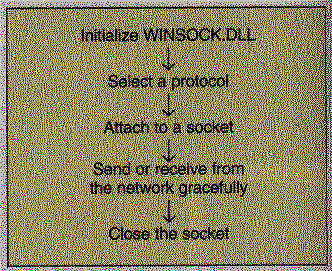
To link to a network, you must initialize the WINSOCK.DLL and determine the protocol to use. You must then attach to, communicate with, and close the socket. This is as straightforward as it sounds, and requires only a few lines of code. Figure 1 illustrates the sequence of tasks.
WINSOCK allows the application to simply wait until a message indicates that data is available on a given socket. However, the message system must be initialized, and WINSOCK must know the handle to the window that is supposed to receive the messages.
The same API call also prevents an error caused by API calls that may block a socket or stop the application. There's a bad side effect to polling a socket to see if it has data--if there is no data, the function stops the application until there is. Typically, the WINSOCK.DLL will return another error message, causing you to bang your head on the desk until you realize that the socket can't be called until the message system is actually in place. This is confusing because you can write to the socket at any time, but you can't read from it unless a message is there.
Listing One loads and checks to see if WINSOCK.DLL is present and enough sockets are available. This doesn't lead to anything spectacular, but does the first-layer initialization. When we use a WINSOCK.DLL, we also ensure it is a current version; if so, we continue forward with the initialization process and take control of a socket.
We call the socket to attach to a particular address family, type, and sometimes a protocol. It returns a socket descriptor, similar to a file pointer. In this case, we are selecting a socket that will provide simple datagram support. We then select a protocol and service port by calling getservbyname.
In the example, we select User Datagram Protocol (UDP) as the protocol and a service port of "echo." (For more information on UDP, see "A VBX for Network Applications," by Frank E. Redmond III, DDJ, September 1995.) However, we override the service port with a custom port. Directly accessing UDP as our protocol would require us to make the application more dependent on the operating system. By using getservbyname, we need to know only the protocol's name; the function will find the correct numeric protocol identification. That lets us move the function to a new operating system with few code changes. Listing Two demonstrates this process.
The binding of the protocol is where we select the protocol and the service port. For some applications, it is best to generate a custom service port so other applications do not respond to our application. This is also where we initialize the messaging system so that we receive the notification that we can read from the socket. Note also the host and network byte ordering. Host byte ordering is how we read a bit map. The least significant bit (LSB) and most significant bit (MSB) are reversed in network byte ordering. A series of different functions can perform this conversion.
Finally, we implement a message handler via a call to WSAAsyncSelect to alert us when data is waiting to be read from the socket or when we can send to the socket. We pass the socket descriptor, a handle to the window that will receive the messages, the message, and the events we wish to be notified of. We can then proceed with the regular send and receive functions. Only one message is sent. A write notification message is sent only when the socket is ready to be written to; another will not be sent until we have written something to the socket. A receive notification message is sent only when there is data on the socket; a second message will not be sent until the socket has been read from in response to the previous read notification message.
To send a packet, we first build the data portion of the packet and then send it out to the network. Listing Three assembles the packet and address.
Network addresses are not read in a user-friendly way. For instance, "198.121.25.22" cannot be sent without first converting it to a more readable form and encapsulating it in another structure. Then we must build the individual fields that make up our packet with whatever data we choose, and pass the packet off to the API function sendto. sendto has several parameters. It will receive the socket descriptor, the data we wish to send, the size of the message, any flags we set, the destination socket of the system to which we're sending the packet, and the length of the destination address. The packet is launched, and hopefully, something receives it.
Receiving a packet follows nearly the same process, but with less work. Instead of inserting all the data, we simply grab the incoming packet. After we have received the packet, we are free to interpret it as we wish. However, we never directly call the socket to check if data is available; if it is, a message will be sent to our window. If we call the function before the notification message is received, the call will error out, stating that the socket is currently blocked. recvfrom also returns the address from which the incoming packet came. We can then view the data inside the packet. As our application closes, we must also close the socket. If not, the WINSOCK.DLL remains active and the actual socket remains allocated. Listing Four shows how to receive the packet, examine its contents, and close it.
The chat application can easily show how to communicate across a network and find other workstations. It can support multiple users in the chat environment employing the UDP protocol as the transport.
The application opens and requests the user name. When the user enters it, a broadcast packet is launched. This packet is read by other workstations running interprocess communications (IPC). Those workstations add the user name and IP address to the user-list table, then reply to the broadcast. The reply is taken and the user name and IP address of the replying station are added to the local user list.
Broadcasting is simply a way to send a single packet that every IP station must read. The only stations that respond are those that have an application using the same service port. In our case, only those running IPC will be able to respond. To get the broadcast address, you must first know your own address. Then you can broadcast with no trouble.
We get the address by calling gethostname, which passes a string containing the system's host name. We pass that into gethostbyname, which returns with a pointer to a hostent structure containing information about our system. The h_addr field can then be read, converted into a manageable IP address, and converted into a broadcast address. This is demonstrated in Listing Five.
Once the initialization is complete and we have a user list, we can receive and transmit. The user merely types in a message and presses Enter. The message is encapsulated into the chat packet and forwarded only to the users in the user list. If no one is in the user list, we do not transmit any packets. This isolates the traffic to just the users running the application. It would also be possible to use just IP broadcasts; however, this would affect many workstations each time a packet was sent, rather than just those running IPC.
When a user changes his or her name, IPC sends a name-update packet, which alerts the other workstations in the user list to a name change; they then update their own user lists to match the name to the IP address.
You can also change the channel that the user is on. Only workstations set to the same channel can display the packet. All packets are processed, but only those on the same channel as the workstation are displayed.
When the user exits, the application sends an exit message to all the workstations, which then remove the user name from the user list so no further packets are sent to that user. Finally, the application closes the socket interface and exits.
TCP/IP applications are fairly portable, which allows applications written in several operating systems to be virtually identical (with the exception of message handling and the user interface). The network interface can be taken from one platform and moved to the other with few changes, making possible portable TCP/IP applications.
Furthermore, after writing a few lines of code, you are ready to communicate with the network. At that point, your focus shifts to the protocol choice and network environment you are using.
It's clear that only a little of this work is network related. After a few short calls, we provided a stable network environment for many IP applications. Likewise, the IPC application is straightforward, which leads to our last point: With the minimal amount of code required to build a TCP/IP application, there is no reason that any application can't have network support. It's straightforward to implement, and the code is fairly obvious and easily maintained. Knowing this, you can add simple network support to nearly every program without fear of reduced portability.
BOOL CChatNet::InitNet(void)
{
if(WSAStartup(SOCKET_VERSION, &m_wsaData))
     {
     // Initializes the WINSOCK.DLL
     TRACE("Couldn't find the winsock.dll\n");
     return FALSE;
     }
if(m_wsaData.wVersion <  SOCKET_VERSION)
     {
     // Checks to make sure we are at a current revision
     TRACE("Winsock too old a rev\n");
     return FALSE;
     }
if(m_wsaData.iMaxSockets < SOCKETS)
     {
     // Checks if there are enough sockets
     TRACE("Not enough sockets available\n");
     return FALSE;
     }
return TRUE;
}
BOOL CChatNet::SetProtocol(HWND hWnd)
{
m_Socket=socket(PF_INET,SOCK_DGRAM,0);
if(m_Socket == INVALID_SOCKET)
     {
     TRACE("Cannot snag socket\n");
     return FALSE;
     }
m_station = getservbyname("echo","udp");  // attaches to the protocol
m_station->s_port = htons(IPC_PORT);
// sets a custom service port in network byte order
if(m_station == NULL)
     {
     TRACE("Can't get service port address\n");
     return FALSE;
     }
source_addr.sin_family = AF_INET; // defines our address family
source_addr.sin_addr.s_addr = INADDR_ANY;
// incoming address types we will accept
source_addr.sin_port = m_station->s_port; // sets the serivce port we wish to use
if(bind(m_Socket, (LPSOCKADDR) &source_addr, sizeof(source_addr)) ==
SOCKET_ERROR)
     {
     // binds protocol to socket
     TRACE("Cannot bind to socket\n");
     return FALSE;
     }
if((WSAAsyncSelect(m_Socket,hWnd,SOCKET_MESSAGE, FD_READ | FD_WRITE
| FD_CLOSE)) ==SOCKET_ERROR)
     {
     // initializes message handler
     TRACE("Unable to set wsaasync\n");
     return FALSE;
     }
return TRUE;
}
UINT CChatNet::SendPacket(LPCSTR
lpstrDestination, LPCSTR lpstrMessage)
{
SOCKADDR_IN    dest_addr;
dest_addr.sin_family = AF_INET;
dest_addr.sin_addr.s_addr =  inet_addr(lpstrDestination);
dest_addr.sin_port = m_srvinfo->s_port;
return sendto(m_Socket, lpstrMessage,
MessageLen(),0, (PSOCKADDR) &dest_addr,sizeof(dest_addr));
}
UINT
CChatNet::RecChatPacket(LPSTR *lpstrSourceAddress,
CHATPACKET *Message)
{
int incoming;
SOCKADDR_IN    inaddr;
int addrlen = sizeof(inaddr);
incoming = recvfrom(m_Socket,(char *)
Message, MessageLen(), 0, (PSOCKADDR) &inaddr,&addrlen);
*lpstrSourceAddress = inet_ntoa(inaddr.sin_addr);
if(incoming == -1)
     {
     incoming = 0;
     incoming = WSAGetLastError() + 2000;
     }
return incoming;
}
BOOL
CChatNet::CloseNet
(void)
{
closesocket(m_Socket);
return TRUE;
BOOL
CChatNet::SendBroadcast(LPSTR UserName)
{
int buflen = 50;
LPHOSTENT Me;
char *buf = new char[100];
if ( gethostname(buf,buflen) == 0)
     Me = gethostbyname(buf);
//gets this systems host envirnoment
else
     return FALSE;
if (Me==NULL)
turn FALSE;
ned char octet[4];
octet[0] = Me->h_addr[0];
//reads the first octet of the ip address and determines the ip
// address calls of the system
if(octet[0] < 191)
     {
     octet[1] = Me->h_addr[1];
     octet[2] = '\xff';
     }
if(octet[0] < 127)
     octet[1] = '\xff';
octet[3] = '\xff';
//builds the broadcast ip address
tf(buf,"%d.%d.%d.%d",octet[0],octet[1],octet[2],octet[3]);
//converts the address into a string
if((SendChatPacket(buf,UserName, BROADCAST,NULL)) >  12000)
     {
      delete [] buf;
      return FALSE;
     }
// sends the broadcast packet.
delete [] buf;
return TRUE;