Mark, a programmer for Greenleaf Software, is the author of The C++ Programmer's Guide to the Standard Template Library (IDG Books, 1995) and The Data Compression Book, Second Edition (M&T Books, 1995). He can be contacted at 73650.312@compuserve.com.
When I wrote the chapter on Huffman coding for the first edition of my data-compression book, my sample programs emphasized clarity at the expense of efficiency. I felt it was much more important for my code to be easy to understand than to be fast or tight.
Were I writing that book today, I wouldn't have to wrestle with this choice. The addition of the Standard Template Library (STL) to the ANSI/ISO C++ standard provides a perfect tool for the creation of Huffman coding trees: the priority_queue container adapter. The STL lets me have the best of both worlds: easy-to-read code that runs with optimal efficiency.
In this article, I'll examine just what a priority queue is and how the STL implements it using heap algorithms. I'll also present a Huffman encoder using the STL priority queue.
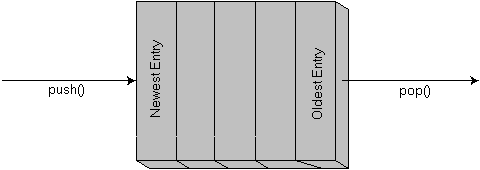
Open any book on data structures and you will undoubtedly run into a container type known as a queue. Another name for the queue, FIFO, is an acronym for the way it works: First In, First Out. Figure 1 describes how a queue normally processes data.
The standard interface to the FIFO queue simply consists of a push() function, which adds new elements, and pop(), which always removes the oldest element.
This data structure is relatively easy to implement. Often, however, a more sophisticated form of queue is needed. The one I present here is the priority queue.
A priority queue, as shown in Figure 2, assigns a priority to every element that it stores. New elements are added to the queue using push(), just as with a FIFO queue. This queue also has a pop() function, but it differs from the FIFO pop() in one key area: When you call pop() for the priority queue, you don't get the oldest element in the queue. Instead, you get the element with the highest priority.
The priority queue obviously fits well with certain types of tasks. For example, the scheduler in an operating system might use a priority queue to track processes. In this article, I'll use a priority queue to build a Huffman coding tree.
There are a few brute-force ways to implement a priority queue. In my inefficient Huffman encoder, I kept the queue elements in an unsorted list, then searched the entire list for the highest-priority item when it came time to pop(). Alternatively, you could perform a sorted insertion when the push() function is called, so that pop() has an easy job of it. This could be accomplished using a sorted tree.
In the case of the priority queue, however, there is a better approach. A data structure known as a "heap" can be used to keep the queue elements in a partially sorted order. Insertions and extractions can then be done in log(N) time, with virtually no extra memory overhead.
A heap has the following key characteristics:
Even though a heap is not completely sorted, it has one very useful characteristic: The node with the highest priority will always be at the top of the tree. This makes it suitable for a priority queue, since the pop() operation requires only the highest element. This characteristic, along with the negligible overhead and fast insertions and removals, makes the heap an ideal data structure for implementation of a priority queue.
The STL has four template functions that work with heaps:
The Compare class defines an STL comparison object used to order the elements in the heap. The STL gives us maximum flexibility in determining how heap elements are compared. The comparison class defaults to less<T>, a predefined STL comparison-object class. less<T> simply compares two objects using the less-than relational operator, operator<(). Alternatively, the comparison could be done with the comparison object passed as an optional parameter to any of the four heap management functions; see Example 1.
The STL uses only three of these heap functions to implement a priority queue. make_heap() is used to create a heap out of unordered data, while push_heap() and pop_heap() are used to insert and remove individual items from the heap. Here, I'll look only at push_heap() and pop_heap(). make_heap() uses techniques very similar to those of push_heap() to create an initial heap, so understanding the latter should make the former easy to follow.
In Example 2, the first two arguments to function push_heap() are iterators that define the start and end of the sequence of elements that make up the heap. (In canonical STL fashion, first points to the first element in the sequence, and last points one past the last element.) The third parameter is the optional comparison object used to order the elements in the heap.
In general, the algorithms supplied with the STL work on sequences of elements and don't perform any operations that require knowledge of how to add or remove elements from containers. (This is one reason why so many of the algorithms work with built-in arrays.)
Given this restriction, push_heap() operates a little differently than you might expect. If you have an existing heap with N elements numbered 1 through N, you must place the new element at location N+1 before calling push_heap(). This creates a new, slightly unbalanced heap with N+1 elements.
You call push_heap() with the heap in this temporary, invalid configuration. At that point, push_heap() simply corrects the heap to take into account this new element. This is done by repeatedly swapping the new node with its parent node until it reaches a position where the parent is greater than the new node. The procedure for this can be described with code like Example 3.
Figure 4 illustrates this procedure. The new node, with a value of 55, is added to the heap at the next available position. push_heap() is called and begins moving the node up the heap. The initial parent of the new node has a value of 49, which is less than 55. The two elements are swapped, and the comparison loop repeats. After the first swap, the new node is in a valid position in the heap. It is greater than all of its children, and less than its parent. If the new node had a value greater than 60, a second swap would have been performed, and the new node would then appear at the root of the heap.
The pop_heap() function requires that you use a set of idiosyncratic conventions similar to those for push_heap(). pop_heap() doesn't want to worry about changing the size of your container. Instead, it moves the current root node of the heap to position N. pop_heap() then adjusts the heap to be correct for positions 1 through N-1, and control passes back to the calling function.
After calling pop_heap(), the size of the heap will be N-1 instead of N. However, there is still a single element in the last position of your array. (This can be removed from STL containers using the container's pop_back() function.) Furthermore, if the heap still contains any data, the highest value will have been moved to the root node of the heap.
The actual mechanics of this operation are similar to those for pop_heap(). First, the root node is swapped with the least node in the heap. Then, the new root node is moved down the tree, swapping the greater of its two children, until it is greater than both of its children. Example 4 illustrates how this function might be implemented. This code is slightly more complicated than that of push_heap(), but you can clearly see that it is performing the reverse operation of push_heap(). It moves the least element to the root of the heap, then loops while checking to see if the root node is less than one of its children. If it is, the node is swapped with its largest child, and the process repeats.
You can see why inserting and removing items from the heap is a Log(N) operation. Regardless of what number is inserted or extracted, the adjustment process will only have to go from the root of the tree to its lowest level, or vice versa. Because of the way the tree is designed for the heap, this will never take more than Log(N) swap operations.
The STL implements priority queues using a "container adapter," a simple wrapper class that uses the framework of an existing container to implement a new container type. The STL has three container-adapter types: stack, queue, and priority_queue. The priority_queue class uses an underlying container that can be either an STL vector or deque. In most cases, a vector object is probably the best choice.
When you create a priority_queue, you have to specify the container type, and optionally a comparison-object type. Typical declarations look like Example 5.
The priority_queue adapter presents a very limited interface. It has a pair of constructors: One creates an empty queue, and the other loads a sequence of initial values into the queue. The copy constructor, assignment operator, and destructor are all implicitly defined by the compiler. The constructors and destructors initialize two protected data members: Container c and the comparison object, Compare comp.
The container offers just five member functions. (Well, six, if you count the const and mutable versions of top() as two separate functions.) Like the priority_queue class itself, these member functions are wrappers around container member functions. The Hewlett-Packard STL release defines these functions as shown in Example 6, and nearly all are self-explanatory. empty() and size() are used to determine the number of elements in the heap at a given time. top() returns a reference to the top element in the heap, which should be the element with the highest priority. push() and pop() are used to insert and remove elements from the queue.
Note that push() and pop() both deal with the idiosyncratic behavior of the STL heap functions. push() first adds the new element to the end of the container that holds the heap. It then calls the STL push_heap() function to walk the new element up to its proper place. pop() first calls the STL pop_heap() function to move the top element to the end of the container. A subsequent call to pop_back() removes that element and shrinks the container.
As a programmer, I feel the most exciting thing about this container adapter is the relative ease with which it was built around an existing container class. It would take hundreds of lines of code to create a new container class from scratch. But this example shows that you can hijack existing container capabilities to define new types without even breaking a sweat.
Earlier, I mentioned that priority-queue containers would be ideal for developing Huffman coding trees. A Huffman coding tree is a binary tree made up of internal nodes and leaf nodes. Coding starts at the root and moves down the tree, issuing 0s and 1s until a leaf node is reached. Leaf nodes signify that a character has been completely encoded, while internal nodes are a stop along the way. Each node has two children, one designated with a 0 bit, and the other designated with a 1 bit. To encode a particular character, you take the path down the tree that leads to the target leaf.
Building the Huffman encoding tree begins with creating a list of unattached leaf nodes, each having an internal weight proportional to the frequency of the character they are encoding. The encoding process then executes a simple loop that combines nodes until there is only one root node, which becomes the starting point for the Huffman coder.
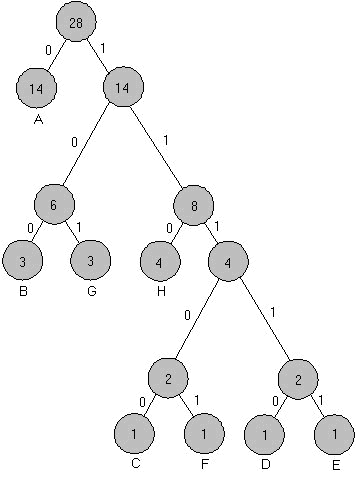
On each pass through the loop you have to identify the two available nodes with the lowest weights. Those two nodes are then removed from the pool of available nodes (the priority queue). A new internal node is then created, and it is assigned those two nodes as children. This internal node is then entered into the priority queue. Figure 5 shows the tree that results from processing the input data in Figure 6 (a).
This data is found in INPUT.DAT, the file used to exercise the test program, PQHUFF.CPP (see Listing One beginning on page 96). As you can see, the nodes with the lowest frequency counts are found the farthest down the tree, meaning they will take more bits to encode. High-frequency characters, such as "A", take fewer bits to encode. The result? Data compression.
PQHUFF.CPP builds the Huffman encoding tree using a priority queue filled with objects of class node. The node objects are simply C++ representations of the nodes in Figure 5. Each node has a weight, which determines its place in the eventual Huffman coding tree.
The utility of the priority queue finally shows up in main() of PQHUFF.CPP. The loop that builds the encoding tree counts all the characters in the input file and adds the initial count values to the priority queue; see Example 7.
In the loop, the two lowest-weight nodes are popped from the priority queue. A new node that has those two nodes for children is then created and inserted into the queue. The process continues until the queue has just one node left, which is then the root node for the encoding tree. Figure 6 (b) is the output from PQHUFF.EXE for the data in Figure 6 (a). (The source code, executable, and sample data file for PQHUFF are available electronically; see "Availability," page 3.)
The STL template class priority_queue provides an efficient encapsulation of a priority queue. The details of both heap management and container support are provided in a fairly transparent manner. Having this class available as part of the C++ standard library gives you a potent, versatile new tool for a variety of problems. I find that it makes my Huffman-table creation much more efficient, while maintaining readability.
(a)

AAAAAAAAAAAAAA
BBB
C
D
E
F
GGG
HHHH

(b)

Char  Count  Code

  A    14    0
  B    3     100
  G    3     101
  H    4     110
  C    1     11100
  F    1     11101
  D    1     11110
  E    1     11111
template<class RandomAccessIterator, class Compare>
pop_heap(  RandomAccessIterator first,
          RandomAccessIterator last,
          Compare compare);
template<class RandomAccessIterator, class Compare>
push_heap( RandomAccessIterator first,
          RandomAccessIterator last,
          Compare compare);
template <class T>
void adjust_heap( T* c, int N )
{
    int test_node = N;
    while ( test_node > 1 ) {
        int parent_node = N/2;
        if ( c[parent_node] < c[test_node] )
            swap( c[parent_node], c[test_node] );
            test_node = parent_node;
        } else
            break;
        }
}
template<class T>
adjust_heap( T* c, int N )
{
    T temp = c[1];
    c[1] = c[N];
    int test_node = 1;
    for ( ; ; ) {
        int child;
        if ( ( test_node * 2 ) >= N )
            break;
        if ( ( test_node * 2 + 1 ) >= N )
            child = test_node * 2;
        else if ( c[ test_node * 2 ] >  c[ test_node* 2 + 1 ]
)
            child = test_node * 2;
        else
            child = test_node * 2 + 1;
        if ( c[ test_node ] < c[ child ] ) {
            swap( c[ test_node ], c[ child ] );
            test_node = child;
        } else
            break;
    }
    c[ N ] = temp;
}
priority_queue< vector<node> > x;
priority_queue< deque<string>,
            case_insensitive_compare > y;
priority_queue< vector<int>, greater<int> > z;
template <class Container, class Compare>
class  priority_queue {
  protected :
    Container c;
    Compare comp;
    ...
  public :
    bool empty() const { return c.empty(); }
    size_type size() const { return c.size(); }
    value_type& top() { return c.front(); }
    const value_type& top() const { return c.front(); }
    void push(const value_type& x) {
        c.push_back(x);
        push_heap(c.begin(), c.end(), comp);
    }
    void pop() {
        pop_heap(c.begin(), c.end(), comp);
        c.pop_back();
    }
while ( q.size() > 1 ) {
    node *child0 = new node( q.top() );
    q.pop();
    node *child1 = new node( q.top() );
    q.pop();
    q.push( node( child0, child1 ) );
}
// PQHUFF.CPP -- This program reads in all the characters from the file
// input.dat, then builds a Huffman encoding tree using an STL priority queue.
// The resulting table is then printed out. If you have the HP version of the
// STL installed, you can build this program with Borland C++ 4.5 using a
// command line like this: bcc -ml -IC:\STL pqhuff.cpp
//
// Borland 4.x workarounds
//
#define __MINMAX_DEFINED
#pragma option -vi-

#include <iostream.h>
#include <iomanip.h>
#include <fstream.h>
#include <vector.h>
#include <stack.h>
#include <cstring.h>

// The node class is used to represent both leaf and internal nodes. leaf nodes
// have 0s in the child pointers, and their value member corresponds to the
// character they encode. internal nodes don't have anything meaningful in
// their value member, but their child pointers point to other nodes.
struct node {
	int weight;
	unsigned char value;
	const node *child0;
	const node *child1;
// Construct a new leaf node for character c
	node( unsigned char c = 0, int i = -1 ) {
		value = c;
		weight = i;
		child0 = 0;
		child1 = 0;
	}
// Construct a new internal node that has children c1 and c2.
	node( const node* c0, const node *c1 ) {
		value = 0;
		weight = c0->weight + c1->weight;
		child0 = c0;
		child1 = c1;
	}
// The comparison operator used to order the priority queue.
	bool operator<( const node &a ) const {
		return weight < a.weight;
	}
	void traverse( string code = "")  const;
};
// The traverse member function is used to print out the code for a given node.
// It is designed to print the entire tree if called for the root node.
void node::traverse( string code ) const {
	if ( child0 ) {
		child0->traverse( code + "0" );
		child1->traverse( code + "1" );
	} else {
		cout << " " << value << "     ";
		cout << setw( 2 ) << weight;
		cout << "     " << code << endl;
	}
}
// This routine does a quick count of all the characters in the input file.
// I skip the whitespace.
void count_chars(char *name, int *counts )
{
	for ( int i = 0 ; i < 256 ; i++ )
		counts[ i ] = 0;
	ifstream file( name );
	if ( !file ) {
		cerr << "Couldn't open " << name << endl;
		throw "abort";
	}
	cout << "Counting chars in " << name << endl;
	file.setf(ios::skipws );
	for ( ; ; ) {
		unsigned char c;
		file >> c;
		if ( file )
			counts[ c ]++;
		else
			break;
	}
}
main( int argc, char *argv[] )
{
	int counts[ 256 ];
	if ( argc > 1 )
		count_chars( argv[ 1 ], counts );
	else
		count_chars( "input.dat", counts );
	priority_queue< vector< node >, greater<node> > q;
// First I push all the leaf nodes into the queue
	for ( int i = 0 ; i < 256 ; i++ )
		if ( counts[ i ] )
			q.push( node( i, counts[ i ] ) );
// This loop removes the two smallest nodes from the queue. It creates a new
// internal node that has those two nodes as children. The new internal node
// is then inserted into the priority queue. When there is only one node in
// the priority queue, the tree is complete.
	while ( q.size() > 1 ) {
		node *child0 = new node( q.top() );
		q.pop();
		node *child1 = new node( q.top() );
		q.pop();
		q.push( node( child0, child1 ) );
	}
// Now I dump the results
	cout << "Char  Symbol   Code" << endl;
	q.top().traverse();
	return 1;
}