Introduction
Adding color features to your application is easy to do but not easy to do well. Typical applications let you pick colors from a dialog box with no concern that the resulting color values might be meaningless outside the narrow context of the user's workstation. When printing these colors, or even displaying them on a different monitor, the results can be remarkably disappointing. Solving these problems requires a color management system outside the scope of this article, but a first step is to understand various color spaces and how they relate to each other.
This article will try to summarize some methods currently in use to quantify colors, especially methods which have a sound basis in colorimetry. It will also introduce a library of C++ classes that can be used to automate the underlying calculations.
Color Measurement
As we all know, a beam of light can be passed through a prism to separate it into a number of constituent colors. The intensity of each constituent can be measured and plotted as a function of wavelength. This is called the spectral power density or SPD. Although our perception of the color of the light depends on the SPD, it has been found that many different SPD's result in the same perceived color. The first question of color measurement is: given two SPD's, how can we predict whether they will be perceived as identical colors?
Imagine an apparatus that displays two color patches next to each other against an otherwise dark field (see Figure 1). The SPD of each patch can be controlled independently and a variety of human observers can be asked whether the two patches have the same color. By trying various combinations, we could hope to figure out the circumstances under which most observers report that two colors with different SPD's look the same. This is exactly what the CIE (from French words meaning "International Commission on Illumination") did. What they found was that any SPD can be reduced to only three numbers - called X, Y, and Z - by multiplying by certain weighting functions and integrating. Another SPD with the same X, Y, and Z values will be perceived by a "standard observer" as an identical color, at least under the viewing conditions imposed by the apparatus.
Of course this represented the beginning rather than the end of color science. Many factors have motivated us to define color spaces other than XYZ. We all know that the appearance of a color depends on various viewing conditions, notably ambient lighting and surrounding colors. Also, there are many other color questions one might ask, such as what color differences are perceived as equally large. Finally, users of specific devices often adopt other color coordinates that are more convenient for use by the device. As these devices proliferate, we have to contend with a large and rapidly growing number of color spaces.
The Clrspace Library
This article presents a C++ library, called Clrspace, that deals with these issues. It is contained completely in a header called clrspace.h, part of which is shown in Listing 1. (Full source code is available from the CUJ ftp site. See p. 3 for downloading instructions.) Figure 2 shows the Clrspace class hierarchy.
The basic approach is to define a set of classes corresponding to color spaces in current use. Closely related classes can be converted back and forth using special constructors. Many classes (the ones we call "colorimetric") have a constructor that accepts one or two XYZ arguments. Class XYZ, on the other hand, has no constructors using classes for the other colors. This would be impossible to maintain when new colors were added to the library. Instead, the other colorimetric colors have a toXYZ member function. If toXYZ has no arguments, the color class also defines an operator XYZ<T> as a shortcut. Thus you can always convert one colorimetric color space to another by going through XYZ space.
Because it would be futile to try to explicitly include every color space in use, the library provides an infrastructure that facilitates extension to related types. For instance, only one colorimetric RGB type is included in the library, but other ones can be defined by the user with minimal effort.
We may need to define color-space coordinates as floating point, for ease of computation, or integer, for economy of storage. This suggests a template approach, which we adopted. I think this worked well because there is plenty to say about color spaces which is independent of the underlying data types.
Because color operations are often applied to large color images, run-time performance can be critical. Thus inlining is used heavily and virtual functions are completely avoided. In Bjarne Stroustrop's terminology [1], the color objects are "concrete data types" rather than "abstract data types."
The default implementation assumes the use of a floating-point type: float, double, or long double. Integer types must be implemented using class specializations provided by the user. Although this requires a fair amount of coding, use of integer types generally implies non-standard scaling and transformations. Thus it cannot be included in the library. All the functions defined as part of the class definitions are independent of data type. If you are planning to write some specialized classes, you need consider only functions defined outside the classes.
I wanted class names to correspond to CIE definitions as closely as possible, but a class name like XYZ<float> begs for a name collision. To prevent this, all class definitions are defined as part of a namespace called clrspace. This approach combined with templates results in a workable but somewhat awkward syntax. For instance, in the expression clrspace::xy<float> the xy is the class name and everything else is boilerplate. It takes some getting used to.
Y and L* Color Spaces
Although you can't say much about color with only one coordinate, you can describe some measure of the overall amount of light you perceive. There are two such single-coordinate metrics:
- luminance, which describes how bright something looks without any reference (e.g., a traffic light in a dark surround)
- lightness, which is defined relative to a white reference (e.g., a color printed on a white piece of paper)
Lightness accounts for the ability of the human visual system to judge reflectance accurately in spite of variations in ambient lighting.
The CIE metrics for luminance and lightness are called Y and L*. The library calls them CIE_Y<T> and CIE_L<T>, where T is the component type. Y is the same coordinate found in XYZ space, and L* is the same coordinate found in L*a*b* and L*u*v* spaces (described below). We can convert back and forth between Y and L* if the white point Yn is known. (The white point is the value of Y for the reference white referred to above.) Thus to compute L* for a Y of 20 with a white point of 100 you can write:
clrspace::CIE_Y<float> myY(20); // Y==20
clrspace::CIE_L<float>
myL(myY,100); // Yn==100
cout << myL.L(); // print out L*
Chromaticity Spaces
When the total amount of light is less important than the identity of the color, one of the three coordinates can be normalized out. For instance, we can define
x = X/(X+Y+Z)
y = Y/(X+Y+Z)
z = Z/(X+Y+Z)
as a coordinate system that depends on the color but not the intensity of a sample of light. Because the z coordinate is simply equal to 1-x-y, we generally only consider x and y. A typical application of this type of coordinate is in specifying the type of light a given source emits. The Clrspace library defines a class xy<T> which can be initialized with an XYZ<T>. The inverse of this transformation requires that you supply the actual Y value of the color:
clrspace::XYZ<float> myXYZ(30,50,20); // X==30, Y==50, Z==20
clrspace::xy<float> myxy = myXYZ; // x==0.3, y==0.5
myXYZ = myxy.toXYZ(100); // X==60, Y==100, Z==40
The library also defines a number of classes derived from xy<T> whose constructors automatically generate standard CIE chromaticities. If you need an xy<float> object to represent D65 illumination, for instance, you can use D65<float>(). See the source code for a complete list of these classes and the case study for an example of the use of D65<float>.
A similar chromaticity space called u'v'w' by the CIE and uvPrime<T> by the library is based on a different transformation from XYZ. It has the useful property of approximate perceptual flatness - equal differences in u'v'w' space are fairly close to being equally perceptible. xy<T> and uvPrime<T> have constructors for converting back and forth automatically.
RGB Spaces
RGB (for "Red, Green, and Blue") space is widely used with computer monitors and color scanners. It comes in three basic flavors: uncalibrated, linear-light, and gamma-corrected. The library provides a general superstructure for all three and also a specific pair of linear-light and gamma-corrected RGB spaces. Floating-point RGB coordinates are normalized to the range [0, 1]. Values outside this range indicate that the color is outside of the gamut of the device.
Uncalibrated RGB has no defined relationship to XYZ. It produces a color which is device dependent. All we can say in general is that you get a neutral color when the R, G, and B values are equal. The RGB values I was complaining about in the introduction are uncalibrated. The library has a class called RGBBase<T> which can be used for uncalibrated RGB. It is also used as a base class for the whole family. It does little except provide the member functions R(), G(), and B() used to access the color components.
Linear-light RGB has the characteristic that the color components vary proportionately with the amount of light in the corresponding wavelength bands. Because physical devices rarely work this way, linear-light is usually a mathematical construct used to facilitate the transformations to and from various other color spaces. In particular, linear-light RGB correlates to XYZ using a 3x3 matrix as follows [2]:
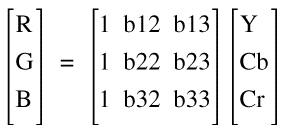
The matrix elements above can be computed from the chromaticities of the R, G, and B colors, and the chromaticity of white (R=G=B=1). Of course that's only eight equations to determine nine unknowns. The ninth equation is provided by the normalization of the Y value of white (1.0 in some literature but 100 here).
Gamma-corrected RGB applies a power law transformation to each linear-light component to account for non-linear behavior of physical devices such as computer monitors [3]. Gamma-corrected RGB can be converted back to linear-light using the inverse of the power-law transformation, and hence to XYZ or any other colorimetric space.
Linear-light and gamma-corrected RGB spaces are best thought of in pairs. Two transformations (with inverses) are required - one to convert linear-light to and from XYZ and another to convert linear-light to and from gamma-corrected. The library expresses these ideas with classes RGBLinear<T, CONV> and RGBGamma<T, CONV>. CONV refers to a class used internally to perform the appropriate conversions. Because only one conversion is applicable to all objects in the class, the CONV object is declared static. A class called ConvertRGB<T> can be used to derive an actual CONV class.
Classes RGB709<T> and RGB709Linear<T> are provided as examples. They may also be useful as they are because they represent proposed HDTV standards [4]. A class called Convert_RGB709<T> is derived from ConvertRGB<T>, which has a default constructor to plug in the parameters appropriate for the RGB709 color space. Then RGB709<T> is derived from RGBGamma<T, CONV> with Convert_RGB709<T> used for the template parameter CONV. RGB709Linear<T> is derived is a similar way. If you use a different version of ConvertRGB<T>, you will be able to derive a pair of RGB classes which are colorimetric, compatible with each other, and compile-time incompatible with all other RGB classes. Thus the CONV template class not only does the conversions for you, it acts as a DNA signature, preventing potentially disastrous inbreeding with other species of RGB.
When I first considered this problem I thought this was a place where I really would miss virtual functions. What could be more natural than to define a base RGB class with pure virtual functions for the XYZ and gamma-correction transforms? But it now seems to me the template approach works at least as well and has no run-time overhead.
YCbCr Color Spaces
YCbCr is a linear transformation of RGB used in the television industry and elsewhere. The matrix transformation from YCbCr to gamma-corrected RGB looks like this [5]:
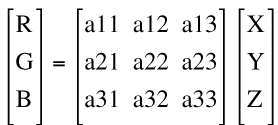
Note the ones in the first column of the matrix. YCbCr can be converted to black and white just by dropping the Cb and Cr terms - resulting in R, G, and B all being equal to Y. This is how broadcasters can transmit a signal that can be correctly decoded by both color and black-and-white TV sets. The Y is the old black-and-white signal, and the Cb and Cr are color signals broadcast in different frequency bands which are ignored by black-and-white sets.
There are lots of YCbCr spaces that have different coefficients and transform to different gamma-corrected RGB spaces. Again, template programming comes to the rescue. The library defines a YCbCr<T, GAM, PAIR> where GAM is the associated gamma-corrected RGB space and PAIR is a class containing a matrix such as the one shown above and its inverse. A class XFormPair<T> is provided to support this protocol. An example class called YCC709<T> is provided which represents a proposed standard for HDTV and may therefore be of some use as is.
One more thing. The Y in YCbCr is not the same as the Y in XYZ! The color space names are not consistent either; American TV (NTSC) calls it YIQ, for instance. Sorry, but I don't make up the nomenclature.
L*u*v* and L*a*b* Color Spaces
L*u*v*and L*a*b* are similar in many ways. They share a common coordinate L*, which is the same lightness described above. They also have polar forms where the L* coordinate is unchanged but the other two are represented by a length and an angle. u* and v* are related to but not equal to u' and v' defined above. In fact, at a fixed value of L*, u* and v* form a little chromaticity space which is just u' and v' with different axes. a* and b* represent the relative amount of red vs. green and yellow vs. blue, respectively. This construct is based on the observation that the human visual system responds to color differences in this way. (Can you visualize a bluish yellow or greenish red? No? Neither can anybody else.) Lab space is the newer of the two and enjoys a place of prominence in ICC color management [6], recent developments in CIE color difference formulas [7], and various current research activities.
The transformation of these color spaces to XYZ is complicated by the fact that you must provide the XYZ of a white reference. You may recall that the Y of the white point (Yn) is required to convert between L* and Y. These color spaces extend this approach to color based on the observation that your eye can judge how colorful something is if the amount of ambient light is changed.
These similarities between Lab and Luv have been abstracted into classes Lxx<T>, which defines the common L* coordinate, and LxxRect<T> and LxxPolar<T>, which define the rectangular/polar conversions. From LxxRect<T> we derive Luv<T> and Lab<T>, supplying the XYZ calibrations which distinguish them. LuvPolar<T> and LabPolar<T> follow trivially.
CMYK Color Space
CMYK (for "Cyan, Magenta, Yellow, and blacK," since B is reserved for Blue) is used by color printers. Four coordinates are more than you need to specify a color, but the apparently redundant black separation turns out to have practical implications in printing. In lithography, for instance, introducing black ink allows the printer to reduce the amounts of the other inks, thus saving cost, drying time, etc. Unfortunately, there are currently no colorimetric CMYK color spaces, so we must provide calibrations for each printer. The library provides a CMYKBase<T> class which does little but name the coordinates.
A Case Study
Any RGB color space is a cube, because each coordinate runs between 0 and 1. What that means in terms of another color space depends on the calibration. Consider the problem of mapping RGB709 into Lab. The simplest approach is to sample equal steps in RGB709 space, convert to XYZ, and hence to Lab. This last step will require a white point, which we will take as the D65 chromaticity specified for RGB709 scaled to Y=100 as usual. The code is shown in Listing 2.
See the Chromaticity Spaces section above for a description of D65<float>. D65 is used here because that is the defined white point for RGB709 (see the source code of the constructor). The white point XnYnZn is computed outside the loop because it does not depend on the color. We then take each coordinate from 0 to 1 in steps of 0.2, construct the RGB709<float> variable with these coordinates, construct the corresponding XYZ<float> variable, and convert it to Lab<float> using XnYnZn.
The results reveal something about a typical monitor's color gamut in Lab terms. Consider Figure 3, which shows the projection of the results on the a*-b* plane. Compared to the gamut of a typical ink jet printer, this gamut looks pretty big except in the neighborhood of cyan. The blue color in particular is remarkably good (i.e., far from neutral). Of course blue is a primary for a CRT but must be formed from cyan and magenta by a hardcopy device. Imperfect colorants take their toll. You may have noticed that when you select blue text it looks pretty good on your monitor but on your hardcopy it looks more grayish.
If you have access to a color densitometer, you can measure the Lab values for cyan, yellow, magenta, red, green, and blue patches printed on any printer of interest. Plotting those results on Figure 3 might provide some interesting insights about what monitor colors can and cannot be printed accurately.
Summary
C++ with template programming proved to be an excellent vehicle for expressing the relationships between color spaces. Templates were used in place of virtual functions for generality without loss of performance. Inheritance, constructors, and conversion operators were used extensively to express relationships between color spaces, many of which proved to be independent of internal representation. Like any good library, clrspace.h is easily extendible.
References
[1] B. Stroustrup, The C++ Programming Language, Second Edition (Addison-Wesley, 1991).
[2] R.W.G. Hunt. The Reproduction of Colour in Photography, Printing and Television, Fifth Edition (Fountain Press, Tolworth, England, 1995).
[3] http://www.inforamp.net/~poynton/notes/colour_and_gamma/GammaFAQ.html
[4] ITU-R Recommendation BT.709, Basic Parameter Values for the HDTV Standard for the Studio and for International Programme Exchange (1990), [formerly CCIR Rec. 709], ITU, 1211 Geneva 20, Switzerland.
[5] http://www.wmin.ac.uk/ITRG/docs/coloureq/COL_32.htm#topic31
[6] ftp://sgigate.sgi.com/pub/icc/ICC34.pdf
[7] CIE Publication 116-1995, "Industrial Colour-Difference Evaluation" (Vienna: CIE 1995).
[8] X. Zhang and B. A. Wandell. SID Symposium Technical Digest, 27, 731-734 (1996).
[9] http://www.inforamp.net/~poynton/ColorFAQ.html
Cyril ("Cy") Edmunds has a B.S. degree in Physics and an M.S. degree in Statistics, both from Rochester Institute of Technology. He is the Image Quality Manager of a color printer project at Xerox Corporation, where he is in his 31st year. He likes hocky games, loud Hawaiian shirts, and playing his guitar.