Introduction
This article presents an "under the hood" look at the cross-platform graphics engine in Apples OpenDoc Development Framework. Because the article describes how it is implemented, I believe it will prove useful for anyone implementing cross-platform graphics and not just for OpenDoc programmers. Also, a pre-release version of the development framework (described below) is available for download for programmers who want to learn more about OpenDoc (URL:http://www.coretools.apple.com/opendoc).
What is OpenDoc?
OpenDoc is a new technology for development of component software. It is an open standard controlled by Component Integration Labs, a consortium of several corporations, with members such as Apple Computer, Adobe, IBM, and Oracle. OpenDoc is a cross-platform technology, designed as such from the start. Apple Computer is developing the Macintosh version of OpenDoc, Novell is working on the Windows version, and IBM is developing versions for AIX and OS/2. The Macintosh version of OpenDoc is nearing completion and should be available by the time this article is published, through the Internet at the web site listed above.
The OpenDoc Development Framework
To simplify development of OpenDoc components (or Part Editors, as they are called), Apple Computer is developing a special purpose, cross-platform framework in C++, appropriately called OpenDoc Development Framework (ODF from now on). The currently supported platforms are Power Macintosh, 68K Macintosh and Win32 (Windows NT and Windows 95). You can find a pre-release version of ODF (with full source code) at the World Wide Web address shown above. ODF is a modular framework, with about a dozen subsystems organized into layers. Each subsystem provides specific kinds of cross-platform services to the programmer. For example, ODF has subsystems for dealing with files, resources, menus, and so on.
One of the most important features in a cross-platform product is graphics, so its only natural that ODF incorporates a simple, yet powerful graphics engine. Its main features are as follows:
- It allows the programmer to write to the same C++ interface on all platforms.
- It uses an object-based model for defining what is drawn (as opposed to a state-based model).
- It greatly simplifies and reduces the amount of graphics code that has to be written.
- It is designed with speed in mind.
- It implements features of one platform that are missing on the other.
An ODF graphics example
The following small piece of code draws several concentric circles (with center at 100, 100) with varying shades of blue. This code will produce exactly the same output with the Windows and Macintosh versions of ODF:
FW_CFacetContext context(facet, clip);
FW_PStyle style = FW_IntToFixed(5);
FW_CRect rect(FW_IntToFixed(90),
              FW_IntToFixed(90),
              FW_IntToFixed(110),
              FW_IntToFixed(110));
for (int i = 0; i < 8; ++ i)
{
    FW_CColor color(0, 0, i * 30 + 45);
    FW_PInk ink(color);
    FW_COvalShape shape(rect, FW_kFrame, ink, style);
    shape.Render(context);
    rect.Inset(FW_IntToFixed(-10),
               FW_IntToFixed(-10));
}
As you can see, with ODF graphics this takes only eleven lines. An equivalent piece of code written directly to Windows or Macintosh API would be longer.
Here's a line-by-line description of what the code does: First, the code creates a graphics context, which is similar to a Macintosh GrafPort or a Windows DC (Device Context) handle. You always need some kind of a graphics context before you can draw. Next, the code creates a style object, which is used to specify line thickness. The third line of code creates a rectangle to define the bounds of circles as they are drawn. Note that ODF graphics uses a fixed-point coordinate system; the code therefore converts integer numbers to fixed-point numbers when constructing the rectangle. Next, a for loop is invoked, which draws each individual circle.
Inside the for loop, the constructor shown for class FW_CColor accepts values for red, green, and blue components, ranging from 0 to 255. Each time through the loop the constructor creates an object named color, which will be used to make all circles a shade of blue — starting from almost black and ending at bright blue. The next line of code creates an ink object, which is used to specify shape colors. Only the foreground color is important in this example, so only one color object is passed in. The FW_COvalShape constructor creates an oval shape using the previously constructed ink, style, and rect. The parameter FW_kFrame is a render verb, which gives specific instructions to the shape object regarding how it will draw itself. In this example, the render verb instructs shape to draw outlines of ovals instead of filling them. The last line of code in the loop inflates the rectangle by 10 units in each direction.
The ODF Graphics Architecture
Object-based vs. State-based API
The ODF graphics API uses an object-based approach for specifying what to draw and how, as opposed to a state-based approach. This means we don't call some function to say "from now on, everything should be drawn in blue." Instead, the oval shape object explicitly contains its own geometry (the bounding rectangle of the oval), a render verb (specifying that the shape should be framed and not filled), and drawing attributes (the ink and the style, which in turn specify color and pen thickness). This object-based approach is one of the ideas ODF graphics borrows from the Macintosh QuickDraw GX graphics library.
Compare this approach to that of the Macintosh graphics API, which is completely state-based. For example, in that API, to draw a rectangle filled with a solid blue color, the programmer must set the pattern to solid, set the color to blue, and then draw the rectangle. The Windows API is more object-based; attribute are specified by pen and brush objects, but still these objects must be selected into the DC, changing its state.
We chose the object-based approach because we believe that it provides the following benefits: code written for an object-based API is easier to read because it is more explicit. Everything that affects a given call is passed in, so the reader only has to look in one place to see what exactly is going on. An object-based API reduces the size of user code because there is no need to save and restore the previous state of objects. In a state-based API, the users code must save and restore every piece of state information that it changes. This means writing more code. Finally, an object-based API presents more opportunities for optimization in the framework code. Since the object-based API code is more explicit, the framework "knows" more about what the user code is trying to do and can take a more appropriate action. By contrast, in a state-based API, some state changes can affect more than one operation, but which one isn't known until later, so its more difficult to optimize the library code.
Fixed-point Coordinates in ODF
ODF graphics uses a fixed-point coordinate system, reserving 16 bits for each integer and fractional part. This configuration gives coordinates a range from -32,768 to +32,767 and a precision of 1 part out of 32,768. Fixed-point coordinates help avoid precision loss when it is necessary to scale logical coordinates to achieve device resolution independence. This, combined with an arbitrary scaling capability in ODF graphics, allows greater flexibility in how data is represented internally. For example, it is probably most convenient for a drawing program to keep coordinates of drawn objects in points (1/72nd of an inch). (For information on the theory of fixed-point math, see "Fixed-Point C for Graphics Applications," by Peter Heinrich and Nathan Dwyer, CUJ, August 1995.)
ODF provides fixed-point math via a special class, FW_CFixed, to represent a fixed-point number in 16.16 format. Although it may seem like overkill to use a real C++ class for something as simple as a fixed-point number, it actually provides some benefits — for example, type safety — with minimal or no performance cost. A problem with using "naked" 32-bit longs to represent 16.16 fixed-point numbers is that they look to the compiler just like other, regular long values. But the same bit pattern will represent a different value if treated as a fixed-point number — different by a factor of 65536, to be exact!
The run-time cost of wrapping fixed-point numbers in a class is very low. For example, adding and subtracting FW_CFixed numbers is just as efficient as with plain longs, thanks to several C++ "tricks":
inline
FW_CFixed(long rep) : fRep(rep)
{
}

inline
FW_CFixed FW_IntToFixed(int n)
{
    return FW_CFixed(n << 16);
}

inline
FW_CFixed operator+(FW_CFixed f1, FW_CFixed f2)
{
    return FW_CFixed(f1.fRep + f2.fRep);
}

inline
FW_CFixed operator-(FW_CFixed f1, FW_CFixed f2)
{
    return FW_CFixed(f1.fRep - f2.fRep);
}
One trick shown in the above code is that operator+ and operator- accept arguments by value, but the class doesnt provide a copy constructor. Letting the compiler generate the copy constructor leads to more efficient code with several compilers. Also, the operators construct the return-value object directly in the return statement, instead of constructing a temporary fixed-point number object, changing its value, and returning it. This last trick allows the compiler to generate more optimized code in cases where the result of the operator is immediately used to construct another fixed-point number variable.
Rendering with Shapes
In the original example, I used a special object — an oval shape — to draw a circle. Using shape classes provides several benefits over using simple function calls to draw shapes. All shape classes are derived from a base class, FW_CShape, which defines operations common to all shapes. For example, the base class defines operations to a get shapes bounds, move it to a specific location, hit-test a shape given a pair of coordinates, and render a shape. All these operations are polymorphic; that is, they are implemented in descendant shapes classes, but the interface is in FW_CShape. This polymorphism allows users code to treat all shapes without having to know how the descendant shape class is implemented — something that comes in handy in a drawing program.
Another benefit of representing shapes with classes becomes apparent when you want to draw multiple copies of the same image; you can create a shape just once and tell it to render itself as many times as needed. Your drawing code doesnt have to specify the shapes attributes every time.
Shape geometry
Each shape class has its own way to define where the shape is drawn — this is the shapes geometry. For example, a line shape is defined by two points, a rectangle shape by a bounding rectangle, and a rounded rectangle shape by a bounding rectangle and a point containing radii of rounded corners. Each shape class contains methods to get and set geometry in ways specific to that shape, for example:
class FW_CLineShape : public FW_CShape
{
public:
    FW_CLineShape(
        const FW_CPoint& start,
        const FW_CPoint& end,
        const FW_PInk&   ink =
           FW_kNormalInk,
        const FW_PStyle& style =
           FW_kNormalStyle);
    void GetGeometry(
        FW_CPoint& start,
        FW_CPoint& end) const;
    void SetGeometry(
        const FW_CPoint& start,
        const FW_CPoint& end);
    // More methods here
};
Shape Attributes
In addition to geometry, each shape object contains other objects (with private access) that control how the shape is rendered. These objects are instances of FW_PInk, FW_PStyle, FW_PFont classes, and the render verb, which can be either FW_kFrame or FW_kFill. The render verb controls whether the shapes interior is filled, or whether its bounds are outlined (framed) when its drawn. You can specify the contents of these embedded objects either by passing parameters to FW_CShapes constructor, or at run time by using FW_CShapes Setxxx methods. Being able to set the render verb at run time gives extra flexibility to your code, compared to having two separate sets of shapes, one for drawing outlines and interiors. (Compare this to the Macintosh QuickDraw approach which requires two separate calls for filling a rectangle and framing it — PaintRect and FrameRect.)
The FW_PInk object is just a combination of foreground and background colors and a transfer mode. The FW_PStyle object specifies line thickness (ignored when filling shapes — used only for framing), the line dash style (for shape framing only) and an optional pattern (used in both filling and framing operations). The FW_PFont object specifies the font for text shapes, and contains font name, its size in user units, and the style, which can be plain or a combination of bold, italic, strike-through, etc.
These shape-attribute objects are actually smart pointers to reference-counted representation(data storing) objects. This is what the "P" in their class names stands for. I will now highlight some benefits that reference counting brings to shape attributes objects.
One obvious benefit is ease of use combined with efficiency. FW_Pxxx objects are always passed by value, which is fast because they are small. The representation objects that the FW_Pxxx objects point to are bigger, and allocated on the heap; reference counting avoids needless copying of these objects and thus makes the code faster. A program can create more than one shape object, each of which contains a FW_Pxxx sub-object pointing to the same representation. This makes it easy to change the representation in one place and change the appearance of all the shapes that share it. This sort of behavior is usually undesirable in the general case of reference-counted pointers, but turns out to be quite usable for graphics:
FW_PInk ink(FW_kRGBGreen);
// Both shapes will be drawn green
FW_CRectShape shape1(rect1, FW_kFill, ink);
FW_CRectShape shape2(rect2, FW_kFill, ink);
ink->SetForeColor(FW_kRGBRed);
// Both shapes will now be drawn red
// The following code makes a
// separate ink just for shape2 and
// sets its color to yellow,
// without affecting shape1,
// which is still red
shape2.GetUnSharedInk()->
   SetForeColor(FW_kRGBYellow);
The ODF Graphics Context
The final ODF class I cover is FW_CGraphicContext. This class is similar to the Macintosh GrafPort or a Windows DC, in the sense that it is the target on which shapes are rendered. Using a class instead of a typedef and open/close functions makes the user code shorter and safer. This is because the graphics context and its subclasses use the "resource acquisition is initialization" idiom: instantiating one of these classes obtains the resources for drawing, which are released when the instance goes out of scope. FW_CGraphicContext has several subclasses which allow the programmer to draw to different targets, such as an off-screen bitmap. The following code shows one way to draw to an off-screen bitmap:
// 256-color bitmap,
// 200 by 100 pixels
FW_PBitmap bitmap(200, 100, 8);
{
    // begin drawing to the bitmap
    FW_CBitmapContext gc(bitmap);
    // render some shapes to it
    FW_COvalShape shape(. . .);
    shape.Render(gc);
    // at this point, gc is
    // destroyed and drawing to the
    // bitmap is over
}
// the bitmap is now ready to be
// transferred to the screen
Implementing ODF on Two Platforms
Now that I've provided an overview of ODF graphics, I'll describe some of the tricks involved in implementing it on two different platforms: Windows and Macintosh.
Different Pixel Models
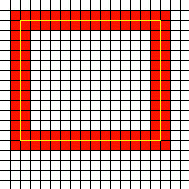
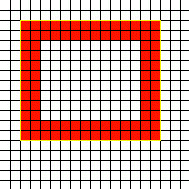
In many cases, what seem like equivalent calls on the Windows and the Macintosh graphics APIs will produce different images. The differences may be subtle, but they become very noticeable when you try to make your application look good. For example, when drawing a line, QuickDraw always highlights pixels below and to the right of the ideal mathematical line connecting the start and end points. The Windows GDI, on the other hand, centers the pixel line on the mathematical line. This difference becomes more noticeable with thicker lines. When drawing bounded shapes (such as rectangles, or ellipses), QuickDraw highlights all the pixels that are completely within the ideal bounding rectangle. Thus, the boundary lines are shifted "inward" with respect to their ideal paths. But the Windows GDI again centers the boundary lines on the shapes mathematical boundaries.
Just as with simple lines, the difference is subtle if frame thickness is one pixel, but becomes more and more noticeable as frame thickness increases.
Figures 1 and 2 show how the Windows GDI and Macintosh QuickDraw render the same rectangle when the pen size is two pixels.
 |
 |
| Figure 1: A bounded shape in Windows |
Figure 2: The same shape drawn on a Macintosh |
The ODF Pixel Model
ODF graphics implements the same pixel model, which is a mixture of Windows and Macintosh approaches, on both platforms. ODF draws lines the same way as the Windows GDI, and bounded shapes like QuickDraw. Therefore, ODF must do some work to make the image appear the same on both platforms. To draw a line centered on its endpoints on the Macintosh is quite easy; adjust the endpoints by half the pen size:
void MacRenderLine(short x1, short y1,
                   short x2, short y2,
                   short penSize)
{
    short penSizeHalf = penSize / 2;
    x1 -= penSizeHalf;
    y1 -= penSizeHalf;
    x2 -= penSizeHalf;
    y2 -= penSizeHalf;
    MoveTo(x1, y1);
    LineTo(x2, y2);
}
Implementing QuickDraw-style bounded shapes on Windows is actually quite easy, too. The GDI provides a little-known pen style, PS_INSIDEFRAME, which produces GDI-drawn bounded shapes just like QuickDraw does. So all the Windows code has to do is use that frame style:
HPEN hPen = ::CreatePen(PS_INSIDEFRAME, width, color);
Implementing pattern lines
An ODF shape can be either filled or framed with a pattern, or both. To incorporate a pattern in a drawing, the ODFuser first creates a FW_PStyle object from a pattern, and then uses that style object to construct the shape:
struct FW_BitPattern // This is in ODF
{
    unsigned char fData[8];
};
// 50% gray pattern
FW_BitPattern patternBits =
    { 0xAA, 0x55, 0xAA, 0x55,
      0xAA, 0x55, 0xAA, 0x55 };
FW_PPattern pattern(patternBits);
FW_PStyle style(FW_IntToFixed(5), pattern);
FW_COvalShape shape(rect, FW_kFrame, FW_kNormalInk, style);
Its easy to implement this feature on the Macintosh, because QuickDraw directly supports drawing lines with a pattern. Doing the same thing in Windows, however, takes a bit of work. Out of several flavors of Windows (3.1, NT, 95), only the Windows NT GDI supports pattern lines. If ODF was intended to run only on Windows NT, it could use NTs "geometrics pens." Here is a piece of code that creates a geometric pen, given a pattern:
HPEN WinCreatePatternPen(FW_BitPattern& pattern)
{
    // First convert the pattern to a bitmap
    // ------
    // Reserve 16 bytes because bitmap's
    // rowbytes has to be even
    unsigned char temp[16];
    for (short i = 0; i < 8; ++i)
        temp[2*i] = pattern.fData[i] ^ 0xFF;
    HBITMAP hBitmap = CreateBitmap(8, 8, 1, 1, temp);
    // Now we are ready to create a brush
    LOGBRUSH lb;
    lb.lbStyle = BS_PATTERN;
    lb.lbHatch = (LONG) hBitmap;
    HPEN hPen = ExtCreatePen(PS_GEOMETRIC, nWidth, &lb,
                             0, NULL);
    DeleteObject(hBitmap);
    return hPen;
}
Unfortunately, the above code only works on Windows NT. On Windows 95, it compiles and then fails at run time (Windows 95 does not support all features of Windows NT and vice versa). Because ODF must run on both Windows 95 and Windows NT, it takes a different approach. ODF creates a GDI brush and uses it to draw a specially created region. The following piece of code draws an ellipse:
FW_Boolean frameBrush = // Select GDI objects
    device->SelectInkAndStyle(ink, style,
        FW_kGeometricShape, renderVerb);
if (frameBrush)// Frame with a pattern line
{
    HBRUSH hBrush =
        device->fGDIBrush.GetObject();
    HRGN hrgn =
        ::CreateEllipticRgn(rect.left,
                            rect.top,
                            rect.right + 1,
                            rect.bottom + 1);
    ::FrameRgn(hDC, hrgn, hBrush,
               device->fPenSize.x,
               device->fPenSize.y);
    ::DeleteObject(hrgn);
}
else
{
    // Not a pattern line framing operation,
    // can use ::Ellipse
    [code for the simple case omitted]
}
Implementing Dashed Lines
While the Windows GDI doesnt support pattern lines, it can draw dashed lines. Macintosh QuickDraw, however, lacks this feature. Because one of ODFs design goals is to support the same functionality on both platforms, it supports dashed lines on the Macintosh. For someone using ODF, drawing something with a dashed line style is just as easy as creating a FW_PStyle object using a special constructor, like this:
FW_PStyle style(FW_kFixedPos1, FW_kDashDotDot);
FW_CRectShape shape(rect, FW_kFrame, FW_kNormalInk, style);
But implementing dashed lines on the Macintosh takes a bit of work. At the lowest level, a dashed line style is defined as an array of integers embedded in a struct:
struct SDashInfo {
    unsigned short fDashCount;
    unsigned short fDashes[kMaxDashCount];
};
The array fDashes specifies the actual dash style: so many pixels on, then so many off, and so on. The first struct member, fDashCount, specifies how many dashes are in the array — after drawing all the dashes, the code simply repeats them until the whole line is drawn. The algorithm is quite simple: it just goes along the line from beginning to end, keeping track of the distance traveled so far, and draws line segments as appropriate. The only subtle detail is that fixed-point math must be used, because we need that extra precision. The code is shown in Listing 1.
Conclusion
Implementing a graphics engine is one of the bigger challenges in developing a cross-platform software product. The OpenDoc Development Framework provides a ready-made solution for OpenDoc Part Editors. If you are developing a cross-platform product which is not targeted for OpenDoc, you can still use the techniques described in this article to implement your own graphics library.
Acknowledgments
I would like to thank Jim Lloyd for reading the article, and for his invaluable comments, Martin Hess for providing the encouragement, and Rich Sadowsky for the inspiration that got me started on the article.
Kostya Vasilyev is a consultant with expertise in C++, frameworks, cross-platform programming (Windows and Macintosh), and OLE. He lives in Cupertino, California and can be reached at Kostya@ScruzNet.com. In his spare time he enjoys cooking and competes in endurance sports, such as triathlon and ultra-distance running.