 System Call Tracing System Call Tracing
Roy Butler
"The world is the totality of facts, not
of things." -- Ludwig Wittgenstein, Tractatus Logico-Philosopicus
As systems administrators,
we're often faced with puzzles in application behavior in the absence of source,
documentation, and especially time. Often, the problems are exceptions to the norm,
and it's not pure application logic we're asked to troubleshoot but rather
some aberrant interaction between the application and its current environment. In
such cases, with a little knowledge of operating system kernel fundamentals, it's
extremely effective to turn to system call tracing to diagnose the behavior at the
application/kernel boundary. In this article, I'll present how this is done
both with truss on Solaris and strace on Linux, including a couple of cases we've
come across on flight missions here at Jet Propulsion Laboratory.
Overview
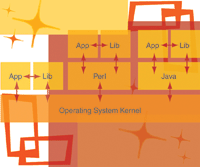
Applications consist of "internal calls"
to self-contained functions, which incorporate unique logic to perform their tasks.
For anything non-trivial, these in turn initiate "library calls" to a
middle layer of external bundles of included code, providing convenience routines
to often-used procedures. From here, when low-level access is required to the filesystem,
network, memory, or other device, "system calls" are made to the operating
system kernel itself. When dealing with an interpreted language, like Perl or Java,
a translational execution unit is wedged in above the kernel as well. Figure 1 illustrates
this call hierarchy. It is at the point when calls are made to the operating system
where system call tracers intervene. They print out each system call, its arguments,
and the return value, all transparently to the process.
For a simple example, refer to the
sample code in Listing 1, which opens a log file, writes to it, and exits. To run
this under a system call tracer, you'd use one of the following syntaxes, depending
on platform:
solaris$ truss ./log_example
linux$ strace ./log_example
The complete output of this example on Solaris
is presented in Listing 2, although the output is largely the same on Linux, both
being POSIX-compliant or at least related, in most respects. Here's an overview
of the highlights:
open("/usr/lib/libc.so.1", O_RDONLY)            = 3
[The standard C library is opened, which corresponds with our #include]

open("mylog", O_WRONLY|O_APPEND|O_CREAT, 0666)  = 3
[The log file is opened, which corresponds with our fopen()]

write(3, " S t a t e   =   1 0\n", 11)          = 11
[11 bytes are written out, which corresponds with our fprintf()]
For details on the arguments and return codes
of individual system calls, you can consult section 2 of your system manual pages,
for instance:
$ man -s 2 open
A brief description of return codes denoting error
conditions returned by system calls can be found in /usr/include/sys/errno.h on
Solaris and /usr/include/asm/errno.h on Linux. Some common examples of these appear
in Table 1.
For further background material on
operating system kernel design and implementation through which system calls are
made available, my recommendations are Modern Operating Systems by Andrew Tanenbaum, Advanced Programming in the Unix Environment by W. Richard Stevens and Stephen Rago,
and Understanding the Linux Kernel by Daniel Bovet and Marco Cesati. Now, let's
move on to some cases where I've used these techniques to quickly and accurately
diagnose somewhat elusive problems.
Case #1: The "Misconfigured" Environment
Configuration management is taken seriously throughout
NASA, as (when done right) it locks down the variations, increases the odds of success,
and provides a structured scenario to backtrack through in the event of failure.
We often replicate workgroup environments to strict standards as project personnel
branch out.
After one such deployment, it was reported
that one of the in-house Perl applications was hanging when run in the new environment.
After checking the Solaris workstations for obvious memory, CPU, and I/O issues,
we decided to run the application under truss in both a working and this "misconfigured"
environment. The end-user was pretty sure it must be a hardware issue, but obliged.
After saving the output from the trial runs, we compared the results side by side
and found the hanging application was calling alarm(), attempting to open() a file
unsuccessfully in a group data directory not under configuration management control,
receiving its alarm() timeout, and then looping to try again, like so:
alarm(10)                               = 0
open("datarun.out", O_WRONLY|O_CREAT|O_TRUNC|O_LARGEFILE, 0666) = -1 EACCES
--- SIGALRM (Alarm clock) @ 0 (0) ---
...repeated...
On the other hand, in the good case, the file
was opened successfully and things proceeded normally. We checked the file permissions
and found the group-write bit not to be set in the new environment's group
data directory, corrected it, and the problem was solved. The application hang on
failing to open a file is not at all standard Perl behavior (of which I'm a
big advocate, as it's elegant and furthermore was developed here by Larry Wall
in 1987). But, in this case, I decided not to dig into the application's logic,
because it included several modules with which I was unfamiliar and I'd already
gotten things working again within 10 minutes.
Case #2: The Pathological Transform
During the final stages of deploying the data
warehousing Solaris server for a recent mission, our image processing group came
to us with the gripe that their software running from Linux workstations over NFS
was operating unacceptably slow. The claim was that it worked well in their testbed.
To make matters worse, it needed to go into production within a few days --
a complication formed by the repeated server crashes we had experienced in our initial
deployment. (This I diagnosed with adb, worked with the vendor, and resolved --
something I hope to cover in a future article).
When asked for more details, we learned
that the slowdown seemed to occur when utilizing a third-party image transformation
Java library, for which we were only provided byte-code. When the external development
group was contacted, we learned that their lead programmer was on vacation. Was
it time to brush up the resume?
All eyes were on the NFS server, whose
previous manifestations had proven so faulty. We tried tuning nfsd thread counts,
read/write sizes, and timeouts, but nothing produced a dramatic change to the situation.
We were using some experimental file access control and logging methods, which we
thought might be complicating the picture. But, then we ran some tests and demonstrated
that file copies to and from the server in all standard cases were completely up
to snuff, so it wasn't an underlying storage or network-saturation event.
At this point, I turned to strace on
the clients, running the imaging software under it and using the tracer's -c option, which summarizes system call count and timing. The results showed that the
library's read and write counts were much higher than expected for the file
sizes it was working with. Running it again under strace with the defaults pinpointed
this:
open("martianCity.dat", O_RDWR|O_CREAT|O_SYNC|O_LARGEFILE, 0666) = 12
fcntl64(12, F_SETFD, FD_CLOEXEC)        = 0
fstat64(12, {st_mode=S_IFREG|0644, st_size=10860, ...}) = 0
read(12, "\200", 1)                     = 1
_llseek(12, 0, [0], SEEK_SET)           = 0
write(12, "\201", 1)                    = 1
read(12, "F", 1)                        = 1
_llseek(12, 1, [1], SEEK_SET)           = 0
write(12, "G", 1)                       = 1
...repeated...
It may not be immediately clear, but what this
represents is the application reading in one unbuffered (O_SYNC) byte at a time,
incrementing it, rewinding, and writing it back out. The actual transform was somewhat
more mathematically complex. My initial thought was that the byte-at-a-time behavior
was the killer, so we suggested wrapping the library in a script that copies the
file locally, works on it there, and then copies it back to the NFS server. This
proved to be quick and effective, leaving all parties mostly satisfied.
Since then, I've dabbled in reproducing
the problem and have found that unbuffered byte-at-a-time reads/writes actually
take place more quickly over NFS than over local storage, at least in test cases.
The situation is that it's faster to write this way to a socket, which buffers
data up and sends it over the network in large blocks, than to the local file system,
which more properly honors the unbuffered request resulting in inefficient disk
I/O.
Further exploration turned up that
the main culprit was the rewinding and writing of each byte back out, which causes
NFS performance to plummet pathologically, just as we saw in production. Looking
at the network traffic with tcpdump (whose output, just as with snoop, can be analyzed
later with ethereal, by the way) revealed that each byte read or written causes
a full NFS buffer size worth of data to be transferred -- due to cache invalidation,
I suspect.
Conclusion
So, for tackling the hidden elements of underlying
application behavior regardless of the high-level programming language used, I hope
I've demonstrated the effectiveness of system call tracers and their right
to a prime spot in the systems administrator's tool box. These techniques have
opened new perspectives for me as I've learned them, and have saved me from
countless misdiagnoses and busy work, not to mention headaches. I welcome correspondence
on these and other advanced techniques.
System call tracers exist for most
other modern platforms, as well, including truss for most SysVR4-based Unix releases,
ports of strace to several Unix releases, ktrace for FreeBSD and Mac OS X, and even
BindView's implementation of strace for Microsoft Windows (which is a wholly
different beast, best when used with the book Windows NT/2000 Native API Reference by Gary Nebbett).
To confuse matters, some systems come
with a program called "strace", which is used for STREAMS diagnosis and
not for system call tracing in the manner I've covered here. A check with the
manual pages should clear things up. It should also be noted that tools exist for
library call tracing, too, fulfilled by truss on Solaris with its -u flag, and separately
on Linux, with the ltrace utility.
Additionally, the use of system call
tracers by privileged accounts can present both security benefits and concerns --
enabling monitoring of all data passed to and from an application. One positive
implementation of its use in this arena is the "real-time" monitoring
of applications by some anti-virus packages to root out worms and Trojan horses.
Roy is a Senior Ground Data Systems
Administrator for NASA/Caltech's Jet Propulsion Laboratory, where he's
worked on the Mars Exploration Rover and Mars Reconnaissance Orbiter projects. His
previous experience includes systems architecture for a backbone ISP and vulnerability
research for an international computer security firm. He holds a bachelor's
degree in Philosophy from U.C. Irvine. He can be reached at: roy.butler@jpl.nasa.gov.
|