 Open Source Build Management for Java Projects -- Part 1 Open Source Build Management for Java Projects -- Part 1
Craig Caulfield
The field of software engineering is now reaching a
stage of maturity such that developers and systems administrators have a
significant body of knowledge, best practices, and patterns to draw upon at
all stages of the development process. For example, when it comes to
setting up the infrastructure for a software development project, best
practice suggests the following elements:
- There should be a central code repository
that represents that latest state of the project.
- Developers should have a local workspace,
isolated from the main development line, where they develop and test their
assigned tasks. When these changes are stable, they can be committed to the
main development line, preferably in small, regular chunks.
- The project should be automatically built from source code
on a regular basis (possibly daily or even multiple times during the day)
so that any newly committed code that breaks the build can be detected and
rectified quickly. An automatic build also
means it should be possible for someone new to the project to check out a
fresh version from the repository, build it from sources, and end up with a
functioning product.
In a Java development environment, implementing this
sort of infrastructure has typically meant using repositories such as CVS:
http://www.nongnu.org/cvs/
or Subversion:
http://subversion.tigris.org/
and perhaps a build management tool like CruiseControl:
http://cruisecontrol.sourceforge.net/
and then crafting various Ant build files to
explicitly orchestrate each step of the build cycle. However, anyone who
has had to maintain these build files over time will know that the task can
quickly become unwieldy.
Fortunately, open source tools such as Maven 2 (http://maven.apache.org) can
help. Rather than hand-cranking an Ant build file, build administrators
define a sequence of Maven goals to, for example, clean out the build
artifacts directory, recompile the project, run the unit tests, generate
any documentation, and publish the results of the build. So that each goal
knows where to go and what to do, Maven assumes there will be a standard directory structure in much the same way the
J2EE specification defines a standard directory structure for Web
applications. When used in conjunction with build management tools such as CruiseControl, which is Maven-aware, build administrators
can provide their development teams with a simple but complete build
environment for just the cost of a low-range box on which to run it.
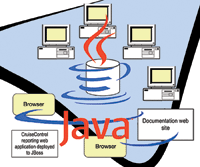
The purpose of these articles is to describe how to
create an open source Java software development build environment using
Maven version 2 and CruiseControl version 2.4
like that shown in Figure 1. In this first part, I will focus on Maven, and
I will cover CruiseControl next month. In my case, the build machine is an
unremarkable Intel box running Linux SUSE 10.0, and it's assumed that
the source code repository is already up and running (here, I'll be
using Subversion).
Maven
Even though every software development project is
unique, at a high level they all need to perform some common infrastructure
tasks like compiling the source code, running tests, creating metrics and
documentation, and deploying the final product. Naturally, there's
variation in detail, but these are the tasks generally done.
Across several Apache projects, it was recognized that
these common tasks could be abstracted in a way that provided some tangible
benefits. For example, having a common development structure meant
developers would be able to move between projects without having to learn
each project's specific routine for getting things done, so they
could become productive much sooner. Furthermore, all the rules for
orchestrating the steps of a build were usually captured in make files or
Ant build files. Maintaining these files for even a project of moderate
size required a certain skill and care.
In response to these and other lessons, Maven creates
a pattern-informed development infrastructure with these features:
- A standard directory structure is defined
along with a way to easily generate it. Then, across different projects,
everyone will know where to find the source files, the test cases, and any
project-specific resources, such as configuration files, images, or
documents.
- Dependencies are managed through remote and local repositories. A remote repository is a
central warehouse for common dependencies like junit or the Apache Commons
utilities (Maven uses Ibiblio http://www.ibiblio.org/maven2/ by default);
while a local repository is a developer's cached collection of
downloads from the remote repository. When a project declares a dependency,
Maven sees whether a copy is already held in the local repository; if not,
it will be automatically downloaded from the remote repository.
As I'll show later, it's also possible to
create "internal" remote repositories where commercial or
proprietary products can be stored, along with any other dependencies that
can't be satisfied by the usual central repository.
- It is easy to create up-to-date project
documentation (javadoc, metrics, project information, dependencies, mailing
lists, repository activity, etc.) and to publish that information as a Web
site. Team members can quickly find project information and see what
everyone else is doing so there's more chance of coordinating work,
reusing code, sharing knowledge, and, most importantly, there are fewer
surprises.
- Each project declares how the final
product will be packaged, for example, as a JAR, WAR, or EAR. Besides
actually creating such an artifact, the packaging declaration indicates
that a specific build lifecycle is followed. For JARs, the default packaging, the build lifecycle is the sequence:
process-resources, compile, process-test-resources, test-compile, test,
package, install, deploy. If any specific goal is invoked, Maven will ensure that any relevant previous goals will be
invoked first.
- In the real world, it's unlikely
that all development will happen within a single Maven project: there may
be a number of projects producing JAR files, with these perhaps being used
in a Web application in yet another project, and maybe some EJBs in the mix
as well. To Maven, this type of project structure is simply configured as
another type of dependency.
So, in a nutshell, Maven is the realization of a
number of fundamental configuration management and project management patterns.
Installing Maven
Download the binary Maven distribution from:
http://maven.apache.org
and unpack it to a location such as /usr/local/maven-2.0. Then create an environment variable
called $MAVEN_HOME, point it to the installation directory, and add the
$MAVEN_HOME/bin to $PATH.
Checking for the version should show if the
installation has been successful:
cruise@snagglepuss:~> mvn -version
Maven version: 2.0
Configuring Maven
The general behavior of Maven is controlled by a
settings.xml file (Listing 1), which can be placed in the user's home
directory for a local configuration or in the $MAVEN_HOME/conf directory
for global configuration.
For example, the <localRepository> element can
be used to change the default location of the locally cached repository.
Meanwhile, the <servers> element can be used to define the
authentication profiles Maven needs when connecting to particular servers.
Matching <id> elements in the project object model (POM, discussed
next) will use this authentication information when connecting to the
server to deploy the project documentation or connect to the internal
remote repository.
Creating and Configuring a Maven Project
Maven uses the idea of an archetype to define a
standard directory structure for new projects. For example:
mvn archetype:create -DgroupId=sopwith -DartifactId=SunDeveloper
This command creates a Maven project called
SunDeveloper, a top-level package called sopwith, along with some skeleton
main and test source files, all inside the standard Maven directory
structure:
SunDeveloper
|-- pom.xml
`-- src
    |-- main
    |   `-- java
    |       `-- sopwith
    |           `-- App.java
    `-- test
        `-- java
            `-- sopwith
                `-- AppTest.java
Besides laying out the directory structure, Maven
creates a project object model file (POM), pom.xml -- the single
source of truth for all project information. The main elements of the
out-of-the-box version (Listing 2) are:
- The <project> element of the root
element of all POM files.
- The <modelVersion> element
indicates which version of the object model this POM is using. Maven is
still a work-in-progress, so the first step in debugging any problems is
making sure that everything is at the right version level.
- The <groupId> is a unique
identifier (often fully qualified) for the organization or group that
created the project.
- The <artifactId>,
<packaging>, and <version> elements work together to name the
project's final product.
The <artifactId> is a unique name for the
product, the <packaging> element declares how the product will be
packaged (as a JAR, WAR, EAR, etc.), and the <version> element gives
the version number. The format is
<artifactId>-<version>.<extension>, so this project will
produce SunDeveloper- 1.0-SNAPSHOT.jar.
As mentioned before, the <packaging> element
also does double duty by indicating that a specific build lifecycle is
followed. If any specific goal is invoked, Maven will ensure that any
preceding lifecycle goals will be invoked first.
Maintaining the build process now means working with
coarse-grained lifecycle goals rather than fine-grained Ant tasks.
- The <name>, <url>, and
<description> elements are all used by Maven's generated
documentation (see the section on creating a documentation Web site for the
details).
As you develop and refine your project by editing the
POM, you influence how and when Maven's goals are executed. See the
Maven online documentation and the XML Schema at:
http://maven.apache.org/maven-v4_0_0.xsd
for the complete description of the project object model.
The standard directory structure can be changed by
defining new archetypes, but unless there's a compelling reason,
it's best to work within Maven's bounds. One valid way in which
the standard directory can be changed is by adding a resources directory
under src/main to contain any project-specific resources such as
configuration files, images, or documents. In this case, the directory
structure would now look like:
SunDeveloper
|-- pom.xml
`-- src
    |-- main
    |   |-- java
    |   |   `-- sopwith
    |   |
     `-- App.java
    |   `-- resources
    |       `--
    instructions.txt
    `-- test
        `-- java
            `-- sopwith
                `-- AppTest.java
When the final project artifact (JAR, WAR, EAR, etc.)
is created, the contents of the resources directory will be copied to the
base directory.
Executing Maven Goals
Even at this early stage, the project is ready to
start responding to Maven goals. But, there's something to be aware
of for new Maven installations -- each time Maven is invoked, it
checks which plug-ins it needs to execute the goal at hand and downloads
from the central repository anything not already held locally. Initially,
this can take a few minutes while Maven gets itself set up, but thereafter
things will happen more quickly. With this forewarning, compiling the
project, which at this point consists of just the skeleton main program,
simply means invoking the following Maven goal:
mvn compile
This single goal will compile any source files and
place the classes in a newly created target/classes directory. Compiling
and running the test cases is equally simple:
mvn test
Even though Maven's goals are a convenient way
to execute most project tasks (see the sidebar "Some Useful Maven
Plug-ins" for some of these), Maven doesn't have goals for
everything. For example, a common requirement
in an automated build environment would be updating the local working copy
with any changes from the source code repository before starting a build,
and perhaps creating a tagged version if the build completes successfully.
At present, there is no Maven or native Ant task that
will do this. So, one solution is to create some custom Ant tasks such as
those in Listing 3, and then take advantage of Maven's build
lifecycle to make sure the tasks are invoked at the appropriate time. In my
case, I have bolted the Subversion update onto the validate lifecycle phase
as shown in the <build> element in Listing 4.
Maven goals can also be executed from within your
favorite IDE. See Sidebar 2 for how this can be done with Eclipse.
Creating a Documentation Web Site
Archetypes are also used to create Maven's
built-in documentation Web site:
mvn archetype:create -DgroupId=sopwith -DartifactId=SunDeveloperSite \
  -DarchetypeGroupId=org.apache.maven.archetypes \
  -DarchetypeArtifactId=maven-archetype-site
This command creates another standard directory
structure. For convenience, I copied the just-created site directory into
the main project, so my directory structure now looks like:
SunDeveloper
|-- pom.xml
`-- src
    |-- main
    |   |-- java
    |   |   `-- sopwith
    |   |       `-- App.java
    |   `-- resources
    |       `-- instructions.txt
    `-- site
    |   |-- site.xml
    |   `-- apt
    |   `-- fml
    |   `-- xdoc
    `-- test
        `-- java
            `-- sopwith
                `-- AppTest.java
Once the documentation Web site has been generated, it
can be customized in a number of ways:
- The site's banners and menus can be
changed via the site descriptor file, site/site.xml (Listing 5).
- The site generator creates three main
sub-directories under the site that can be used for FAQs, technical
documents, and any other project-specific content.
- Lots of information in the POM is used as
fodder for the documentation Web site. This includes the project name, URL,
and description, along with information about the development team members,
mailing lists, issue tracking system, and source control tools. Listing 4
has some of the usual inclusions.
The basics of Maven's documentation Web site
have now been created; it just needs to be fleshed out with some reports.
Maven knows which reports it should generate by the contents of the
<reporting> element in the POM. A typical collection is shown in
Listing 4.
To generate the Web site, the following command is
used:
mvn site
Maven generates the documentation under the target
directory, but naturally it can't just be left there.
To then deploy the documentation Web site, the <distributionManagement> element is added to the POM.
Listing 4 shows a <distributionManagement> element that points to a
directory at /opt/maven/sites/developer on http://snagglepuss, which is served by Apache. As
mentioned previously, if a username and password are needed to connect to
the deployment server, they can be specified in the <server> element
of $MAVEN_HOME/conf/settings.xml.
The following command is then run to deploy the site
to its final destination:
mvn site-deploy
When calling this goal, an error message like
"The authenticity of host 'snagglepuss' can't be
established..." may come up. The solution is to create a directory
called .ssh in the user's home directory. The next time the goal is
called, Maven will create a known_hosts file in this new directory, and the
problem won't happen again.
The documentation Web site should now be up and
running (Figure 2).
Setting Up and Using Repositories
As mentioned before, Maven uses a number of
repositories to manage each project's dependencies and build
artifacts:
- Remote repositories are central
warehouses for commonly used dependencies like junit and are typically
accessed using protocols such as http://, ftp://, scp:// or file://. By
default, Maven uses Ibiblio (http://www.ibiblio.org/maven2) as its remote
repository.
- The local repository is a local cache of
downloads from a remote repository and also contains build artifacts that
have not yet been released.
When the POM declares a required dependency, such as
junit in Listing 4, Maven first checks if a cached copy is held in the
local repository; if not, the dependency is downloaded from the remote
repository and then becomes available to the project.
So that all this happens seamlessly, all Maven
repositories have a certain directory structure and naming convention,
which maps to particular parts of the <dependency> element in the
POM. The <groupId> tells Maven to look in a specific repository
directory, <artifactId> then points to a specific subdirectory,
<version> is yet another subdirectory down, and <type> points
to a named file of this type. Browse through http://www.ibiblio.org/maven2/ to see this
directory structure in action.
For the most part, Maven will handle any repository
activity for you, but there may be times when you manually need to install
a certain resource into your local repository. For this, Maven provides an
install goal:
mvn install:install-file -Dfile=<path-to-file> -DgroupId=<group-id> \
    -DartifactId=<artefact-id> -Dversion=<version> -Dpackaging=<packaging>
Afterwards, the resource will be available to your
project just like anything else in the local repository.
Normally, developers manually add resources to their
local repository only when those resources can't be found in the
remote repository. This practice can lead to subtle version conflicts and
inconsistencies between developers' workspaces, because each
developer is actively manipulating his local repository. It also means that
developers can no longer clean out their local repository and rely on Maven
to do a complete refresh on their behalf. A better way is to create an
"internal" remote repository -- one that contains jars and
resources that can't be found in Ibiblio, that are locally created,
or which are commercially licensed. All developers can then point to this
alternative repository.
An "internal" remote repository is just a
local directory served by an appropriate protocol. In my case, I've
created a repository directory at /opt/maven/remote and set it up to be
served by Apache. So that Maven knows what is happening, a <repository> element is added to the
Maven configuration file, settings.xml (Listing 1). A <repository>
element with a matching <id> in the POM (Listing 4) then lets each
project know it has an alternative place to search for dependencies.
With the "internal" remote repository set
up, artifacts can be added to it so they can be drawn upon when necessary.
For example, to deploy the MySQL Connector/J JAR file:
mvn deploy:deploy-file -DgroupId=MySQL -DartifactId=MySQLConnectorJ \
  -Dversion=3.1.12 -DgeneratedPom=true -Dpackaging=jar \
  -Dfile=mysql-connector-java-3.1.12-bin.jar -DrepositoryId=internalRepository \
  -Durl=scp://snagglepuss/opt/maven/remote
Maven Wrap-Up
Maven is a tool that developers and build
administrators have long been waiting for. But, it is still a work in
progress, so be prepared to do some research (read: trial and error) and to
hit the newsgroups when things don't work as expected. Also, there
have been some major changes between versions 1 and 2, which means finding
good, version-right examples and documentation, or just any documentation
in general, can be a problem. Even so, Maven is worth the perseverance.
With Maven up and running, we're half way
towards the goal of an automated build environment. In part 2 of this
series, I'll show how CruiseControl completes the setup.
Resources
Apache Maven Project -- http://maven.apache.org/
Beck, K. 2000. Extreme Programming Explained: Embrace Change. Boston: Addison-Wesley.
Berczuk, S. P. and Appleton, B. 2003. Software Configuration Management Patterns. Boston: Addison-Wesley.
Clark, M. 2004. Pragmatic Project Automation: How to Build, Deploy, and Monitor Java Applications. Raleigh, NC: The Pragmatic Programmers.
CruiseControl -- http://cruisecontrol.sourceforge.net/
Fowler, M. and Foemmel, M. "Continuous Integration". Available at: http://www.martinfowler.com/articles/continuousIntegration.html
Maraia, V. 2005. The Build Master: Microsoft's Software Configuration Management Best
Practices. Upper Saddle River: Addison-Wesley.
Massol, V. and O'Brien, T. M. 2005. Maven: A Developer's Notebook. Sebastopol, CA: O'Reilly Media.
McConnell, S. 1996. Rapid Development: Taming Wild Software Schedules.
Redmond, WA: Microsoft Press.
O'Brien, T. M. 2006. "Maven Project Info
Reports Considered Dangerous". Available at: http://www.oreillynet.com/onjava/blog/2006/03/maven_project_info_reports_con.html
Craig Caulfield is a senior software engineer and
build manager for a defense and commercial software house in Perth, Western
Australia. He holds a Bachelor's degree in Computer Science, a
Master's degree in Software Engineering, and certifications in Java,
XML, DB2, UML, MySQL, and WebSphere. He can be contacted at: ccaulfi1@bigpond.net.au.
|