 Semi-HA (Highly Available) CVS Service Semi-HA (Highly Available) CVS Service
Alex Markelov
High availability (HA) has been defined as "A
level of system availability implied by a design that is expected to meet
or exceed the business requirements for which the system is
implemented." [1] CVS, however, doesn't seem to be designed
with high availability in mind. In response to a post to info-cvs about
allowing two or more CVS servers access to the same repository for
load-balancing and/or redundancy purposes, Andrew Johnson said:
"What happens if one system has created a lock
file and then promptly dies, leaving the repository in a locked state? Bear
in mind that there's nothing built into CVS to recover from this, so
it might require manual intervention in the event of one system failing.
The data will still be safe, although a multi-file commit might be only
partially applied in that circumstance." [2]
So, is there a way to make CVS at least semi-HA? The
article will give you few ideas of how to get your CVS repositories
available most of the time and have redundancy in place. Mind you, none of
the described recipes will fix the type of consistency problem just
mentioned. If the sudden death of your server leads
to data inconsistency, you will have to deal with it manually. I only
outline the ways to improve availability of CVS service, not to make it
100% available (which in turn would mean doing
automatic consistency checks and fixing any inconsistency found).
Problem
The CVS repository needs to be available most of the
time. The longest allowed period of absence of the service is less than an
hour. Platform: Intel + FreeBSD.
Recipes (Based on FreeBSD)
We purchased two identical servers to implement CVS
redundancy. The idea of high availability came from the fact that, at my
work, only two of us look after the Lab, and there is a chance that one of
us will be on holiday while the other gets sick or something.
Ideas for how to make CVS highly available came from
clustering. I was reading Karl Kopper's book about Linux clustering [3], and the part about Heartbeat set my wheels in motion. I
decided to try it, so then I needed a way to replicate the data. The first
obvious tool for replication was rsync.
The Lab
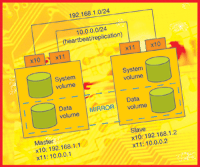
For the test lab I used two machines running FreeBSD 5-STABLE. Master and slave had two 3Com Ethernet adapters:
Master (hb1): xl0:192.168.1.1, xl1:10.0.0.1
Slave (hb2): xl0:192.168.1.2, xl1:10.0.0.2
Shared IP address and the address for clients SSH
access (cvs): 192.168.1.10 xl1 interfaces used purely for heartbeat and
data replication (Figure 1).
Heartbeat Subsystem
In all of the recipes, I will be using two machines
connected with crossover Ethernet cable through the second network
interface (see Figure 1). Heartbeat will
ensure that master and slave know about the status of each other at all
times. All I need is to migrate an IP address that my users access using
SSH to get to their CVS repositories.
A simple configuration will do. On both machines, I
install heartbeat-1.2.3_1 from ports, then create /usr/local/ha.d/ha.cf and
/usr/local/ha.d/haresources as follows:
/usr/local/ha.d/ha.cf:

logfacility     local3
node            hb1 hb2
keepalive       1
deadtime        10
bcast           xl1
logfile         /var/log/heartbeat.log
auto_failback   no
respawn         hacluster       /usr/local/lib/heartbeat/ipfail

/usr/local/ha.d/haresources:
hb1     192.168.1.10
With this simple configuration the IP address
192.168.1.10 migrates to slave server if master dies. Setting auto_failback
to "no" ensures that the IP does not migrate back to master
automatically. You do not want that to happen before you make sure that the
data on master has synchronized successfully.
Make sure the configuration files are identical on
both machines!
To save time, I installed one test machine and
configured it, then cloned its system hard drive, using dd, to the drive taken from
my second test machine:
dd if=/dev/ad0 of=/dev/ad3 bs=512
When I booted up my second test machine with the
cloned hard drive in it, I simply changed hostname and IP addresses in
/etc/rc.conf.
Now back to business.
Recipe #1: Two boxes + snapshot + rsync + heartbeat
In this scenario, we have file system snapshots
available on FreeBSD, and the idea is to connect the two servers via the
second Ethernet interface (crossover), make a snapshot of the CVS, and then
rsync it to the slave server.
Heartbeat will failover CVS IP address between the
two servers. We can do snapshot+rsync every hour (thanks to the size of the
repositories). In case of a master failure, the IP address migrates to the
slave and the last hour rsync will provide almost up-to-date repositories.
The administrator can get a notification from the slave server that the
master has crashed and will be able to notify users to re-commit the latest
(anything they may have committed since the last rsync) updates to their
repositories.
I have written a small shell script to accomplish this
task (see Listing 1) and tested it during the
day. Before I went home, I created a crontab
entry to run it every hour:
# mirror /r1
0 */1 * * 1-5 /root/bin/snapbackup.sh -d
Why the Gap?
The issue with access of snapshot file on the server
appeared after I left my script to run every hour via cron. The next
morning, I could not access the server using SSH, and ps ax revealed a number of mksnap_ffs running. The
symptoms were exactly as described in Branko F. Graènar post to
freebsd-current. He had an empty file system /export that he was making a
snapshot of. It took 30 minutes to complete the snapshot, but the real
problem was that if any other process touched the snapshot file during its
creation, then all other processes doing something on /export would hang.
"Filesystem cannot be unmounted. mksnap_ffs process cannot be killed.
Reboot and foreground fsck helps."
The issue was explained by Kirk McKusick himself. On
his test system, it took 48 minutes to create a snapshot file. He said:
"The problem is that although the filesystem is
only locked briefly, the snapshot file is locked for the entire 48 minutes.
Thus, if you touch the snapshot file (by for example doing a
"stat" on it), then the process doing the stat will hang for 48 minutes.
The next process to try and touch the snapshot will
lock /export while it waits for the lock on the snapshot to clear. And at
that point you are hosed for 48 minutes on all access to /export. :-( So, I
think that the best solution for you would be to try creating a hidden
directory for the snapshot file, e.g., create a /export/.snap directory
mode 700 owned by root, then create the snapshot as say
/export/.snap/snap1. This way, it will be out of the way of all snoopy
programs except those walking the filetree as root."
The answer in my case was simple; I had Amanda [4]
doing dump backup of the partition at night. After I implemented the gap
for the duration of the backup, everything got back to normal:
# mirror /r1
0 1-23 * * 1-5 /root/bin/snapbackup.sh -d
I could have used tar and exclude file to avoid
touching the snapshot file by Amanda, but I need it this way for now.
Remember, you do not want to have write access
allowed to the repository while taking the snapshot. Imagine a situation
where the snapshot is taken in the middle of long check-in operation. You
would end up with a repository having something partially committed. You
may want to deny access to the repository for the duration of the snapshot
(just a few milliseconds) and then re-enable the access (e.g., firewall
rule to block SSH incoming connections or you can stop sshd or chmod 000
cvs binary). In my case, it's a bit tricky to distinguish between SSH
sessions that are cvs-only and those that may run something else on the
same machine, and I can't stop sshd just like that. Your case may be
different, especially if you have a dedicated CVS-only server.
Pros of the recipe:
- Simple rsync.
- Snapshot gives you a frozen image of your
data without disturbing client's activity.
Cons of the recipe:
- Snapshot (in its current implementation) might freeze access to the file system if
anything touches snapshot file during its creation.
- Rsync is not the fastest way to mirror
repositories.
- Risk of data inconsistency is high unless
you've taken steps to freeze access to the repository while taking
the snapshot.
With the above cons in mind, I came up with another recipe (see Figure 2).
Recipe #2: Two boxes + ggate{d,c} + gmirror + Heartbeat
Rsync and snapshot make a good solution, but I wanted more. Sys Admin had
a good article last year about Heartbeat and DRDB [5]. But DRDB is not
available on FreeBSD, and I didn't want to migrate to Linux (not for
a religious reason, but a pure time management one). I googled the problem
and found the solution right under my nose -- GEOM: Modular Disk
Transformation Framework. I used GEOM to implement software RAID1 on
FreeBSD a few months ago, and it worked just as the doctor prescribed [6,
7].
So, the idea is to use ggated (GEOM Gate network
daemon) on the master and export the whole device (e.g., /dev/aacd1) to
ggatec (GEOM Gate network client and control utility) on the slave. I have
/dev/aacd1 in RAID10 dedicated to CVS on my production server and that
works nicely. To test this setup, I put a second hard drive in each of the
test machines (detected as /dev/ad3) and started to play.
To do this, make sure you have the following options
in your kernel:
options         GEOM_MIRROR
options         GEOM_GATE
Otherwise, you'll need to recompile your kernel.
Check the FreeBSD Handbook [8] for the instructions.
On slave server, run ggated and export /dev/ad3 read-write:
slave# cat /etc/gg.exports
10.0.0.1 RW /dev/ad3
slave# ggated
Create RAID1 using master's /dev/ad3:
master# gmirror label -v -b round-robin gm0 /dev/ad3
master# echo geom_mirror_load="YES" > /boot/loader.conf

edit /etc/fstab on master to have
/dev/mirror/gm0s1d    /r1     ufs     rw         2       2
Reboot the master and see that /r1 mounted
successfully. Then run ggatec to import slave's /dev/ad3. It will show up as
/dev/ggatec0:
master# ggatec create -o rw 10.0.0.2 /dev/ad3
ggate0
Then add /dev/ggate0 to the mirror. This will allow us
to mirror any changes from master to slave almost instantaneously
(depending on your network connection between the machines):
master# gmirror insert gm0 /dev/ggate0
To make a backup of the data, just split the mirror,
mount the partition on the slave (remember ggate0 is exported /dev/ad3 of
the slave) and do the backup using your favorite backup tools. I prefer Amanda for the task. Here is the sequence of events to
accomplish the task:
master# gmirror deactivate gm0 ggate0
master# ggatec destroy -u 0
And now you can mount the partition and do the backup:
slave# mount /dev/ad3s1d /r1
When finished, do the following:
slave# umount /r1
master# ggatec create -o rw 10.0.0.2 /dev/ad3
ggate0
master# gmirror activate gm0 ggate0
master# gmirror rebuild gm0 ggate0
It will take a while before your mirror rebuilds, but
the repositories will be available for the clients in the meantime.
Pros of the recipe:
- You have a RAID1 across a crossover
network connection between two machines, which gives you almost
instantaneous synchronization of data.
- You can split the mirror to do backup of the data from the slave while your master
runs at full speed serving your clients. Once the backup is complete, you
can activate the slave's disk back into the mirror and get it
synchronized quickly.
Cons of the recipe:
- You will need to develop a few scripts to
make ggated/ggatec start during boot time. There is some activity in this
direction, but I will try to do it myself in the meantime.
Recipe #3: Two boxes + IBM EXP15 disk storage + Two IBM ServeRAID controllers
A hardware way of doing things came from IBM ServeRAID
controllers and the ability of some of the models to be configured for
clustering. Two ServeRAID controllers can be connected to the same SCSI
array, and then either (but not both) of the two machines can access the
data. (See Figure 3, taken from IBM User's Reference [9].) There are
some limitations for RAID levels supported (any sort of RAID 5 level is NOT
supported due to the fact that the firmware does not properly handle
certain error recovery cases).
Unfortunately, I didn't have a chance to try
this setup, even though I have all the required components: two ServeRAID
4Lx controllers and EXP15 disk storage. But the disk storage was not
available at the time of writing. I will definitely try the configuration
when I have the time and the disk storage is free to use. Meanwhile, you
can read the details of configuration at [10]:
http://linux-ha.org/ServeRAID
STONITH (Shoot The Other Node In The Head)
This is a technique to eliminate a so-called
split-brain situation in clustering, where the slave node thinks that
master is dead, while the master is still up and running. When our slave
server detects via heartbeat that the master is dead, we need some way of
killing the master if it's still up and running. I'm using
Cyclades AlterPath PM power modules, which are part of my outband
management solution. I can power off any machine by ssh'ing into
Cyclades TS console server and then issuing a command to PM to power off an
outlet by name or number.
Summary
All the recipes described above may give your clients
a robust CVS service. Why am I still calling it semi-HA? The definition
given to high availability at the very beginning of the article does apply
to the ways I just described. All three methods gave me CVS availability
that "is expected to meet or exceed the business requirements for
which the system is implemented".
It's due to the nature of CVS itself that I
cannot call any of these methods a real HA solution. Imagine a really bad
situation, where your server died in the middle of some long check-in
operation leaving you with multi-file commit partially done. Then you have
to intervene and the fix takes more than an hour, which is indicated above
as the longest period of CVS service being not available to clients.
Apart from this, I got what I originally wanted
(higher availability of the service), and I hope my clients will appreciate
the new level of CVS availability. However, they most likely will never
know how much is under the hood of a simple SSH access to their CVS
repositories.
I'm using Amanda to do nightly backup of CVS
repositories. Whatever the level of availability, proper backup gives you
assurance that when everything else fails, you can go back online with
little to no loss of data in case of disaster.
I thank my friend and colleague, Joe Kiernan, for
covering me from daily interruptions while I ran all the tests and played
around with all the different scenarios. Special thanks to Hal Pomeranz for
his great ideas on maintaining consistency of data.
References
1. Marcus, Evan and Hal Stern. 2003. Blueprints for High Availability, Second Edition. John Wiley & Sons.
2. Info-cvs mailing list archive -- http://lists.nongnu.org/archive/html/info-cvs/2001-12/msg00604.html
3. Kopper, Karl. 2005. The Linux Enterprise Cluster. No Starch Press.
4. Amanda, The Advanced Maryland Automatic Network Disk Archiver -- http://www.amanda.org
5. Reifschneider, Sean. 2005. "Linux High
Availability Clusters with Heartbeat, DRBD, and DRBDLinks," Sys Admin 14(5):16-21.
6. Lavigne, Dru. "Using Software RAID-1 with
FreeBSD" -- http://www.onlamp.com/pub/a/bsd/2005/11/10/FreeBSD_Basics.html
7. Engelschall, Ralf S. "FreeBSD System Disk Mirroring How to establish a RAID-1 for the system partitions"
-- http://people.freebsd.org/~rse/mirror/
8. FreeBSD Handbook -- http://www.freebsd.org/handbook
9. IBM« User's Reference. ServeRAID -4 Ultra160 SCSI Controller. SC25-P257-90.
10. The High-Availability Linux Project -- http://linux-ha.org/
Alex Markelov holds a masters degree in CS. He studied
computers at Naval College of Radio-Electronics in St. Petersburg and at
the University of Telecommunication and informatics, Moscow. He now works
for IBM Dublin Software Lab in Dublin as a UNIX Sys Admin. He can be
reached at: alex.markelov@gmail.com.
|