 MySQL
5.0 Cluster: Architecture, Implementation, and Management MySQL
5.0 Cluster: Architecture, Implementation, and Management
Norm Collins
Today's networks and applications are concentrating more on high
availability and redundancy. Corporations are selling services to
customers with a "guarantee", or "service-level agreement" (SLA),
that provides an overall percentage of uptime along with detailed
instructions on the rebate structure if certain conditions are not
met. One of the key components in the delivery of information to
customers is the availability of data from a robust and effective
database management system (DBMS).
MySQL is one of the main database management systems that corporations
rely on to store their data. The release of MySQL 5.0 has brought
many rich features that make it one of the leading database management
systems available. Some of the new features include stored procedures,
triggers, and views. Other features that have been previously available
are replication and clustering. All of these features make MySQL
what it is today. I will focus on one feature in particular -- the
MySQL clustering technology.
In this article, I will discuss the benefits of using a MySQL
cluster to corporations that require highly available data, the
implementation of basic MySQL cluster using the minimum recommended
requirements, and how to enhance the initial cluster to allow for
more availability. I will also describe some cluster configuration
options and some typical MySQL cluster management client commands
for managing a cluster.
Benefits
Implementing a MySQL cluster provides many benefits for critical
applications:
1. High Availability -- A MySQL cluster provides a higher level
of availability because of the architecture of the system. The MySQL
cluster is a layered implementation in which servers are specifically
allocated as SQL nodes where applications connect and perform queries.
Other servers are allocated as data nodes where the data is stored
across all the nodes in their memory.
2. Low Cost -- MySQL clusters can be a low-cost solution as they
will run on older, commodity hardware instead of requiring the latest
and greatest SunFire V440s. (Remember that four systems are required
in order to implement a basic cluster.)
3. In-Memory Database -- The biggest requirement for implementing
a MySQL cluster is the need for memory. A MySQL cluster runs as
an in-memory database where all the data is stored across all the
data nodes memory. The result for storing the data in memory is
to provide greater speed when accessing the data from the application
layer.
MySQL clusters are suitable for any organization needing to implement
critical applications requiring high availability at low cost. The
fact that MySQL is an open source product with commercial support
that can be purchased from MySQL AB is also a great benefit for
implementing MySQL in any corporation.
Implementing a Cluster
Before I get into the details of implementing a MySQL cluster,
I will explain a few concepts so you will understand the terminology
of the implementation.
- NDB -- This is the acronym for Network Database.
- Node -- Each part of the cluster is referred to as a node.
In context, nodes typically denote a physical computer; however,
a node could also mean a process.
- Management Node -- This node is used to manage all other nodes
in a cluster. Some of the typical management functions that are
performed from this node include backups, and starting and stopping
services.
- SQL Node -- The role of this node is to access the cluster
data.
- Data Node -- This type of node is used to store cluster data.
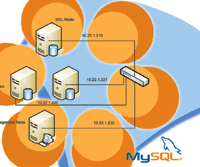
To implement a basic cluster, we will use four nodes, where each
node is a separate computer system. Table 1 provides the details
for each node that we are configuring.
Figure 1 shows the basic implementation. When implementing a cluster,
each of the hosts should be on the same subnet for security and
efficiency. The cluster also needs to be configured on a Fast Ethernet,
or Gigabit Ethernet network for support.
To take advantage of the clustering technology, the MySQL-max
binary must be installed on each SQL and data node in the cluster.
The MySQL-max binary is not required on the management node, but
you do have to install the management server daemon and client binaries
ndb_mgmd and ndb_mgm.
Storage and SQL Node Installation
On a Red Hat system, the commands to install MySQL-max are as
follows:
groupadd mysql
useradd -g mysql mysql
cd /var/tmp
tar -xzvf -C /usr/local/bin mysql-max-5.0.16-pc-linux-gnu-i686.tar.gz
ln -s /usr/local/bin/mysql-max-5.0.16-pc-linux-gnu-i686 mysql
cd mysql
scripts/mysql_install_db --user=mysql
chown -R root .
chown -R mysql data
chgrp -R mysql .
cp support-files/mysql.server /etc/rc.d/init.d/
chmod +x /etc/rc.d/init.d/mysql.server
chkconfig --add mysql.server
Management Node Installation
MySQL server is not required to be installed on the management
node, but you need to extract the ndb_mgm and ndb_mgmd files and
place them in the /usr/local/bin directory as follows:
cd /var/tmp
tar -zxvf mysql-max-5.0.16-pc-linux-gnu-i686.tar.gz /usr/local/bin
'*/bin/ndb_mgm*'
Make the files executable:
cd /usr/local/bin
chmod +x ndb_mgm*
Initial Management Host Startup
The following command must be executed to initially start up the Management
Host:
ndb_mgmd -f /var/lib/mysql-cluster/config.ini
Initial Data Node Startup
The command required to execute is as follows:
ndbd --initial
Initial SQL Node Startup
To start the SQL nodes, just execute the mysql.server startup
script in the /etc/init.d/ directory. The one change that is required
in the startup script is to change the MySQL binary to the MySQL-max
binary.
Configuration Options
To configure each of the data and SQL nodes, a my.cnf must be
configured on each of the three systems. On each of the systems,
you need to edit the /etc/my.cnf file so that each of the files
includes the following configuration:
# Options for mysqld process:
[MYSQLD]
ndbcluster                     # run NDB engine
ndb-connectstring=10.22.1.230  # location of MGM node

# Options for ndbd process:
[MYSQL_CLUSTER]
ndb-connectstring=10.22.1.230  # location of MGM node
To configure the management node, begin by creating a directory where
the config.ini file is to be located:
mkdir /var/lib/mysql-cluster
cd /var/lib/mysql-cluster/config.ini
vi config.ini
For this particular setup, the config.ini should contain the following
information:
# Options affecting ndbd processes on all data nodes:
[NDBD DEFAULT]
NoOfReplicas=1    # Number of replicas
DataMemory=80M    # How much memory to allocate for data storage
IndexMemory=18M   # How much memory to allocate for index storage
                  # For DataMemory and IndexMemory, we have used
                  # the default values.

# TCP/IP options:
[TCP DEFAULT]
portnumber=2202   # This the default; however, you can use any
                  # port that is free for all the hosts in cluster


# Management process options:
[NDB_MGMD]
hostname=10.22.1.230           # Hostname or IP address of MGM node
datadir=/var/lib/mysql-cluster # Directory for MGM node logfiles

# Options for data node "A":
[NDBD]
                               # (one [NDBD] section per data node)
hostname=10.22.1.220           # Hostname or IP address
datadir=/usr/local/mysql/data  # Directory for this data node's
datafiles

# Options for data node "B":
[NDBD]
hostname=10.22.1.221           # Hostname or IP address
datadir=/usr/local/mysql/data  # Directory for this data node's
datafiles

# SQL node options:
[MYSQLD]
hostname=10.22.1.210           # Hostname or IP address
Increasing the Size of a MySQL Cluster Implementation
When increasing the size of a cluster, you must consider the database
size that will be stored on the cluster, the amount of memory required
on the data nodes, the number of application layer systems requiring
access to the cluster, and the number of fragments and replicas
required in the cluster before knowing the requirements of the cluster.
Once you know the size of the database, you can calculate the amount
of memory needed based on the following calculation outlined in
the MySQL Reference Manual:
(SizeofDatabase * NumberOfReplicas * 1.1 ) / NumberOfDataNodes

where;
SizeofDatabase = the database size
NumberOfReplicas = the number of replicas that are required in the
cluster.  Only 1 replica is required in the majority of MySQL cluster
environments
NumberOfDataNodes = the number of data nodes being planned for in a
cluster. One data is also known as one fragment in a cluster.
To find out how much memory is required, we can calculate this formula
based on some initial data. Theoretically, if the size of the database
is 1 GB, the number of replicas is 1, and the number of data nodes
is 4, then the amount of memory required is:
Amount of memory required = (1GB * 1 * 1.1) / 4
Amount of memory required = 275MB per data node
As the number of application servers and the location of those servers
increase, there will be a requirement to increase the number of SQL
nodes. The increase in SQL nodes can be grouped by application or
by geographical location.
The data nodes will need to be upgraded as the database size increases
or the processing of the requests will need to be done more quickly
than can be done from the current system. In this case, we would
replace the current hardware with more robust hardware.
In Figure 2, you can see a more detailed network diagram that
outlines a larger MySQL Cluster and how it would be implemented
within a corporate network.
MySQL Cluster Management Client Commands
The commands outlined below need to be executed from the management
node in the cluster.
Safe shutdown and restart:
- Shutdown -- ndb_mgm -e shutdown
- Restart Management Node -- ndb_mgmd -f /var/lib/mysql-cluster/config.ini
- Restart Data Node -- ndbd
- Restart SQL Node -- mysqld &
Once all of the cluster nodes have been started, the following
commands can be used:
- SHOW ENGINES\G -- This will show the supported engine
currently set up on the server.
- Ndb_mgm -- This binary is the management client binary
and, once it is invoked, other commands can be executed to verify
the status of the cluster.
- SHOW -- The execution of this command will provide a
report of the cluster status from the management station.
- Node_id STOP -- Stops the data node specified by the
node_id.
- Node_id RESTART -- Restarts the data node identified
by the node_id.
- Node_id STATUS -- Displays status information on a specific
node.
- ENTER SINGLE USER MODE node_id -- This command enters
the specified node_id into single-user mode.
- Exit SINGLE User Mode -- Exits single user mode and
allows all applications access.
- QUIT -- Shuts down the management client.
- SHUTDOWN -- Shuts down all cluster nodes except for
the SQL nodes.
Conclusion
In today's networks, customers demand high-availability applications
and data storage solutions as a basic requirement. Implementing
MySQL clustering technology will bring your corporation one step
closer to having a fully redundant architecture for critical applications.
Norm Collins has a B.Sc. in Computer Information Systems and
is a technical Specialist at MTS Allstream Inc., which is a technical
solutions provider for small businesses to large enterprises. He
is responsible for developing network-based technology services
utilizing Solaris and Cisco platforms. In his spare time, he also
develops solutions on BSD and Linux platforms. Norm can be reached
at: normc@aci.on.ca. |