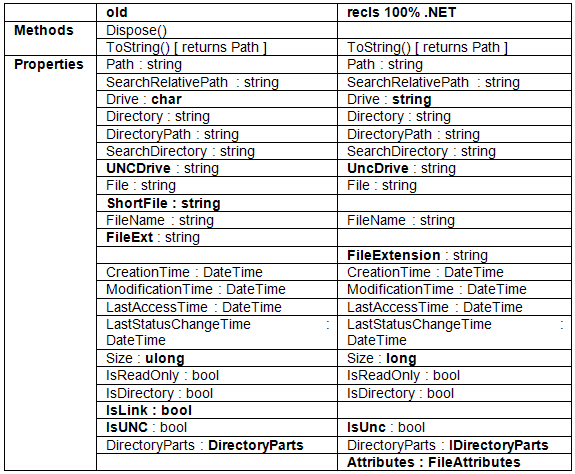
Table 1: Mappings Between Old and New Entry class/interface Methods and Properties
Dr. Dobb's Digest December 2009
Matthew Wilson is a software development consultant and trainer for Synesis Software who helps clients to build high-performance software that does not break, specializing in C++ and C#/.NET. He is the author of the books Imperfect C++ and Extended STL, a columnist for ACCU, and a resident guru at Dr. Dobb's CodeTalk, focusing on Windows technologies. He can be contacted at matthew@synesis.com.au.
Several years ago I wrote the column Positive Integration for C/C++ Users Journal and later Dr. Dobb's Journal, which discussed issues involved in adapting C/C++ libraries to other languages. The main exemplar project used was recls ("recursive ls") [1], a platform-independent recursive filesystem search library written in C and C++, and with a C API. Adaptation to numerous languages (including Ch, C#/.NET (via P/Invoke), D, Java, Python, and Ruby) was examined, covering the development of the library from versions 1.0 through 1.6. Since that time, the library has continued to evolve, and now stands at 1.8. A new C/C++ version, 1.9, will be released in the coming weeks.
I have long planned to rework the library implementation. The two main changes will be a substantial refactoring of the source files and packaging for the core library and the C++ layer, and a rewrite of some/all of the language mappings in the form of full "100%" implementations. This article describes the first of these, a 100% C# implementation of recls for .NET. For clarity I'll refer to the original stream of work as recls 1.x and the new .NET library as recls 100% .NET in this article.
The reasons for these changes are:
Despite being written entirely in C#, the implementation of recls 100% .NET is larger than can be fully covered here. So I intend to focus on the interesting design points, language features, and the differences in functionality between recls 1.x and recls 100% .NET.
The first difference is a cosmetic one. To placate FxCop [2], and also to clearly distinguish the new recls .NET API from the old for anyone who wishes to port their code to it, I changed the old recls namespace to Recls.
Similarly, the RECLS_FLAG enumeration is now SearchOptions (see Listing 1), and its enumerators are Files not FILES, Directories not DIRECTORIES, and so on. There are also fewer enumerators. Notably absent from the original [3] are RECURSIVE, LINKS, DEVICES, NO_FOLLOW_LINKS, DIRECTORY_PARTS, DETAILS_LATER, PASSIVE_FTP, and ALLOW_REPARSE_DIRS. The changes reflect the intended increase in portability and improvements to discoverability and transparency [4, 5] of the new API, based on user feedback.
 [Flags]

public enum SearchOptions

{

  None                         = 0x00000000,

  Files                        = 0x00000001,

  Directories                  = 0x00000002,

  IgnoreInaccessibleNodes      = 0x00100000,

  MarkDirectories              = 0x00200000,

  IncludeHidden                = 0x00000100,

  IncludeSystem                = 0x00000200,

  DoNotTranslatePathSeparators = 0x00002000,

}
The FileEntry class is gone, replaced by the IEntry interface (see Listing 2). The FtpSearch class goes entirely, as the first version of recls 100% .NET does not support FTP search. The DirectoryParts class is no longer externally visible; the DirectoryParts getter-property now returns (an instance implementing) the interface IDirectoryParts; see Listing 3. The FileSearch class goes, and search is now provided by the (static) FileSearcher class.
// in namespace Recls

public interface IEntry

{

  string Path { get; }

  string SearchRelativePath { get; }

  string Drive { get; }

  string DirectoryPath { get; }

  string Directory { get; }

  string SearchDirectory { get; }

  string UncDrive { get; }

  string File { get; }

  string FileName { get; }

  string FileExtension { get; }

  DateTime CreationTime { get; }

  DateTime ModificationTime { get; }

  DateTime LastAccessTime { get; }

  DateTime LastStatusChangeTime { get; }

  long Size { get; }

  FileAttributes Attributes { get; }

  bool IsReadOnly { get; }

  bool IsDirectory { get; }

  bool IsUnc { get; }

  IDirectoryParts DirectoryParts { get; }

}
public interface IDirectoryParts

  : IEnumerable<string>

{

  int Count { get; }

  string this[int index] { get; }

  bool Contains(string item);

  void CopyTo(string[] array, int index);

}
Table 1 compares the public interfaces of the old FileEntry class and recls 100% .NET's IEntry interface. The differences, highlighted in bold, involve changes to both syntax and semantics, and result from lessons learned by users of recls 1.x.
Drive changed from a character to a string so that there'd be less hassle when manipulating UNC-based paths: Now users can deal with a single property, rather than a drive letter character in one, and a (UNC) drive string in another. The spellings of UNCDrive and IsUNC changed to follow .NET idiom. The Size property changed from ulong to long to be CLS compatible (for example, to be able to be used from VB.NET and other .NET languages that don't support unsigned integral types). IsLink and ShortFile had to go by the wayside because of the need to be implemented 100% in terms of the CLR facilities (and not go to P/Invoke). The Attributes property was added to allow recls to stay relevant in light of evolution in the CLR of the file attributes that may be made available to managed programmers.
There are also some semantic changes. The form of the file extension has changed, and now includes the dot, so "abc.net" will have an extension of ".net", rather than "net" as was the case with recls 1.x. Since this is a breaking change, I've removed the previous name, FileExt, and given it a new name FileExtension. (This also fits better with the .NET way of doing things, which is to avoid unnecessary contractions in names.)
It's useful to be able to paste the extension to another file name without having to pollute client code with logic to determine whether or not to insert the dot. Now, all of the following combinations will reproduce the full path (and, to be useful, may be used in combination with other strings to build correctly-formed new paths):
The change from instance to class methods has probably the greatest impact on usage, so let's look at a pair of examples illustrating the old and the new. To search for all the font files in the Windows directory and its subdirectories with the old recls 1.x .NET mapping we'd write:
using recls;

foreach(FileEntry entry in new FileSearch(@"C:\Windows", "*.fon|*.ttf", RECLS_FLAG.RECURSIVE))

{

  Console.WriteLine(entry);

}
With recls 100% .NET, you would write:
using Recls;

foreach(IEntry in FileSearcher.Search(@"C:\Windows", "*.fon|*.ttf"))

{

  Console.WriteLine(entry);

}
With such a simple example the differences are not huge, which is a good thing. Nonetheless, two of the most significant changes are illustrated:
A search is conducted from a specified directory, in which all entries (files or directories) that match the given pattern(s) and correspond to the given search options, up to a given depth, are retrieved. A directory may be absolute or relative, but must exist. If null (or the empty string) is specified, the current directory is assumed. A pattern may be a file (or directory) name, or may use wildcards, as in "*.ttf". Furthermore, the library supports multi-part patterns, allowing discovery of entries matching different wildcards within the same string, as in "*.fon|*.ttf". A null argument for the patterns parameter is interpreted to mean the "everything" pattern for the given platform (i.e. "*" on UNIX, and "*.*" on Windows).
The search options can select Files, Directories, or both; absence of both is interpreted as Files). Other options allow for tailoring the search policy, as follows:
Exceptions that interrupt the processing may be filtered by specifying an exception handler (see Listing 4).
enum ExceptionHandlerResult

{

  PropagateException = 0,

  ConsumeExceptionAndContinue

}

interface IExceptionHandler

{

  ExceptionHandlerResult OnException(string path, Exception x);

}
Returning PropagateException causes the exception to be rethrown, causing the search to be cancelled and the caller to receive the exception. Returning ConsumeExceptionAndContinue consumes the exception (perhaps after logging the condition) and continues the search, skipping the offending directory. Naturally, the purpose of this callback is not to allow users to attempt to suppress unrecoverable conditions, and the library does not invoke the callback in some such cases. Unfortunately, because the .NET exception hierarchy is such an abject mess, discriminating between logical errors, practically unrecoverable conditions, and recoverable runtime conditions is not a simple task, and it is likely that the set of exceptions made suppressible in this regard will change in future implementations. Users are expected to consume only specific expected exceptions; for instance, System.IO.DirectoryNotFoundException, rather than doing anything as unwise as consuming System.Exception.
Finally, processing a large directory tree with highly-specific pattern(s) can lead to a user experience with discernible pauses, due to filesystem latencies. Consequently, a progress callback mechanism is also provided, in the form of the IProgressHandler interface (see Listing 5), which allows callers to be notified as each new (sub-)directory is searched, perhaps to log the directory traversal changes to console, status bar, etc. It also affords the opportunity to apply search policy on a location basis, via return of a control code from the ExceptionHandlerResult enumeration: CancelDirectory causes the given directory and all its sub-directories to be excluded from the search; CancelSearch causes exclusion of all remaining directories, even those at a higher level in the tree.
enum ProgressHandlerResult

{

  Continue = 0,

  CancelDirectory,

  CancelSearch

}

interface IProgressHandler

{

  ProgressHandlerResult OnProgress(string directory, int depth);

}
Given this richness in search specification -- directory, patterns, depth, options, exception-handler, progress-handler -- there is clearly a conflict between flexibility and discoverability [4, 5] in the possible overloads for the file search functions. Ignoring parameter ordering and ambiguities caused by some parameters (directory and patterns) sharing the same type, there are 64 possible combinations of the six parameters. If we add in parameter ordering, it becomes 121. To get a handle on the problem consider the case for just three parameters, directory (dir), patterns (ptns) and depth, with and without parameter ordering considerations. (In both lists, type ambiguities are marked with a <-X->.)
Without considering parameter ordering, we have eight combinations, of which six are viable:
()

(dir)

(ptns) <-X-> (dir)

(depth)

(dir, ptns)

(dir, depth)

(ptns, depth) <-X-> (dir, depth)

(dir, ptns, depth)
If we add in parameter ordering, we get 16, of which nine are viable:
()

(dir)

(ptns) <-X->(dir)

(depth)

(dir, ptns)

(ptns, dir) <-X->(dir, ptns)

(dir, depth)

(ptns, depth) <-X->(dir, depth)

(depth, dir)

(depth, ptns) <-X->(depth, dir)

(dir, ptns, depth)

(ptns, dir, depth) <-X->(dir, ptns, depth)

(dir, depth, ptns)

(ptns, depth, dir) <-X->(dir, depth, ptns)

(depth, dir, ptns)

(depth, ptns, dir) <-X->(depth, dir, ptns)
You can imagine the complexity when permuting all six parameters! Clearly we need to make some judicious cuts. Since none of the parameters obviate the need for any of the others, the obvious must-have overload is one in which all six are present. The order is somewhat moot, but I'd suggest it should be either of the following:
(dir, ptns, options, depth, progressHandler, exceptionHandler)

(dir, ptns, options, progressHandler, exceptionHandler, depth)
Let's leave that decision for the moment while we consider the other options.
Another obvious decision is that we can throw out all permutations that don't have both directory and patterns parameters (and in that order). The utility of being able to specify only directory (to search for all files) or only patterns (to search in the current directory), rather simply specifying null in the stead of the omitted argument is vanishingly small. Not to mention the detraction from discoverability. So we can treat them as a mandatory unit. Furthermore, I think we can also stipulate that they'll always come first in the parameter list.
A further simplification that I felt was justified was that, as "advanced" options, we could treat the two handler arguments as a pair. The cost is a slight extra effort in specifying null for whichever is not needed, at the gain of reducing the overload set.
Given that it can make sense to specify depth independently of options, and them both independently of progress+exception, we can now cut the list down to eight (which ignores parameter ordering for the moment):
(dir, ptns)

(dir, ptns, options)

(dir, ptns, depth)

(dir, ptns, progressHandler, exceptionHandler)

(dir, ptns, options, depth)

(dir, ptns, options, progressHandler, exceptionHandler)

(dir, ptns, depth, progressHandler, exceptionHandler)

(dir, ptns, options, depth, progressHandler, exceptionHandler)
Another concern is that, so far, we've discussed the handlers in terms of the interfaces IExceptionHandler and IProgressHandler. But C# allows a different callback construct, the delegate, which is particularly useful with the advent of C# 2 and (even more so) with C# 3. recls 100% .NET defines two delegates, for handling exceptions and progress (see Listing 6).
public delegate ExceptionHandlerResult OnException(string path, Exception x);

public delegate ProgressHandlerResult OnProgress(string directory, int depth);
So, even if we thought eight was a survivable number of overloads (which is in doubt), providing for the delegate forms (which are highly convenient, as we'll see later on) would push this out to a minimum of 12. Unequivocally, this is too much choice, one of the enemies of discoverability.
Consequently, some hard decisions had to be made, and I made the necessary (and somewhat arbitrary) decisions to give the following overload set (where {D} designates a delegate form, as opposed to an interface form):
(dir, ptns)

(dir, ptns, options)

(dir, ptns, depth)

(dir, ptns, options, depth)

(dir, ptns, options, depth, progressHandler, exceptionHandler)

(dir, ptns, options, depth, progressHandler{D}, exceptionHandler{D})
Although six may still feel like a lot, the fact that C# discriminates between int and enumeration types makes it pretty easy to live with it without ambiguity. We couldn't do the same in C++.
There's one final refinement to the overloading. Even though a search involving progress and/or exception handler may not usually require depth, I chose to keep the parameter ordering consistent (i.e. depth follows options) as this is an established principle of interface design [4, 6, 7]. It also fits in better with Visual Studio's Intellisense: when scrolling through the list of options the additional parameters appear naturally at the end of the list, rather than jumping around confusingly. Because of these reasons, I decided to remove the third overload -- (directory, patterns, depth) -- giving a final five. You may demur, but I think these five overloads represent an appropriate balance between flexibility and discoverability.
The class interface for FileSearcher is shown in Listing 7.
public static class FileSearcher

{

// Properties

  public static int UnrestricedDepth { get; }

  public static string WildcardsAll { get; }


// Search Operations

  public static IEnumerable<IEntry> Search(

    string directory

  , string patterns

  );

  public static IEnumerable<IEntry> Search(

    string directory

  , string patterns

  , SearchOptions options

  );

  public static IEnumerable<IEntry> Search(

    string directory

  , string patterns

  , SearchOptions options

  , int depth

  );

  public static IEnumerable<IEntry> Search(

    string directory

  , string patterns

  , SearchOptions options

  , int depth

  , IProgressHandler progressHandler

  , IExceptionHandler exceptionHandler

  );

  public static IEnumerable<IEntry> Search(

    string directory

  , string patterns

  , SearchOptions options

  , int depth

  , OnProgress progressHandler

  , OnException exceptionHandler

  );

  public static class BreadthFirst

  {

    . . . // Search() x 5 same overloads

  }

  public static class DepthFirst

  {

    . . . // Search() x 5 same overloads

  }

// Utility Operations

  public static IEntry Stat(string path);

  public static long CalculateDirectorySize(string directory);

  public static long CalculateDirectorySize(string directory, int depth);

}
The first thing to note is that there are 15 search functions, in three groups of five, representing depth-first, breadth-first, and mechanism-agnostic search; each returns an enumerable type implementing the IEnumerable<IEntry> interface. It would certainly have been possible to include BreadthFirst and DepthFirst flags in the SearchOptions enumeration, but it's unlikely that a choice between depth-first and breadth-first search is one you will need to make at runtime, and expressing design-time choices at runtime is best avoided because it detracts from discoverability.
Rather than define 15 methods (5 x Search(), 5 x BreadthFirstSearch(), 5 x DepthFirstSearch()) in the same class, they are segregated them into three groups of 5, with the algorithm-specific overloads associated with the nested (static) classes BreadthFirst and DepthFirst. Obviously this transgresses the accepted wisdom that class names be nouns, but in this case it's acceptable because it engenders transparency of client code in the form of human-readable statements, as in:
foreach(IEntry in FileSearcher.BreadthFirst.Search(@"C:\Windows", "*.fon|*.ttf"))

{

  Console.WriteLine(entry);

}
This is a technique that will be familiar to many .NET programmers. The provision of (static) Write()/WriteLine() methods of the Console class offers a syntactic convenience over calling them via its Out (static) property. Similarly, the notionally algorithm-agnostic FileSearcher.Search() methods simply call corresponding FileSearcher.DepthFirst.Search() methods. (This is consistent with recls 1.x, where depth-first was the only algorithm.)
We've now discussed the nuances of all parameters, with the exception of depth. There are two special values for depth: FileSearcher.UnrestrictedDepth and 0. The former places no restrictions on depth. The latter causes the search to be non-recursive, i.e. it searches only in the specified directory.
As UNIX programmers will know, the stat() system call provides status information about a given path, in the form of the struct stat type. The recls core C API provides the function Recls_Stat(), which provides status information about a given path, in the form of the recls_info_t type (a multi-attribute type analogous to IEntryj). Several recls mappings provide a stat()/Stat() method that returns a file entry object, or null/nil if no such entry exists. I have found this a handy tool over the years, particularly when working in Python and Ruby, and I wanted to continue to offer it for .NET users, as FileSearcher.Stat(). This method either returns null if the file does not exist, or an instance implementing IEntry representing the filesystem entry if it can be accessed, or throws an exception if it cannot. (In other words, System.IO.FileNotFoundException and System.IO.DirectoryNotFoundException are caught, and null returned.)
The other function set, FileSearcher.CalculateDirectorySize(), does exactly what it says on the tin: it calculates the size of a directory, as the sum of the sizes of all files in that directory or in any of its sub-directories (up to a given depth). Since this is an expensive operation, I chose not to have directory size automatically calculated during a b>Search()-based enumeration. But it's a useful thing to have available, as in the following example, which displays the sizes of all immediate subdirectories of the current directory:
foreach(IEntry entry in FileSearcher.Search(

  null, null, SearchOptions.Directories,

  0 // Don't recurse

))

{

  Console.WriteLine("{0} : {1}", entry.Path

        , FileSearcher.CalculateDirectorySize(entry.Path));

}
As well as the FileSearcher methods, recls 100% .NET provides a number of additional utility functions via the static class PathUtil (see Listing 9).
public static class PathUtil

{

  public static string DeriveRelativePath(string origin, string target);

  public static string CanonicalizePath(string path);

  public static string GetAbsolutePath(string path);

  public static string GetDirectoryPath(string path);

  public static string GetFile(string path);

  public static string GetDrive(string path);

}
Each of these represents some functionality essential to the proper workings of Recls's searching that is not available in, or corrects defective alternatives in, the CLR's path manipulation facilities:
With C# 3 comes the ability to enhance the (apparent) operations available on existing types by the use of Extension Methods [8, 9]. I've taken advantage of this for recls 100% .NET by adding the ForEach, Select, and Where methods, as shown in Listing 10. We'll see an example of how these are used (with LINQ [8, 9]) shortly.
public static class SearchExtensions

{

  public static void ForEach(

    this IEnumerable<IEntry> sequence

  , Action<IEntry> action

  )

  {

    foreach(IEntry entry in sequence)

    {

      action(entry);

    }

  }

  public static IEnumerable<TTarget> Select<TTarget>(

    this IEnumerable<IEntry> sequence

  , Func<IEntry, TTarget>    function

  )

  {

    foreach(IEntry entry in sequence)

    {

      yield return function(entry);

    }

  }

  public static IEnumerable<IEntry> Where(

    this IEnumerable<IEntry> sequence

  , Func<IEntry, bool>       predicate

  )

  {

    foreach(IEntry entry in sequence)

    {

      if(predicate(entry))

      {

        yield return entry;

      }

    }

  }

}
In C++ terms, this is akin to a partial template specialization, because the extension methods are defined only for IEnumerable<IEntry>.
There was one interesting twist here, with implementing Where. Since it requires a predicate -- a decision function that returns a Boolean value -- I defined it in terms of System.Predicate, which is a delegate defined as follows:
namespace System

{

  public delegate bool Predicate<T>(T arg);

}
That works fine with IEnumerable<IEntry>, as in Listing 11.
namespace WhereDemo

{

  using Recls;

  using System;

  class WhereDemo

  {

    public static void WhereDemo()

    {

      // with lambda expression

      foreach(IEntry entry in FileSearcher.Search(null, null)

        .Where((e) => e.IsReadOnly))

      {

        Console.WriteLine(entry);

      }

      // with anonymous delegate

      foreach(IEntry entry in FileSearcher.Search(null, null)

        .Where(delegate(IEntry e) { return e.IsReadOnly; }))

      {

        Console.WriteLine(entry);

      }

    }

  }

}
However, if we add in a "using System.Linq;" statement to the WhereDemo namespace, we get a compile error (with some namespace qualifications removed for clarity):
error CS0121: The call is ambiguous between the following methods or properties: 'System.Linq.Enumerable.Where<Recls.IEntry>(IEnumerable<IEntry>, System.Func<IEntry,bool>)' and 'Recls.SearchExtensions.Where(IEnumerable<IEntry>, System.Predicate<IEntry>)'
What appears to be happening here is that the compiler resolves the lambda expression (e) => e.IsReadOnly) (or the equivalent anonymous delegate expression, also shown) to System.Func<IEntry, bool>, rather than System.Predicate<IEntry>.
namespace System

{

  public delegate TResult Func<T, TResult>(T arg);

}
Consequently, the two possible Where (extension) functions each have one precisely matching argument and one possibly matching argument, hence the ambiguity. This is why I had to implement the recls Where extension in terms of System.Func<IEntry, bool>, giving two precisely matching arguments, and removing the ambiguity. Obviously, if the C# team ever decide to change the compiler to interpret one-parameter Boolean-returning anonymous delegates / lambda expressions as System.Predicate<>, any such "partial specialisations" will be broken, so I'm guessing that'll never happen, and we just need to get used to using System.Func<T, bool>, even though a predicate makes more sense.
That's probably enough talk about the design. Let's now take a look at the library in action. We've already seen the Windows Font file search, so now let's look at some of the other simple examples that are included with the recls 100% .NET distribution. (For brevity, I'm going to elide the command-line argument handling and other non-relevant aspects here. Check the distribution for the full program listings.)
FindEmptySubdirectories
This example (Listing 12) finds all the empty, accessible subdirectories of the current directory.
SearchOptions all = SearchOptions.IncludeHidden

                  | SearchOptions.IncludeSystem

                  | SearchOptions.IgnoreInaccessibleNodes;


foreach(IEntry directory in FileSearcher.Search(null, null

                               , SearchOptions.Directories | all))

{

  bool fileFound = false;

  foreach(IEntry file in FileSearcher.Search(directory.Path, null

                               , SearchOptions.Files | all))

  {

    fileFound = true;

    break;

  }

  if(!fileFound)

  {

    Console.WriteLine(entry);

  }

}
ShowImmediateSubdirectoriesTotalSizes
This example shows the total sizes of all immediate sub-directories. It is similar to the one above, but it does not recurse.
foreach(IEntry entry in FileSearcher.Search(null, null

  , SearchOptions.Directories, 0))

{

  Console.WriteLine("{0} : {1}", entry

    , FileSearcher.CalculateDirectorySize(entry));

}
This is actually a really useful tool when you're trying to find where the space is being consumed on a drive. It can also be written in a single statement:
FileSearcher.Search(null, null,

  SearchOptions.Directories, 0

).ForEach((e) => Console.WriteLine("{0} : {1}", e

            , FileSearcher.CalculateDirectorySize(e)));
ListInaccessibleDirectories
This example (Listing 13) uses the exception handler to list all the inaccessible sub-directories.
FileSearcher.Search(null, null

  , SearchOptions.Directories |

    SearchOptions.IncludeHidden |

    SearchOptions.IncludeSystem

  , FileSearcher.UnrestrictedDepth,

  (string directory, int depth) =>

  {

    Trace.WriteLine("searching " + directory + " [" + depth + "]");

    return ProgressHandlerResult.Continue;

  },

  (path, x) =>

  {

    Console.WriteLine("could not access {0}: {1}", path, x.Message);

    return ExceptionHandlerResult.ConsumeExceptionAndContinue;

  }

).ForEach((e) => e = null);
The hidden and system flags are specified to ensure the best chance of running into inaccessible directories. For good measure, I have it perform some rudimentary diagnostic logging by specifying a progress handler that traces the directory and depth. Also, note the curious lambda expression in the ForEach() call. This is the best I could think of to give a no-op, since we don't need to do anything with the search results, just have it iterate over all the elements accessible in the IEnumerable<IEntry> instance returned from FileSearcher.Search().
When run on my work drive, I get the following output:
could not access H:\dev\bin\hidden\inaccessible\: Access to the path 'H:\dev\bin\hidden\inaccessible' is denied.

could not access H:\dev\bin\hidden\inaccessible\: Access to the path 'H:\dev\bin\hidden\inaccessible' is denied.

could not access H:\System Volume Information\: Access to the path 'H:\System Volume Information' is denied.

could not access H:\System Volume Information\: Access to the path 'H:\System Volume Information' is denied.
DirectoryEntryCountFrequencyAnalysis
The final directory-oriented example (Listing 14) lists the number of files contained in each directory.
foreach(IEntry dir in FileSearcher.Search(null, null

  , SearchOptions.Directories))

{

  int n = 0;

  foreach(IEntry file in FileSearcher.Search(dir.Path, null

    , SearchOptions.Files, 0))

  {

    ++n;

  }

  Console.WriteLine("{0} has {1} file(s)", dir.SearchRelativePath, n);

}
FindLargestMatchingFile
This example (Listing 15) finds the largest file matching the given pattern(s). I'm including the full listing to illustrate one way of processing command-line arguments into multi-part patterns. (Please note: it's not the best way of handling command-line arguments, but I didn't want to introduce any more dependencies or complexities into the examples.)
static void Main(string[] args) { string directory = null; List<string> patterns = new List
(); foreach(string arg in args) { if(0 != arg.Length && '-' == arg[0]) { switch(arg) { case "--help": ShowUsageAndQuit(0); break; default: Console.Error.WriteLine("FindLargestMatchingFile: unrecognised argument {0}; use --help for usage", arg); break; } } else { if(null == directory && arg.IndexOfAny(new char[] { '?', '*' }) < 0) { directory = arg; } else { if(arg.IndexOfAny(new char[] { Path.DirectorySeparatorChar, Path.AltDirectorySeparatorChar } ) >= 0) { Console.Error.WriteLine("invalid pattern: {0}", arg); Environment.Exit(1); } else { patterns.Add(arg); } } } } if(0 == patterns.Count) { patterns.Add(FileSearcher.WildcardsAll); } IEntry largest = null; foreach(IEntry entry in FileSearcher.Search(directory , String.Join("|", patterns.ToArray()) , SearchOptions.None)) { if(null == largest || largest.Size < entry.Size) { largest = entry; } } if(null == largest) { Console.Out.WriteLine("no matching entries found"); } else { Console.Out.WriteLine("largest entry is {0}, which is {1} bytes" , largest.SearchRelativePath, largest.Size); } }
FindCertainSmallExecutables (with LINQ)
This example (Listing 16) finds (the search-relative path of) executable modules that are smaller than 10k and read-only, and uses LINQ.
var files = FileSearcher.Search(null, "*.exe|*.dll", SearchOptions.Files);


var modules = from file in files

              where file.Size < 10240 && file.IsReadOnly

              select file.SearchRelativePath;


foreach(var module in modules)

{

  Console.WriteLine("module: {0}", module);

}
StatAFile
The last example (Listing 17) illustrates the use of Stat() to elicit information about a single filesystem entity. Once again, I'll show the full listing.
static void Main(string[] args)

{

  string path = Assembly.GetEntryAssembly().Location;

  if(0 != args.Length)

  {

    path = args[0];

  }

  IEntry entry = FileSearcher.Stat(path);

  if(null == entry)

  {

    Console.Error.WriteLine("file not found");

  }

  else

  {

    Console.WriteLine("{0,20}:\t{1}", "Path", entry.Path);

    Console.WriteLine("{0,20}:\t{1}", "SearchRelativePath", entry.SearchRelativePath);

    Console.WriteLine("{0,20}:\t{1}", "Drive", entry.Drive);

    Console.WriteLine("{0,20}:\t{1}", "DirectoryPath", entry.DirectoryPath);

    Console.WriteLine("{0,20}:\t{1}", "Directory", entry.Directory);

    Console.WriteLine("{0,20}:\t{1}", "SearchDirectory", entry.SearchDirectory);

    Console.WriteLine("{0,20}:\t{1}", "UncDrive", entry.UncDrive);

    Console.WriteLine("{0,20}:\t{1}", "File", entry.File);

    Console.WriteLine("{0,20}:\t{1}", "FileName", entry.FileName);

    Console.WriteLine("{0,20}:\t{1}", "FileExtension", entry.FileExtension);

    Console.WriteLine("{0,20}:\t{1}", "CreationTime", entry.CreationTime);

    Console.WriteLine("{0,20}:\t{1}", "ModificationTime", entry.ModificationTime);

    Console.WriteLine("{0,20}:\t{1}", "LastAccessTime", entry.LastAccessTime);

    Console.WriteLine("{0,20}:\t{1}", "LastStatusChangeTime", entry.LastStatusChangeTime);

    Console.WriteLine("{0,20}:\t{1}", "Size", entry.Size);

    Console.WriteLine("{0,20}:\t{1}", "Attributes", entry.Attributes);

    Console.WriteLine("{0,20}:\t{1}", "IsReadOnly", entry.IsReadOnly);

    Console.WriteLine("{0,20}:\t{1}", "IsDirectory", entry.IsDirectory);

    Console.WriteLine("{0,20}:\t{1}", "IsUnc", entry.IsUnc);

    Console.WriteLine("{0,20}:\t[{1}]", "DirectoryParts", String.Join(", ", entry.DirectoryParts.ToArray())); // Assumes "using System.Linq"

  }

}
When run on my development system, I get the following output:
                Path:   H:\freelibs\recls\100\recls.net\examples\StatASolutionFile\bin\Debug\StatASolutionFile.exe

  SearchRelativePath:   StatASolutionFile.exe

               Drive:   H:

       DirectoryPath:   H:\freelibs\recls\100\recls.net\examples\StatASolutionFile\bin\Debug\

           Directory:   \freelibs\recls\100\recls.net\examples\StatASolutionFile\bin\Debug\

     SearchDirectory:   H:\freelibs\recls\100\recls.net\examples\StatASolutionFile\bin\Debug\

            UncDrive:

                File:   StatASolutionFile.exe

            FileName:   StatASolutionFile

       FileExtension:   .exe

        CreationTime:   3/10/2009 6:53:23 AM

    ModificationTime:   3/10/2009 8:05:59 AM

      LastAccessTime:   3/10/2009 8:14:35 AM

LastStatusChangeTime:   3/10/2009 8:05:59 AM

                Size:   7168

          Attributes:   Archive, Compressed

          IsReadOnly:   False

         IsDirectory:   False

               IsUnc:   False

      DirectoryParts:   [\, freelibs\, recls\, 100\, recls.net\, examples\, StatASolutionFile\, bin\, Debug\]
You may be reading this and thinking "but there have been standard facilities for recursive filesystem search since CLR version 2". And you'd be right. DirectoryInfo's GetFiles() and GetDirectories() methods have a third overload that takes a parameter of type System.IO.SearchOption, which has the enumerators TopDirectoryOnly and AllDirectories. And it's the same for Directory's GetFiles() and GetDirectories() methods.
So what does recls 100% .NET provide that is not available in the standard libraries?
As mentioned earlier, recls 100% .NET does not currently provide FTP searching. That's something that might be added in a later version, though at this stage it looks doubtful. Without a commercial imperative to do so it's likely to languish at the end of one of my long to-do lists.
Also, the new version does not support the specification of multiple patterns where one or more includes a sub-directory, as in:
FileSearcher.Search(@"C:\Windows", "system/*.dll|system32/*.dll");
This will be added in a future version.
I am considering a future facility to treat the patterns parameter as a regular expression, which would probably be indicated by a new SearchOptions flag. (The main reason I haven't yet is I'm still in two minds about whether (and how) to handle multiple patterns in that form. I'm definitely interested in opinions from users/readers on the subject.)
Finally, other languages will be getting the recls 100% treatment, probably starting with Ruby or Python next year.
recls 100% .NET is available, from http://recls.net. The download includes the library (which incorporates all the core functionality discussed in this article) along with documentation (Intellisense XML and CHM), and example projects.
I'd like to thank my .NET posse -- Chris Oldwood, Garth Lancaster, John O'Halloran and Joy Chan -- for their assistance in keeping me to the point and making it interesting. Any failures are my own fault for inadequately addressing their concerns.
[1] The recls project; http://recls.org/
[2] http://en.wikipedia.org/wiki/FxCop
[3] Introducing recls, Matthew Wilson, C/C++ Users Journal, November 2003
[4] Extended STL, volume 1: Collections and Iterators, Matthew Wilson, Addison-Wesley, 2007
[5] Quality Matters, Part 1: Introductions, and Nomenclature, Matthew Wilson, Overload 92, August 2009
[6] Code Complete, 2nd Edition, Steve McConnell, Microsoft Press, 2004
[7] An Enhanced ostream_iterator, Matthew Wilson, Dr. Dobb's Journal, June 2007
[8] C# In Depth, Jon Skeet, Manning, 2008
[9] More Effective C#, Bill Wagner, Addison-Wesley, 2009