
Figure 1: Uploading the ZIP file with the application to run and all the necessary additional files.
Dr. Dobb's Digest December 2009
You already know that achieving a linear speedup as the number of cores increases in real life parallelized applications is indeed very difficult. However, sometimes, the multicore scalability of certain algorithms for existing multicore systems could be worse than expected. The overhead and the bugs introduced by concurrency could bring really unexpected scalability problems when the number of cores increases. Intel can help you with its Parallel Universe Portal, a free service in the cloud.
You don't have access to a system with an Intel Xeon X5560 CPU running at a maximum clock speed of 2.80 GHz and offering 8 Hyperthreaded physical cores (16 logical cores, 16 hardware threads). However, you want to test the multicore scalability for an algorithm as the number of cores increases, up to 16 logical cores. If your application is written in C++, you can compile it in 32-bits to run on Windows and the total time needed to run it using 1, 2, 4, 8, and 16 logical cores in less than 1 minute, you can use the new scalability service offered by Intel Parallel Universe Portal. If you already own a system with 16 logical cores, you can skip this post.
It is very easy to use this new service. You just have to follow a few steps and you'll be able to check the multicore scalability of your application up to 16 logical cores. I'm going to explain you how to use this service step-by-step.
Create an application without the need of user interaction. Make the necessary changes to make sure your application will try to use as many logical cores as available in the underlying hardware. This way, you'll be able to test its multicore scalability. Once you obtain the first results, you will be able to make the necessary changes to test other specific scenarios.
If the application needs additional files or DLLs, copy all the necessary files to a new folder and create a ZIP file including the EXE file and all these additional files. For example, if the application is myparallelapp.exe and it needs the libiomp5md.dll DLL, your ZIP file should include both files. So far, the service doesn't support .NET applications, they must be unmanaged Windows C++ apps.
Enter Intel Parallel Universe Portal, login with your account, and click on Start Here.
Enter a name to identify your session. Click on the Upload button, choose the previously created ZIP file and the file will begin uploading, as in Figure 1:
Click on the Next button. It is time to configure your job. You have to select the command line to run, the executable file and the arguments, as in Figure 2:

You can leave the arguments textbox blank if the application doesn't need arguments. Click on the Next button. The Web site will offer a summary with the session name, the uploaded zip file name and the command line to run. You have to check whether everything is specified as expected, as in Figure 3:

If everything is okay, you have to click on the Submit button. This way, the job will enter in a queue. The Web page will show your job and it will refresh the information about it. However, you can also wait for an e-mail with information about your job. If something goes wrong, you'll receive an e-mail with a link to a Web page with more information about the errors. The most common problem is that the application can take more than 1 minute to run with all the different configurations. As aforementioned, there's a 1 minute time limit. The other usual problem is an unsatisfied dependency, like a missing DLL that the application needs to run. Remember to include everything your app needs in the ZIP file. The error report usually includes the name of the unsatisfied dependencies.
If the application could run without problems using 1, 2, 4, 8, and 16 logical cores in less than 1 minute, you'll receive an e-mail with a link to a Web page with an easy to understand scalability report. The report offers both tables and graphs with the following information for the different number of logical cores used:
The following picture shows part of the report created by a job with easy to detect multicore scalability problems. As you can see, the application takes less time to run when it moves from 1 to 2 logical cores. However, when it runs with 4, 8, and 16 logical cores, there's no speedup. In fact, when it tries to take advantage of 16 logical cores, its performance is really bad.
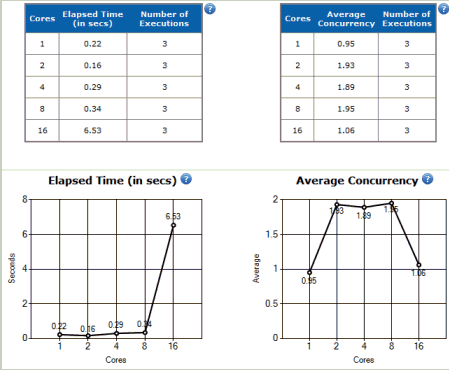
The application has a very important multicore scalability problem. It cannot achieve significant speedups when the number of cores is greater than 2. Besides, it introduces a very big overhead when the number of cores is 16. There is a very important overhead to work with 16 logical cores and the parallelized algorithms are taking more time than the time needed to complete the mission with just one logical core. Believe me; this situation is more common than expected. Redesigning serial algorithms in order to take advantage of multicore is a complex task. Redesigning them in order to scale as the number of cores is greater than 4 is even a more complex task. The manycore challenge is round the corner.
Besides, the report offers two additional graphs with the following information for the different number of logical cores used:
Figure 5 shows the two graphs generated by the same job with multicore scalability problems. As you can see, the application increases both performance and throughput when it moves from 1 to 2 logical cores. However, when it runs with 4, 8, and 16 logical cores, throughput scalability decreases. The performance improvement graph shows two lines, a black line with the actual time needed to run the job with the different number of logical cores and a red line with the optimal time. In this case, the actual time needed to run the application with 16 logical cores is around 600 times the optimal time.
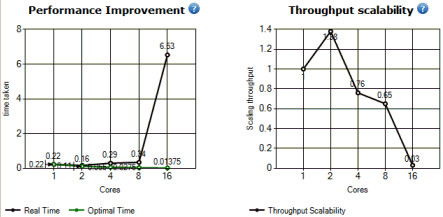
As you can see, the reports are very easy to understand. This application is not able to scale beyond 2 logical cores.
For more information, you can read also check Intel Parallel Universe Portal Forums
You can also read Beware of Those That Claim Linear Performance Increases by Markus Levy.
If you want to use virtualization to test multicore scalability, you can read Using VirtualBox 3.0 Virtualization Software to Measure Multicore Scalability.