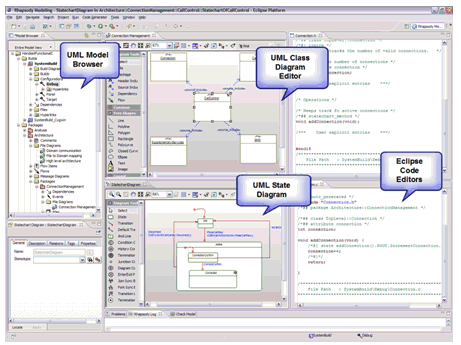
Figure 1: An example of a MDD environment embedded within the Eclipse IDE
Dr. Dobb's Digest November 2009
Paul Urban has more than 20 years experience in the embedded and real-time systems industry developing systems, software, and hardware. Currently, Paul works for IBM Rational as a Senior Marketing Manager for Systems and Medical Devices. He has worked with the IBM Rational Rhapsody MDD environment since 1995 in various roles including application engineer, consultant, and in product marketing. Prior to his career at IBM, Urban developed custom hardware for high-performance computing applications.
Embedded systems and software developers juggle three critical challenges: rising design complexity, increasingly narrow time-to-market windows, and doing more with existing resources. To overcome these difficult issues, many development teams use the Eclipse open source platform for software development. One advantage of the Eclipse workspace is that it provides a highly customizable environment that can be tailored to the needs of individual software developers.
While working in Eclipse, many developers are also using model-driven development (MDD) to obtain automation, visualization, and abstraction capabilities to help improve team communication and design quality. MDD is becoming a mainstream technique to assist productivity and team collaboration. When your team effectively combines MDD and an Eclipse environment, you can create a powerful, customizable development environment that helps you improve overall team effectiveness.
There have been major hurdles for engineers in transitioning to a complete MDD environment with Unified Modeling Language (UML), such as giving up control over the structure of the code and learning to design at the model level. With the recent advances in MDD technology, however, engineers can now successfully use Eclipse C/C++ Development Tools (CDT) and Java Development Tools (JDT) to work at the code level and in a MDD environment. This approach allows users to obtain the benefits of abstraction and automation provided by a modeling, simulation and code generation solution with C, C++ and Java development capabilities -- helping users get a "best of both worlds" workflow.
In the past, MDD environments and IDE forced users to work in one or the other with no substantive interaction between the two "worlds." A developer that wanted to work in the model faced the tedious task of writing the code themselves in an IDE and then the developer would have to maintain both the models and the code since they would easily lapse out of synch with each other. Early MDD solutions -- many of which still exist today -- that generated code produced black box code, which is often unreadable and lacks user control of the results. Getting the black box code to look right and operate as intended was difficult at best; if the user resorted to changing the code, it was a given that the model and the code would be out of synch, leading to a major maintenance issue. Writing the code from scratch was even worse, because the model was rarely updated to reflect any changes implemented in the code. With the model and code out of synch, the value of the reusability, communication and consistency of the model was lost. Now, with a strong Eclipse IDE and a UML-based MDD environment that also offers code generation with automated synchronization of the model and code, organizations have the help they need to develop software in a combined model-based and open-source environment.
The power of the combined Eclipse IDE and MDD environment is that this integration allows users to work at multiple levels. Now teams can work at the code level in the same natural workflow as before, and at the model level, with a host of benefits derived from working in a MDD framework. These benefits include transitioning to a MDD environment at the user's own pace, with reduced risks from changing to a MDD framework. Since developers can continue to work at the code level, there is a short learning curve with the solution and almost zero ramp-up time. As an additional benefit, the MDD environment automatically produces code documentation and test scenarios, easily streamlining this process.
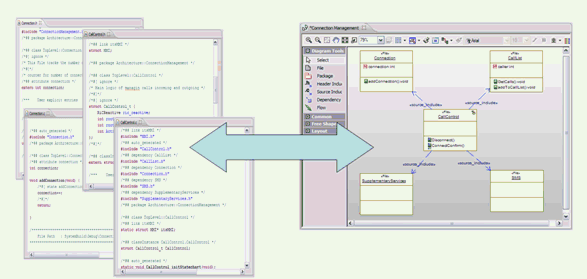
Four important technologies make the bi-directional combination between an Eclipse-based, code-centric workflow and an MDD, model-centric workflow a reality:
By employing these technologies, the code is automatically visualized in the modeling environment and code changes are automatically updated within the model, but the code remains in the same format.
Generating the code from the model automates your development process and avoids manually typing code. Code generated from the model accurately reflects the design, and the model can be used as a source of documentation for the code. It is possible to generate structural code such as classes, operations, and variables, but it's also possible to generate the full behavior from UML state diagrams with tools such as IBM Rational Rhapsody. The generated code can be viewed and edited within the Eclipse editors.
This combination is particularly effective when challenges to meeting project requirements arise. You can use the Eclipse IDE to write or modify the code and have changes automatically appear in the MDD environment, helping ensure that algorithms meet special characteristics including timing, safety, and security. In situations where code size is important or direct interaction with the hardware is required, this workflow is particularly effective. Additionally, a scenario where the existing code must be included in the project, such as a wish to reuse legacy code or a need to integrate third-party code, the combined Eclipse IDE and MDD environment helps provide a smart solution.
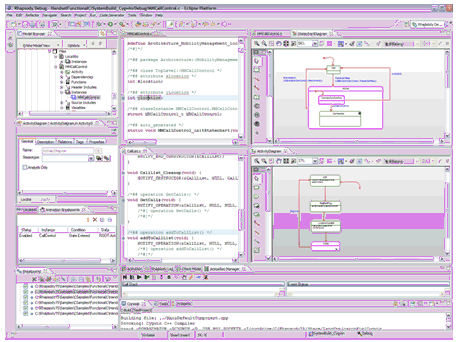
Incorporating graphical modeling into the project allows engineers and developers to abstract away from the code in order to clearly see how all the elements of the project operate together. With the ability to simulate the model and the code on the host computer during the development process, rooting out problems is done quickly at the beginning of the process, when the costs and time needed to fix these issues is at a minimum. Additionally, this allows development and testing to begin before the target hardware is available. By automatically generating the code for a majority of the new capabilities and reverse engineering any existing code into the model, engineers can shorten the development time through automation. Perhaps the most valuable feature is the self-documenting workflow. The ability to generate designs of the code being developed makes design intent much clearer to each stakeholder.
Eclipse users also leverage tools and processes within Eclipse for configuration management and team collaboration. Fortunately, users have the ability to continue to leverage their current processes on the code and model exactly the way it is done today with an extension that provides differencing and merging of multiple branches at the graphical model level. Using Eclipse to maintain and manage the source code with base-aware graphical differencing and merging, the MDD and Eclipse combination helps enable teams to collaborate in real time and work in parallel.
Obtaining maximum productivity benefits requires that the navigation from the code to the model and the model to the code is seamless and automated. The MDD and Eclipse integration achieves this by allowing users to select some code in Eclipse and automatically find and open the corresponding model element (operating in reverse, too), or by simply selecting a model element and the corresponding code is then located.
Embracing a bi-directional, code-centric and model-centric Eclipse-based approach can help your organization rapidly produce high-quality software deliverables -- without adding resources -- while continuing to meet challenging deadlines. Users can embrace a powerful environment when they use the Eclipse IDE and MDD integrated solution that automates software delivery, enables early design validation and maintains consistency across the product lifecycle.