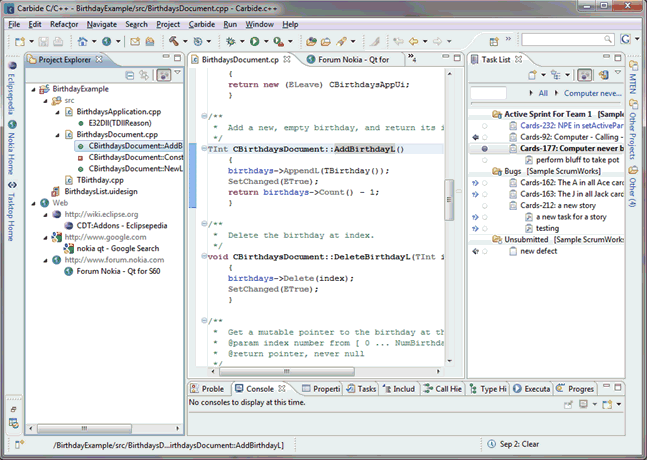
Figure 1: Focused Carbide IDE view on the left, backlog integration with active task on the right.
Dr. Dobb's Digest October 2009
Andy Boyle is principal specialist and IDE concept owner at Nokia.
This article is about lessons my colleagues and I have learned in deploying software development and ALM tools, and how those lessons are being applied in deploying a task-focused interface and backlog integration to Nokia engineers. As you'll see, we learned that tool environments in technology companies requires a much stronger emphasis on treating engineers as customers than what might be the case with traditional ALM deployments. This article is not intended to be a comprehensive guide to deploying software in technology companies, but rather it is a collection of tips that we believe would benefit others undertaking similar deployments.
The key driver for the Tasktop Deployment Project at Nokia is engineer productivity, with the specific objective of leveraging the opportunity of providing engineers with the (Carbide Eclipse-based IDE and Tasktop task-focus interface. Tasktop is the enterprise product built on the open-source Eclipse Mylyn framework. The goal of the Tasktop Deployment Project is to make it easier for engineers to switch between programming tasks (from stories on their Scrum product backlog) by remembering which artefacts an engineer works with in relation to a task, and by automatically filtering the information visible in the IDE to show only the code relevant to that task. For an engineer returning to a task, the task-focused interface answers the question: "Now where was I?"
In terms of measuring the benefit that this technology brings, consider how much time a programmer spends searching within an IDE for programming artefacts versus actually editing them. Past studies of the task-focused interface have shown a statistically significant improvement of this ratio.
The project to provide Carbide with Tasktop/Mylyn capability has two components:
Tasktop's function here is to integrate the various development and ALM tools with the IDE, and to layer the productivity-enhancing task-focused interface on top of that integration.
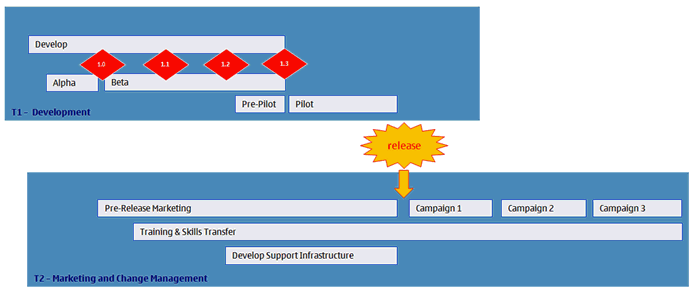
The deployment process will take the product of Tasktop Technologies development component and ensure that it maximizes adoption of the software and its long-term adoption within Nokia. We decided to use the Agile Scrum process to manage both development and deployment, since this allows us to quickly respond to the lessons we learn along the way. The deployment is managed in two week "sprints." Figure 2 outlines the deployment plan. At this writing we are in the midst of sprint 5 of 12 development sprints.
The risks and opportunities faced by a project is dependent upon the environment within which a tool or system is being deployed. Consider the deployment of systems that support a key development process. The deployment will be endorsed by management, users will have to follow the process, and there will be only one tool or system that supports the new process: Users are compelled to use the system. At the other end of the spectrum are tool deployments, where the continued running of a production process is not dependent upon the tool. In this case, there are often alternative incumbent tools or other open source options. Also, the environment will often allow users a degree of latitude in the tools they use. In this environment you are "selling in a free market"and your success will depend upon how well you focus on the needs of the end user. This is the sort of "change" environment where the tactics discussed in the rest of this article come in handy.
While not always possible, incremental deployments are beneficial because they:
Incremental development engages key users early in the development phase. Our development is organized as a series of two-week sprints (driven by a shared ScrumWorks backlog), which deliver functionality to a group of "Beta consumers" who try out the software and provide feedback in the form of defects and new requirements.
The benefits of this approach are:
The benefits of early engagement with key users is so compelling that I would look for a proven agile capability in any supplier undertaking development work on a project I am running. We were fortunate that Tasktop Technologies' background in the Eclipse development process, and their internal adoption of Scrum methods, made it easy for us to work with them in an agile fashion.
A key feature being built into the version of Tasktop being deployed at Nokia is the ability to track usage, not only of the tool itself, but also of the different features of the tool. The information (which is collected anonoymously and cannot be traced back to the end user) helps us paint a picture of how users are using Tasktop, Carbide, and other Eclipse-based tools. This helps:
In my experience, it is really helpful if the tool itself can provide usage stats -- to the extent that I now view this as a requirement for any tool I am going to deploy.
Our guiding philosophy is that our users are customers, their time is important, and we need their first experience of using the software to be positive.
For these reasons, an understanding of what it is that users find confusing in their initial interaction with the "whole product" is valuable and needs to be factored into development plans or your training materials. I say "whole product" here because it's as much about installation and training material as it is about the actual software itself.
This is one of those situations where an incremental approach with early user engagement -- where you have a chance to adapt installation or orientation materials -- pays off. If you pay close attention to the sorts of things that cause people grief during development, you can deal with them by creating either a development story (which changes the UI in some way) or a training story (for which you develop or enhance your training materials).
It's worth noting that something which is patently obvious to you, may not be to someone else; and if you are deploying to 1000+ users, there may be a significant number of them who will respond differently to the "product" than you would . And they may be a lot less forgiving and a lot more vocal. The moral here is to consider carefully every case of new user confusion, as it may be a warning of things to come.
Software that supports complex tasks will probably require an investment in time for users to become adept. A well thought out UI and training material will allow users to perform basic tasks quickly and gain immediate benefit from their first steps onto the learning curve.
With that in mind, one useful approach to organising and presenting your training assets is to structure them into a series of levels from new user (white belt) through expert (black belt). In doing this, you need to:
Again, the driving force behind this is respecting the value of the user's time -- if you make it clear what they need to do to become effective and are careful not to mix basics with advanced usage, then users can structure their learning around their work schedule.
Make any training screencasts short -- even if they're well structured, their perceived size can be off-putting (the user sees a 40-minute price tag on the screen and decides to set aside their learning for another day that never comes). The deployment of the collaboration suite at Nokia (including IM tool and online meeting tools) took the approach of breaking everything down into 5-minute lessons. Regular emails would appear in your mailbox inviting you to view the next lesson in the series. The beauty of this approach is that it gives the user great flexibility in when they pick up new skills -- again, it respects their time. Small chunks of knowledge presented within a well structured learning plan seems to be the most effective way of enabling users to progress from "white belt" to "black belt."
In deploying ALM, the first and most important part of the project has to be respect for the end user. In deploying Tasktop at Nokia, I've learned that incremental deployment and development and using agile methodology to incorporate the user's perceptions and suggestions into the finished product, as well as providing straightforward and easy-to-digest training resources, will smooth any integration process.