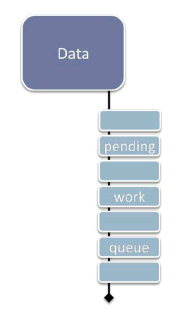
Figure 1: Deferring work via "data + pending changes."
Dr. Dobb's Digest July 2009
Herb Sutter is a bestselling author and consultant on software development topics, and a software architect at Microsoft. He can be contacted at www.gotw.ca.
Don't let a long-running operation take hostages. When some work that takes a long time to complete holds exclusive access to one or more popular shared resources, such as a thread or a mutex that controls access to some popular shared data, it can block other work that needs the same resource. Forcing that other work to wait its turn hurts both throughput and responsiveness.
To solve this problem, a key general strategy is to "design out" such long-running operations bysplitting them up in to shorter operations that can be run a piece at a time. Last month in Break Up and Interleave Work to Keep Threads Responsive, we considered the special case when the hostage is a thread, and we want to prevent one long operation from commandeering the thread (and its associated data) for a long time all at once. Two techniques that accomplish the strategy of splitting up the work are continuations and reentrancy; both let us perform the long work a chunk at a time, and in between those pieces our thread can interleave other waiting work to stay responsive.
Unfortunately, there's a downside: We also saw that both techniques require some extra care because the interleaved work can have side effects on the state the long operation is using, and we needed to make sure any interleaved work wouldn't cause trouble for the next chunk of the longer operation already in progress. That can be hard to remember, and sometimes downright complicated and messy. Is there another, more general way?
Let's look at the question from another angle, suggested by my colleague Terry Crowley: Instead of viewing partially-updated state with in-progress work as an 'unfortunate' special case to remember and recover from, what if we simply embrace it as the normal case?
The idea is to treat the state of the shared data as stable, long-lived and valid even while there is some work pending. That is, the "work pending" that results from splitting long operations into smaller pieces isn't tacked on later via a black-box continuation object or encoded in a stack frame on a reentrant call; rather, it's promoted to a full-fledged, first-class, designed-in-up-front part of the data structure itself.
Looking at the problem this way has several benefits. Perhaps the most important one is correctness: We're making it clear that each "chunk" of processing is starting fresh and not relying on system state being unchanged since a previous call. In [1], we had to remember not to make that implicit assumption when we resumed a continuation or returned from a yield; this way, were are explicit about the "data plus work pending" state as the normal and expected state of the system.
This approach also enables several performance and concurrency benefits, including that we have a range of options for when and how to do the pending work. We'll look at those in more detail once we've seen a few examples, but for now note that they include that we can choose to do the pending work:
Note the "and/or" -- one or more of these may apply in any given situation. Some of these techniques, notably enabling lazy evaluation, are well-known optimizations for ordinary performance, but they also directly help with concurrency and responsiveness.
The rest of this article will consider two mostly orthogonal issues: First, we'll consider different ways to represent the pending work in the data structure, with real-world examples. Then, we'll separately consider what major options we have for actually executing the work, how to use them singly or in combination, and what their tradeoffs are and where each one applies.
Perhaps the simplest option is to represent the data along with a (possibly empty) queue of pending updates or other work to be performed against it, as illustrated in Figure 1. This configuration is the most similar to the continuation style in [1]. However, unlike that style where we explicitly created a continuation object and appended it to a queue that was logically separate from the data, here the pending work queue is an intentional first-class part of the data structure integrated into its design and operation.
One potential drawback to Option 1 is that it can be less flexible if we may need to interrupt and restart an operation we've split into pieces and enqueued. For example, if recalculations are affected by further user input, and multiple chunks of the recalculation work are already in the queue, we may need to traverse the queue to remove specific work items. One way to minimize this concern is to only enqueue one "next step" at a time for each long-running operation, and have the end of each chunk of work enqueue its own continuation (see sample code in [1]).
Figure 2a shows a different way to encode pending work: Attach reminders (or "cookies") that go with the data, each of which remembers the current state of a given operation in progress.
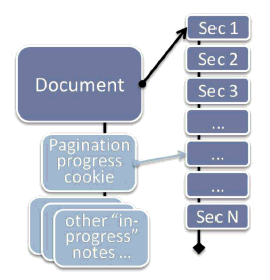
Consider the example of a word processing application, as suggested in Figure 2a: Pagination, or formatting the content of a document as a series of pages for display, is one of dozens of operations that can take far longer than would be acceptable to perform synchronously; there's no way we want to make the user wait that long while typing. In Microsoft Word, the internal data structure that represents a document makes it well-defined to have a document that is only partially paginated, specifically so Word can break the pagination work up into pieces. By executing the operation a piece at a time, it can stay responsive to any pending user messages and provide intermediate feedback before continuing on to the next chunk.
At any given time, we only need to immediately and synchronously perform pagination up to the currently displayed page, and then only if the program is in a mode that displays page breaks. Later pages in the document can be paginated lazily during idle time, on a background thread, or using some other strategy (see "When and How To Do the Work" later in this article). However, if the user jumps ahead to a later page, pagination must be completed to at least that page, and any that is not yet performed must be done immediately.
This approach can be more flexible than Option 1 in the case when we may need to interrupt and restart the operation, such as if pagination is impacted by some further user input such as inserting a paragraph. Instead of walking a work queue, we update the (single) state of pagination for this document; in this case, it's probably sufficient to just resume pagination from a specific earlier point where the new paragraph was inserted.
Figure 2b shows another example of how this technique can be used in a typical modern word processor, in this case OpenOffice Writer.
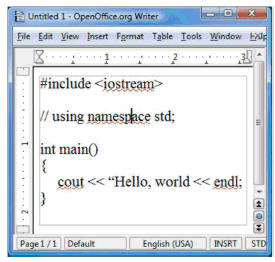
Like many word processors, Writer offers a synchronous "spell check my document now" function that pops up a dialog and lets you step through all the potential spelling mistakes in your document. But it also offers something even more helpful: "red squigglies," or immediate visual feedback as you type to highlight words that may be misspelled. In Figure 2b, the document contains what looks more like C++ code than English words, and so a number of words get the red-squiggly I-can't-find-that-in-my-dictionary treatment. (Aside: Yes, the typo is intentional. See Figure 3b.)
Consider: Would you add red squigglies synchronously as the user types, or would you do it asynchronously? Well, if all the user has done is type a new word, it may be okay to do it synchronously for that word because each dictionary lookup is probably fast. But what about when the user pastes several paragraphs at once? Or loads a large document for the first time? With a lot of work left to do, we may well want to do the spell checking in the background and let the red squigglies appear asynchronously. We can optimize this technique further in a number of ways, such as giving priority to checking first the visible part of the document, but in general we can get better overall responsiveness by doing all spell checking in the background by default to build up a list of spelling errors in the document, so that the information is already available and the user doesn't have to wait as he navigates around the document or enters the dedicated spell-check mode.
Lazy evaluation is a traditional optimization technique that happens to also help concurrency and responsiveness. The basic idea is simple: We want to optimize performance by not doing work until that work is actually needed. Traditional applications include demand-loading persistent objects from a slow database store and creating expensive Singleton objects on demand. In Excel, for example, it is well-defined to have worksheets with pending recalculations to perform, and each cell may be "completely evaluated" or "pending evaluation" at any given time, so that we can immediately evaluate those that are visible on-screen and lazily evaluate those that are off-screen or hidden.
Figure 3a illustrates how we can use lazy evaluation as a natural way to encode pending work. A compiler typically stores the abstract representation of your program code as a tree. To fully compile your code to generate a standalone executable, clearly the compiler has to process the entire tree so that it can generate all the required code. But do we always need to process the whole tree immediately?
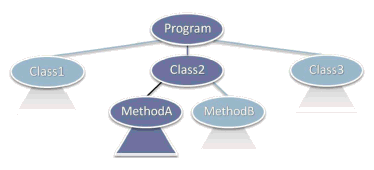
One common example where we do not is compilation in managed environments like Java and .NET, where it's typical to use a just-in-time (JIT) compiler that compiles classes and methods on demand as they get invoked. In Figure 3a, for example, we may have called and compiled Class2::MethodA(), but if we haven't yet called Class2::MethodB or anything in Class1 or Class3, those entities can be compiled later on demand (or asynchronously in the background during idle time or some other strategy; again, see "When and How To Do the Work").
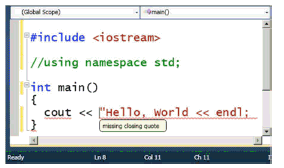
But lazy compilation is useful for much more than just JIT. Now consider Figure 3b: Let's say we want to dynamically provide red-squiggly feedback, not on English misspellings, but rather on code warnings and errors. Just as we wanted dynamic spell-checking feedback without going into a special spell-check-everything-now mode (see Figure 2b), we might want dynamic compilation warnings and errors without going into a separate compile-everything-now mode.
In Figure 3b, the IDE is helpfully informing us that the code has several problems, and even provides the helpful message "missing closing quote" in a tooltip balloon as the mouse hovers over the second error -- all dynamically as we write the code, before we try to explicitly recompile anything. Clearly, we have to compile something in order to diagnose those errors, but we don't have to compile the whole program. As with the word processing squigglies, we can prioritize the visible part of the code, and lazily compile just enough of the context to make sense of the code the user sees; in this example, we can avoiding compiling pretty much the entire <:iostream> header because nothing in it is relevant to diagnosing these particular errors.
This brings us to the key question: So, when and how is the pending work performed?
One option is to do the pending work interleaved with other work, such as in response to timer messages or using explicit continuations as in [1]. This approach is especially useful when the updates must be performed by a single thread, either for historical reasons (e.g., on systems that require a single GUI thread) or to avoid complex locking and synchronization of internal data structures by making the data isolated to a particular thread.
A second approach is to do the work when idle and there is no other work to do. For example, Word normally performs pagination and similar operations in incremental chunks at idle time. This approach is usually used in combination with a fallback to one of the other approaches if we discover that some part of the work needs to happen more immediately, for example if the user jumps to not-yet-paginated part of the document. There are multiple ways to implement "when idle":
Third, we can do the work asynchronously and concurrently with other work, such as on one or more normal background worker threads, each of which locks the structure long enough to perform a single piece of pending work and then pauses to let other threads make progress. For example, in Excel 2007 and later, cell recalculation uses a lock-free algorithm that executes in parallel in the background while the user is interacting with the spreadsheet; it may run on several worker threads whose number is scaled to match the amount of hardware parallelism available on the user's machine.
Fourth, in some cases it can be appropriate to do the work lazily on use, where each use of the data structure also performs some pending work to contribute to overall progress; or similarly we may do it on demand specifically in the case of traditional lazy evaluation. With these approaches, note that if the data structure is unused for a time then no progress will be made; that might be desirable, or it might not. Also, if the accesses can come from different threads, it must be safe and appropriate to run different pieces of pending work on whatever threads happen to access the data.
Embrace change: For high-contention data that may be the target of long-running operations, consider designing for "partially updated" as a normal case by making pending work a first-class part of the shared data structure. Doing so enables greater concurrency and better responsiveness. It lets us shorten the length of time we need to hold exclusion on a given piece of shared data at any time, while still allowing for operations that take a long time to complete -- but can now run to completion without taking the data hostage the whole time.
We can express the pending work in a number of ways, including as a queue of work, as cookies representing the state of operations still in progress, or using lazy evaluation for its concurrency and responsiveness benefits as well as for its traditional optimization value. Then we can execute the work using one or more strategies that make sense; common ones include executing it interleaved with other work, during idle processing, asynchronously on one or more other threads, on use, or on demand.
It's true that we'll typically incur extra overhead to store and "rediscover" how to resume the longer operation at the appropriate point, but the benefits to overall system maintainability and understandability will often far outweigh the cost. Especially when the interleaved work may need to be canceled or restarted in response to other actions, as in the pagination and recalculation examples, it's easier to write the code correctly when the work still in progress is a well-defined part of the overall state of the system.
Thanks to Terry Crowley, director of development for Microsoft Office, for providing the motivation to write about this topic and several of the points and examples. Other examples were drawn from the development of Visual C++ 2010.
[1] H. Sutter. "Break Up and Interleave Work to Keep Threads Responsive" (Dr. Dobb's Digest, June 2009). Available online at http://www.ddj.com/architect/217801299.