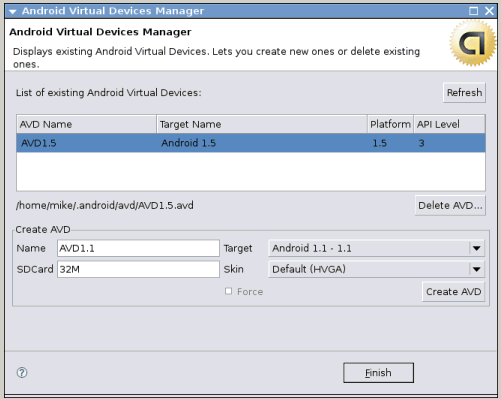
Figure 1: Setting up an Android emulator profile.
Dr. Dobb's Digest June 2009
On the heels of my Android Developer Experience article, Google released a major update to its Android mobile operating system in late April 2009. Version 1.5 corrected a number of shortcomings with the initial launch of the OS along with providing some exciting new enhancements.
A number of additions have been included in the 1.5 release to not only bring it to parity with its closest technical competitor, the Apple iPhone, but also to exceed the iPhone's capabilities in key hardware feature sets. Some of the most notable improvements include:
Additionally, there are a number of other improvements peppered throughout the existing API's as well as the SDK and Eclipse plug-ins. For example, the new SDK allows the easy creation of profiled Android devices, running a particular version of the OS (1.0, 1.1 or 1.5) or allowing for the automatic creation of a virtual SD card up to 64 MB in size. Such an operation in earlier SDK's was an error-prone chore but the 1.5 SDK release via the version 0.9.1.v200905011822-1621 Android Development Tools and Editors add-ons transform this into a simple painless dialog box.
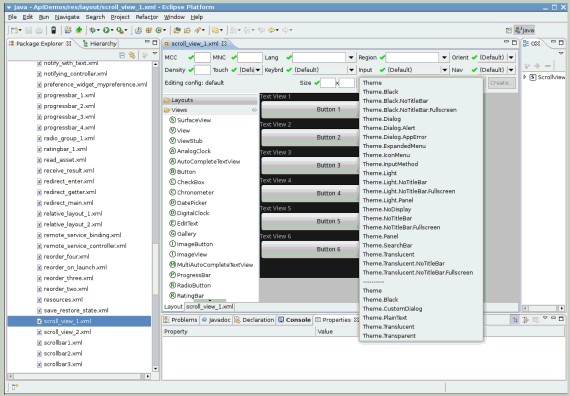
Design-time form rendering is also now available While one can still not 'paint' a form by dragging and dropping controls onto a design surface, the updated Eclipse Android editor plug-ins accurately pre-render the layout XML code. This considerably speeds up development time, though until a robust design-time layout editor is fully baked into the Eclipse plug-ins, an external designer like the free DroidDraw is still quite helpful and sometimes even necessary.
Android Developer Phone users will have an unfortunate surprise waiting for them after they download the 1.5 radio and system images from HTC. For developers and their unlocked developer phones, Google also chose to bow to the pressures of the mobile telecoms by removing local root access. As such, the section of my original article covering the ability to su to root-level file access no longer applies when running 1.5. The only legitimate way to gain root-level access to the file system in the 1.5 release is to tether the developer phone to a Apple OSX, Linux or Windows desktop running the Android SDK, executing the adb shell command from a terminal window and then su'ing from that connection. While Google claims it removed root access on the phone for security reasons, it seems obvious to me that they did so in response to hacks that were appearing in the Android Marketplace (like the WiFi Tether for Root Users application) that effectively transformed the phone into a WiFi access point. While I can understand the business reasons for Google appeasing the telecomms, this does prevent legitimate uses of root access (i.e., killing hidden and/or unauthorized background application processes). It also backpedals on Google's marketing of Android as a truly open, developer-friendly platform.
If Google wanted to advise secure practices while appeasing the developer community, it could have instead simply added a adb switch (ex: tether the phone to a SDK-enabled PC, open a terminal window and execute something like a adb unlock command) to open the phone's root access back up if the developer required it. Alas, at least for the 1.5 release, the only other way to obtain root access on the phone is to load a recompiled, unsigned and unsupported kernel such as the 'netfilter-enabled' kernel the developers of the WiFi Tether for Root Users compiled, available Stickcam, Ustream, and others come to mind.
The AppWidget API is perhaps the most exciting new feature for 1.5 developers due to the way it can be used to expose larger applications in a very small viewport on the Android desktop. Similar to Microsoft Windows desktop widgets, Android widgets live on the desktop and can be mounted and relocated on any of the three Android desktop screens. The OS comes stocked with an Analog Clock, Calendar, Music, Picture Frame and Search widgets, and the Android Marketplace has rapidly expanded with many others including widgets for monitoring battery, internal and SD storage capacity, messaging and many more.
Technically, AppWidgets can be embedded in other applications besides the Android home/desktop, reminding me of the days when Microsoft introduced the concept of OLE (Object Linking and Embedding) to the PC desktop.
Writing a AppWidget is quite easy, especially for seasoned Android developers. The main coding concepts to remember are the XML AppWidget layout metadata and its conduit of communication via the BroadcastReceiver intent. Each of these are defined and stored like other application metadata such as name, icon, version, permissions and more in the Android project's AndroidManifest.xml file.
Once defined, extending a custom class from the AppWidgetProvider helper class helps manage the various broadcast events and managing whatever update and error handling within that class makes widget construction almost too easy. AppWidget is an excellent, easy-to-follow tutorial (accompanied by full source code), written by Android Developer Challenge winner and relatively new Google employee Jeff Sharkey. Additional AppWidget details can be found in the Android Dev Guide.
Using this simple framework, I wrote a rudimentary widget to post an XMPP message to my Identi.ca account that then replicates the post to my Twitter account. Although several Twitter clients are currently available in the Android Marketplace (the best still being Twidroid), I prefer quick and lightweight. While most widgets offer a window into a much larger back-end application, others like mine perform a simple service. The advantageous design aspect behind widgets is the fact that they can support this wide spectrum of usage scenarios.
While still quite a ways behind the iPhone in terms of elegance and ease of use, the Android platform is rapidly gaining ground and, in certain technical categories, surpassing what the iPhone 3G running the 2.x version OS can do. When I demo'd the new Android 1.5 features to a co-worker who is an ardent iPhone fan, he was pleased to see the innovations the Android team had injected into their OS. Why was he pleased? Because these improvements will drive Apple to further innovation on the platform, prompting a mobile arms war between the two platforms that will ultimately benefit consumers with amazing capabilities in the palm of their hand.
Even so, the new 1.5 additions supply developers with powerful, exciting possibilities. Looking over some of my favorite Android 1.0 applications, I foresee programs like the TTS Translator program leveraging the android.speech RecognizerIntenet to allow near real-time spoken word language translation. My favorite Twitter (and Identi.ca/Laconi.ca) client on Android, Twidroid, will hopefully leverage the Widget API in a future release to expose portions of its program to the desktop. In the meantime, I have created my own simple XMPP widget for immediate access, one click quick posts to my Identi.ca account that then propagates my Tweet to my Twitter account. Considering that this hack took me less than an hour to design, code, package and install on my Android Dev Phone, the power and potential of the Android platform is really coming into focus. I can't wait to see what's in store for the next major release of the Android OS.