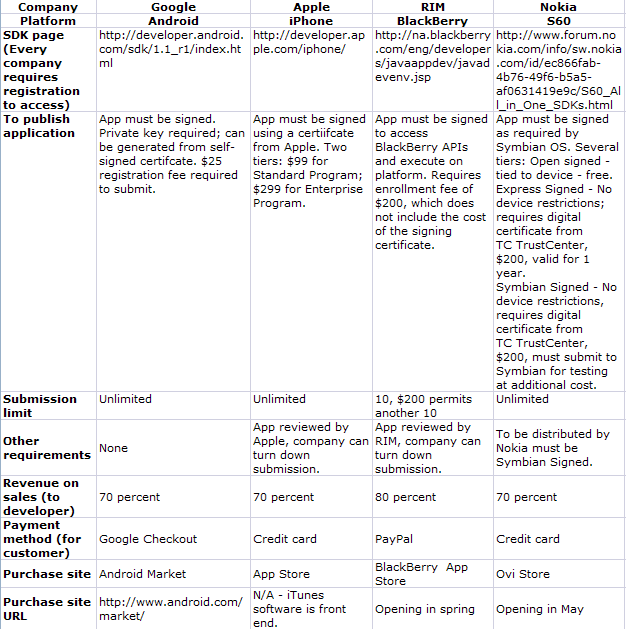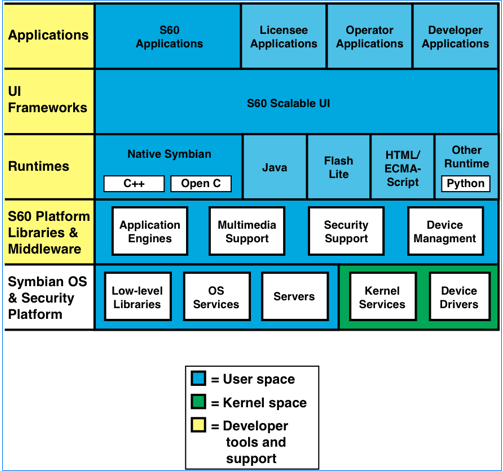
Figure 1: S60 software stack
Dr. Dobb's Digest April 2009
Tom Thompson is the head of Proactive Support for embedded products at Freescale Semiconductor. He can be reached at tom_thompson@lycos.com. The views stated in this article are the author's, and don't necessarily represent Freescale's positions, strategies, or opinions.
Apple's iPhone is either loved or loathed, for as many reasons as there are users. However, there's one fact that everyone can agree on about the device: it shook up the smartphone industry. Despite Apple's coming late to the party in 2007, by the end of 2008 the iPhone had rocketed to second or third place in U.S. smartphone market and upstaging other vendors who have been selling smartphones for over a decade. Depending upon whose market report you consult, along with the surges and slides of smartphone sales, these positions are subject to change over the coming months, but there's no disputing that the iPhone has altered the landscape forever.
What is the secret sauce to the iPhone's success? Feature-wise, the iPhone's hardware hardly makes a compelling case, as it lacks certain features found on other smartphones. However, what the iPhone does, it does effectively and easily. In a single word, the features that the iPhone offer are *useable*. To prove this, all you have to do is take a look at the picture submission statistics of Flickr, a popular photo-sharing site. The graphs on the site's Camera Finder page, which track the volume of photo submissions by device, reveal that the iPhone postings easily outpaced other smartphones with much better cameras. Furthermore, at the end of 2008, the iPhone temporarily matched the submission volume from several high-end digital cameras. What drove this volume was not the camera capabilities of the iPhone, but that its owner can snap and send photos easily and quickly to any web site.
Another factor in the iPhone's success is its means of application distribution. This is done through Apple's App Store, which leverages the familiarity and infrastructure of Apple's iTune software which many people already use to search for and purchase music. While network operators have had their own ways to distribute software, it's obvious that the App Store's quick access to the goods has made the difference, as the store was making $1 million a day a month after its launch in 2008.
What Apple has shown is that an easy-to-use platform, with ready access to applications, can carve out a section of the smartphone market filled with established players. Apple has fired the opening shot in the battle for the next stage in personal computing--the era of the smartphone. "Apple's iPhone radically redefined the concept of the smartphone, and RIM's Storm is obviously the first response," said Tom R. Halfhill, senior analyst for In-Stat's Microprocessor Report. "The huge software community that Apple is building around the iPhone is as revolutionary as the iPhone's hardware design. Google's Android could expand the concept even further by encouraging a more open approach to both hardware and software development."
The existing stewards of the smartphone market, such as Nokia, Microsoft, and Research In Motion, are not going to stand by and let upstarts like Apple and Google grab market share. Already they are beginning to counter with smartphones that offer a touch screen, accelerometers, and location services. However, the situation is complicated by the demands of the network operators, who want to be more than just dumb pipes carrying data and want to make money on services.
As the battle lines form, this is a time of opportunity for developers. Apple's App Store has shown that developers can write software that adds value to the platform--and just as important, distribute them in a way that they can make money. The industry stewards have countered Apple's move with their own application stores, so there's a huge opportunity to write the "killer app" for one of several smartphone platforms.
Without a doubt, Nokia is the steward of the mobile phone market. It dominates the smartphone industry, both in market share and sheer volume of devices sold. The Finnish company sold its first mobile phone in 1992, and at the end of 2008 it owned 38.6 percent of the world market share, according to ABI Research. Admob, which tracks on-line requests to web sites by platform, pegged Nokia's share in mobile network traffic at 41 percent. In terms of devices shipped, the numbers are impressive: In 2005, the billionth (yes, that's with a 'b') Nokia phone was sold. Nokia's smartphone platform, the S60, was introduced in 2001 and the first handset that incorporated the platform was the Nokia 7650. While smartphones are a subset of the Nokia's product line, the numbers are formidable: Nokia shipped 180 million S60-based devices in 2008.
The S60 Platform is a smartphone reference design that provides a consistent interface and execution environment across the various devices made by Nokia and its licensees, which include Samsung, Lenovo, and LG. Some of the S60 Platform's key features are:
To see how S60 Platform implements these features, a tour of its software stack is in order. The platform's layered structure (figure 1) allows the platform to address the different needs of Nokia, the network operator, and the developer.
The topmost layer is the Applications Layer, which is where native S60, licensee, operator, and third-party applications execute.
Beneath this layer is the S60 Scalable UI layer. This layer was developed and is licensed by Nokia, and consists of UI frameworks. The visible components of these frameworks adjust for different screen sizes, or when the device switches between portrait and landscape screen orientations. They use Scalable Vector Graphics - Tiny (SVG-T) and relative positioning to achieve this capability. These UI components also adopt the device's localization settings and rules, such as which direction to draw text, and how to display the calendar and time. The UI framework provides a toolkit of ready-to-use components that implement lists, editable forms, grids, notification screens, content viewers, and other visual UI elements.
The next layer in the S60 Platform stack is the Runtimes layer. As its name implies, this layer contains the runtime libraries that support various programming languages, interactive content display, and web rendering. For example, the runtime libraries for Symbian C++, and Open C/C++ programming languages reside here. It also houses the execution environment for Java ME. Web support for the S60's web browser and for Web Runtime (WRT) widgets is provided via a WebKit rendering engine. The Runtimes layer also supports bindings for other execution modules such as Flash Lite and Python.
The Platform Libraries and Middleware Layer contains the frameworks used to implement specific services for layers higher in the stack, or expose lower-level OS APIs in the stack to the developer. It contains various application engines that manage Personal Information Management (PIM) data, messaging, and data synchronization. Multimedia content rendering--such as video decoding--is performed here. Camera and audio recording interfaces are provided for multimedia applications. A security framework manages the security certificates and keys used for secure data sessions.
The Symbian OS and Security Platform Layer resides at the lowest part of the stack. The Symbian OS provides fundamental system services for the S60 Platform. The OS is microkernel-based, with the microkernel residing in kernel space, while the rest of the OS and software stack resides in user space. This provides security and memory protection for vital low-level services. In addition, the OS places each application into its own separate address space that isolates them from the OS and each other for security and reliability. The Security Layer helps an IT department manage its smartphones, allowing an enterprise to lock or wipe a lost smartphone.
The Symbian OS has undergone extensive field-testing, having evolved from the 32-bit EPOC OS in 1994. The Nokia S60 Platform uses the latest Symbian OS v9, which has a EKA2 real-time kernel. The real-time capability is required to properly manage a device's telephony and multimedia functions. The Symbian OS has a plug-in framework that enables the easy addition of new peripherals, because their drivers and supporting frameworks can be "snapped" into the system without having to modify the OS or other frameworks. A client-server mechanism provides access to low-level system resources, and in fact the kernel itself is a server that parcels out resources to those applications that need them. This transaction scheme allows applications to exchange data without requiring direct access to the OS space.
Tools for S60 Platform Development
There is something just about for everyone to write S60 Platform applications. The platform supports several programming languages, notably C/C++ for porting existing UNIX applications, and Java to port Java ME MIDlets. As mentioned previously, the software stack offers several run-times that offer application development using WRT widgets, Flash, and Python.
The primary programming language for the platform is Symbian C++, which meshes with Symbian's object-oriented interfaces and frameworks. You use Carbide.c++, an Eclipse-based IDE and toolset, to write and debug Symbian C++ code. Symbian C++ has special language idioms for embedded system support, such as a clean-up stack. One the negative side, these idioms and the language's behavior makes for a steep learning curve with the language, although this is no different than learning Objective-C for the iPhone. One other complication is that over the years the platform has accumulated hundreds of API classes and huge number of methods. It takes time to sift through these when learning to write a S60 Platform application.
The platform also supports Open C/C++, which implements a vendor-neutral C programming interface. Open C's runtime consists of an implementation of selected POSIX libraries, while Open C++ uses STL/Boost libraries. These libraries allow ports of Linux applications to the platform. Using the Open C SDK, the Carbide.c++ IDE can be used to write Open C/C++ programs. The SDK can also be used with GCCE and RVCT compilers.
Python language support is available as an installable runtime. Python is valuable as a rapid prototyping environment, and it can be extended to function as a code wrapper that invokes S60 Platform APIs.
WRT widgets can be written using any web authoring tools. A WRT widget is essentially a web page containing HTML and ECMAScript, stored in a .zip file. The widget's markup language and scripts execute locally on the phone. Nokia has developed a plug-in that works with Aptanna's Studio, a development environment used to debug HTML, Javascript, CSS and Ajax code. In latest release of S60 platform, WRT widgets can, through Javascript extensions, access the phone's contacts list or location API directly, to make simple yet useful lightweight applications.
Java ME development can be done with the usual suspects: either Eclipse or the NetBeans IDEs. The Runtimes layer implements the Java ME profile/configuration MIDP 2.0/CLDC 1.1.
Once you've completed that killer mobile app, those programs written in Symbian C++ and Open C/C++ are packaged as SIS files. Symbian SIS files contain installation metadata, program code, and resources. The smartphone's software installer reads the metadata to determine if the application requires specific hardware that might be absent on the device, such as an accelerometer or Bluetooth. The installer can also perform a security check at this time.
For the S60 Platform, the SIS file must be digitally signed. This is required by Symbian OS v 9 for the security check and trusted code mechanism to work. Security certificates can be used to permit or block application execution. Such certificates can be used by the enterprise to control in-house mobile applications, or by the network operator to manage smartphone features or access to network services.
S60 applications can be distributed over-the-air (OTA), or via Bluetooth, or PC connectivity software. Handango has managed the wide-scale distribution of Nokia applications. In February, Nokia announced plans to launch its Ovi Store, which sells applications, videos, games, pod-casts and other content, similar to Apple's App Store. The store will be accessible by Nokia S60 smartphones in May. Nokia will also offer developers seventy percent of the reveue from sales.
Finally, the Symbian Foundation will take on the governance of of Symbian and Symbian-based platforms such as S60 Platform, and move them to open source over the next two years. The source code for these platforms will be available to developers for free.
S60 Platform Summary
Pros:
Cons:
If there is one smartphone widely recognized for its enterprise support and communication capabilities, it's Research In Motion's (RIM) BlackBerry smartphones. BlackBerry smartphones feature a useable--if cramped--QWERTY-style keypad that owners can easily write e-mails, rather than going through all of the contortions of entering leetspeak on a numeric keypad. Combined with wireless support and a server infrastructure that pushes Microsoft Exchange e-mails to the device, BlackBerry smartphones enable on-the-go workers to keep in touch from anywhere.
The Canadian company introduced its first device, a wireless two-way pager, in 1999. In 2002, it launched its first BlackBerry smartphone. RIM, as a smartphone steward, has mounted a rapid response to the iPhone threat: it launched the Storm, a full touch screen version of its platform, in Q4 of 2008. In addition, the company offers a range of BlackBerry smartphones with different feature sets, knowing that one size does not fit all. Some of the BlackBerry platform's features are:
Like Nokia and Apple, RIM owns and builds the entire hardware and software stack for the BlackBerry smartphone, which gives them the ability to tightly integrate software features to hardware functions. Interestingly, at its core the BlackBerry smartphone is Java ME device, and can execute Java ME MIDlets. However, RIM's BlackBerry Device Software has enhanced the capabilities of the platform with its own Java virtual machine (JVM), along with new Java classes that offer multitasking capabilities and UI enhancements to go beyond the capabilities of Java ME.
Let's take a look at the software stack (Figure 2) to see how RIM accomplished this.
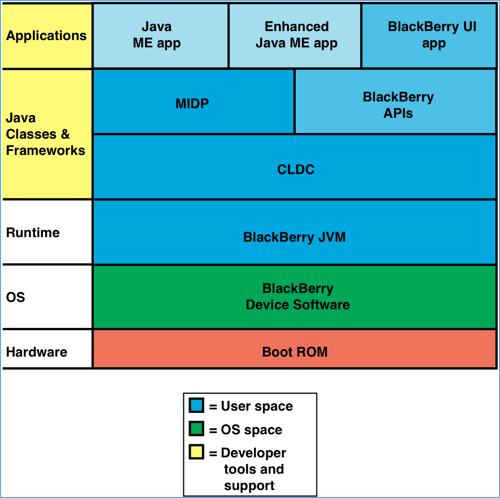
The topmost Application layer is where Java ME applications (MIDlets) and BlackBerry UI applications execute. You can also take existing Java ME code and add specific BlackBerry classes to make a hybrid Java ME application. For example, you might invoke a BlackBerry API call to select an audio output device (speakers or headphones), then use a standard multimedia player class to play the audio content. Hybrid applications are possible as long as you don't intermix MIDP 2.0 and BlackBerry API calls that perform either screen drawing or application management.
Drilling down, the next stack layer is the Java Classes and Frameworks layer. The programmer who has written many a Java ME MIDlet will be on familiar ground here, as this layer resembles the Java ME platform. There's the usual MIDP MIDlet classes that manage the UI and application life cycle, and beneath that resides the CLDC classes that provide access to low-level resources. For BlackBerry smartphones running BlackBerry Device Software 4.0 or later, the platform's Java profile/configuration is MIDP 2.0/CLDC 1.1 compliant, otherwise it uses MIDP 1.0/CLDC 1.0. This layer also implements useful Java Specification Request (JSR) API packages, such as JSR-75 (PIM and FileConnection services), JSR-135 (multimedia capture and playback), JSR-82 (Bluetooth support), JSR-120 (wireless messaging), and JSR-179 (location services), to name a few. All of these classes and those of the application are loaded and executed by the BlackBerry JVM.
The BlackBerry API extensions in this layer enhance the platform in several ways. First, they provide UI APIs for custom menu, widget, and screens. Next, an application class, Application, enables an application to persist and continue to run in the background, unlike the MIDP Midlet class which requires that the application terminate when it is closed. Other APIs handle the set-up and tear-down of network sessions, and manage I/O to servers. Finally, these APIs provide hooks into the device's camera, media player, and Web browser. An application can be written using only CLDC and BlackBerry APIs. Such an application has access to all of the device's features including, for example, Bluetooth, the accelerometer, and the touch screen on the Storm. It can also run concurrently with other applications. Finally, the application can be launched when the BlackBerry starts up and then run in the background. The catch to writing an application that uses BlackBerry API extensions is that it ties the application this smartphone. However, this is no worse than using the unique Java classes found in Google's Android.
The BlackBerry Device Software layer implements a low-level multitasking, multithreaded operating system. It uses listener threads to monitor for specific device events. For example, these listener threads manage push support for e-mail and messages. The BlackBerry Device Software allows an IT manager to configure applications and disable certain smartphone features, and to blank a lost device remotely.
Software Tools for the BlackBerry Platform
With the BlackBerry platform being a Java ME platform, you can use a number of Java development tools, such as Eclipse and NetBeans to write applications for BlackBerry smartphones.
RIM also provides a BlackBerry Java Development Environment (JDE), which is a set of standalone tools. The JDE consists of an IDE that allows you to write, build and test Java Mobile and BlackBerry smartphone applications at the source code level. The JDE has phone simulators that allow you to view and interact with the program. It also has a Signing Authority Tool, which you use to sign the application. Note that for your application to access the BlackBerry APIs, the code must be signed. Simulator software for e-mail and communications with BlackBerry Enterprise Servers is available for thoroughly checking out a networked application.
For specialized client/server applications, RIM provides RAD tools that can quickly build BlackBerry smartphone client applications. These tools can prototype services for a UI framework, data management, and client-server I/O. The RAD tools are available as a plug-in for Microsoft Visual Studio, or as a stand-alone Mobile Development System (MDS) used inside of Eclipse.
For Web development, you can use standards-based HTML, Javascript, and CSS. The BlackBerry web browser is standards compliant, and on BlackBerry Device Software 4.6 or later, the browser adheres to AJAX, JavaScript 1.5, CSS 2.1, DOM L2, and HTM4.01 standards. The platform also supports a messaging arrangement termed "Web Signals". When an update is made to a web site, its server can use RIM's push infrastructure to send a notification to a BlackBerry device. The pushed message includes a hyperlink back to the updated content.
Applications can be distributed over the air (OTA), or through a web loader application on a PC, with a BlackBerry smartphone tethered to the computer with a USB cable. RIM has been distributing applications through Handango. However, in March the company plans to launch an app store to distribute applications. Developers will retain eighty percent of the revenue made from sales of the application.
BlackBerry Summary
Pros:
Con:
Apple introduced its first iPhone in September 2007, and 11 months later in July 2008 followed that with the iPhone 3G. By the end of 2008, the company sold over ten million iPhones, to capture one percent of the mobile phone market. Not a bad beginning for a newcomer to the industry. This success occurred despite the fact that the device has a low-resolution 2 megapixel camera, and lacked some common smartphone features such video recording, voice dialling, and a to-do list.
On the other hand, what makes the iPhone a success is that it dispensed with the phone keypad and function buttons. Instead, the iPhone uses a touch screen to display whatever the user needs at the moment: a web page, the latest e-mail, a map displaying your current location, an iPod music selection screen, and more. Getting to a feature usually takes a couple of taps on the screen. The iPhone applications display large, uncluttered interfaces, partially because the touch screen does not require a stylus, and Apple promotes the design goal that applications should accomplish one purpose. Apple is able to integrate its software well with the device because the company builds the iPhone's hardware and its software stack, similar to the smartphone stewards.
Some of the capabilities of the iPhone are:
The iPhone has one of the best browsing experiences for a smartphone. Its WebKit-based Mobile Safari browser conforms to AJAX, ECMAScript 3, CSS 2.1 and partial CCS 3, DOM 2, HTML 4.01, and XHTML 1.0 standards, and renders most web sites accurately. The multi-touch gestures interface lets you to zoom in and interact with the content. On the other hand, there's no Flash support, and you can't download files. A built-in e-mail program uses a virtual keyboard to type in messages, eliminating the need to do leetspeak, and you can view certain types of mail attachments. Unfortunately, the mailer doesn't let you store these attachments as files in a directory, not does it support a landscape mode (unlike the browser). The smartphone is also an iPod, and lets you choose music using CoverFlow (a unique graphic selection mechanism) or from a typical list. On the negative side, for the iPhone 2.2 OS the Bluetooth stack lacks a A2DP profile, so your music choice can't be played through wireless stereo headphones. Everywhere you look, the iPhone exhibits this Jekyl-and-Hyde personality of doing certain things very well, but then there are those odd omissions.
The iPhone 3G can work in tandem with Microsoft Exhange Server 2003 and 2007 to support enterprise operations. For example, Exchange's ActiveSync technology can perform remote wipes on lost iPhones, and manages users logging to the corporate intranet. The smartphone supports VPN connections that can use Cisco IPSec, L2TP/IPSec, PPTP and certificate-based authentication (PKCS1, PKCS12). ActiveSync's direct push feature can send updates regarding e-mail, calender, and contacts to the device. Note that iPhone only allows one Exchange account. For non-Exchange users, Apple's MobileMe online service, after some fits and starts in 2008, now supports the push of e-mails and changes to the calendar and contacts.
To the end user, there's no concept of files on this platform (although they do lurk behind the UI curtain), which explains why you can't download content. Copy-and-paste is not supported for version 2.2. Only one third-party app executes at a time, which some competitors attempt to allude that the iPhone can't multitask. However, e-mail can be checked while music plays in the background, so obviously it can. What is going on here? To find an answer for that, we have to delve into the iPhone OS's software stack (Figure 3).
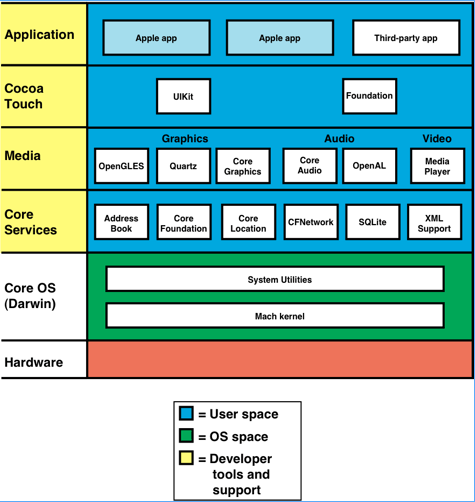
Like the other mobile platforms, the topmost layer of the iPhone OS stack is the Applications layer. Apple applications can run concurrently, but only a single third-party application can run alongside of them. The platform doesn't have any Java implementation, so Java ME applications aren't allowed.
Beneath this layer is the Cocoa Touch layer. It consists of frameworks that manage the UI, such as capturing events, managing windows, and displaying graphics within these windows. Cocoa Touch is a subset of Apple's Cocoa, which are object-oriented frameworks written in Objective-C. Cocoa provides many classes, or components, from which you can build a fully-featured application. However, Cocoa Touch frameworks are tailored for the constraints of the smartphone platform. These frameworks strike the right balance between abstracting much of the iPhone's low-level hardware, while still enabling you to use device-specific features. For example, Cocoa Touch components manage most of the writing to the screen and playing media, yet there are APIs exposed that let you access the accelerometer and camera.
Further down the software stack is the Media layer. This layer manages all graphics rendering, audio generation, and playback of audio or video files. While Cocoa Touch provides the high-level means to generate animations and graphics, you can use the frameworks in this layer to exert fine-grained control over the display of your content. Three-dimensional objects are displayed with an OpenGL ES framework that conforms to the OpenGL ES 1.1 specification. This framework uses the device's hardware accelerators to provide full-screen animations at high frame rates, a valuable capability for games. This layer also uses Quartz, which is a vector-based graphics engine, to handle 2D drawing and graphics effects. The Quartz engine is identical to the one found in Mac OS X. The Core Animation frameworks support sophisticated animation and visual effects, with the image compositing required to accomplish them is performed in hardware. Playback and recording for audio files and streams is handled here, and a media player framework provides full-screen playback of video files of several format types.
The Core Services layer provides system services for the higher layers. It consists of frameworks and engines that support an address book, a SQL database (SQLite), Location services (using GPS coordinates), and networking services. A security framework manages the digital certificates, keys, and access policies that can protect an application's data.
The Core layer implements basic OS services, and consists of the kernel, drivers, and OS interfaces. The kernel is Mach based, and manages low-level functions such as virtual memory, POSIX threads, network connectivity (BSD sockets), math computations, file system access, and more. Only a select few higher-level frameworks have access to the kernel and drivers. If necessary, an application can indirectly access some of these services through C-based interfaces provided in a LibSystem library.
The iPhone OS stack has a rich legacy. Cocoa, the Mach kernel, and certain Core layer components had their start with the original 68030-based NexTSTEP computer in 1989. Over the years, this software was ported to PowerPC- and Intel-based platforms, and finally to the iPhone's ARM processor. As a consequence, the code has been subjected to rigorous examination during these ports. It has also undergone extensive field-testing, since the Cocoa frameworks, Quartz, and Mach kernel are part of Mac OS X for millions of Macintosh computers. The iPhone OS can be considered a highly stripped-down version of Mac OS X, thus bringing some of that operating system's reliability and multitasking capabilities to the platform.
However, there are fundamental differences between the iPhone OS and Mac OS X, given that one runs on an embedded smartphone and the other on a desktop computer. One difference is that there is very little RAM memory to spare in the iPhone. This is not surprising given that memory--not the processor--is usually the most expensive part in the device. The iPhone comes with 128 MB of RAM, and after the OS and Apple applications take their share, there can be anywhere from 40 MB to less than 4 MB of free RAM available for a third party application. Simply put, there's not much memory to run more than one additional application. The small amount of free memory and one-app-at-a-time requirement complicates any implementation of a copy-and-paste mechanism.
Furthermore, developers have determined that everything runs at root level in the iPhone. There had to be a design compromise behind this decision, but obviously every process executing with root privileges poses a potential security threat. As a security sandbox, the iPhone OS permits only one third-party application to run at a time, and not in the background.
iPhone Development Tools
You write iPhone applications using XCode, which is an IDE developed and maintained by Apple. Native applications are written in Objective-C, which is an object-oriented extension to C. Unlike C++, Objective-C is both a language and a runtime. Also, Objective-C's syntax for objected-oriented operations is significantly different from those used in C++. In short, it takes some effort to get familiar with the language's syntax and idiosyncrasies.
XCode's development tools allow you to debug iPhone applications in an iPhone simulator, and you can trace and place breakpoints at the source code level. The SDK that provides the Cocoa Touch frameworks and simulator is a free download. However, to run your program on an actual iPhone, the application must be signed, which requires that you purchase a signing certificate. With an enterprise signing certificate, you can distribute provision profiles that allow internally-developed applications to execute only on those iPhones that have installed the profile.
For web-based applications, the SDK provides Dashcode, which is a framework based on a Web page composed of HTML and Javascript. You can use DashCode's simulator to write and test your web application. You can also use several other third-party frameworks to write web applications, and debug these with Aptanna Studio's tools.
All iPhone applications are distributed via Apple's App Store, and they must be digitally signed. The App Stores uses the familiar iTunes front end to both display and handle purchases. Applications can be obtained through iTunes on the desktop computer with the iPhone tethered to it by a USB cable, or OTA via an App Store program on the iPhone. A developer's path to the money is clear-cut: seventy percent of the revenue goes to the developer, and thirty percent to Apple. There have been several instances where developers made small fortunes with a highly popular app. Other smarthphone vendors have quickly adopted similar revenue arrangements.
Apple reviews the application you submit before publishing it. This review can screen applications of questionable content or malicious code, but it's also been used to quash applications that "duplicate the functionality" of the iPhone. This is unfortunate, as developers could fill the gaps or improve the features of the device. For example, adding some useful Bluetooth profiles that supported stereo headsets, data synchronization, or the ability to implement multiplayer games would be useful, and make money.
Despite some missing features, the iPhone's ease-of-use advantage has made it a popular device. However, as this article points out, the smartphone's industry stewards are working on leveling the playing field in terms of the UI, and Apple must counter with additional features or perhaps different iPhone models (one with more memory) to continue its growth.
To this end, Apple announced an update in March, iPhone OS 3, that provides some of the missing features mentioned here, such as the A2DP profile for Bluetooth, voice recording, and copy-and-paste. Landscape mode is now supported by more Apple applications (the feature has always been available to developers), and push notification on the device side. You're still limited to running one third-party application at a time, and no background task are allowed. A beta became available at the time of the announcement, and it is expected to be released by mid-year. The update can be installed on all existing iPhones and iPhone 3Gs, although the older models might have fewer features. Apple declined to comment on this article.
iPhone Platform Summary
Pros:
Cons:
|
New Release of iPhone OS Adds New and Missing Features
On March 17th, Apple announced the iPhone OS 3.0, which promises to fill in some of the missing features on the device, while adding new capabilities.
Missing features that have been added:
What's been added:
What's still missing:
The update will be available by mid-year, and can be installed on all existing iPhone models through an iTunes download. It is also available for iPod Touches, for a small fee. Apple declined to comment on this article.
—TT |
Like Apple, Google is one of the upstart companies that jumped into the smartphone fray recently. In late 2007, the company launched its Android platform, a smartphone stack developed for the Open Handset Alliance, which is an association of 48 hardware, software, and telecommunications companies. In the fall of 2008, T-Mobile released the G1. Made by HTC, the G1 is the first smartphone using the Android platform. According to Admob, in January 2009 Android generated 3 percent of the smartphone network traffic -- a signficant jump considering the platform had only been on the market a few months. It will be interesting to see if this trend continues, especially as more Android-powered smartphones appear.
The Android platform is built upon Linux 2.6, whose pedigree can be traced back to its first source code release in 1991. Since then, Linux has evolved and its code heavily reviewed and extensively field-tested on just about everything, from embedded systems to mainframes. Linux therefore provides a solid foundation on which the Android platform is built. In addition, Android is distributed under the Apache license, which means all of its software components are free and the source code available.
Some of the features of the Android platform are:
Android comes with a number of useful applications, such as an e-mail program (which makes use of Google's Gmail), a mapping program (using the company's Google Maps), and a browser that uses WebKit, not Google's Chrome web browser. However, Chrome happens to be based on Webkit.
Applications are written in Java, but Android is not Java ME, nor does it support such applications, for reasons that we'll see when we tour its software stack. Like most smartphones nowadays, Android can handle changes in screen orientation, and provides access to accelerometer data. Android applications are designed to operate concurrently, and on the G1, the platform is noted for its ability to both browse and manage multiple IM conversations. On the other hand, such heavy use of the smartphone's CPU shortens battery life significantly. Maybe Apple is on to something in limiting the number of applications that the platform can run.
Android as implemented on the G1 has some strange omissions, just like Apple's iPhone OS on the iPhone. For starters, Android doesn't offer a virtual keyboard. This problem is mitigated on the G1 with its built-in keyboard, and you can expect future Android releases to include an input management framework that support soft keyboards and other input options. Like the iPhone's version 2.2 OS, Android's Bluetooth stack lacks many useful profiles. Flash support is lacking as well. On the positive side, the Android APIs support a touch interface (and the G1 has a capacitive touch screen), but not any multi-touch gestures. The platform does currently support copy-and-paste, a feature the iPhone OS won't get until version 3.0. Note that Android's copy and paste only handles editeable text fields, and copying text from the web pages is the browser isn't allowed. For starters, it doesn't offer a virtual keyboard. This problem is mitigated on the G1 with its built-in keyboard, but it does create problem for smartphone manufacturers who wish to release a touch-screen only device. Although the APIs support a touch interface (and the G1 has a capacitive touch screen), it lacks multi-touch gestures, which complicates web surfing and editing mail replies. Copy-and-paste is supported, but only for browser URLs, and not text in applications. Like the iPhone's OS, Android's Bluetooth stack lacks many useful profiles. Flash support is lacking as well.
Let's now examine the Android software stack (figure 4) to see how it implements the platform.
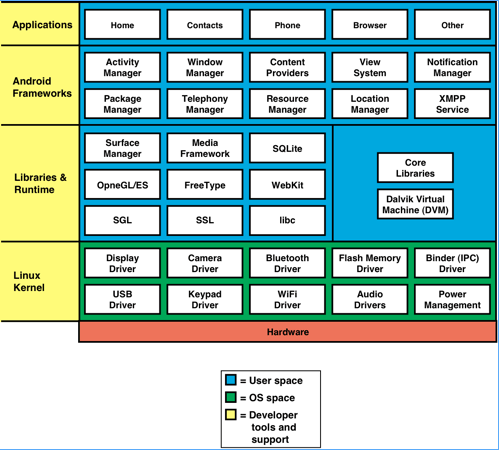
The Applications layer hosts all Android and third-party applications, and several or more third-party applications can execute simultaneously. However, as noted, doing so can shorten battery life.
Beneath the Applications layer is the Android Frameworks layer. This layer consists of Java classes that provide application functions such as window management, window content display, application messaging, and handling phone calls. Obviously the interface Android presents at this level uses the Java programming language, and because the source code is available, you can modify these classes to extend their capabilities or over override their behavior. Note that some of the lower levels in the stack present C++ interfaces.
Next on the software stack comes the Libraries and Runtime layer. The libraries implement 2D and 3D graphics support, along with multimedia content decoding. This layer has engines to support application features, such as a SQLite database engine and WebKit, which handles web content rendering.
Like Java ME, Android strives for hardware independence by using a bytecode interpreter to execute Android applications. However, it doesn't use Sun's JVM, but instead uses its own Dalvik Virtual Machine (DVM). The advantage to Android's use of a different bytecode interpreter is that the DVM was designed so that multiple instances of it can run, each in their own protected memory space, and each executing an application. While this approach offers stability and a robust environment for running multiple applications, it does so at the expense of compatibility with Java ME applications.
The lowest layer of the stack is the Linux kernel. It provides preemptive multitasking and system services such as threads, networking services, and process management. It handles all low-level drivers and manages the device's power. For a detailed description of Android system stack, see my earlier DDJ article, "The Android Mobile Phone Platform", September 2008.
Android Developer Tools
The programming language of choice for the Android platform is--no surprise here--Java, although you can use C++ if you're writing code that might reside in the other layers. With the Android Development Tools (ADT) plugin, you can use Eclipse to write and debug your applications. Other Java IDEs, such as IntelliJ, can be used. The Android SDK (now at version 1.1) is a free download.
Android's core Java libraries are derived from the Apache Harmony project, and are as compliant with J2SE as Google could can make them. Seasoned Java programmers will find the Android SDK an amalgam of Java SE and Java ME methods and classes, along with unique new ones that address the needs of mobile platforms. In short, while Java programming experience is valuable, you still have to master the SDK's new classes and methods. A manifest file serves a similar function as the Java ME one in that it describes the contents of the archive file and its entry point. However, the Android manifest also specifies the application's permissions, which are required for sharing resources, and the events that the application can handle. Additional XML files describe the application's UI elements, and how they are laid out on the screen. All of these enhancements mean that the Android program that you write aren't portable to other Java ME platforms, but this is also true of applications that you'd write using RIM's UI APIs.
The developer tools compile the Java code to generate Dalvik bytecode files, with an extension of .dex. These files, along with the manifest, graphics files, and XML files, are packaged into an .apk file that is similar to a Java JAR file. Fortunately, you can use the existing Java signing tools, Keytool and Jarsigner, to create keys and sign your Android application.
All Android applications must be signed or the platform won't execute them. While the SDK provides a developer key for use during code test, you must generate a private key to sign the application when it is ready for public distribution. The private key is required to identify the author of the application, and to establish relationships between applications so that they can share code or information. The certificate that you use to generate the private key does not require a signing authority, and you can use self-signed certificates for this purpose.
At the end of 2008, Google announced the availability of the Android Developer Phone 1, which is a HTC phone with the Android platform installed. This eliminates the purchase a G1 phone and a service contract from T-Mobile. The Developer Phone provides access to a shipping Android device without the cash outlay or contract contortions required when developing for the other platforms. The Developer Phone allows you access to a shipping Android device without the cash outlay or contract contortions required for the other platforms.
For application distribution, there's Google's Android Market, which was launched in October 2008. The only requirements are that the application must be signed, and you must pay a $25 USD application fee. Initially all applications distributed by the site had to be free, but in February the site began supporting priced applications. Google allows developers to take seventy percent of the proceeds. Unlike Apple, Google doesn't review the applications submitted to Android Market, although the user community can rate the application. This arrangement gives you a shot at writing an application that can truly enhance the platform. On the other hand, it's possible that you might pick up a malicious application before it is detected by the user community. Like most things in life, sometimes there isn't an ideal way to handle things, just practical compromises.
Android Summary
Pros:
Cons: