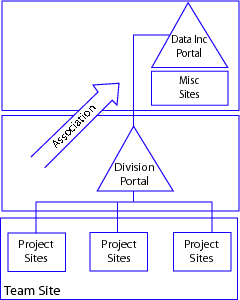
Figure 1: Logical architecture for collaboration platform.
Dr. Dobb's Journal February 2007
In the new world economy, global delivery models have become a way of life for most major corporations. Mergers and acquisitions, corporate globalization, technology breakthroughs, and the quest for low-cost solutions are just a few of the reasons behind this phenomenon taking shape.
When dealing with global IT projects, you quickly discover an inherently complex array of factors that must be managed to ensure success. These factors include some of the most basic elements—scope, cost, quality assurance, risk, and communication. In addition, distributed delivery—specifically global delivery—adds more complexity and poses additional challenges to achieving overall success. Many organizations implement a distributed model as a means of dealing with the issues. However, without having the systems, methodologies, and support mechanisms in place, the path to success is undefined.
In determining how to mitigate the challenges posed with global IT projects, we researched best practices in project management and technology solutions, and developed a customized project management system based around an array of applications including Microsoft SharePoint Services. The example we cite in this article helped streamline and mitigate the challenges behind the development of applications and is ushering in a true 24-hour development lifecycle by providing synchronization between development centers.
The typical start for the process of collaboration in IT is with one individual who is on-site, off-site, or offshore. An employee may generate an idea and share it with peers. From there, teams form around the idea and launch a project, creating the need to share and disseminate information quickly. Teams working together on related projects then might form a group or division. At the division level, effective organization through the categorization of content is of paramount importance. When the project finally reaches the enterprise level, leaders need the capability to assess high-level summaries and key documents to effectively disseminate information across the organization.
If the right applications are used effectively, central management communications and administrative information should successfully flow between divisions, teams, and individuals. Using a central portal can facilitate new ideas and project information flow from individuals and teams to divisions and the enterprise.
In dealing with the factors that may inhibit success, it is clear that technology can help increase productivity on an individual and team basis. A hybrid of customized applications derived from systems such as Microsoft SharePoint Services let project teams create portal sites for information sharing and document collaboration.
Project management portals let users locate distributed information quickly and efficiently, as well as connect to and work with others more productively. The sites facilitate team participation in discussions, shared document collaboration, and surveys. In the portal Data Inc. (the company we work for; see www .datainc.biz) implemented, site content is readily accessible from both a web browser and through clients that support web services when dealing with inherently complex IT development projects. The document collaboration present in the system allows for easy check-in/check-out and document version control. This system is also integrated with other project management tools, such as Microsoft Project Server, facilitating better team collaboration and information centralization. In our case, the system has streamlined the management of work, collection of business intelligence, and improved overall productivity, ultimately streamlining and formalizing standards, processes, controls, and documentation pertaining to application development.
Overall, developing a project management portal based around Microsoft SharePoint Services helped us streamline:
Figure 1 is a logical representation of how a project management system (such as the one used by Data Inc.) can be utilized for collaboration across an organization.
Each element present in the collaboration topology work in concert, addressing organization-wide enterprise collaboration requirements. This specific enterprise-wide collaboration consists of:
With any globally distributed organization, a consistent portal experience is needed to ensure that standards are implemented effectively. In our case, we wanted to leverage the capabilities of Microsoft's SharePoint technology in particular to meet this goal.
Borrowing from the Data Inc. example, a shared services infrastructure can be deployed at a single central location in concert with multiple shared service farms globally, ultimately creating redundancy should any problems occur. Figure 2 shows a typical deployment that includes three shared services farms at the enterprise, divisional, and group levels.
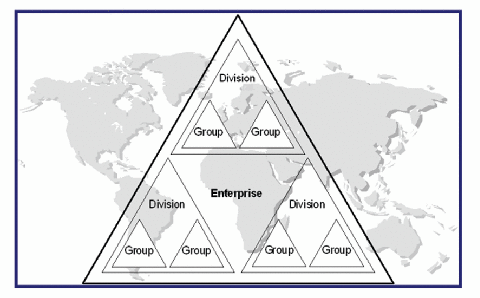
This type of deployment helps standardize practices in project management across the board, creating a true 24-hour development lifecycle on projects.
Upon deployment of the system in our case, individuals and teams found that they were able to execute work faster. Using the capabilities of integrated applications such as Microsoft Project Server 2003, the technology team was able to provide Enterprise Project Management (EPM) capabilities with team workspaces to improve the overall integration and efficiency of project management tasks. From the deployment of the system, we realized several benefits including:
Effective scope management is critical to the success of a global or geographically distributed project. In our example, a hybrid methodology is the typical choice for most projects; taking advantage of on-site, off-site, and offshore resources to facilitate faster time to market and cost savings for organizations. In defining the scope, we utilize the capabilities of applications such as Microsoft SharePoint and WebEx for team discussions and feedback solicitation. From there, project objectives, deliverables, change control procedures, and a Work Breakdown Structure are established and stored within an online SharePoint repository, accessible 24/7 online by all stakeholders. The project can then start and move forward.
During the project, any actual changes made are managed using a "list feature" on the SharePoint web site. The changes are then reflected in the Microsoft Project Server.
In addition to streamlining the management of scope within a project, the system has helped to streamline time management by making information readily accessible throughout teams, divisions, and executive management. In our case, the solution integrates with applications such as Microsoft Project Server for task scheduling and progress tracking, letting team members view up-to-the minute information on the projects they are working on, including the work breakdown structure and allocated tasks. Clients also have access to the solution—providing them with the capability of monitoring the progress of projects and their milestones.
To keep project costs in check, integration with the latest accounting solutions is key. Data Inc. opted for Microsoft Dynamics SL (formerly Microsoft Solomon Accounting Software), which fully integrates into the project management system, providing a centralized repository for accessing accounting costs and other data.
Since we have a globally distributed team, the features of Solomon have been useful for facilitating the flow of accounting and cost data throughout multiple locations through the management of multiple currencies and financial statement translations. Divisions can tailor their capabilities based on a number of different requirements. This ultimately helps keep costs down and provides an alert to the stakeholders within a project on how the costs continue to evolve.
Ensuring that each issue is solved through a decision based around the facts and collaboration is paramount. In our case, tools such as the integrated discussion boards present in the SharePoint solution helped streamline the process behind resolving issues, ensuring that quality within a project is maintained.
The process begins with a team member opening a new issue. The newly entered issue appears on the team member's home page accessible by the project center and tasks section within the portal.
From there, other team and divisional members can access the issue and contribute information through the discussion field. Based on the information provided by the team or division members, a solution can then be developed and recorded for future reference, creating a knowledgebase of information. Upon change of status, the issue is flagged depending on the actual resolution as open, assigned, updated, or resolved.
Effective communications management is critical in any distributed delivery engagement. In a distributed environment, communications issues range from production support calls to data security issues, and the people that need to be informed/involved run the gamut within the customer and vendor organizations.
Everything from how developers interface with end users to the frequency of executive steering committees (and everything in between) should be discussed and agreed upon prior to project inception. The issue of communications cannot be minimized.
Utilizing a single node for all communications such as SharePoint helps to streamline communications among all project stakeholders. Clients could log into SharePoint to check project status, request meetings, and log defects. Project managers and team members could communicate using meeting workspaces and threaded discussion boards as well. In addition, there is integration with Microsoft Outlook for e-mail alerts of task assignments from Microsoft Project Server. SharePoint facilitates resource centralization, document repository, and knowledge retention.
When it comes to IT projects, the implementation of a global delivery model is not an easy task. However, utilizing the right technology solutions and implementing them along side of project management methodologies can help deliver projects on time, under budget, and without incident. In the case of Data Inc., this technology system has become a way of life in the quest to streamline the development lifecycle and create a true 24-hour application development discipline.