[Click image to view at full size]
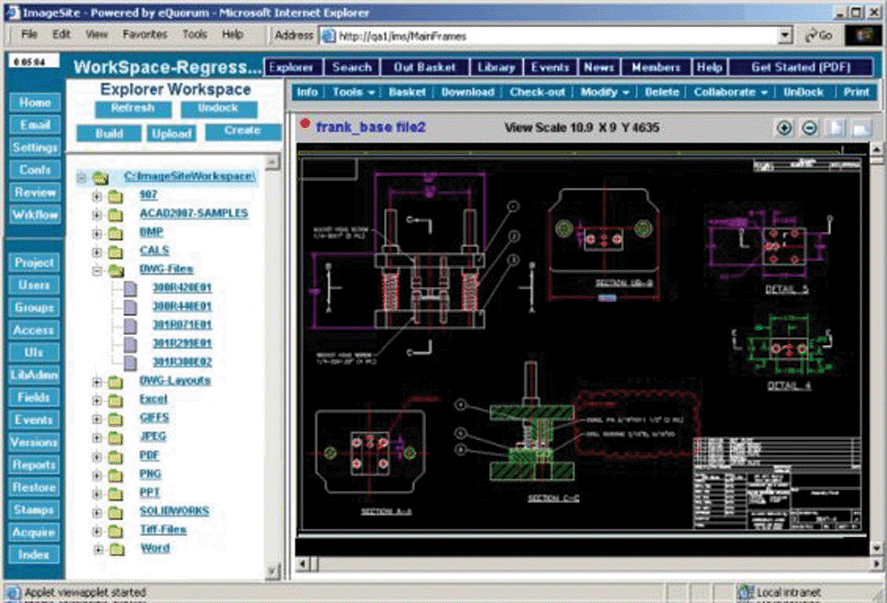
Figure 1: ImageSite displaying an AutoCAD vector file.
Dr. Dobb's Journal January 2007
Like virtually all software, the applications we develop at eQuorum are built on code from others, from operating-system APIs, compilers, and development environments, to task-specific libraries. In this article, I discuss some of the issues we found in the latter case, specifically in what are called "third-party components."
eQuorum (www.equorum.com) is a 20-year-old software company with a focus on the management of large-format engineering documents. We have two primary products:
Early in our products' lifecycles, all of the functionality was produced in-house, even when it meant too many hours spent reverse engineering a file format. At times, that was the only path , as there were few third-party components available.
But as the computer industry has matured (and we've become less obsessed with "do it yourself"), we've found several functional areas of our apps where third-party components have become available. Here, I examine issues involved in using third-party components, specifically in experiences with two that are important parts of our products:
While third-party components can be a time-saving option when adding features to an application, this savings definitely comes with a cost, both initially and during the product lifetime. The initial costs include both the dollar price of the component and the development time to integrate it into your product. Lifetime costs include on-going subscription costs, time spent on chasing down defects in the component, and of course, time spent adapting to new versions of the component.
We've found three primary categories of issues when using third-party components:
First and most obvious is that defects in the component and how the supplier handles support can be critical. Vendors who do not support their products well must be avoided at all costs! Use any and all Internet resources to investigate potential vendors, ask for references, and follow-up those references with e-mail or phone calls. Spend as much time as you would when you hire a programmer because, in effect, that is what you are doing.
For example, in our experience, AccuSoft is a third-party component vendor that does a good job of handling support. It has a responsive support group with a totally web-based issue logging/tracking system. We've submitted issues supported by code fragments and most of the time received quick response from its first-level support. Some issues were resolved by advice on how to change our use of its tools, while others required code updates. AccuSoft has usually been prompt in generating fixes for problems that we labeled as "Critical."
In interacting with customer support, we've found that obtaining the best results requires us to properly document the problem, supply test code and simple sample files, and (if possible) use the vendor's demo code to reproduce a problem. You get the best results if you assume that vendor support people are overloaded with work and need help reproducing and documenting your case. Sure, it takes more time and may seem beyond the call of duty to help vendors find their defects; but remember, your main goal is to solve your problem, even if it means spending more time helping the vendor.
DWF Toolkit from Autodesk includes full source code for processing DWF files. The customer-support system is also totally web-based, allowing complete tracking of all issues. The issues we submit to Autodesk receive quick response with advice on what we need to do to resolve our problem. And because of the large customer base using DWF, the toolkit receives a lot of testing from other third-party users.
Any use of third-party components involves an investment on your part, not only in purchasing the component, but also (and more importantly) in the effort required to integrate it into your application. This is an area where documentation can be critical. Look for vendors that supply lots of sample code to illustrate usage. These can range from just code fragments to complete project sets ready to run in your development environment. Look for migration guides to assist you in migrating to new releases.
Vendors that have some longevity and a larger user group can also have considerable presence on the Web, with code and issues that can be searched by Google. Don't forget to also search Google Groups when looking for code samples and other developers with similar problems.
Autodesk's DWF Toolkit is a great example of a third-party component with a large Internet presence. Much of its documentation is available on the Web and there are active programmer groups that can be searched.
The third consideration is how the supplier handles changes in the component, especially with respect to API interfaces. All vendors need to make modifications to their code, whether to add new features or change architecture to support greater functionality. Generally, we make it a goal to keep up-to-date with a vendor's releases. Getting behind can mean real problems in getting help for defects, especially if they have already been fixed in more recent releases. However, keeping up with releases to adapt to modifications or even to complete rewrites of the API can also lead to substantial work, and that work sometimes does not result in readily visible benefits.
As an example, AccuSoft's ImageGear is a third-party component that we use heavily, and due to the volatility of raster formats, is one that we need to keep updated. AccuSoft recently reengineered its ImageGear API to improve memory management, add support for additional color depths, and add support for 64-bit processing. While AccuSoft maintained compatibility with most of its prior API, some of the calls that we used heavily were no longer supported. Consequently, we had to invest considerable resources adapting code that was working quite well to use the new methods. This resulted in no visible additional features for our products, but should help overall system performance. For this release, AccuSoft produced a helpful document to describe the migration from old API to new API.
As another example, we did not keep up with recent releases of Autodesk's DWF Toolkit. We use this product for parsing and managing 2D DWF files, and had been happy with its 6.0 release for several years. We had reported no defects and fell several releases behind. When support became available for 3D DWF files, we decided to upgrade to the 7.1 release, and were surprised to find that the higher level aspects of the API had been completely reworked! Most of the API architecture was similar, but the details had changed—from renamed calls to argument counts. Migrating to this release required a complete relearning of the API, which was almost as much work as our initial implementation. However, in this case, the new release resulted in new features available in our product.
We've found great success in adding code libraries from other vendors, even to replace functionality that we had developed ourselves when our perceived cost of maintenance became too high. Using third-party components can be a great way for a development organization to save time and also provide application features that would be difficult or too expensive to develop in-house.