Some corporate benefactor had given Jeff's school an old computer that was no longer being used (a PDP 8, if memory serves). So the advanced math class got to do a bit of programming in assembly language. Jeff's favorite story about his computer class in school involved multiplication. The teacher told the students to multiply two numbers. Since the students didn't know how to code I/O (no mean feat in those days), they had to load the two numbers in registers, perform the multiplication, and examine the results in a register (using the front panel lights, of course).
Of course, being a software professional, I'd think about using Booth's algorithm to do multiplication. You know, test a bit, add the number to a running total if the bit is true, shift the number one bit over, and start over. Of course, the average high school student might take a simpler approach and add one number to itself the indicated number of times. For example to multiply 5 by 3, you could write (in Basic):
ct=0
 For I=1 to 3
  ct=ct+5
 Next I
Not as efficient as Booth's algorithm, but still not too shabby.
Jeff's favorite answer, however, was the following code (converted to Basic, for clarity):
ct=5
ct=ct+5
ct=ct+5
Well, that does work (albeit inefficiently). It wouldn't be easy to make this simple algorithm general purpose, however. Also, multiplying by large numbers would quickly become tedious.
This little story tells you what I'm sure you already know-loops are important in computer programming. Loops are great for lots of things, but they really shine when combined with arrays. Arrays make it easy to do the same operation over and over again with different data.
Microsoft's Visual Basic, of course, has arrays. However, it also has something that most other languages don't-control arrays. What's a control array? Simply put, it's just an array that contains screen objects (things like edit boxes or buttons). Just as an array can help you perform the same operation repeatedly on data, control arrays make it easy to repeat operations on controls.
Why is this important? The most common cases involve buttons. Suppose you have some buttons on a form. When you press the first button, you want to fetch 25 records from a database. When you press the second button, you want 50 records. The third button retrieves 100 records. Of course, you could write three separate handlers to do the work. They could even call a common subroutine to do the work and pass the correct number of records as an argument. However, a more elegant way would be to use a control array. Then you could have a single handler do all the work. An argument to the handler would tell you which button the user pressed automatically.
Even if that wasn't important, control arrays allow you do something else you often need to do: Create controls at run time. Suppose you want to add buttons to a program after it is already running? The answer is a control array.
Another time when creating controls on the fly can be helpful is when you have a lot of controls that are hard to place. For example, if you were writing a checkers game, you might find it tedious to create all the checkers and place them on the correct squares. However, it is easy to write code to create the checkers and place them properly.
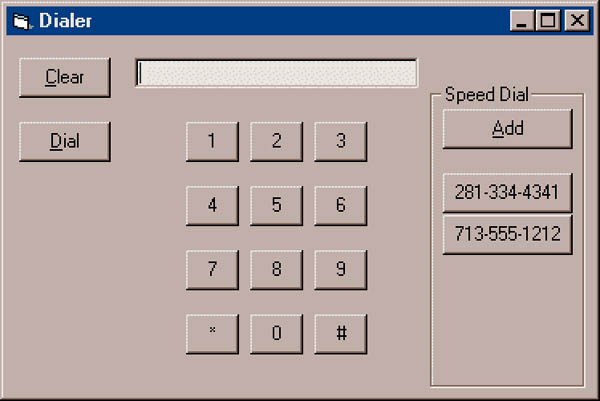
In this column, I'll show you how to use control arrays for both purposes. The sample program (see Figure 1) is a simple phone dialer. There is a single event handler for all of the touch tone digit keys. When you enter a number, you can press the Add button to create a new speed dialer button. There is only one handler for all the speed-dialer buttons, too.
Background
Every Visual Basic component that has an Index property can be part of an array. To make a component part of an array, you must provide at least one item, and it must have an entry in the Index property. Usually, the first item has its Index property set to 0, and each subsequent component uses the next higher number. However, you can number your items any way that you like.
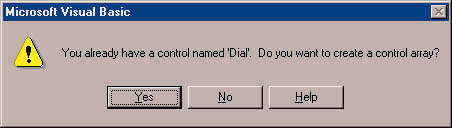
Another common way to create a control array is to copy a control to the clipboard and paste it back. You've undoubtedly done this and seen VB's message box asking you if you'd like to create a control array (see Figure 2). Answering "yes" simply duplicates the object and sets the index of the new item to 1 and the original item's index to 0.
|
|
| Figure 1: the Phone Dialer |
If you want to use a control array at run time, you must have at least one item in it at design time. This item acts as a prototype for all other objects in the array. You are able to make more than one control at design time, but you must have at least one. Of course, none of the components have to be visible.
If you want to change a control's property in the array, you can treat it like any other array. For example, to change one button's caption at run time, you could write DBQButton(1).Caption = "50".
Any event handlers you add to the array apply to all controls in the array. The event handler then receives the Index property of the control that fired the event.
|
| Figure 2: VB prompt for control arrays |
When you load a new control, VB knows you haven't had a chance to set its position. Therefore, the new control will not be visible. This gives you a chance to set the Top and Left properties (as well as anything else you might like to set) before setting the Visible property to True.
When you no longer need a control you can UnLoad it. If you think you might want it back later, you could just make it invisible. If you want the control to remain forever, just don't unload it.
Inside the Phone Dialer
To illustrate control arrays, I wrote a phone dialer application. Unfortunately, actually dialing the phone is left as an exercise for the reader (hint: Use TAPI, Microsoft's "Telephony API"). Figure 1 shows the application running. You can enter numbers from the keypad or the actual keyboard. You can also add up to five speed-dial buttons by pressing the Add button.
This program is a natural for control arrays. It would be very tedious to write a separate command handler for each digit button. Adding buttons would also be a slight problem. Truthfully, since there is a maximum of five buttons, I could have simply hidden the buttons until I needed them. This isn't very elegant, however. Besides, like the simple multiplication program, it would be hard to extend.
The code to handle the phone dialer couldn't be much simpler; see Listings One, Two, and Three, DIALER.FRM, DIALER.VBW, and DIALER.VBP, respectively (listings begin on page 58). The Key1 array contains all of the numeric entry keys. Since the index must be an integer, the Key1_Click handler has to transform indexes 10 and 11 into the "*" and "#" keys. Another approach would have been to store the correct key in the Tag property and use that.
The remainder of the Key1_Click code is concerned with formatting the number properly. This code, of course, doesn't have anything to do with control arrays, but it makes the speed dial buttons look better.
Adding Buttons
The program starts with one invisible speed-dial button (Speed(0)). The Add_ Click handler knows whether it is creating the first button or a later button by examining the SpeedBtns variable. If the button is not the first button, the code calls Load and moves the new button to the correct location (relative to the first button). By not hard coding the location of the buttons, it is trivial to move all of the speed-dial buttons. You simply move the invisible first button. Then all the other buttons move with it.
For all speed-dial buttons, the program sets the caption and makes the button visible. The handler for the buttons, Speed_Click, is similar to Key1_Click. It handles all the speed dial buttons. The routine just reads the number from the button's caption and dials the number.
You might like to experiment with adding the keyboard buttons in the same way. That way you could create one prototypical button, and let the code create (and place) the other 11 buttons. Of course, this is ugly during design time, but it is often easier than placing each button manually.
More Fun with Control Arrays
There are many ways you'll use control arrays in your programs. They are a natural any time you want a control to appear and disappear under program control-especially when those controls need similar event handling. Some example that come to mind are playing cards, flowchart symbols, or (as I mentioned earlier) checkers.
Recent News
Although this column covers Microsoft's Visual Basic, you may have seen me write about Delphi in Dr. Dobb's Sourcebook in the past. Borland's Delphi 3 is just out and offers many interesting features including ActiveX and COM support. I've always liked Delphi and Delphi 3 looks like a winner. I've also enjoyed playing with Borland C++Builder (which is basically Delphi meets C++). That's the best of both worlds. You'll be hearing from me about both of these products in the near future.
DDJ