 Fuzzy logic has become a common tool in control engineering and decision making. In the senior year of Eastern Washington University's computer-science curriculum, students typically carry out a large and practical project. One such project, conducted in the spring of 1995, was to add useful enhancements to an existing Fuzzy Logic Engine (FLE).
Rather than start from scratch, we chose to use Greg Viot's article "Fuzzy Logic in C" (Dr. Dobb's Journal, February 1993) and the follow-up article by John Tucker et al., "Fuzzy Logic in C: An Update" (Dr. Dobb's Journal, April 1994) as a springboard. The latter article included an extended version of Viot's Fuzzy Logic Engine that can be used in a limited range of application problems. It is an excellent first exposure, uncluttered with sophisticated (albeit useful) features. (For background information on fuzzy logic, see Earl Cox's The Fuzzy Systems Handbook, AP Professional, 1994, and the two-part interview with fuzzy logic inventor Lotfi Zadeh, Dr. Dobb's Journal, July and August 1994.)
In this article, we'll focus on two enhancements to Viot's FLE. The first is a potentially robust online-tuning capability as supported by a tuning language and its associated translator. The second is a dynamic simulator allowing users to try out their fuzzy logic parameter choices in an active setting. For our purposes, we assumed the application was in automated control using fuzzy logic control algorithm, although the Tuning Language (TL) would be equally useful for setting up a decision making package.
The enhanced Viot program, presented by Tucker, Fraley, and Swanson, consisted of an FLE with up to two input variables and one output variable. Fuzzy sets for inputs and outputs did not allow modifiers (called "hedges"). For example, a temperature could be "cold" but not "very cold." Conditional rules were supported, but not unconditional rules. The rules were extensible to support the fuzzy sets appropriately. The AND connective was provided for rule antecedents, so that an antecedent could be something like "If Temperature is COLD and Humidity is HIGH, ...". This AND was interpreted as the traditional Zadeh AND. The OR connective was not provided in antecedents, but it could be accommodated with multiple rules.
Students were encouraged to make the modifications needed for a selection of enhancements, such as hedges or connectives other than the traditional Zadeh choices. However, the retention of one crucial feature from the preexisting program was required—the program had to initialize its FLE by reading a data file designed for that purpose. This provides convenient flexibility in applying the software to different problems by modifying the initialization data file. However, it is also a key feature needed in tuning the algorithm and it is useful in establishing the simulator.
In most cases, students folded the simulator in with the FLE as a single executable file. However, in all cases, the translator was a separate executable file.
The software was developed in a Linux operating-system environment. This was attractive because the online tuning feature relies on the ability of Linux to open multiple consoles in a multitasking fashion. Of course, the needed tools—lex, yacc, and the GNU C compiler—were free, as was the entire Linux system. Also, Linux is used elsewhere in our curriculum and was familiar to the students. The source code developed in this project is extensive and is available electronically.
These two enhancements—tuning and simulation capabilities—are relatively independent of the particular fuzzy logic software package. Hence, the ideas presented here could easily be adapted to other fuzzy logic approaches. In fact, upon completion, several of the student projects had taken quite distinct approaches to the FLE. Any of those projects could have been used as the vehicle used in this article.
You might argue that if the only task of the TL is to automate the preparation of that initialization data file, you might as well prepare the data file with an editor. However, such hand preparation of a data file for online tuning is risk prone: A minor typo can cause a software crash. If that software is controlling an expensive hardware installation, such a failure could be dangerous. Consequently, the second major task of the TL is to catch errors before run time, insofar as is possible. These errors might be classed as superficial (typos, for example) or significant (for instance, inconsistencies in Fuzzy Input Sets). The translator converts the user's TL source code into an initialization data file and performs this error checking.
The translator was constructed with the help of lex and yacc. A complete discussion of the use of lex and yacc is outside the scope of this article, but the book lex & yacc, by John Levine, Tony Mason, and Doug Brown (O'Reilly & Associates, 1992) is a good resource.
Examination of the chosen version of the TL makes it particularly evident that this software is prototypical. An industrial-strength application would require consultation with potential users to design a truly useful and convenient TL. It is possible that such development would result in a general-purpose text-based language on top of which a family of graphical user interfaces, aimed at specific niche application markets, could be built.
Note how the user can create a few simple rules for controlling room temperature with a fan. For the sake of readability, reserved words appear in lowercase and user-specified identifiers in capitals; however, the translator is not case sensitive. Text enclosed in C-style comment delimiters ("/*...*/") has been included strictly for clarity, but is not valid input.
To see how the fuzzy set definitions work, consider the four lines defining the sets within the TEMPERATURE domain. The group of four numbers within braces describes the shape of the set. In particular, the x-y graph of a given set is a trapezoid whose base runs along the x-axis from the first of the four numbers to the last, and whose top, at y=1, runs between the second and third numbers.
Thus, in Listing One, WARM begins at 60 degrees, ends at 90 degrees, and has its maximum value (=1) between 70 and 80 degrees. The meaning of an x-value depends on the domain in question, but a y-value always represents the degree of fuzzy set membership (0 indicating exclusion from the set, and 1 representing complete membership) that is associated with a given x. Conditional statements of the form "if ... then ..." are rules. Note the use of clarifying parentheses in certain rules. Without punctuation, the conjunctions "and" and "or" associate from left to right.
The structure of this particular translator input can be somewhat loose. There is no declaration section or rules section. Identifiers (domains and sets) must be defined before they are used in rules or other definitions, but, provided this intuitive restriction is obeyed, rules and definitions may be freely mixed.
Let's look at several examples to observe how errors in the user's TL source code are identified. The errors exemplified are all careless errors of the sorts likely to occur. For example, assume that we had used the domain TEMPERATURE in a rule before it and its sets have been defined (Listing Two). When the source file containing this is submitted to the translator, the error is identified with the relevant source line as in Listing Three.
The translator also recognizes badly formed or meaningless fuzzy sets, such as the sets in Listing Four. Listing Five shows the translator identifying the incorrect set parameters.
Finally, Listing Six shows sample input that mismatches a domain with a set in a rule. The error is that HIGH is not defined as a TEMPERATURE (although it is a valid FAN_SPEED). The translator responds to the badly formed rule with the message shown in Listing Seven.
Example 1: Pseudocode for an automated control application.
While the control is still active
 * If there is a new initialization data file,
initialize the FLE and mark the new FLE
initialization file as old
 * Read all FLE inputs coming from the
process being controlled
 * Apply the fuzzy-logic algorithm creating
FLE outputs
 * Send all FLE outputs to the process
being controlled
One approach to performing online tuning is to open a second console and write a TL source file incorporating the desired parameter changes. The TL source file is then submitted to the translator. This process is iterated until the translator finds no errors and produces the new initialization file. The latter will be detected by the FLE per the preceding pseudocode.
It is useful to also incorporate the ability to return to the previous initialization by a keystroke combination. Hence, if the new FLE degrades performance, the prior engine is easily restored. It might also be useful to restrict the size of the changes allowed in the tuning step, but this was not implemented.
To see how the FLS is designed to operate with the FLE, a pseudocode representation is useful. Note that the possibility of tuning both the FLE and FLS is suppressed in the pseudocode in Example 2 to avoid obscuring the salient features.
Example 2: Pseudocode for the dynamic simulator.
Initialize FLE inputs
While the control is still active
 * Read all FLE inputs
 * Apply the FLE algorithm creating FLE outputs
 * FLS inputs = FLE inputs AND FLE outputs
 * Apply the FLS algorithm creating the FLS
outputs; these are incremental changes in the FLE inputs
 * FLE inputs = FLE inputs + changes in FLE inputs
As a specific example, assume you are controlling temperature in a hot cell by a ventilating cooler. One of the FLE rules might be that shown in Listing Eight, where TEMPERATURE is an FLE input variable (value=HOT) and FAN_SPEED is an FLE output (value=HIGH). Similarly, an associated FLS rule might be that shown in Listing Nine, where both TEMPERATURE and FAN_SPEED are FLS input variables (value=HOT and HIGH) and DELTA_TEMPERATURE is an FLS output variable (value=NEGATIVE_SMALL).
From the the examples and listings, it is clear that the number of FLS inputs will inherently outnumber the FLE inputs. This can lead to an explosion in the number of rules, potentially straining system resources and slowing system performance. Our investigation was perhaps too simplistic and did not suffer from this problem.
There are ways to cut down the number of rules. For example, a set of unconditional rules can be used to establish default behavior while minimizing the number of conditional rules. This can lead to an overall reduction in the number of rules. The book by Cox discusses unconditional rules at length.
A second difficulty with the simulator follows from the fact that the user supplies the fuzzy logic models for both control and simulation. Hence, the system acts in accord with those models, and not necessarily in accord with reality. This can give a very misleading prediction of system behavior.
This is quite evident in the preceding example of an FLS rule. In particular, note how that rule will tend to force the model away from a high-temperature runaway condition. This behavior is simply built-in by the rule and does not necessarily reflect what would actually happen.
However, keeping this important caveat in mind, the simulation can be useful in identifying gross conceptual errors in parameter choices for control. Further, as system experience is gained, the models can be corrected and refined. Once the simulation is realistic, it can be used for other purposes such as operator training.
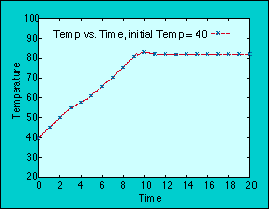
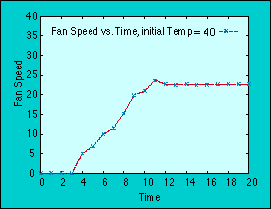
Figures 1 through 4 show the result of using the preceding FLE and FLS initialization files to create a simulation scenario with two different initial temperatures. Figure 1 depicts the simulated behavior of the temperature when it starts at 40. As the process heat raises temperature, the cooling fan competes until the temperature reaches a value just above 80 where the control algorithm holds it steady. Figure 2 shows the corresponding fan behavior leading to the temperature curve of Figure 1.
Figure 1: Simulated behavior of the temperature when it starts at 40.
Figure 2: Corresponding fan behavior leading to the temperature curve of Figure 1.
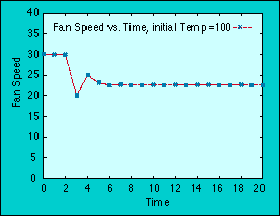
Similarly, Figures 3 and 4 show the behavior with a starting temperature of 100. The same control algorithm again brings the temperature to a steady state value, just above 80. A designer wishing to simulate a realistic system would naturally want to concoct a much richer set of rules and domains, but this example gives the flavor of the simulator's appearance and behavior.
Figure 3: Behavior with a starting temperature of 100.
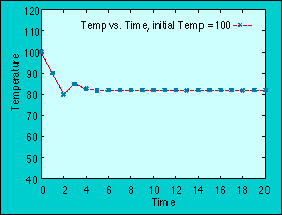
Figure 4: Corresponding fan behavior leading to the temperature curve in Figure 3.
The simulator is similarly insensitive to the particular FLE software; it merely uses that same model to create the simulator. While modifications must be made to the rules, input sets, and output sets, a fundamental change in the model is not required. On the other hand, the simulator must be used with the realization that it can help discover gross conceptual errors but cannot provide realistic simulation until significant experience is accrued from the actual control process.