 The company I work for specializes in CD-ROMs, and we generate files with sizes that range from 100 MB to over 1 GB. These files have to be viewed and sometimes even edited. The edits are usually minor, but none of the editors we tried could handle such large files well. Many load the entire file into virtual memory. As a result, simply viewing a 900-MB file can be quite tedious. Since the editor's temporary files are at least as big as the original, disk space becomes a problem as well.
As a result, I began to look for a C++ class that could be used to build my own, more-efficient editing tools. I found classes that encapsulate standard file operations, but I also needed support for basic editing operations. I finally decided to design my own class, specifically tailored to meet the following "CD-ROM" requirements:
The complete source code for the class is available electronically.
Example 1: Identifying modified sections of a file.
while(pos<file.size()) {
    long endPos;
    if(file.isUnmodified(pos,&endPos))
        cout << "Positions " << pos << " through " << endPos
             << " unmodified" << endl;
    else
        cout << "Positions " << pos << " through " << endPos
             << " modified" << endl;
    pos=endPos+1;
}
To see how this mechanism works, consider editing the 11-byte file containing "Hello World." Originally, there is a single delta F[0,11]. If you remove 3 bytes from position 2, the original delta is split into F[0,2], F[5,6]. If you then insert the 2 bytes "ol" at position 1, the first file delta will be split (analogous with the remove operation), and an edit delta will be inserted between the two cuts. The final file contains:
   F[0,1]="H"
   E[2]="ol"
   F[1,1]="e"
   F[5,6]=" World"
Every edit operation (write, insert, remove) causes the delta list for the file to be updated with the new information. Writing n bytes is equivalent to removing n bytes and inserting the new bytes at the same position.
Note that the file deltas only require storage space for the pointers, not the actual data. Only edit deltas actually store data.
The first observation hinted at a very simple implementation of the TEditable file class: Find the correct delta and "delegate" the operation to that delta. Listing One shows how this works. The getDelta function locates the (unique) delta containing a file position. The read, write, insert, and remove operations call that function and pass the operation to the delta object. Note that the offset will be the offset within the delta, not the offset within the file.
The second observation led me to organize the deltas in a doubly linked circular list with a sentinel. There are several advantages to this structure:
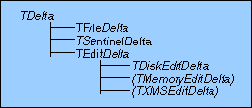
With all this in mind, Figure 1 illustrates the class hierarchy for the deltas.
Figure 1: Class hierarchy (classes in parentheses not implemented).
TDelta is an abstract class, defining a common protocol for all derived delta classes. This protocol is enforced by using pure virtual functions. The functions bytesLeft(), which returns the number of bytes that can be inserted, and unmodified(), which returns true if the delta contains unmodified data, identify the kind of delta. These functions are sufficient to identify file deltas from edit deltas, and are generic enough to be applicable to any other kind of delta you may dream up.
The TFileDelta implements file deltas, and is shown in Listing Two. The TSentinelDelta implements the sentinel for the doubly linked list. There will typically be only one instance of this class per deltaList.
The other classes implement edit deltas. Because inserted data might be stored in a variety of places—disk, extended memory, conventional memory—I chose to have a different class for each delta variety.
Having different kinds of edit deltas introduces the problem of determining which type of edit delta to create in each different situation. I have therefore defined a "factory" class TEditDelta. This class contains only one static function, called createNew. It will return a new edit delta of the appropriate type. The current implementation always creates a TDiskEditDelta (which is the only type I've implemented so far), but could be modified to create different kinds of deltas depending on such factors as memory availability.
The most interesting operation is flush. Consider a 100-byte file in which 10 bytes have been inserted at the beginning. The deltaList will be E[10], F[0,100]. If you write the deltas to the file sequentially, E[10] will overwrite the first 10 bytes of the file, but F[0,100] needs these first 10 bytes.
Another approach is to first flush the file deltas that have moved, and then flush the rest. But that doesn't work with the deltaList E[10], F[0,50], F[55,45]. This is the previous file, but with 5 bytes removed from position 50. If you write the moved file deltas in order, the last 5 bytes of the second file delta will overwrite the first 5 bytes of the third.
The solution is to use three passes:
The entire implementation has been split into six .cpp files, each with a corresponding header file, as shown in Table 1.
Table 1: Flush implementation reflecting the class hierarchy.
File Name	Implements	 	        Corresponding
                                                Header File

EDITABLE.CPP	TEditableFile class 	        EDITBALE.H
DELTA.CPP	TDelta abstract base class      DELTA.H
FILDELTA.CPP	TFileDelta class	        FILEDELTA.H
SENDELTA.CPP	TSentinelDelta class	        SENDELTA.H
EDTDELTA.CPP	TEditDelta class	        EDTDELTA.H
DSKDELTA.CPP	TDiskEditDelta class	        DSKDELTA.H
These files directly reflect the class hierarchy. Your program only needs to include EDITABLE.H (which, itself, depends on no other header files). The rest of the files can be compiled into a library that can be linked with your program.
One potential problem is the handling of operator new. The draft C++ standard states that if operator new fails, an exception (xalloc) is thrown. My code assumes the previous behavior, that operator new returns NULL if it fails.
The other potential problem is the file operations. The classes have been designed using (UNIX-like) handle-based file I/O, which is not covered by the ANSI standard. It's trivial to make the classes iostream or FILE oriented. Buffer size problems have been circumvented by using the ANSI-defined size_t type instead of the more usual int or long integral type. As a result, the maximum amount of data you will be able to transfer is whatever the maximum value of size_t is.
Unfortunately, there is no constant describing the maximum value of size_t or the maximum number of bytes that can be read in one read() operation. On a 16-bit PC compiler, size_t is an unsigned short (if the memory model is not huge), but the maximum read size is slightly less than 64 KB, so that constant had to be hard coded. In a Windows environment, you may be able to use hread() and hwrite() to handle I/O requests of more than 64 KB at a time.
One way to address this is to design a more-efficient search structure for the deltaList. For example, each delta could keep the actual file position, and you could keep the list in "Least Recently Used" order. This would allow the deltaList to self organize, such that the most frequently used deltas are found first.
Another approach is to minimize the length of the list by delaying the creation of new deltas (as much as possible) and by collapsing deltas. I have already implemented delayed creation to some extent, but the algorithm currently does not collapse deltas. For example, the deltaList of a 100-byte file in which 10 bytes were inserted at position 50, then immediately removed, would be F[0,50], F[50,50], which can be collapsed to F[0,100].
Since you can only collapse deltas of the same type, you need to identify the type of the delta. You could use run-time type identification (RTTI) supported by some compilers, or you could add a pure virtual function in TDelta such as virtual int typeId() =0; redefined to return a unique ID (or a string constant) for each delta type.
Although removing bottlenecks is not trivial, it does not fundamentally change the algorithm described here, and is, therefore, left as an exercise for you. Simpler improvements, like adding a cache to speed I/O, should not be a problem.