Laurence is a freelance software engineer and author. He can be contacted at lva@telework.demon.co.uk.
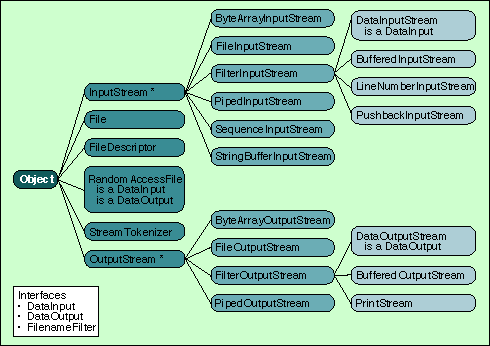
 The java.io package is Java's solution for shielding you from input/ output related device and platform dependencies. Of the 23 core java.io classes, 19 rely on the concept of a data stream (see Figure 1). A Java stream is simply a unidirectional, sequential flow of bytes that emanates from some concrete source (for input streams) or flows toward a concrete sink (for output streams). Input streams can only be read from, and output streams can only be written to.
In this article, I'll show how to subclass stream classes by designing and implementing I/O stream classes that support bit streams rather than byte streams. I'll then demonstrate these classes by deploying them in a Java implementation of the ubiquitous Lempel-Zif-Welch (LZW) data compression and decompression algorithm.
public class InputStream extends Object {
   public abstract int read() throws IOException;
   public int read(byte b[]) throws IOException;
   public int read(byte b[], int off, int len) throws IOException;
   public long skip(long n) throws IOException;
   public int available() throws IOException;
   public void close() throws IOException;
   public synchronized void mark(int readlimit);
   public synchronized void reset() throws IOException;
   public boolean markSupported();
}
The main methods are the three overloaded read() variants that let you read a single byte or a block of bytes at a time. The last three methods—mark(), reset(), and markSupported()—allow subclasses of InputStream to implement a multibyte "unread" function. Clients can drop a mark in the input stream and revert back to it at a later time if the class in question supports the unread feature. Most don't because, by default, InputStream returns "false" when its markSupported() method is called, and most subclasses inherit markSupported() without overriding it. Class InputStream is abstract because of one single component that is left unimplemented: the building block read() method, on which the other read() methods and the skip() method rely.
OutputStream is equally straightforward. It mainly provides equivalent write() methods to send bytes to any output stream (see Example 2). The mark/reset mechanism is not present in OutputStream because it doesn't make any sense on output.
public class OutputStream extends Object {
   public OutputStream();
   public abstract void write(int b) throws IOException;
   public void write(byte b[]) throws IOException;
   public void write(byte b[], int off, int len) throws IOException;
   public void flush() throws IOException;
   public void close() throws IOException;
}
Table 1 shows the data sources and sinks supported by the core input and output stream classes. In addition to these, classes in the java.net networking package produce input and output stream objects that connect to various network sources (like a TCP stream) and destinations. Unlike the input stream classes, the output stream classes do not support writing data to a String since Java Strings are read only. Furthermore, you can expect Sun's future Java API additions to support and rely on stream objects.
Data Types    Input Class            Output Class

external files   FileInputStream           FileOutputStream
Strings          StringBufferInputStream
byte arrays      ByteArrayInputStream      ByteArrayOutputStream
pipes            PipedInputStream          PipedOutputStream
You can further divide both the input and output branches of java.io's inheritance hierarchy into two types of classes:
public FileInputStream(String name) throws
  FileNotFoundException.

public FileInputStream(File file) throws
  FileNotFoundException.

public FileInputStream(FileDescriptor fdObj)
All three constructors let you specify a file with content that will be used to feed read requests to the input stream. On the output side of the java.io hierarchy, the same approach is used (ByteArrayOutputStream being an exception). Listing One shows an example Java program that uses class FileInputStream to calculate character frequencies.
public class FilterInputStream extends InputStream {
   protected InputStream in;
   protected FilterInputStream(InputStream in);
   public int read() throws IOException;
   public int read(byte b[]) throws IOException;
   public int read(byte b[], int off, int len) throws IOException;
   public long skip(long n) throws IOException;
   public int available() throws IOException;
   public void close() throws IOException;
   public synchronized void mark(int readlimit);
   public synchronized void reset() throws IOException;
   public boolean markSupported();
}
Class FilterInputStream looks almost exactly like InputStream. The crucial difference is the constructor's signature: The FilterInputStream constructor takes any other InputStream object as an argument. This simple difference (along with the protected instance variable in) allows you to chain input streams together to form input-processing pipelines of arbitrary complexity, all built from concrete, reusable instances of various FilterInputStream classes. The same powerful and flexible features are in the output-stream class hierarchy.
Figure 1: Package java.io inheritance hierarchy.
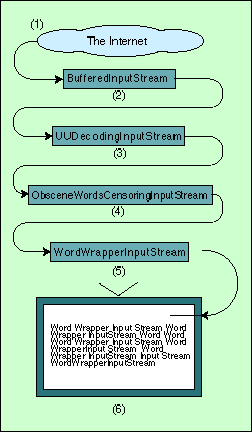
Figure 2 illustrates a fictitious input-processing pipeline. In Step 1, unencoded, uncensored, and unformatted text originating from the Internet enters the pipeline. Step 2 buffers this data in large chunks, thereby enhancing the performance of the entire pipeline. Step 3 decodes the text into plain ASCII. Step 4 enforces the CDA and substitutes certain unspeakable words with sequences of Xs (I entirely support the Free Speech On-line campaign, so this example is purely tongue-in-cheek.) Finally, Step 5 reformats the text so it fits properly on cheap, low-resolution displays hooked up to the NCs of the future.
Figure 2 shows the general raison d'être for all filter stream subclasses—enhancing stream functionality.
Figure 2: A fictitious input- processing pipeline.
Chained input or output pipelines frequently consist of three or more stream objects, so the aforementioned syntax can quickly become unmanageable. The preferred way of coding your chains is to use one constructor per line and declare variables to hold every object; see the coding template in Example 4.
<StreamType> varNameSource = new <StreamType>( concrete source );
<StreamType> varNameLink1  = new <StreamType>( varNameSource);
<StreamType> varNameLink2  = new <StreamType>( varNameLink1);
         :                         :
<StreamType> varNameLinkN-1  = new <StreamType>( varNameLinkN-2);
<StreamType> varNameLinkN  = new <StreamType>( varNameLinkN-1);
Supporting 1- to 32-bit bitfields suggests two new methods: readBitField() for the input class, and writeBitField() for the output class. These two methods are the logical analogs of read() and write().
On the input side, the return mechanism for readBitField() needs to use the same trick as read() as defined in InputStream. read() can either return a single byte or the integer 1 (which represents EOF). Since the integer value of 1 is equivalent to the byte value 255, read() returns a 32-bit int rather than an 8-bit byte. For the sake of consistency, but not elegance, I use the same approach, returning 64-bit long to allow 32-bit bitfields and 1 for EOF. It would be much cleaner to use the Java exception mechanism to trap EOF. This technique is, in fact, used by class DataInputStream, but this is an exception (no pun intended).
Aligning bitfields on their natural bitfield boundaries is handled transparently: No methods are required to support arbitrary bitfield alignment. Altering the bitfield size suggests that the method setBitFieldSize(int bfSize) is present in both classes. Examples 5 and 6 show the interface definitions for these two classes.
public class BitStreamInputStream extends FilterInputStream {
   public BitStreamInputStream(InputStream in)
   public BitStreamInputStream(InputStream in, int bitFieldSize)
   public long readBitField() throws IOException
   public void setBitFieldSize(int bits) throws IllegalArgumentException
   public int getBitFieldSize()
}
Example 6: Class BitStreamOutputStream interface.
public class BitStreamOutputStream {
   public BitStreamOutputStream(OutputStream out)
   public BitStreamOutputStream(OutputStream out, int bitFieldSize)
   public long writeBitField() throws IOException
   public void setBitFieldSize(int bits) throws IllegalArgumentException
   public int getBitFieldSize()
}
The getBitFieldSize() method is provided for completeness and symmetry. Both classes provide two constructor options. The simpler constructor creates streams supporting 8-bit bitfields. In other words, it produces an everyday byte-aligned byte stream by default. The second and (more useful) constructor allows you to explicitly specify the initial bitfield size for the stream.
Since I built my bit stream classes on top of byte stream classes (and not vice versa), I need to pack and align variable-sized bitfields into bytes for writing and unpack and align these same fields for reading.
To implement method BitStreamInputStream.readBitField(), I chose to use a single-byte buffer sitting between the stream and the bitfield assembly code. While this might be less efficient than using a larger buffer (say, 8 bytes, capable of holding the largest bitfield—32 bits—under all alignment circumstances), it greatly simplifies implementation and EOF handling. The basic structure of the algorithm is shown in Example 7 in pseudocode.
bitField = 0
bitsToRead = current field size
while bitsToRead > 0
    if read buffer is empty, re-fill byte read buffer (and possibly
      generate EOF here)
    extract largest possible subfield (possibly entire bitfield requested)
    gradually build bitField up by adding subfield to bitField (using
      shifts and an OR)
    decrement bookkeeping variable tracking the number of unread bits
      in buffer (bitsInCache)
    decrement bitsToRead by the number of bits extracted in this iteration
return bitField
Instead of using an explicit bitstream pointer (the equivalent of a filepointer for byte streams) to track which bits have already been consumed, the code keeps the next bitfield left-aligned in the read buffer. Bitfield fragments (called "partials" or "subfields" in the code) are extracted from the read buffer and right-aligned before being shifted left the necessary number of bits and ORed into the bitfield construction variable (bitField).
The choice of alignment directions can be reversed without affecting the basic algorithm, although this would mean more than changing the few << and >> operators. The algorithm and code are rather hard to understand because of their generic and very low-level character: Any size bitfield (from 1 to 32 bits inclusive), aligned to any bit boundary should be fair game to the algorithm. To convince yourself of the correctness of the algorithm, you should try pen-and-paper simulations using the following test cases:
The bitfield-writing algorithm requires bit-shuffling operations similar to those in the reading algorithm, except it will be the write buffer (again a single byte) that receives bitfield fragments. These need to be aligned to the bitstream's current bit alignment. Whenever the write buffer contains eight bits of data, the buffer is flushed to make room for more bitfield data (either whole bitfields, if the current bitfield size is between 1 and 8, or parts of bitfields if the size is between 9 and 32).
While the bitfield-reading algorithm had to deal with encountering and passing an EOF, the writing algorithm has to ensure that all bitfield data is written when the stream is closed. This is done by overriding the close() method: When the BitStreamOutputStream is closed, it checks if there are any unwritten bits in the write buffer, and flushes them if they exist.
When subclassing a class, you should pay careful attention to the new semantics of your new class to ensure that these are as logical and as close to the original as possible. When designing my bit-stream classes, I had to decide the exact semantics for these same read() and write() methods in my extended classes. For the read() method, my options were:
While the first option is elegant, I rejected it because it deviates too much from the byte bias of the java.io classes. The read() and write() methods of all the java.io classes implicitly deal with 8-bit bytes. The second option can discard data depending on the alignment of the last bitfield and/or its size, so that option is rejected too. I chose reading an arbitrarily aligned 8-bit bitfield as the new behavior for read(). Symmetry forced me to use analogous semantics for the write() methods. Similar reasoning led me to decide that skip() shall skip multiples of 8 bits (and not an arbitrary number of bits).
I ignored Mark's C source code and used his pseudocode listings to implement the compress() and decompress() methods in class LZW. At one point, Mark refers to having the "implementation blues." However, using my bit-stream classes and the Hashtable class in Java's java.util package, I found coding to be refreshingly simple.
As Shawn clearly explained in his article, one optimization of the LZW algorithm is to use dynamic code sizing (that is, bitfield sizes). While both authors found this to be an additional obstacle (which Shawn tackled), I found that, because of the bit-stream classes' dynamic bitfield size capability coupled with class Hashtable's unlimited capacity, the Java implementation did not share these obstacles.
The design of the LZW class (Listing Four) uses a helper class, LZWDictionary (Listing Five), to encapsulate the core LZW data structure: a two-way code-to-string/ string-to-code look-up structure. While the previous articles on LZW used fixed-sized arrays (in C) to implement this functionality, I simply use two Hashtable objects—one per look-up direction. This implementation, therefore, does not have any "table full" conditions: class java .util.Hashtable transparently grows whenever necessary.
Do the new bit-stream classes cause the bottleneck? If you run the LZWClient program with the prof JVM option, then study the resulting profiling report generated in the file java.prof, you'll see that the bit-stream classes and their expensive-looking bit manipulation operations are not the cause. The top cycle guzzlers are Hashtable's containsKey() and put(), and StringBuffer's append() and toString(). Class StringBuffer's involvement without my program's explicit usage of this class might seem surprising. The explanation lies with the behind-the-scenes reliance of Java compilers on class StringBuffer to translate simple string concatenation expressions like stringA + stringB into((newStringBuffer(stringA)).append(stringB)).toString(). Method LZW.compress() does, indeed, use the concatenation operator ('+') to append every newly read source character to the current string, hence the numerous append() and toString() invocations. Because the performance hot spots are not located in the bit-stream classes, I leave the optimization challenge (and fun) to you.