 Have you ever heard of "grandfathering?" Suppose your company decides that all programmers must have an object-oriented design class. However, management exempts anyone who has programmed for the company for more than three years. That's grandfathering.
Only a few of us in the computer business can claim to be real grandfathers (my granddaughter Amber is almost three years old). The computer business isn't very old. However, anyone who has worked in software development for a while is already grandfathered in the sense of knowing about the development tools in common use.
It is amazing how many tools the computer industry embraces (and discards). In this article, I'll give you a solid road map for the PC development landscape as it exists today. Knowing about different development tools can help you with your next project. It can also help you get a job. You don't have to be old to be a grandfather.
So Windows is the standard operating system for the foreseeable future. That should simplify development, right? Sadly, that assertion is not as true as it should be (see the accompanying text box entitled "The History of Windows, Part I"). Thankfully, all of the versions of Windows do have some common ground. If you use high-level development tools, you'll find very few differences between the various Windows versions.
Does anyone care about older, non-32-bit versions of Windows? According to Microsoft, no; the company has all but abandoned its 16-bit tools. However, in the real world, 16-bit development goes on. Why? If your customers still use Windows 3.1, you have little choice. Many corporate users still cling to Windows 3.1 because of cost or support issues.
That being said, 32-bit programming is clearly the future. Pundits have predicted the demise of MS-DOS for ten or more years—yet there are still MS-DOS programs being written. Granted, DOS is gasping and wheezing, but 16-bit Windows is unlikely to die overnight either.
Is Windows ideal? No. Nothing ever is. Early versions of Windows gave Windows development a bad name. The modern versions are quite pleasant and support everything you might want. The most common complaint about Windows is that it doesn't work exactly like UNIX (or whatever the complainer likes to use).
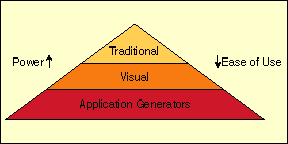
As with most things, there are always tradeoffs. These three categories form a kind of food chain; see Figure 1. At the top of the food chain are the traditional languages (C++, for example). These languages can do just about anything. What's more, you can—if you try—write efficient code. However, developing with these tools is a significant endeavor.
Figure 1: The software development food chain.
The further down the chain you go, the easier it is to write programs. However, each tool tends to be adept at creating only certain types of programs. That's not to say you can't write other types of programs—it just becomes more difficult. Also, programs made with higher-level tools tend to be less efficient than well-designed programs written with tools further up the chain.
So what's the right choice? There isn't one. In carpentry, you don't hammer nails with a saw. Hammers tend to make poor saws, too. The same principle applies to programming. If an application generator can turn out a program that fits your needs in 30 minutes, you'd be foolish not to use it. On the other hand, it would be equally foolish to spend three months coaxing that same tool into doing something it was not meant to do, especially if you could accomplish the same task in two weeks using a different tool.
There's an old saying that goes, "When all you have is a hammer, everything looks like a nail." Programmers often have the same problem. You owe it to yourself to be abreast of different tools. That way, you can use the one that is most appropriate. Sure, we all have our favorite tools, but we should try to stay flexible.
The hallmark of application generators is that if they do what you want, they are wonderful. If they don't do what you want, they are maddening. Generally, these tools fall into the purview of power users, not programmers.
Don't be misled by names. Visual C++, for example, doesn't really fit in the visual-tool category. Although it has some visual tools, it is primarily a traditional environment. Of course, as tools improve, the line between traditional tools and visual tools is becoming more and more blurry.
The main idea behind a visual tool is that you draw your user interface in a WYSIWYG environment. Once you like the arrangement, you add code in some language (Basic for Visual Basic, Pascal for Delphi, and so on). Most often, this code handles events. For example, if you click on a button, it generates an event. When the program starts, that generates an event. If the user resizes the window, enters text, or clicks on a menu, events are generated.
Visual tools are excellent for prototyping. First, you can rapidly draw a screen and show it to end users. If the users don't like what you have, you can rearrange it to suit them right on the spot. Also, many sophisticated end users can design simple interfaces themselves. Nothing lowers end-user resistance better than giving them some ownership of the project.
The downside to most visual languages is that they can't do everything. The current version of Visual Basic, for example, can't work in cases where you need a callback function (that is, a function that some external entity will call). Also, you can't create Visual Basic controls using Visual Basic (at least, not until the forthcoming release of Visual Basic 5.x).
Today, Visual Basic and many other visual tools don't generate native compiled code. Instead, they partially compile your program that, in turn, relies on a run-time library supplied with the product. This can make your programs sluggish. However, for most user interfaces, the weak link is the user, not the code speed. Still, you might think twice before you turn to visual tools to do heavy-duty number crunching or other time-intensive tasks.
One strategy that works is to allow end users to design front ends with a visual tool. This lets them handle all the interface design. Then a programmer builds a back end using the appropriate tools. For a simple program, you might just augment the code the user supplies. More sophisticated programs might require back ends in C++, Fortran, or some other language.
One exception to these rules is Borland's Delphi. Although it is very visual, underneath it sits a full-blown Pascal compiler that can do anything you like. The downside here is that when you do unusual things (like develop a Delphi component) you don't get as much visual support. In such cases, Delphi looks more like a traditional environment.
Table 1: Some vendors and their tools.
Company	     	  Tool		    URL

Borland	Delphi,      C++	      http://www.borland.com/


IBM	             Visual Age       http://www.software.ibm.com/

Microsoft	     C++, Fortran     http://www.microsoft.com/
	             Visual Basic,
	             Java, others

Metaware	     C++, Pascal      http://www.metaware.com/

Powersoft	     Powerbuilder,    http://www.powersoft.com/
	             Optima++,
	             C++ (formerly Watcom C++)

Symantec	     C++, Java	      http://www.symantec.com/
Is this because C++ is better? Many people would argue that. I certainly like C++, myself. But the reasons for its popularity are a bit more complex. The Windows API is the core resource that all Windows programs must use to do basic tasks. Microsoft specifies this API in C. That means two things: You can do everything Windows supports in C (or C++), and C/C++ never requires major changes to generate Windows code. Other languages struggle to track changes to the API. Also, Microsoft makes C++ language tools that greatly simplify programming. Not surprisingly, these tools tend to track new features in Windows more quickly than other languages.
Today, the king of the C/C++ environments is Microsoft's Visual C++. At one time, Borland had a larger market share, but several things combined to dislodge it from the top spot. Other vendors that make C++ compilers (Watcom, Symantec, and others) now license libraries and tools from Microsoft so that they can easily track changes in Windows.
A strength of Visual C++ (and similar compilers) are Windows programming libraries. Microsoft supplies a C++ class library called Microsoft Foundation Classes (MFC) that helps you write Windows programs with sophisticated features. MFC programs can easily incorporate print preview, printing, OLE, and other technologies. Most C++ vendors license MFC from Microsoft and make it available with their tools.
By itself, MFC would be a big help to Windows programmers. But there is more. The compilers that support MFC also support tools (often called Wizards) that write code for you. For example, Visual C++'s App Wizard creates new projects for you. You can specify how the program will look and what features you want it to have. When App Wizard completes, you'll have a working program that will run. It won't do anything interesting, but the entire framework is complete.
Another interesting tool is Class Wizard. This "Swiss army knife" allows you to add event-handling code, relate variables to on-screen controls, and manage OLE. Although it doesn't succeed in being as visual as Visual Basic, Class Wizard promotes Visual C++ to almost visual status.
Borland has a similar class library known as the ObjectWindows Library (OWL). However, OWL's inability to track new Windows features as quickly as Microsoft's MFC is part of the reason Borland C++ lost many users. Is it fair? Probably not. But it is still the way it is. Very few new projects seem to be using OWL.
Another emerging language similar to C++ is Java. Java's biggest draw is that it is highly portable. Java code can run under Windows, on a Macintosh, under UNIX—practically anywhere. The drawback is that many Java environments partially interpret code, which doesn't exactly make Java known for its speed. Some environments will compile Java code after loading (a just-in-time compiler). This can help in some cases.
Perhaps the most famous Java interpreters are web browsers. Many popular browsers support Java, so you can write a program that follows certain rules (an applet) and embed it inside a web page. However, you can also write stand-alone Java programs.
There have been several new PC development platforms for Java. One particularly interesting platform is Microsoft's Visual J++. This product uses the exact same interface that Visual C++ uses, but it creates and debugs Java code.
While Java is a new language, it is traditional in the sense that it works primarily using the traditional development cycle. Whether Java will flourish or fade away with time isn't easy to tell.
Another "new traditional" language of interest is Powersoft's Optima++. This language is compatible with Powerbuilder and allows you to mix traditional programming code with visual applications written in Powerbuilder.
There are many languages available, each with its cadre of adherents. There is also a healthy market for components for the major languages. Many vendors sell libraries and toolkits for C++, Visual Basic, Delphi, and Powerbuilder developers. Some of these toolkits are almost minilanguages in themselves.
Often, you won't have a choice in language: Your employer or an existing code base will dictate it for you. Still, it is good to have a perspective of what's out there and what you could be using.
If you want to know what language will help you land a new job, that's easy. The answer is all of them. Scanning through the newspaper shows tons of jobs for Visual C++, Visual Basic, Java, and Powerbuilder. There might not be quite as many jobs for Delphi, but it is still relatively new, and I expect to see the number of Delphi jobs go up before it goes down.
Why? When Windows first appeared, it was terrible. To be fair, it wasn't all Windows' fault. In those days, Windows needed to run on 5 MHz 8088 8-bit processors. Contrast this with today's 200 MHz 64-bit powerhouses. Besides, a big computer back then might have 1 MB of memory. Today, the smallest machine I have sports 24 MB.
Between slow computers, low memory, and overall flakiness, Windows languished. Very few people really used it. A few applications (notably PageMaker) used Windows to provide device-independent fonts and graphics. Even then, most people would only start Windows to run a particular program and exit to DOS when they were done using it.
If you and I started a company back then and tried to sell Windows, we would have been out of business within a year. However, Microsoft weathered it out while DOS paid the electricity bill.
If you were a die-hard Windows fanatic, you got a taste of better things with the introduction of Windows/386. This version could capitalize on the 386 32-bit processor. It provided better performance, and a few people started taking Windows more seriously.
Then came Windows 3.0. This was the turning point. For the first time, Windows offered an environment that users could enter and use all the time. As user acceptance of Windows 3.0 grew, more developers began writing (or porting) their programs to Windows.
Windows 3.0 was far from perfect. Although it was light years ahead of previous versions, it still had many bugs. It also lacked features like standard dialog boxes and scalable fonts. The release of Windows 3.1 cured many of those problems. Windows 3.1 became the de facto standard Windows platform for some time.
Microsoft also sold a version of Windows that had built-in networking support called "Windows for Workgroups." From a programming standpoint, these versions were the same as ordinary Windows.
The main limiting factor for Windows was that it still operated in a mode appropriate for the old 8- and 16-bit processors. While Microsoft enhanced some code, the core software was antique. Microsoft redesigned Windows to use a portable 32-bit architecture and released it as Windows NT (New Technology). This version of Windows offered better multitasking and security, but required lots of hardware resources. Also, many older programs wouldn't run properly on the new system. These factors limited the desktop use of Windows NT for several years.
To bridge the gap between Windows 3.1 and Windows NT, Microsoft introduced Windows 95. Microsoft would like people to think of Windows 95 as Windows NT light. In many ways, this is true. Many NT programs will run under Windows 95. However, from a programming point of view, Windows 95 is more like Windows 3.1 on steroids. To ensure old programs will run under Windows 95, most of the code is direct from Windows 3.1. There is simply a new 32-bit front end wrapped around that code. There are a few new pieces of code, but Windows 95 is much closer to Windows 3.1 than it is to Windows NT.
So, where does it stand today? Windows NT is a major player in the corporate market. It is also gaining momentum as memory and CPU prices fall. The consumer market seems happy with Windows 95. Most new PCs come with Windows 95 preinstalled. There are still pockets of Windows 3.1 users, but they are rapidly dwindling.
Who knows what the future will bring? It is very likely that, one day, Windows NT will replace Windows 95 since, from the user's view, they are similar. It is also clear that Microsoft wants to increase the integration between Windows and the Internet. Other than that, you'll have to wait and see for yourself. After all, who could have imagined all of this after seeing a beta copy of Windows 1.0?