What was the most amazing thing I saw at Comdex/Fall 1990? This: Author Tom Swan launching rubber chickens from a catapult at the Circus Circus hotel casino. Circus Circus has a stranglehold on a good niche: They cater to families with kids. While children are not allowed unattended down on the floor with all the slot machines, upstairs there is a never-ending collection of good old fashioned carnival games, waiting for parents to hand a roll of quarters each to Nickie and Suzie and shag them up the stairs.
The best of these games involves a circular counter about 25 feet in diameter. At 12 points around the circumference of the counter are small steel catapults, each of which has a rubber mallet chained to it. Inside the counter, a circular disk about ten feet in diameter slowly rotates, carrying about 15 two-gallon stewpots arranged randomly on the disk.
You get three rubber chickens for a dollar. You position a chicken on one end of the catapult. You clobber the other end with the rubber mallet. If you're lucky, your chicken flies gracefully through the air and flops into one of the stewpots, providing you with a stuffed penguin that may have cost the casino as much as fifty cents. Most of the time, however, the chicken ends up elsewhere, and you lose.
While watching Tom Swan catapulting rubber chickens with gay abandon, it occurred to me that this is a fair metaphor for launching a software product in our high-stakes industry. First of all, how you position the chicken is critical. Call it a database when it's really a spreadsheet and it won't fly right. Rubber chickens fly best when you put them butt-forward and tummy-down on the catapult. Software products tend to fly best when you position them as something familiar. Calling a product "... like nothing you've ever heard of before!" no matter how honest an assertion, will usually send the product flying right over the heads of the people with money in their fists.
Second, how hard you hit the catapult is critical. Hit it only a little, and both your chickens and your products will fall flat on the floor without ever approaching the magic disk. Our audience (unlike that of the early '80s) is a jaded audience. They've seen a lot. Rubber chickens are flying past them all the time. They won't come looking for you or your product. You have to let them know that you exist. Good use of PR, effective ads, press tours, all of these are necessary these days to get the chicken into the air.
Hit the catapult too hard, and your chicken will go rocketing across the circle into someone else's face, at which point you will be glad the rubber mallets are chained to the catapults. Similarly, too much hype, too much noise, too high a profile eventually become more irritating than effective and turn opinion against you, especially when the chicken you launch is too much of a lightweight to live up to your hype campaign.
Third, when a lot of people are launching rubber chickens at the same time, some are bound to collide in mid-air. Worse, if one comes down in the pot you were aiming for just before yours, your chicken will bounce off and you will lose, regardless of the quality of your aim. Timing is critical, competition can appear out of nowhere and eat your launch. There are no guarantees.
Fourth, even if you hit the catapult exactly right, remember that the stewpots are slowly moving around the circle, and when your chicken comes down, the stewpot you aimed for may well be somewhere else. Niches and audiences are both moving targets. Sometimes their movements can be predicted, but they occasionally veer sharply to one side or another. Now and then they vanish before you ever bring the mallet down.
And finally, it's three rubber chickens for a dollar, win or lose. No refunds. Most of the money goes out up front. Rarely can any of it be gotten back. Launching products, unlike launching rubber chickens, is hellishly expensive. Study. Observe others who have done it well. Practice in the privacy of your local market. And never forget that the odds always favor someone else.
Tom has evidently had some practice launching rubber chickens. He walked away with three stuffed penguins. I shot chickens all over hell and gone, and didn't sink a one into a pot. At some point you just have to ask yourself: Am I in the wrong game? (Don't despair, though -- later, at a totally different game, I won a stuffed toucan for Carol on the first try.) Nonetheless, and this may be the most important insight into the whole matter, I would rather lose every time than be the poor guy selling the rubber chickens.
In other words, go for it.
If you get the impression that it was a dull Comdex, you're right. It's never a software man's show, and this time less so than ever. "Best of show" in developer tools was Digitalk's Smalltalk/V for Windows 3.0. Digitalk has ported their most potent Smalltalk/V PM down to Windows under DOS, and it looks great. Dan Goldman showed me some wonderful things you could do with Windows DDE (Dynamic Data Exchange), calling Smalltalk/V from inside Microsoft Word for Windows. If your machine is fast enough (and these days, most 386 machines are) you can treat Smalltalk/V as a word processor macro language. Call Smalltalk/V from Word, crunch some data, and pass data back to Word via DDE. Dan called Smalltalk from Word, generated a 200-digit factorial, and then pasted a string equivalent of the monster number back into his Word document, all automatically. This is fine, fine stuff, and I'll have more to say about Smalltalk/V for Windows once it ships.
The other developer tools there were mostly Windows tools, including a tantalizing sneak preview of a Turbo Pascal product running under Windows 3.0. Needless to say, watch this space; when the time comes, you'll hear about it.
There was one hardware concept afoot at Comdex worth mentioning among developers. Supersmall system units are turning up, often no larger than a fat trade book, containing all system components (including diskette drive, hard disk, and VGA graphics) except a keyboard and screen. The ones I saw tended to be 12 MHz 286 boxes from small Pacific Rim companies, but at least one -- the rakish Brick from Ergo Computing -- runs a 386SX.
The idea here is that you don't need removable media to take your work home after hours -- just unplug the keyboard and screen and throw the whole machine into your briefcase. Running an onsite product demo is easy: Use your prospect's keyboard and screen, but bring the fully configured machine and avoid the embarrassment of a demo that won't run (or worse, runs and then blows up) on a prospect machine. Little by little, the system unit becomes a swelling on the cable between the keyboard and the screen, which is how I feel it should be.
I'm interested in machines like this, and very few other writers seem to have noticed the trend. If your firm sells one or plans to, please get some product information out to me.
One element of software design that few people bother to mention is pretty important: Be familiar with the technologies you're going to be using before you begin the design itself. Don't try to pick it up after you've made several major design decisions and burned a few bridges. If your design incorporates SQL and you are a total SQL virgin, pick up a book on SQL and read it thoroughly. Try to find another product that does SQL and play with it for awhile. You don't have to become an SQL expert to get your design down correctly, but you'd better understand what SQL is at a high level, and perhaps take some notes on whatever "gotchas" SQL can hand you.
Furthermore, this is true even if you intend to buy your SQL technology from someone else. It may be more true, since if you buy SQL in a can you may not have the opportunity to become an SQL expert by building it yourself.
I've found it broadly true that Pascal programmers tend to shy away from things like hardware interrupts, UART registers, and things like that. This technology will lie at the heart of JTERM, so I'm going to spend some time introducing you to it. Keep in mind that we haven't really gotten into our design yet. This is research -- though it will save us a lot of time later on.
There are certain things I would just as soon not know -- how bodies are embalmed comes to mind, as well as how stainless-steel hip joints are installed in little old ladies. Many people feel the same way about understanding the nature of communications software. Somewhere along the way, they learned just enough to suspect they don't want to learn any more.
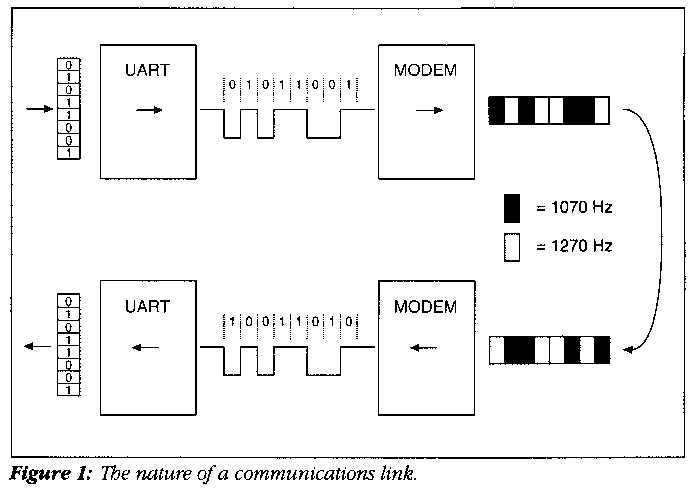
It's a little messier, but much less messy than code generation (in my opinion) or housebreaking small dogs. Mostly it's a translation process, as I've outlined in Figure 1.
The idea in any communications link is to get an 8-bit byte across a single-conductor line so that it arrives on the other end of the line with all bits intact. Obviously, the bits have to go one-by-one down the wire in follow-the-leader fashion. The first translation takes the eight parallel bits of a byte and sends them down the line one by one. The engine behind this translation is called a UART, which is a passable euphemism for Universal Asynchronous Receiver/Transmitter. The UART is one chip and a little support logic; in a PC-type machine, typically an 8255.
The UART has a register (which is just a fancy name for a memory location) into which the byte to be transmitted may be written. The UART then takes the byte in the register and translates it into a carefully timed series of voltage levels on a single output pin. A +5V level on the pin indicates the presence of a 1-bit, while a 0V voltage level indicates the presence of a 0-bit.
"Carefully timed" means that each bit is placed on the line for a very short and precisely measured period of time. Each bit may get three milliseconds, for example. What this means is that the UART will place a +5V voltage level on the line for three milliseconds, and by convention we say that a 1-bit has been placed on the line. When that three milliseconds is up, the next bit (by convention) is placed on the line. If that bit is also a 1-bit, the voltage on the line won't change; it simply remains at +5V for another three milliseconds. If the bit is a 0-bit, however, the voltage level will drop from +5V to 0 volts, where it will remain for three milliseconds. Then the next bit will be placed on the line, and the process continues until all 8 bits have had their moment on the line.
When you hook a serial cable to your serial port, (and a serial port on a PC is essentially a UART) you are providing a path for these changing voltage levels. Such a serial cable can get you anywhere within about 50 feet. Beyond that, the inductance of the wire in the cable begins to bog down the UART's rather meager ability to switch voltages quickly.
Fifty feet will get you across the room or maybe across the office. It won't get you across the street, however -- for that, the next translation stage is necessary. This is the modem, for Modulator/Demodulator.
At least for purposes of transmitting bits, the modem is best thought of as a tone generator. The venerable and thoroughly obsolete Bell 103 300-baud modem takes a +5 voltage level on the input side and converts it to a burst of audio tone at a frequency of 1270 Hz. A 0-bit is translated to a burst of audio at 1070 Hz. So rather than switching voltage levels from 0 volts to 5 volts, the modem plays a little two-note song as bits are presented to it. For each 1-bit, it plays a 1270 Hz tone for three milliseconds; for each 0-bit, it plays a 1070 Hz tone for three milliseconds.
Audio tones are much more readily sent down very long runs of wire than pure DC voltage levels. And audio tones are the only way to send signals over telephone lines, which deliberately block the passage of DC. The modem, in fact, lets you send data anywhere the phone lines go, which today is almost anywhere.
Once the transmitting modem's little song reaches the receiving modem on the other end of the link, the translation process runs in reverse. The receiving modem takes the bursts of audio tones and translates them into voltage levels. It sends those voltage levels over a short serial cable to a serial port. The UART in that serial port takes the sequence of voltage levels sent to it by the modem and reassembles the original byte in its register. And there it is: A byte has been broken down into loose bits, translated into loose beeps for shipment over phone lines, and then reassembled into the original byte, all in a very short period of time, even when the two ends are separated by half a planet.
That's about as simple as I can make the process sound. I've left out a number of critical issues like baud rate and framing just to get the basic idea across. We'll return to all the details in time.
I've described a communications link in such a way as to make you think it operates in only one direction. Not true -- your typical serial link can pass data in both directions at the same time. This is less of a trick than it may seem, since no one thinks it remarkable that you can talk and listen at the same time on the telephone. Talking and listening on the phone is possible because the person on the other end sounds different from the way you sound to yourself. And so it is with the modem. When two modems connect, they agree to sing in two different keys so that they can tell one another apart.
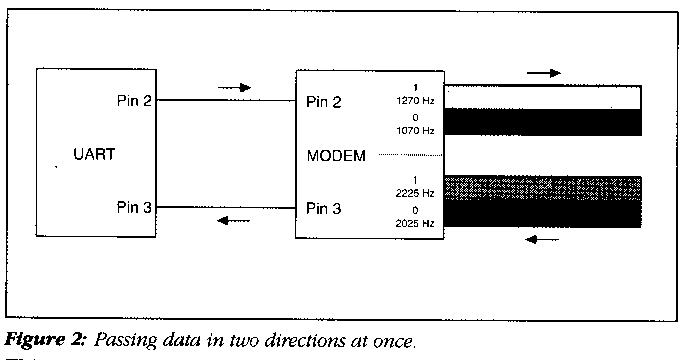
When two modems connect over a line, one (typically the one that coordinates the connection) is called the originate modem, and the other is called the answer modem. The originate modem uses the set of two audio tones I described above: 1070 Hz for a 0-bit, and 1270 Hz for a 1-bit. The answer modem, on the other hand, goes up the scale a little and uses 2025 Hz for a 0-bit and 2225 Hz for a 1-bit. Both modems contain circuitry that can easily distinguish between the two pairs of tones. Encoded in these two sets of tones, data can pass one another on the line as obliviously as though the line were in fact passing data in only one direction.
The cable between the serial port and the modem does not deal in audio tones. It deals in voltage levels, which do not mix well on a single wire. This is why your typical serial cable has two data conductors: One for data passing into the serial port, and another, separate conductor for data passing out of the serial port. (See Figure 1.) The UART, like the modem, is thoroughly ambidextrous and can handle data moving through itself in two directions at once without a burp.
Figure 2 shows that what might seem like a single data channel between the two ends is actually two separate data channels. Between the UART and the modem, data is kept separate by being passed on separate wires. Between the two modems, data is kept separate by being encoded in two different and easily discernable pairs of audio tones. Operation in this fashion, where data flows simultaneously in both directions through a link, is called full duplex operation. There are circumstances where the line will only accommodate data moving in one direction at a time. This is called half duplex operation, and is not used very much in asynch work.
When you speak of a "serial port" on a PC, what you're actually talking about is a UART. When you send a byte of data out through the link, you write it into the UART, and the UART takes it from there. Similarly, when the UART receives a complete byte from the other end of the link, it makes that byte available in a register for your program to read.
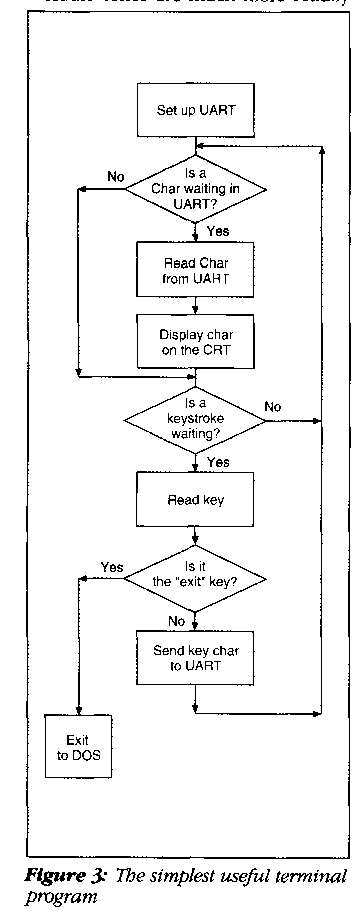
Keeping all of that in mind, the fundamental nature of a simple terminal program is simple indeed. I've drawn up a flowchart in Figure 3 to show you how simple it is.
What we have here is simply a loop that checks two things: Availability of a character coming in from the modem, and the availability of a keystroke typed at the keyboard. If a character is available from the modem, the program reads the character and displays it to the screen. If a key was pressed at the keyboard, the program reads the keystroke and hands it to the modem. One additional check is made to see whether the keystroke is a predefined exit key (Alt-X has come to be common) but this isn't essential as long as you don't mind re-booting out of your program. (Don't laugh; I used to use programs like that in my CP/M days, and the original version of Visicalc for the Apple III was designed such that a cold reboot was necessary to get out of it -- a rather pathetic antipiracy measure.)
If this were all it took to implement a communications link, I wouldn't be bothering to write whole columns about it. Figure 1 shows you the idea of a link through a serial port and modem, but it ignores a very serious problem: The UART doesn't retain characters somewhere until they are read. It simply places an incoming character up on a rack and expects you to come and get it. If a second character comes in on the link before you have had a chance to grab the first one, the first character will be nudged into nothingness and the second character will take its place.
If the polling loop is fast enough, you won't lose data. But once you start adding other features to the program that slow down the loop -- for example, allowing the remote system to position the cursor through control sequences -- lost characters are almost inevitable.
The solution is wonderfully messy: Allow the UART to generate an interrupt every time a character comes in on the line. The interrupt forces the CPU to stop what it's doing and go fetch the character from the UART right now, and place it someplace temporarily safe: a memory buffer. When the polling loop has time, it goes to the buffer for characters rather than directly to the UART.
Behind that one paragraph hides a universe of complication. It's messy but comprehensible -- and next time I'll explain the machinery of UART interrupts and how you can use them.
Smalltalk/V Windows Digitalk 9841 Airport Blvd. Los Angeles, CA 90045 213-645-1082 Price: $499.95
Copyright © 1991, Dr. Dobb's JournalSlim Pickens
Get the Background Down!
The Nature of a Communications Link
Two Directions at Once
Interactive Communication Through a Link
Products Mentioned