William Smith is the engineering manager at Montana Software, a software development company specializing in custom applications for MS-DOS and Windows. You may contact him by mail at P.O. Box 663, Bozeman, MT 59771-0663.
I was grappling with a problem of how to display and present 3-D surface topography data as contour maps. I had mountains of data (pun intended) generated using the Global Positioning System (GPS) satellites — not your typical land survey data. The data was not equidistant, had no order, and presented a formidable graphics display challenge. Unexpectedly, while skiing, I met someone who works in the optical-instrumentation field. In the ten minutes it takes to ride the chairlift to the top of the ski run, my new skiing acquaintance introduced me to ray tracing and how I might use it to solve my graphics display problem.
Imagine a row of archers shooting arrows at an object. The object is a group of surfaces. The archers shoot arrows straight out parallel to one another and all in the same plane (a flat trajectory). The arrows are special. They do not stop or get deflected when they encounter the object. They penetrate every surface and layer of the object. Each place where an arrow penetrates a surface leaves a little hole. If the density of the arrows is high, they leave holes that are very close together. The holes form an outline of the intersection of the surfaces that compose the 3-D object with the plane in which the arrows are fired. Connecting adjacent holes in the same surface with lines yields a complete outline.
You can think of the holes as pixels on a display screen or dots on a printed image. The arrows are rays and the holes are ray-surface intercepts. Connect the dots and you have a contour line. Moving the archers up and down orthogonal to the plane of the arrows generates numerous contours lines. This was exactly what I needed. You get better coverage by having two rows of archers firing arrows at the object. Just orient the two rows in the same plane but at 90 degrees to each other.
What is simple in concept can be complex to implement. To make this work, you need to enter the world of 3-D space, coordinate transformations, surface geometry, and ray tracing. I am going to at least get you started. I will present the code to calculate ray-surface intercepts for first and second order surfaces and the code for transforming first- and second-order surfaces from one coordinate system to another.
Ray Tracing
Rigorously, ray tracing models the behavior of light. A ray is a discrete vector representation of radiation. The physics of optics controls the magnitude and direction of the ray as it propagates through different materials and encounters different surfaces. In simplest terms, the ray is reflected when it encounters an opaque surface or refracted when it encounters a transparent surface. More complete modeling can require a myriad of combinations that dictate splitting rays to account for reflection, transmission, absorption, scatter, and diffraction. The ray tracing I am going to do here is non-optical. When a ray encounters a surface, the location of the surface is tabulated, but the ray continues on in the same direction as if the surface were not there. I will use ray tracing as a tool to compute surface intercepts.I define a ray as a location and a direction. The location is the origin of the ray. The direction is a vector of direction cosines for the ray. I implement the location and direction as individual arrays of three floating-point numbers each. The location array consists of the x, y, and z coordinates of the ray origin. The direction array consists of the x, y, and z direction cosines.
Direction cosines are the dot product of the ray direction vector with the coordinate-system unit vectors. The dot product between two vectors is the cosine of the angle between the vectors. Hence the name direction cosine.
Coordinate Rotation
When working in three-dimensional space, eventually you will have to deal with coordinate systems. While it is logical to define a global coordinate system, unfortunately, it is sometimes inconvenient to describe objects in this global coordinate system. Surfaces are usually easier to describe in a local coordinate system specific to the surface. But, depending upon the orientation between the local and global coordinate systems, describing a surface in global coordinates can be difficult. Fortunately, transforming from one coordinate system to another is straightforward.Before you can calculate a surface and ray intersection, you must define both the surface and the ray in the same coordinate system. When working with both local and global coordinates, you have two options to accomplish this. First, you can describe the surface in a convenient local coordinate system and transform the ray from global coordinates into the local surface coordinates. You solve for the surface intercept in the local surface coordinate system. You then transform this value back into the global coordinates. This option requires two coordinate transformations for every ray and surface intercept. For a system of many surfaces and many rays, this can chew up a lot of CPU cycles. A second, more efficient method requires transforming the surface into global coordinates. This option requires only one transformation for each ray and surface intercept.
If you define surfaces in a local system, you also need to know the relationship between the local and global coordinate systems. This relationship consists of a rotation matrix and a translation vector. The rotation matrix converts between two coordinate systems that are rotated with respect to one another. The translation vector is just the vector distance between the two coordinate systems' origins.
The rotation matrix is a three by three matrix. I find it convenient to create matrices dynamically and define a matrix type as (double **). In the May 1992 issue of C Users Journal, my article "Number Crunching in C" presents code for creating dynamic two-dimensional matrices. You can access the elements of this matrix type with array notation A[i][j].
The rotation matrix between coordinate systems results from knowing the orientation of one system with respect to the other. This orientation can be either three direction vectors or a series of three rotation angles. If you have the direction cosines of the x, y and z axes of one coordinate system as described in the other you know the rotation matrix. The three columns of the rotation matrix are the three direction-cosine vectors of the three coordinate axes.
If you know the three rotation angles of one coordinate system with respect to another and also know the order of the rotations you can compute the rotation matrix. I call the three rotations angles: qx, qy and qz. qx is the rotation about the x axis, qy the y axis and qzthe z axis. The order of the rotations is important. Changing the order will change the rotation matrix. Since there are three rotations there are 3! or six possible orders.
Since matrix multiplication is not associative, you must be careful with the orders. To generate a rotation matrix, you multiply the first rotation matrix, A1, by the second, A2, and then this result is multiplied by the third, A3. In vector math this is R=A3(A2A1)
For the case of the rotation order being x, y, z, the three individual rotation matrices become
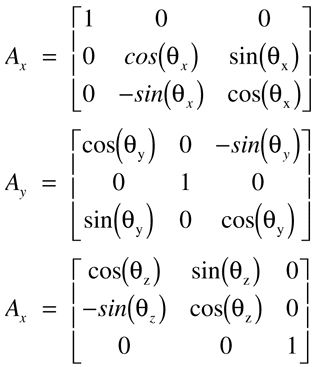
Figure 1 contains the resulting total rotation matrix. (Space does not permit listing the other five possible rotation orders). A rotation matrix converts a vector from one coordinate system to another with the following expression.
V' = [A]VV' is the vector in the new coordinate system. [A] is the rotation matrix of the new coordinate system with respect to the old. V is the vector in the old coordinate system.
Coordinate Translation
Besides a rotational relationship between coordinate systems, if two coordinate systems do not share the same origin there is a translation. Translation of coordinate systems does not affect direction vectors that are pure direction cosines. The direction does not change. A point or location will change. Consequently, you will have to adjust a point described by x, y, and z coordinates by adding the translation vector.
V' = T + VT is the location of the original coordinate system origin with respect to the translated coordinate system origin. For this to work, the two coordinate systems must be oriented the same way. That is, if both a rotation and a translation exist between coordinate systems, the rotation transformation must be done first.
Surface Types
For my problem, I was able to get by using first-order surfaces (planes) to represent the survey data. I let every unique set of three adjacent points define a plane. I bounded the plane by the three orthogonal planes that intersected with the three line segments joining the three points. The data formed a surface composed of a lattice of triangular planes. The algorithms presented here are for either first- or second- order surfaces.A first- order surface is a plane and is defined in local coordinates as:
z = 0In global coordinates a general equation is:
C01X + C02Y + C03Z + C00 = 0A plane is just a special case of a second-order surface. In global coordinates, the general equation for a second-order surface is
C11X2 + C22Y2 + C33Z2 + C12XY C23YZ + C13XZ C01X + C02Y + C03Z + C03Z + C00 = 0Familiar second-order surfaces are conic surfaces of revolution. The following equation defines conic surfaces.
CvX2 + CvY2 + CkCvZ2 + 2Z = 0Cv is the vertex curvature and Ck is the conic constant. For this special case, C11 = C22 = Cv, C33 = CkCv, C12 = C23 = C13 = C01 = C02 = C00 = 0 and C03 = 2. Table 1 lists the different types of conic surfaces and the corresponding conic constants.
The code stores surface coefficients in 4x4 matrices. Since the surface matrix is symmetric, there is some duplication of data. From the standpoint of generalization and efficiency of the algorithms, the matrix representation is convenient.
Surface Rotation
Rotation of a surface from one coordinate system to another is a bit more complex than rotation of a vector. The expressions for the variables x, y, and z in the new coordinates must be plugged back into the surface equation. After some algebraic manipulation and gathering of like terms you can solve for the new coefficients. This becomes a tedious exercise in algebra, especially as the order of the surface equation increases. Here are the resulting expressions for a second-order surface. Since a plane is a special case of a second-order surface, these expressions work for planes.If A is the rotation matrix, the coefficients for the surface in the rotated (primed) coordinate system are given by the following equations. The function, srf_rotate in Listing 1, SRF_TRNS.C, is the C code implementation of these expressions. Listing 2, SRF_TRNS.H, is the include file for Listing 1.
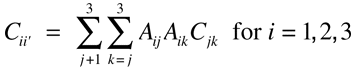
for the squared terms,
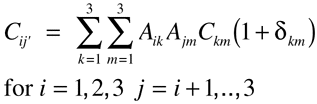
for the mixed second-order terms with Cij = Cij and
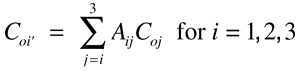
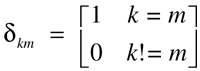
for the linear terms. The symbol dkm is the delta function defined as
Surface Translation
Translation of a surface expression into another coordinate system is not quite as complex as rotation. This is another exercise in algebra by replacing the variables x, y and z in the surface equation with expressions for x, y, and z in the translated coordinate system. The result is the following expression for a second-order surface.Ti is the translation vector between coordinate systems with T0 = 1. The coefficients for a second order surface in a new translated coordinates system are:
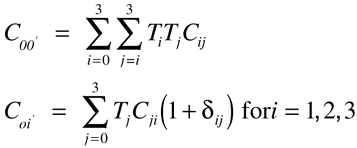
   C12' = C12
   C23' = C23
   C13' = C13
   Cii' = Cii for i=1,2,3
Listing 1, SRF_TRNS.C, contains the function srf_trans. You can use this function to translate either a first- or second- order surface into a new coordinate system.
Surface-Ray Intercepts
Once both a ray and a surface are in the same coordinate system, you can determine the ray and surface intersection points in that coordinate system. There can be as many inter-sections as the order of the surface.Starting from a location L the ray direction is the vector D and the distance to the next closest intercept is S. To solve for the next intercept, you solve the equation f(L + DS). f(x, y, z) is the equation for the surface. The unknown in the equation is the distance S. You determine the individual x,y,z components of the intercept by vectorially evaluating L = DS.
The second-order surface equation in vector form is

Substituting L=DS into this equation yields

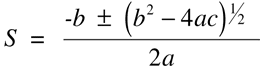
Setting f=0 and using the quadratic formula, you can solve for up to two values of S,
where
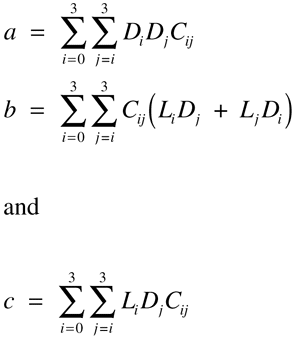
Listing 3, SRF_INCP.C, contains the function srf_intrcpt. Listing 4, SRF_INCP.H, is the include file for Listing 3. You can use this function to calculate ray-surface intercepts. The function returns the number of intercepts. The function stores the values of the intercepts in a vector that you pass to the function. In the case of a first-order surface, there will be either zero or one intercept. A second-order surface can have zero, one, or two intercepts. The intercept calculated by the function srf_intrcpt is a displacement value. To get coordinates of the intercept point in space, multiply the direction vector by this displacement value and then add it to the original ray origin location. In most situations, you will be interested in surfaces that have finite boundaries. After a surface intercept is determined you will have to check whether this location is within the boundaries.
In some situations, obtaining the expression for the surface and plane intersection will be more convenient that just a set of points. If your graphics display driver supports a line draw primitive this will be the case for intersections with first-order surfaces. Intersections with second-order surfaces yields a curve. Graphics display drivers that support a curve-drawing primitive are rare and the ray-tracing method has great value.
Example
Listing 5, EXAMPLE.C, contains an example of generating contour lines from a 3-D surface. In this case, the 3-D surface is a simple sphere. The example defines the coefficients in local coordinates. A call to srf_tran translates the surface coefficients into the global coordinates. The code starts rays along the x and y axis for three different elevations in z. This generates three contour lines. The code lists the surface-ray intercepts to standard out. If you define GRAPHICS_ON and link with the Microsoft C graphics library the intercepts are mapped into pixels on the display screen.