W. Harvey Gray is a manager in the Computing and Telecommunications Department of Martin Marietta Energy Systems in Oak Ridge, Tennessee. He has a Ph.D. in Mechanical Engineering from Vanderbilt University in the area of finite element methods. His fascination 25 years ago with Vanderbilt's first CalComp pen plotter turned into a career interest in computer graphics which, when coupled with finite element methods, led him to become an expert in Computer-Aided Engineering.
Some consider a touchscreen to be the ultimate in userfriendly input devices. When a user touches a touchscreen, typically with his finger or other blunt pointing instrument, resistive surface coatings produce voltages that vary in magnitude, depending upon the position of the touch. An analog-to-digital converter electronically interprets these voltages into touchscreen (x, y) coordinate pairs. A programmer can retrieve the touch's coordinates by using calls to the touchscreen driver program.
During development of a touchscreen software application for use with a projection panel, I discovered that I needed to distinguish between two fundamental types of user touches. I call them the "John Madden" touch and the button-type touch. With a "John Madden" touch, a user wants to draw or trace a line across the surface of the touchscreen like John does on TV when diagramming football plays on Sunday afternoon. Alternatively, with a button-type touch, a user wants to activate or deactivate a software function.
I searched the software library that came with my touchscreen's driver program and could not find a function that detects differences between these two types of touches. So, I wrote a function that does. This article explains the algorithm I use to interpret the two touch types and presents a C module that implements the concept. It also discusses a simple example program to test the C module.
Requirements for a Touchscreen Presentation
When using a touchscreen in a presentation, the software should be able to transfer the imaginary lines traced by your finger into the image displayed by a PC or overhead projector. For example, Interactive Presentation Systems (IPS), Inc. sells a product called a TAP Screen (IPS, 1991). It is a combination of Elographics, Inc. hardware and custom software (Elographics, 1989) that permits a lecturer to control an interactive presentation from a touchscreen mounted directly on top of an overhead projection panel. John Madden's performance during Super Bowl XXVI resembles the results you get with this product. Using an electronic stylus to draw into our TV image, John diagrammed plays, drew boxes around interesting people in the audience, circled cheerleaders, and even outlined the guide-wires tethering the end-zone blimp. With a TAP screen, instead of drawing into a network-broadcast video image, you draw into the image on a PC monitor. Software transfers the imaginary lines traced by your finger on the touch screen into the image on the PC screen. The overhead projector displays the composite image.In addition to displaying lines, you should be able to control the presentation from the touchscreen. If the lights in the room have been dimmed or if the PC is distant from the overhead projector you may have trouble using the keyboard. To control the presentation from the touchscreen, you must be (touchscreen touches that trace lines) and button-type touches (touches that control or switch between functions). For example, button touches might command presentation software to zoom in on a region of interest on the displayed image, to save an image after it has been drawn into and modified, or to return an image to its original, unmodified state.
Touchscreen Devices
A touchscreen consists of two, thin sheets of plastic, each with a transparent, conductive coating on the facing surfaces. Sandwiched between the two sheets (and creating a uniform gap) are tiny transparent, separator dots which are evenly distributed across the active touch area. These two sheets are mounted on a thicker plastic (or glass) support surface to maintain stability. Finger pressure causes the top conductive sheet to make contact with the lower conductive sheet during the touch. The touchscreen controller measures the voltage gradients generated by the touch's contact and electronically interprets them into a finite number of (xt, yt) touchscreen coordinate pairs.Touchscreen controllers may be mounted either in a separate box and accessed via a PC's RS232 port, or located on a circuit board that inserts directly into the PC's bus. Bus type controllers interpret and return touch points at a greater rate than RS232 type controllers, other things being equal.
A Touchscreen Driver
I worked with the Elographics, Inc. MS-DOS Terminate and Stay Resident (TSR) driver program, called ELODEV, for this project. Passing the appropriate command-line arguments to ELODEV during installation configures the system for the correct combination of touchscreen and controller. With my touchscreen and PC configuration, ELODEV takes less than 7KB of memory.An application program and the ELODEV TSR communicate through a user-programmable software interrupt. Multiple copies of the ELODEV TSR can be present to control multiple touchscreens and, when not in use, individual copies can be removed from memory. ELODEV responds to 26 different commands and, because it is a TSR, can be called easily from C. Its C interface provides the following interrupt functions:
- driverinfo - returns touchscreen hardware and status information
- opentouch - prepares the touchscreen for use
- closetouch - terminates touchscreen use
- enabletouch - enables touchscreen interrupts
- disabletouch - disables touchscreen interrupts
- setcalibrange - calibrates the touchscreen
- gettouch - returns touch-point coordinate values
Of the 26 functions to which the ELODEV TSR responds, only one, gettouch, returns touch-point coordinates. This function takes three arguments, xt, yt, and ut. xt and yt are pointers to ints and return a touch-point coordinate (xt, yt). ut is a pointer to a boolean and returns the untouch logical value. If ut is TRUE, then the user removed a finger from the touchscreen, making the area the finger vacated the last touch point for the current touch. gettouch also returns a boolean value. If TRUE, then a touch was present. If FALSE, then a touch was not present. (The ELODEV C interface typedefs boolean to be an unsigned char.)
Touchscreen Touches
A touchscreen touch consists of many touch-point (xt, yt) coordinate values. Theoretically, a touch consists of an infinite number of touch points. However, the speed of a PC and touchscreen hardware and their configuration will dictate the actual (finite) number of touch points returned during a touch. In practice, my experience has been that Elographics, Inc. PC bus controllers return enough touch points to insure smooth, visually-satisfying lines at VGA resolutions while finger or stylus motions simulate normal-speed, cursive handwriting on a touchscreen's surface.Uncalibrated values of touch-point coordinates range from (0,0) to (4095,4095). Touches may be calibrated and translated using an ELODEV function that changes the default characteristics of the touch screen controller and software. One useful coordinate mapping scheme instructs the ELODEV TSR to return touch-point coordinates ranging from (0,0) to (639,479) (the graphics coordinate range of a PC's VGA screen) assuming that lines are to be drawn directly into the VGA image. The modules I describe in this article will work with any touchscreen calibration; however, the example program only demonstrates using a touchscreen in its native (or uncalibrated, untranslated) mode.
Distinguishing Touch Types
The algorithm to distinguish between button- and curvetype touches dynamically examines a touch's touch points in the order that they are received. The algorithm determines if any touch points fall outside of an imaginary circle (of a known radius) whose center is located at the instantaneous touch centroid. All touch points within the imaginary circle's (button's) area indicates a button touch. Any touch points lying outside of a button's imaginary area returns a curve touch. Calculating the instantaneous touch centroid (xcen, ycen) requires summing the individual touch-point coordinate values and dividing by the number of received touch points, n, or
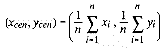
The distance, di, between the most recent touch point (xi, yi) and the touch centroid (xcen, ycen) is

Therefore, if the touch is a button type and rb is the imaginary button radius, then di <= rb for 1 < in. If di > rb for any i, then the touch is a curve type.
The Implementation
GetTouch.c (see Listing 1) provides an enhanced and extended interface to ELODEV's gettouch function. Five external functions are coded in GetTouch.c. These five functions are GetTouch, InitializeTouch, ReplayTouch, SetButtonRadius, and TouchInfo. Not only do these functions provide all the information that ELODEV's gettouch function provides, but they also set and return other useful information about a touch, including whether the pending touch is a button-type touch. Listing 2 shows module GetTouch.h. It contains all the external definitions needed to interface with GetTouch.c, including function prototypes and struct tags.
GetTouch
The function GetTouch is the principal interface between an application code and the ELODEV TSR. From an application's point-of-view, it replaces ELODEV's gettouch. GetTouch returns a pointer to a touchxy struct. If there is no touch present, then GetTouch returns a NULL pointer to a touchyxy struct; else, it returns a legitimate pointer to touchpoint data. Additionally, GetTouch returns the logical value of the button variable via a pointer to a boolean.The general design of GetTouch follows the rule that if the touch is a button type, then di <= rb for 1 < i <= n. This implies that every touch's touch point must be examined before a determination can be made about the touch type. Since the number of touch points for a touch cannot be known in advance, what do you do? Each touch point could be malloced into a simple linked list, but this solution would preclude using the function GetTouch in a TSR application. In practice, however, I've found that button touches are much shorter in duration than curve touches. It follows that the shorter the touch duration, the fewer the touch points. So even though the total number of touch points for a button touch is never known in advance, choosing a reasonably large static touch buffer (and carefully crafting a few explanatory words about brief button touches in any user documentation) will suffice. Changing the #defined value of TOUCH_BUF_NUM easily changes the size of GetTouch.c's touch buffer.
The pseudo-code in Figure 1 describes how the function Get Touch works.
The function GetTouch uses several static functions to implement this algorithm. buffer_touch reads an entire touch and fills up the static touchxy struct that stores the internal touch point buffer. store_touch stores a single touch point into the touch buffer and calculates the instantaneous touch distance, di. Notice that this module uses di2 and rb2 in any calculations and comparisons, thus avoiding floating-point arithmetic and its slower speed and increased memory requirements. buffered and unbuffered return pointers to touchxy structs containing buffered and unbuffered touch points, respectively.
Other Get touch.c Functions
The other four globally-scoped functions of GetTouch.c either set parameters for, modify the behavior of, or return information about function GetTouch. InitializeTouch initializes several of the static variables in GetTouch.c. Call it once before calling any of the other functions.SetButtonRadius, appropriately, sets the button radius, rb. It takes one argument, the value of the button radius (in appropriate units). I've found that between 4% to 8% of the diagonal dimension of the touchscreen's touch area is a reasonable range for button radii. For example,

where (xmin, ymin) and (xmax, ymax) are the current touchscreen minimum and maximum calibrated and translated coordinate values.
ReplayTouch does what its name implies, but only works if GetTouch.c's internal touch buffer holds an entire touch. If not, then nothing happens. If it does hold a complete touch, then a subsequent call to GetTouch will replay it. ReplayTouch accepts an argument that overrides the button-type logical value for the touch. The typical use for this function occurs if a user dots an 'i' while writing on the touchscreen. Since GetTouch normally interprets the dot of an 'i' to be a button touch, ReplayTouch permits overriding this default behavior and drawing a dot on the 'i'.
Lastly, TouchInfo returns a pointer to a touchit struct that contains the values of the touch point (Xcen, ycen) centroid, the number of touch points, and the button-type indicator.
Testing the Software
Listing 3 contains a simple program, called ShowTch.c, that demonstrates the use of and tests module GetTouch.c. This program repetitively reads, examines, and reports on touch types and statistics until a keyboard key press. The first part of main is typical of many touchscreen applications. It begins by finding the ELODEV driver and software interrupt number with a call to finddriver. driverinfo returns driver information so ShowTch.c can make sure that the version of the ELODEV TSR matches the version of the Elographics, Inc. functions linked with this application. setmode selects BUFFERED, UNTOUCH, and STREAM touchscreen operational characteristics. (UNTOUCH and STREAM touchscreen modes must be set for Get Touch.c to work correctly.) Finally, standard ELODEV functions open and enable the touchscreen for use.ShowTch.c initializes GetTouch.c by calling InitializeTouch and SetButtonRadius. The value of the argument passed to SetButtonRadius is rb. This program uses 4% (4096/25) of the uncalibrated touchscreen coordinate maximum value, but you can easily adjust it to suit your own needs. The next part of ShowTch.c is a while loop that examines and prints touches by repetitively calling touch_loop. The program continues until a keyboard key press, then finishes by flushing the keyboard buffer and closing the touchscreen.
touch_loop loops through all a touch's touch points. (A touch is present when the pointer to a touchxy struct returned by GetTouch is not NULL.) If a touchscreen touch is not present, touch_loop simply returns. When one is present, touch_loop eats all the touch-point coordinates until an untouch occurs. Upon receiving an untouch, touch_loop calls print_touch to print out the touch information. Control returns to main and the process starts over again. Listing 4 contains a makefile for ShowTch.c.
References
Elographics, Inc. 1989. ELODEV Touchscreen Driver Program Version 1.4 - Installation Guide and Programmer's Reference Manual, Version 2.0b. Oak Ridge, TN.Interactive Presentation Systems. 1991. TAP Screen Users Manual, Version PC1.0. Oak Ridge, Tennessee.