Dwayne Phillips works as a computer and electronics engineer with the United States Department of Defense. He has a Ph.D. in electrical and computer engineering at Louisiana State University. His interests include computer vision, artificial intelligence, software engineering, and programming languages.
One of the best known data compression schemes is Morse code. Morse code uses few dots and dashes for frequently occurring letters such as e and t, and more dots and dashes for infrequent letters such as x and z. Compare this scheme to the ASCII code which uses seven bits for all the letters and symbols. The ASCII code is clearly inferior when it comes to the length of a message.
Huffman coding [1] uses an idea similar to Morse code. In Huffman coding, you represent frequently occurring characters with a small number of bits, and infrequent characters with a larger number of bits. We could always represent the character t by 01 instead of 1100001 (ASCII), e by 10 instead of 1100101 and so on. This would save space, but some files do not contain any t's or e's and these short codes could be used for other characters. Adaptive coding solves that problem. In adaptive coding, you examine a file, count the occurrences of each character, and create a code unique to that file.
To compress a file using Huffman coding you (1) examine the file and count the occurrences of characters, (2) create a new code for the characters in the file, and (3) code the file using the new codes. To decompress a file, you (1) read the unique code for the file, (2) read the compressed file, and (3) decode the compressed file using the unique code. The trick in this process is creating the new code and packing and unpacking bits. The source code presented later will illustrate how to do that.
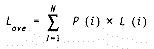
Huffman coding attempts to create a minimum redundancy code, that minimizes the average number of bits per character. Let N = number of characters (256 for eight bit codes) and P(i) = probability of the ith character occurring. This yields equation 1.
Equation 1:

We let L(i) = number of bits to represent the ith character and we want to minimize the average number of bits needed to code a file as shown in equation 2.
Equation 2:
There are two rules to follow when using Huffman coding. First, the code for each character must be unique. Second, there will be no start of code or end of code once the stream of bits begins. In ASCII you know when the code for each character starts because they are all seven bits long. When you've coded a file using Huffman coding, however, the codes for each character have different lengths (some are two bits, some three bits, and so on). If you have a start of code marker, you will waste space and defeat the purpose of data compression.
In order to follow the second rule, you must abide by the first. This means that no code can be the prefix of another code. The code for each character must be unique. For example, if you represent an a by 01 and a b by 1, then the bit stream 011101101 can be decoded to abbaba. Now suppose we needed a code to represent c. We cannot represent c by 10 because the code for b (1) is a prefix of the code for c (10). In such a case, the stream 011101101 could either be abcbcb or abbaba. To correct this confusion, you could represent a by 01, b by 1, and c by 00. The prefix condition is not violated and there will not be any confusion when it's time to decompress the bit stream.
There is one more derived rule for Huffman coding. The following equation states mathematically that the most frequently occurring characters will have shorter codes. If two characters occur with the same frequency, then their codes will be equal or differ only by one bit.
if P (a) P (b) P (c) then L (a) >= L (D) >= LFigure 1 and Figure 2 illustrate the creation of Huffman codes. Figure 1 shows a simple example. Suppose there is a file containing 10 as, five cs, and three bs. Figure 1 shows the characters in the file arranged with the most frequent letter at the top and with the number of occurrences next to each character. You begin coding at the bottom with the least frequently occurring characters.
You link characters b and c by adding their numbers of occurrences and connecting them with a line. You give the least occurring letter (b) a 1 bit and the most occurring letter (c) a 0 bit. In the next step you link letter a with the bc combination. You give the bc combination a 1 bit and the a a 0 bit. The codes for these characters are read backwards from right to left. The new code for a is 0. The new code for b is 11 and for c is 10.
Now, if a part of the input file contained abcaaaccb, the coded bit stream would be 0-11-10-0-0-0-10-10-11. This required only 14 bits. The ASCII coding (seven bits per character) would require 63 bits. The entire file of 18 characters would only require 26 bits instead of 126 bits. The compressed coding requires only 26/126 = 20.6 percent as much space. (There is, however, the question of how to store the new code (a=0 b=11 c=10) at the front of the compressed file without taking too much space.) Notice that the most frequently occurring character, a, has the shortest code. Using equation 1 and equation 2, the average number of bits per character is 1.44 instead of 7 for ASCII.
Figure 2 shows a more complicated example. The coding process begins at the bottom. Everything proceeds as before until you link c with the def combination. At this point both a (10) and b (8) occur less frequently than the cdef combination (12) so you must link a and b. After this you may link the ab combination with cdef. You read the new codes backwards from right to left and the result is shown at the bottom right of the figure. Again, using equations 1 and 2, the average number of bits per character is 2.46 instead of 7 for ASCII.
Now let's look at some code listings. Listing 1 shows the include file for the program. Note the three data structures. The first structure, item_struct, is used inside the program to create the new codes, code the characters in the input file, and decode the bit stream in the compressed file. This structure is easy to use inside the program, but is too long to store as the header to the compressed file. The second, header_struct, is the one stored as the header to the compressed file. It requires much less space than the item_struct and still holds enough information to allow the compressed file to be decompressed. This scheme enables you to experiment with different types of file headers to store with the compressed file. If you can create a shorter, more efficient file header, then you only need to change the conversion routines and the read and write routines. If you used only one structure for internal use and the file header, then you would need to change code throughout the program whenever you thought of a better file header. The third structure in Listing 1 is the constant CODE_LENGTH. This gives the maximum number of bits you can use for a new code. This may not be big enough if you are compressing a large file that has some very infrequent characters. The more infrequent the character the longer its code. If you have problems with large files you may need to increase this to 24 or 32.
Listing 2 shows the main routine of the program and several other functions. The main routine interprets the command line and starts the compression or decompression process. The function read_input_file_and_create_histogram performs the first step of compression. It reads through the entire uncompressed file and records the number of occurrences of each character. This information will be passed to the functions in Listing 3 which will then create the new code. This points out one of the disadvantages of Huffman coding. In Huffman coding you must read the file twice. The first time you count occurrences of characters and the second time you code the characters.
Also shown in Listing 2 are the functions convert_short_to_long and convert_long_to_short. These functions convert the long item_struct to the shorter header_struct discussed previously. If you create a better file header for the compressed file, then you need to change these two conversion functions.
Listing 3 shows the functions that perform the second step of compression. They take the number of occurrences of each character and create the new code for this particular file. The function create_huffman_code is the controlling routine for this process. It first sorts the item_array so the most frequent characters are at the "top" and the least frequent are at the "bottom" as in the examples of Figure 1 and Figure 2. Next, it disables the characters that do not occur in the input file. There is no need to process those characters. Finally, it goes into a while loop of linking or combining the two smallest items in the item_array until they are all linked. Most of the functions in Listing 3 search the item_array, and find the characters to be linked.
The key functions in Listing 3 are code_smallest_item and code_next_smallest_item. They attach the 1's and 0's to the characters. The difficult part of this task is propagating the 1's and 0's to all the characters linked together. Notice in Figure 2 that when cdef was linked to ab, the 1 assigned to c propagated down to d, e, and f. At the end of code_smallest_item the program loops through the item_array looking for links to other characters. If it finds a link, it calls itself recursively using the link (code_next_smallest_item does the same operation). The function combine_2_ smallest_items created these links using the .includes part of the item_array.
Listing 4 shows the final step of compression. These functions use the new codes to code the input file into a compressed bit stream and write this to a file. The function code_and_write_output_file controls the process. It reads a character from the input file, uses the new code for that character to set bits in the output buffer, and writes the output buffer to the output file. One thing to watch in the output process is to wait until the bit stream in the output buffer is on a byte boundary before writing to the file. The last section of code in this function performs that task.
The key functions in Listing 4 are code_byte, set_bit_to_1, and clear_bit_to_0. The code_byte function looks at the character to code, finds its new code, and calls the other two functions to set the bits in the output buffer. The bit setting functions set or clear a particular bit in the output buffer. They use bit masks defined in the include file and bit-wise AND or bitwise OR the mask with a byte in the output buffer.
Listing 5 shows the code to decompress a file. Decompression is easier and quicker than compression. The new code already exists so you only need to reverse the last step of the compression process. The function decode_compressed_file controls the process. The first step is to read the new codes from the file header. This comprises a file read and then a call to convert_short_to_long to put the header into the item_struct format.
The function decode_file_and_write_output performs the last two steps of the decompression process. It decodes the compressed bit stream and writes the characters to the output file. To decode the compressed bit stream you must look at the codes read from the file header and compare them one by one to the bit stream. Recall that the codes are all unique and the prefix condition must hold. Therefore, if you start at one end of the item_struct and compare each code to the first bits in the bit stream, you will find a match. The program uses two functions to do this. The function convert_bits_to_char looks at the bit stream and translates the 1 and 0 bits to ONE and ZERO character constants. The function decode_bits uses this stream of characters to search through the item_struct. This makes the comparisons easier because the item_struct holds the codes as characters. The convert_bits_to_char function examines each bit using a shift bit and compare operation. This requires less code than the set bit functions discussed earlier.
The decode_bits function looks at the input bits, matches them to a code in the item_struct, and puts the decoded character in the output buffer. This operation requires searching through the item_struct until you find a code that matches the first bits in the bit stream. A strncmp performs the comparisons. When the decode_bits finds a match, it writes the decoded character to the output buffer.
This process of reading compressed bits, matching the codes, and writing out the decoded characters continues until the compressed file is empty. At that time the decompression process is finished.
There is always room for improvement in a program. The objective of this program is to compress files. The biggest place for reducing the size of the compressed file is in the file header. This must store the new codes for the characters in the original file. The header_struct shown in Listing 1 contains 4,356 bytes. This can no doubt be smaller. One idea is to keep only those characters that occurred in the message instead of all 256. Another idea is to pack the codes into bits instead of characters. The program is designed to allow experiments in this area. The item_struct is used internally so you do not need to make code changes everywhere. When you are ready to try a new file header, change the conversion routines in Listing 2 (convert_long_to_short, convert_short_to_long) and the write and read routines in Listing 4 and Listing 5, (output_file_header) and (input_file_header).
Reference
1. Huffman, David, "A Method for the Construction of Minimum-Redundancy Codes," Proceedings of the IRE, Vol. 40, No. 9, pp. 1098-1101, 1952.